
Something on your Mac made a noise. This tells you what it was.
Free · Requires macOS 15 or later
A ding with no explanation
You are working, something chimes, and there is no window, no badge, no clue. By the time you look up, whatever made the sound has moved on. What Just Pinged Me? is already listening, so it can answer the question after the fact.
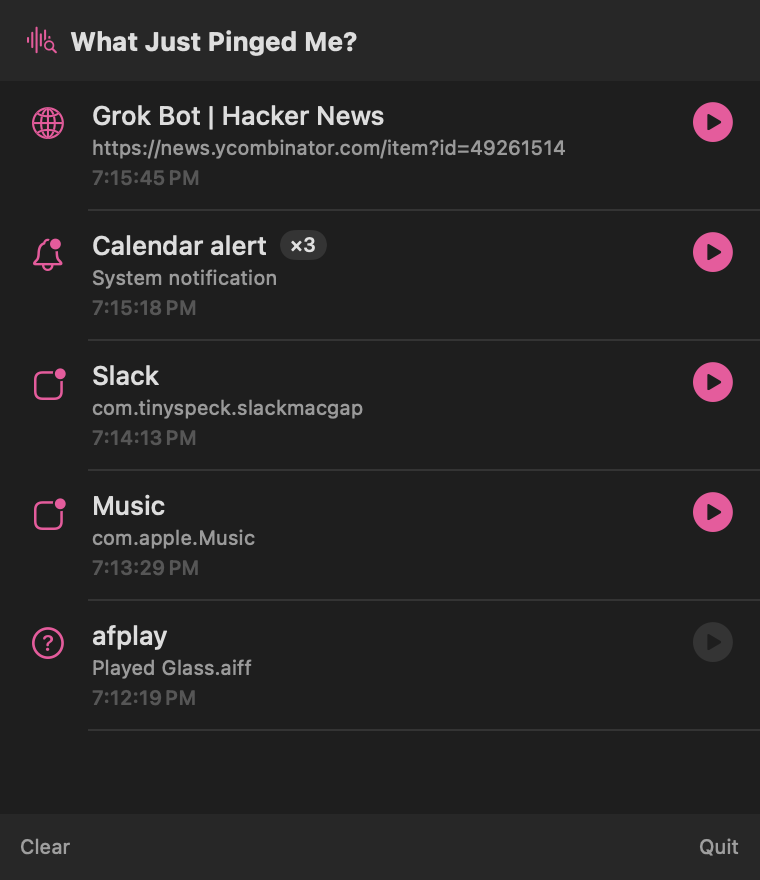
What it tells you
-
Web pages
Not just "Safari" — the title and address of the tab that actually played the sound.
-
Mac apps
The app that made the noise, even when it plays through a helper process you have never heard of.
-
System notifications
Alert sounds and Notification Center pings, told apart from everything else.
-
Background processes
Scripts and command-line tools, right down to the sound file they were told to play.
-
Play it back
Every sound is recorded as you hear it, so you can listen again instead of trying to remember.
-
Out of the way
It lives in the menu bar, takes no Dock space, and only speaks when you ask it to.
Your sounds stay yours
The app records a few seconds of audio at a time so it can replay what you heard. Those recordings never leave your Mac. There is no account, no analytics, and no network connection of any kind — the app does not know how to talk to the internet. Read the privacy policy.
Two ways to get it
Both are the same app and both are free. The App Store copy keeps itself up to date the way everything else on your Mac does, which is the easy answer for most people.
The direct download is a disk image, signed and notarized by Apple, so macOS opens it without argument. Drag the app to your Applications folder and it appears in your menu bar. Take this one if you would rather not go through the App Store.