Smalltalk is the language that started the Object Oriented Programming revolution. Certainly, there was some important work before Smalltalk (like Simula and Clu), but it was Smalltalk that first embodied and articulated the fundamental concepts of OOP.
Not only did Smalltalk introduce the basic ideas of "object", "class", "message", "method", and "inheritance", it ran with them. Languages that came after Smalltalk (like C++ and Java) have been mere imitations, dwarfed by the shadow of the past and crippled by their compromises. These newer languages have introduced few new concepts and in many ways have failed to realize the OOP ideals as well as Smalltalk. Any success they have had has been due not to the purity of their designs, but to non- technical considerations.
Today, Smalltalk is a mature, evolved system. Comparing it to (say) Java, Smalltalk is highly efficient, extremely portable, easy to use, and very reliable. But more importantly, Smalltalk is still the most enjoyable language in which to program. While the Java camp is busy bragging about "Just-In-Time" compiling, some people forget that the original just-in-time compiling research was part of the Smalltalk project.
We should remind ourselves that the Smalltalk research project brought the world a number of innovations which have shaped today's computer landscape. Which of the following ideas were pioneered by the group that developed Smalltalk?
    (1) the mouse
    (2) bit-mapped graphics displays
    (3) windowing systems
    (4) mouse-driven menus
    (5) object-oriented programming
    (6) "personal" computers
The answer is, of course, "all of the above." Aside from the introduction of color displays and portable
laptop computers, very little real innovation has occurred in user interfaces since the Smalltalk-80
project was completed in 1980.
Smalltalk was developed at the Xerox Corporation's Palo Alto Research Center (PARC) in the decade of the 1970's. This was a 10 year project that culminated in the release, in 1980, of the Smalltalk-80 system. This included
    The Smalltalk Language
    The Smalltalk System
      A large body of Smalltalk Code
      The Smalltalk Virtual Machine
    Complete Documentation and Source Code
In 1980, the outside world began learning what the PARC group had created. The Virtual Machine was
promptly ported to a number of different computers, the Smalltalk system booted to life on a number of
platforms, and the OOP revolution began as researchers began to study Smalltalk.
One major influence of the Smalltalk-80 project was on a young man named Steve Jobs. He came for a tour at PARC and saw a demo of Smalltalk. He was shown three things: the Smalltalk user interface, the Smalltalk language, and the idea of object-oriented programming. He fully appreciated the user- interface ideas he saw, but he failed to understand Smalltalk or object-oriented programming. Nevertheless, he went back to his company and asked his engineers to copy the user interface. They responded by creating the Macintosh operating system.
The idea of object-oriented programming turned out to be a major revolution in programming languages. Immediately after Smalltalk-80 was released, all important previous languages were retrofitted with "object-orientation." We saw the introduction of the Common LISP Object System (CLOS), Object- Pascal, and Objective-C. There was even a mutant thing called Object-Cobol. Several years later, someone came along and made a second attempt at adding object-orientation to C and cleverly called the result C++. Later still, Sun created a completely new OOP language called Java, which seems to be catching on.
Where is Smalltalk today? Due to licensing restrictions and corporate machinations, the original Smalltalk-80 system remained somewhat expensive and not available to the wider community. It was appreciated in research and academic circles but not used by garage hackers or beginning students. Then, several years ago, the original Smalltalk team re-united to produce a new, highly portable, highly efficient virtual machine, called Squeak, and released this as public-domain software.
The Squeak implementation of Smalltalk appears to be superior to all previous implementations and has spread like wildfire, breathing new life into the Smalltalk language. Suddenly, every programmer can download and run Smalltalk for free. Squeak is an implementation of Smalltalk, but because Squeak has the endorsement of the original team, the terms Smalltalk and Squeak are more or less synonymous. Other implementations of Smalltalk will not be discussed in this document, and I suspect they will fade in importance.
In this document, we will use the term Smalltalk to refer to the language and the large body of code that has been developed. When we discuss implementation details that are specific to the Squeak implementation, we will use the term Squeak. However, we should make clear that the language in Squeak is exactly the Smalltalk-80 language. All of the original Smalltalk-80 software is included in the Squeak system, although Squeak has added substantially to the growing body of code.
The Smalltalk "object" is very similar to the Java or C++ object. In particular, each object is stored in memory and has several fields, which can point to other objects or contain primitive data values. Each object is an instance of a class.
An object is like a C "struct" or a Pascal record. The only difference between a record and an object is that the object contains a single special field that identifies which class the object belongs to. In C++, Java, and Smalltalk, there is a single hidden field in every object. In Smalltalk, this field is called the "class pointer." In other languages, this hidden field is called the "V-table pointer" or "dispatch table pointer".
In C++ we talk about "pointers" to objects while in Java we talk about "references" to objects. Both concepts are more or less the same and references are implemented by straight pointers, which are just memory addresses. In Smalltalk, references are sometimes called "object-oriented pointers" or "OOPs". In Squeak, an OOP is implemented with a 32-bit pointer. So a Smalltalk object points to other objects, but we say the object "contains OOPs to other objects".
Each object belongs to exactly one class. We say that each object is an "instance" of its class. Classes are related in a tree-shaped hierarchy, so each class has exactly one superclass, except the class at the root of the tree. So Smalltalk has single-inheritance. Smalltalk uses the terms "subclass", "superclass", and "inherits from". C++ uses the term "derived class", but we prefer to say "subclass" instead.
When the programmer defines a new class, he or she is (in some sense) describing all the instances of that class that may later be created. Two things must be described: (1) how the objects will be represented, and (2) how the objects will behave. This is true in Smalltalk, C++, and Java.
To describe how the objects are represented, the programmer must list all the fields in the object, and give each field a name. To describe how the object will behave, the programmer will give a series of "methods".
A method is like a function, except that it is applied to a specific object. We also say that the method is "invoked" on an object or "sent to" an object. The object in question is called the "receiver." Every method is invoked on a receiving object. In C++ and Java, the receiver is called the "this object", but Smalltalk does not use this this terminology. The "this" terminology makes for awkward wordings.
Methods in Smalltalk are similar to methods in Java and C++, where they are called "member functions". Methods may take arguments and may return a result. The method body is a sequence of executable statements. Methods are invoked from expressions, just as in other languages.
There is an important distinction between "methods" and "messages". A method is a body of code, while a message is something that is sent. A method is similar to a function; in this analogy, sending a message is similar to calling a function. An expression which invokes a method is called a "message sending expression."
Smalltalk terminology makes a clear distinction between "message" and "method", but Java and C++ terminology sometimes confuses these concepts. A message-sending expression will send a message to the object. How the object responds to the message depends on the class of the object. Objects of different classes will respond to the same message differently, since they will invoke different methods.
When a message is sent to an object, a method will be selected and executed. Since we cannot know, in general, the class of the object until run-time, the method cannot be selected until the message is actually sent. This is called "dynamic binding", and Java, C++, and Smalltalk all have it. With straight functions, the compiler can look at a "call" statement and figure out at compile-time (i.e., "statically") which body of code to branch to. C++ (which always prefers efficiency over clarity) encourages static binding and refers to dynamically bound methods as "virtual" methods, and refers to the virtual table.
In the Smalltalk programming model, all binding is dynamic. However, the compiler and virtual machine will often bind methods statically for greater execution efficiency when it is can be done safely and without changing the program's behavior.
So far, we have discussed only the similarities between Smalltalk and other languages. As you can see, the fundamental concepts of OOP are all present in Smalltalk in very straightforward ways. The Smalltalk terminology is a little different, but often seems more direct. The terms: "Object, Field, Class, Method, Message, Inheritance, Receiver, and Dynamic Binding" all have their usual meanings.
We now turn to areas where there are differences between Smalltalk and other languages. We begin by talking about what objects look like.
In languages like C++ and Java, we have objects and primitive values, like "int" and "double." In Java, for example, each field can contain either a pointer to an object or it can contain a primitive value, like "123". The same is true of Smalltalk objects; each field may contain either an OOP or a primitive value. The unusual thing about Smalltalk is that there is only one primitive data type, and it is called "SmallInteger."
A SmallInteger is stored as a 31-bit, two's complement (i.e., signed) integer. Note that Smalltalk uses 31 bits, not 32 bits. Thus, the range of values is -1,073,741,824 to +1,073,741,823. This is a little less than the typical C++ "int", but the difference in range is not important.
Far more important is the fact that in Smalltalk, arithmetic overflow always results in automatic promotion to arbitrary precision arithmetic and the result is always correct, while in C++, arithmetic overflow results in mathematically incorrect results, generally with no warning or error message.
Why are there only 31 bits, instead of 32? The answer is connected with one of the most important differences between Smalltalk and languages like C++ or Java.
Smalltalk is an un-typed language. The compiler does not know the types of variables. Any variable may contain either a pointer (an "OOP") or a SmallInteger and, at different times, the same variable can contain both SmallIntegers and OOPs.
This works because a single bit in each 32-bit word is used as a "tag" bit. In particular, the least significant bit of all pointers will always be a "0". (All objects are word-aligned, so all addresses will end with "0" anyway.) The least significant bit in a word containing a SmallInteger will always be a "1".
In C++ and Java, there is an important distinction between primitive values and objects. We can pass primitive values (like "int"s) to functions and methods, but we cannot send messages to the primitive types. We can only send messages to objects.
In C++, the programmer may add new operators and functions that work on primitive types and, because of the overloading rules, an effect similar to message sending can be achieved. Nevertheless, in Java and C++, methods, which are sent to objects, remain fundamentally different from operators, which work on primitive types.
This occasionally causes problems, and Java introduces "wrapper classes" like "Integer" for "int" and "Double" for "double". Wrapper classes are a "hack" solution to give the primitive values some of the benefits of classes and methods.
In Smalltalk, the primitive values (instances of SmallIntegers) are really first-class objects. There is a single class called SmallInteger, and when the programmer adds a new method to it, it can be used in exactly the same way as any other method. In Smalltalk, we can send messages to SmallIntegers.
At runtime, the virtual machine can differentiate between OOPs and SmallIntegers by looking at the tag bit. If the value is a pointer, then the normal dynamic binding process is used. First, the pointer is followed, and then the class of the receiver is determined, then a method is located and executed. On the other hand, if the tag bit indicates that the value is a SmallInteger, then the virtual machine will look for a method in the class "SmallInteger", and that method will be executed.
How does Smalltalk handle other kinds of primitive types, like "double", "bool", "char", and "string"? There are two different techniques. First, we discuss how doubles and strings are handled, then we discuss how bools and chars are represented.
Previously we said that each object contains a class pointer and zero or more fields. This was a simplification. So here (all in one place) we will spell out the full truth. In subsequent sections, we will explain and elaborate on this statement:
"Each object contains a header. The header contains enough information to deduce (1) the class of the object, (2) the size of the object, (3) the hash code of the object, (4) the format of the object, and (5) extra bits for use by the garbage collector. The header is followed by zero or more fixed fields. These are followed by zero or more indexable fields. These are followed by zero or more bytes of raw data."
The object header contains a lot of information, but in the Squeak implementation it is cleverly encoded and generally takes only 32-bits. Therefore, it does not impose much more overhead than the virtual table pointer in C++.
We have mentioned that an object can have zero or more fields. For example, if some class definition specifies 5 fields, then each and every instance of this class will have exactly 5 fields. Each field will have a name, just as in C++ or Java. Each field will contain either a pointer to another object, or a SmallInteger object directly. (These fields are the "fixed" fields, mentioned above. We'll discuss "indexable" fields later.)
In addition, some objects will have "raw data bytes" after the fields. These data bytes are not tagged.
For example, floating point values are represented with a class called "Float". Each instance of this class will have 8 bytes of raw data, giving a double-precision floating-point value, according to the IEEE standard representation.
Strings of characters are represented with a class called "String". Each instance of this class will have a single fixed field, which stores the length as an integer, and zero or more bytes of raw data. For example, one instance of String might have 5 bytes to store the ASCII characters "hello" while some other instance might have 16 bytes storing the characters "Now is the time". Smalltalk does not use the terminating '\0' character and any String may contain any character.
Characters and Boolean values are represented differently. In both cases, there are a finite number of possible values, and these values can be easily enumerated, so a different approach is used. There are 256 possible characters--the ASCII character encoding is used--and there are 2 Boolean values.
There is a single class called "Character" and there are exactly 256 instances of this class. New instances of this class may not be created. Thus, each different character is represented as an object. If there is a variable "x" and you wish to store a character in it, then you store a reference to the object representing the character. This might seem wasteful, except that Characters are not often used in a language that deals well with Strings, in which each character takes only 8 bits. The Unicode encoding is also handled, using other classes.
There is also a class call "Boolean". There are two instances of this class, and they are given the names "true" and "false". You may refer to the true and false objects in code sequences, just like in other languages.
Compared to Java or C++ syntax, Smalltalk syntax is simpler and cleaner. Technically, Smalltalk is LL(1), which means it can be parsed with the simplest top-down parsing algorithms, while C++ is LR(1) and cannot be parsed with any simple algorithms. What is hard for computers to parse is also hard for programmers to parse.
To illustrate, here is an example C++ fragment:
... (X < Y ...The reader cannot tell what kind of syntactic entity this is in isolation. Here are some possibilities:
    (X < Y) ? foo() : bar();   // normal expression
    (X < Y >) a . foo()        // cast
    (X < Y > * a = NULL; ...   // variable declaration
    void foo (X < Y > a);      // formal declaration
While the Java / C++ syntax is close to standard mathematical notation for arithmetic expressions, it is
complex and sometimes tricky. The Smalltalk expressions tend to be less confusing and, as a result,
programmers tend to insert parentheses exactly when they are needed. Thus, parentheses tend to convey
a little more information in Smalltalk, leading to more concise code.
There is always the likelihood that the Smalltalk programmer may "mis-group" expressions. For example, the programmer may forget parentheses in:
x + y * zwhen he or she really intends:
x + (y * z)But, in practice, this is not a significant problem of Smalltalk. Generally, beginning programmers tend to mis-group expressions far more in C++ than in Smalltalk.
The more significant problem among beginning Smalltalk programmers seems to be the keyword syntax, which is so unfamiliar.
However, among experienced programmers, the Smalltalk keyword syntax may be superior to the Java/C++ syntax. An effect happens with messages with several arguments, where the number and order of the arguments may become confused.
To illustrate, here is a Java/C++ method invocation:
x.processString (y, m, s, d)In Smalltalk, the same method would probably be given a different name. Often, method names in Smalltalk can be quite long, and are designed to indicate the parameters. For example, a Smalltalk programmer might have chosen to call this method "processString:mapping:symbols:defaults:".
Here is an example of its use:
x processString: y mapping: m symbols: s defaults: dAs you can see from the example, there is more information in the expression about which arguments are which. True, there is more typing than in the Java/C++ style, but the Smalltalk style unquestionably leads to greater readability.
When we create a new array, we must specify the size of the array. Here is an example:
arr := Array new: 10To access or retrieve an element from an array, we use the "at:" method. To store a value into an array, we use the "at:put:" method. Smalltalk also has a syntax for specifying array constants. Here are examples, contrasted with Java/C++:
     Smalltalk              Java/C++
    ====================   ===============
     j := arr at: (i+4)     j = arr[i+4];
     arr at: i put: n       arr[i] = n;
     #(3 2 1)               {3, 2, 1}
The Smalltalk syntax is not as natural or easy to read as Java/C++.
My impression is that arrays are not used as frequently by the Smalltalk programmer as they are in Java/C++. Instead, the Smalltalk programmer often works with data structures like Sets, Lists, and Dictionaries. These, in turn, are implemented with arrays. Nevertheless, arrays are useful in many applications and are widely used.
The Smalltalk approach to array indexing errors is to check and flag every error at runtime. Any attempt to provide a bad index value will result in an error notifier popping up on the screen.
We mentioned earlier that an object can contain "fixed fields", "indexable fields", and/or "raw data bytes". By fixed fields, we mean the normal instance variables we are familiar with. Each fixed field has a name and they are accessed by name. When a class is defined, the programmer will specify the names of the fixed fields. All instances of this class will have the same number of fixed fields.
Unlike the fixed fields, the indexable fields are not given names but are accessed by number. Each instance of a given class may have a different number of indexable fields. When the class is defined, the programmer says only whether indexable fields are allowed in instances or not; the actual number of fields in some object is specified when that object is created.
Arrays and Strings are implemented using objects with indexable fields. If, for example, you wish to create a new class (such as a "PersonList"), you might want to use indexable fields or you might just include a single fixed field which will point to an Array object.
A block is a sequence of executable code. Syntactically, a block has a number of statements, surrounded by brackets. For example:
    [
      x := x + 1.
      y := x * y.
      z := x + y
    ]
This example contains only assignment statements, but in general blocks may have flow-of-control
statements and return statements as well.
In the above example, the variables x, y, and z are defined somewhere else, outside of the block.
A block may also take arguments. In the following example, the block takes 2 arguments. These are represented by the formal parameter variables "a" and "b".
    [ :a :b |
      b := x + a.
      y := a * y.
      z := x + b.
      a - x
    ]
In this block, the last statement is a simple expression. It will be evaluated, just like all expressions in
the block. However, the value of the last expression executed will be returned from the execution of the
block.
Contrast this block to the following function, given in Java/C++ syntax:
    void foo (int a, int b) {     // Java/C++
      b = x + a;
      y = a * y;
      z = x + b;
      return a-x;
    }
The most important difference between blocks and functions is that, in Java/C++, the function has a
name "foo", while in Smalltalk, the block does not have a name.
Another difference is that the parameters to the Java/C++ function have types, while the parameters to the block are untyped. In the Java/C++ function, we can see that the values of "a" and "b" will be integers. In the Smalltalk block, the values of "a" and "b" may be SmallIntegers or Floats. In fact, they could be anything that can handle the messages involved ("+", "*", and "-").
Each block is an object. More precisely we can say that every block is represented by an object which is created at run-time and which can be stored in variables, like any other object.
Consider this code:
    myBlock := [ :a :b |
                 b := x + a.
                 y := a * y.
                 z := x + b.
                 a - x
               ]
The execution of this assignment statement will create a Block object, but it will not execute the
statements inside the block. Execution will happen later.
To cause the execution of the block object, we send it a message! In particular, we send the "value:value:" message. For example:
myBlock value: 34 value: (j-2)This block returns a value, so we might want to capture that value. Here is an example:
w := myBlock value: 34 value: (j-2)The block takes 2 arguments so we used the "value:value:" message. When a block requires 3 arguments, we use the "value:value:value:" message. There are many such messages.
If the block takes no arguments, we use the "value" unary message. For example:
    giveRaise := [salary := salary + 1000].
    ...
    giveRaise value
    Basic System Classes
      Object, Boolean, ...
    Numeric / Arithmetic Classes
    Collections
      Sets, Arrays, Lists, Dictionaries, ...
    Tools
      Compiler, Code Browser, Debugger, Inspector...
    Graphics
      Points, Lines, Text, ...
      Windowing system
      Text Editing
      The Morphic Subsystem
    Sound and Speech Synthesis
    Access to the Outside World
      Disk-File Access
      Network / Communication
    Applications
      Web Browser, E-mail, Paint, ...
    Virtual Machine Code
Of course really learning Smalltalk involves learning how to use the existing body of code. To be an
effective programmer you have to become familiar with a sizeable subset of these classes and their
methods.
In this paper, we will not attempt to survey all these classes, but we can make the following remarks.
The numeric model is a little different from that in Java or C++. For example, integer arithmetic always overflows automatically into arbitrary-precision arithmetic. There is a class called "Fraction", which implements Rational numbers. This is different from floating-point representation. For example, "1/3" in Smalltalk will give an exact result.
The Collection framework has been well-designed and use of these classes accounts for a significant amount of code re-use. Collection classes are easy to use and the algorithms employed are well-tuned for performance.
While the code for the various tools, like the compiler and debugger, is available, most programmers will never look at this code.
The graphics code is widely re-used by programmers. The "Morphic" subsystem is a new approach to graphic widgets, that is both extremely flexible and easy to understand and program.
All source code is supplied and any method can be altered by any user.
    getAge
        "Return the receiver's age."
        | x |
        x :=  (Date today) - birthdate.
        ^ x
First, we see that the method begins with the message name and any parameters. Unary messages have
no parameters, so the header of this method simply has the message name "getAge". Method headers
are always shown in boldface in the Smalltalk code browser, so it makes it easy to see this is a method.
After the header, we see a comment.
Next, we see a declaration of local variables. There is only one local variable, called "x". In general, we can have several local variables. They would be separated by spaces and enclosed in vertical bars. For example:
| x y myVar z cnt |Finally, we see a sequence of statements, separated by periods. The last one is a return statement.
Just as in Java or C++, we can freely access (i.e., read and write) the fields of the receiver within a method. Here we use the value of the receiver's "birthdate".
The code in this method makes use of the pre-existing class named "Date", which understands the "today" message. Dates may be subtracted, just like numbers.
This method could be re-written to avoid the use of the temporary "x". The improved version is:
    getAge
        "Return my age."
        ^ (Date today) - birthdate
In the next example, we show another method from class "Person". Here we assume that each Person
has a field called "employer". This method is a keyword method and is passed a single parameter. It
modifies the "employer" field.
    changeEmployer: aCompany
        "Change the receiver's employer to 'aCompany'."
        employer := aCompany
Here is how this same method would look in Java:
    void changeEmployer (Company aCompany) {
        // Change the receiver's employer to 'aCompany'.
        employer = aCompany;
    }
Notice that the "changeEmployer:" method does not explicitly return anything. In Smalltalk, methods
always return a value, whether or not they end with a "return". If the "return" statement is left out, the
compiler will insert code to return the last expression evaluated. Often the returned value will be
ignored and not used by the sending expression.
In the code that sends a message, we can ignore the returned value whenever we want. Since the "changeEmployer:" method is invoked for its effect (and not its returned value), we would probably invoke it like this:
myEmp changeEmployer: myCompHowever, the following code is perfectly legal, although probably misleading:
x := myEmp changeEmployer: myComp
A typical Java file would contain an entire class, including many methods. For example:
    class Person {
      String name;
      Date birthdate;
      Company employer;
      ...
      Date getAge (...) {...}
      void changeEmployer (...) {...}
      ...
    }
A fundamental difference between Smalltalk and other languages is that the unit of compilation in
Smalltalk is a single method. In Smalltalk, the programmer edits a method. After finishing, the
programmer clicks a button and the method is re-compiled. The compilation is instantaneous, much
faster than C++ or Java. Furthermore, there is no separate link or load phase.
With Java/C++, there is a clear distinction between the "compilation" phase and the "run-time". Smalltalk is different in this respect; the Smalltalk system is running at all times and all classes (about 1500 of them) are present and loaded all the time. When new a class is created, it is added incrementally to the running system.
After the class is created, it is immediately usable, but first the programmer will probably want to add a few methods to the class. With this approach, there is no syntax for the class as a whole; there is only a syntax for expressions, statements, and methods. Also note that there is no need for a method to be enclosed in braces, as in Java or C++, since there is no syntactic need.
The Smalltalk compiler is written in Smalltalk itself and is, of course, composed of many classes and methods. The compiler runs in the very same object space as the classes that it is compiling. If you wish, you can modify some method of the compiler itself. The change will take effect immediately. Doing this can be risky, of course. If you change the compiler and break it, you will not be able to compile a fix!
(This might sound dangerous; it is not. We'll discuss Smalltalk's approach to robustness, later. The general spirit of Smalltalk is, "Go ahead, try making a change to the compiler. If you mess things up, you will not be inconvenienced too much but you will have to take some actions to restore whatever you messed up.")
While Smalltalk does not have a syntax for a complete class, there is an informal syntax for showing complete classes in the literature and a textual representation for saving entire classes in text files.
In Smalltalk there is a special object, called "nil", and this object is used to achieve almost the same effect as NULL in Java and C++. Here are some example statements, showing that the Smalltalk approach leads to similar-looking code sequences:
    if (p == NULL) {...}         // In Java/C++
    p = NULL;

    (p == nil) ifTrue: [...]     "In Smalltalk"
    p := nil
The "nil" object is similar to the "true" and "false" objects in that all three of these objects belong to
their own special classes (named "UndefinedObject", "True", and "False"). Each of these 3 classes
describes the behavior that is unique and special to its solitary instance.
Since "nil" is an object, it can be sent messages just like any other object. For example, all objects understand messages like these:
    isNil
    notNil
    asString
Although the "nil" object is no different than any other object, it responds to these messages in its own
unique ways. There are also messages "ifNil:" and "notNil:" which allow nil-testing to be done in an
easy-to-read way.
Consider this test, shown in Java/C++:
    if (p != NULL) {                 // In Java/C++
       ... do something with p ...
    }
Here's how this would look in Smalltalk.
    p notNil: [                      "In Smalltalk"
       ... do something with p ...
    ]
As another example, we could do the test in the reverse sense:
    p isNil: [
       ... deal with the case when p is nil ...
    ]
The fact that the Smalltalk examples read closer to English seems to make them less error-prone.
One practical consequence of Smalltalk's approach is that the virtual machine never needs to do any special-case testing for a NULL pointer. It can therefore run faster, as a result. In Smalltalk, all message-sending occurs in exactly the same way, whether the object is "nil" or not. In Java/C++, the runtime must either perform a test to guard against the NULL pointer or permit the possibility that the program will crash when a NULL pointer is used incorrectly.
Another benefit of Smalltalk's approach to "nil" is that the garbage collector can run faster since it never needs to check for NULL pointers. (There is a cost to checking the "tag" bit in each word, but this issue is orthogonal to the issue of NULL versus nil.)
Let's say the programmer has a pointer to an object (call it "x") which he or she thinks is a Person object, but which is not. Assume the programmer wishes to send it a message, such as "printName".
In Java, the compiler prevents any attempt to send a message to an object that does not understand it. Instead, the problem is shifted to the casting expression. Here's how the code Java might look:
    Person p;                // In Java
    p = (Person) x;
    p.printName ();
The programmer first casts the pointer, then sends the message. If "x" points to something besides a
Person, the cast will fail and the system will throw a "ClassCastException".
If "p" happens to be NULL when a message is sent to it, the runtime system will catch the attempt to use a NULL pointer, and will throw the "NullPointerException".
In C++, the compiler assumes that the programmer knows what he or she is doing and will not make mistakes. Here's how the code might look:
    Person * p;                // In C++
    p = (Person *) x;
    p->printName ();
Again, the programmer must cast the pointer before sending the message, and the compiler will
complain if this step is left out. But if "x" points to something besides a Person, the cast will set "p" to
point to the strange object without warning. At runtime there will be no special test when the message is
sent. The result will be "undefined", which generally means the system will crash.
With Smalltalk, the code looks like this:
x printName "In Smalltalk"Since there is no type-checking in Smalltalk, no cast is used. The message would be sent directly to "x". At runtime, when the message-send occurs, the virtual machine will discover that "x" does not understand the "printName" message.
The following then occurs.
First, the message-send sequence is suspended and all arguments are set aside. Then, the virtual machine sends a special message called "doesNotUnderstand" to the receiver object, "x". Fortunately, all objects understand the "doesNotUnderstand" message. This method is implemented in class Object. It will pop up an "error notifier". If the user wants to, he or she can push a button to immediately open up a "debugger" window. The user will then be confronted with the method's source code and the offending expression will be highlighted. He or she will also see the actual class of "x", whatever it might be.
We will defer a discussion of the debugger until later.
The interesting thing is that this is exactly the sequence when "x" happens to be "nil". While the "nil" object can respond to many messages, it does not have a method called "printName". Any attempt to send this message to "nil" will result in the same error sequence as above. The user will be confronted with an error notifier with a title something like:
UndefinedObject doesNotUnderstand: printNameThe above line will be familiar to any Smalltalk programmer since it is what they see whenever they try to send a message to "nil", a common bug.
As an example, assume we have a class called "Person" with a field called "age". In Java or C++, we could access an object's "name" from anywhere.
    Person p = ...;              // In Java
    p.name = "Porter,Harry";
    s = p.name;
Such open access can be problematic in large programs, and both Java and C++ allow the field to be
declared either "public" or "private". The above example will only compile if the "name" field has
public access.
In Smalltalk, all fields are private and there is no language support for access control. Instead, all external accesses must come through methods. If the programmer wants to allow the field to be read or written, he or she must provide methods for this. These are called "access" methods.
For example, assume we have created a class with a "name" field; to allow free access to this field, the programmer would provide 2 methods. By tradition, these methods would be given the same name as the field itself.
    name
        "Return my name."
        ^ name

    name: str
        "Update my name."
        name := str
Then, from outside the class, we can read and write the field with code like this:
    p := ...
    p name: 'Porter,Harry'.
    s := p name
The Smalltalk approach has two important advantages over the Java/C++ approach. By using access
methods (as opposed to public fields), outsiders can be permitted to have only read or write access, but
not both, if that is desired. For example, the programmer might implement the "name" unary message to
allow reading, but not implement the "name:" keyword message for writing.
In Smalltalk, by requiring outsiders to always use access methods, outsiders are always shielded from the object's representation. For example, assume that the Person class also has a field called "age" and that there are 2 access methods, as follows:
    age
        ^ age

    age: anInt
        age := anInt
Later, assume that the programmer decides to change the implementation of Person. Perhaps the
programmer has decided it is wiser to store the Person's birthdate instead of age, and to compute the age
when necessary, based on the current date. He or she can then reimplement these messages as follows:
    age
        ^ Date today - birthdate

    age: anInt
        birthdate := Date today - anInt
The outside code will be unaffected by the change in representation. In the Smalltalk approach, the
object's representation is considered an "implementation detail" and is always hidden. All
communication with the object must go through messages.
Of course within the class and any of its subclasses, the fields may be accessed directly by name just like in Java/C++.
Incidentally, these examples show a typical Smalltalk stylistic convention. As discussed earlier, Smalltalk is untyped. Each variable may point to any kind of object. However, the programmer will often choose names that are suggestive of what kinds of objects will normally be pointed to. In this example, we chose to call the parameters "str" and "anInt", which suggests that they might point to instances of the "String" or "Integer" classes.
In more complex languages like Java and C++, there is a greater ability to access information about classes at runtime. For example, when a "cast" is performed in Java, the system needs to be able to ask about the type of some object and ask whether it is "subtype compatible" with the type it is being cast into.
In Java, it is also possible to write code to ask about the classes. For example, the programmer can write code to print out the names of all the fields in a class. The compiler facilitates this by placing information about the types and classes into memory, so it will be available at runtime. The programmer can gain access to this data and query it like any other data.
The ideal way to represent information about classes, methods, fields, and so on is with objects. To this end, there are a number of special, pre-defined classes that are used to describe the type information that would normally be present only during compilation in simpler languages.
Smalltalk took this idea to its logical conclusion. Each class is represented using a single object. We call these "class-representing objects". Such objects can be queried and, if you dare, modified. In fact, that is exactly what the compiler and code "browser" do: they modify the class-representing objects.
Since these class-representing objects are normal objects, just like any others, they must be instances of classes, because in Smalltalk, every object is an instance of some class. But which class? The answer--and this usually confuses people at first--is that each class is an instance of a "metaclass".
Each class-representing object is an instance of its metaclass. Each metaclass has exactly one instance. In other words, there is a one-to-one correspondence between class-representing objects and their metaclasses.
The metaclasses are themselves normal objects, so they must also be instances of some class. This might seem to lead to infinite regress, with an infinite chain of "instances of instances of instances of...".
The Smalltalk solution is rather beautiful. It turns out that some metaclasses are instances of other metaclasses. So, instead of an infinite chain of "instances of instances of instances of..." there is a point where two objects are instances of each other and the infinite regress is resolved as a cycle.
Although metaclasses are difficult to understand, several points are important.
First, programmers do not need to understand metaclasses to program in Smalltalk, and most probably do not understand metaclasses too well.
Second, the metaclass setup works well in practice. There is a very nice symmetry between instances and classes. In fact, class methods are nothing more than instance methods of metaclasses! This may sound confusing, but it results in elegant software.
Third, there is something mysterious and beautiful about metaclasses and reflection. This aspect of Smalltalk is something that other languages do not seem to have. It makes Smalltalk interesting on a different, higher level.
With Smalltalk, the heap is an ongoing entity, persisting over days, months, or years. In Smalltalk, the heap is called the "image". The heap and all the objects in it are kept in a disk file when the system is not being used. At the beginning of a Smalltalk session, the virtual machine will read the image from disk into memory and then begin executing code it contains. For the extent of the work session (hours or days), the image is entirely in memory. At the completion of the session, all objects are written back out to disk. When the user is ready to resume work, the image is read back into memory and execution resumes.
As with any computer system, there is always the possibility of a crash. From time to time, at the user's discretion, the image can be saved. This is called "taking a snapshot" and it means that the in-memory heap is copied back out to disk. If the system should crash, the user may restart the system, going back to the exact state of the heap at the time of the previous saved copy of the image, to the last "snapshot".
When the heap is stored on disk during a snapshot, all pointers are preserved. There is no "linearizing" of the objects. In other words, the objects are not converted into text or transformed in any other way. In effect, the bytes of memory are just written directly out to disk, although pointer address re-mapping will occur when the image is started up at a later time in a different memory location.
The "save and restore" model is easy for novices to understand and use. Furthermore, it is fast and convenient for experienced programmers. There is a main-menu button to take a snapshot. The actual operation takes under a second.
When the image is saved, the entire, complete state of the system is captured. Upon restart, the user will see the windows in exactly the same places on the screen where they were when the last snapshot was taken. The same text will be highlighted.
At any one time, there are many different threads (i.e., "lightweight processes") running in any Smalltalk image. All process-control-blocks and stack frames are first-class objects, so the full state of each of these threads will also be captured during a snapshot. Upon a restore, each of these threads will resume execution from the saved state without missing a beat.
The save-restore model has one serious drawback: crashes seem to schedule themselves inconveniently, long after the most recent snapshot. And foolish users fail to take a snapshot directly before a crash. Ah, foolish users...
In order to provide a more complete recovery from a crash, there is also a second recovery mechanism, involving logging. Every time something significant is done (such as a change to code or when the user explicitly sends a message) a record of the action is written to a "log-file" on disk. This written record comes in handy when things go bad.
The log-file is written in text form so that it can be easily browsed and read by humans. The restart procedure is to first go back to the last snapshot and restart the Smalltalk system. Then, if the user wishes to recover work up to the point just before the crash, he or she can ask for the log-file to be processed. If the user wishes to take only certain parts of the log-file, then he or she can browse through all previous work and select specific actions to be re-performed.
A full discussion of the log-file and recovery process is beyond the scope of this paper, but suffice it to say that Smalltalk provides several sophisticated tools to categorize and browse log-files and to manipulate the log-files. The user can compare and contrast multiple log-files, see clearly what actions were done, and selectively pick which actions are to be re-performed. The actual processing of the log- file, once the selection is made, might take (for example) 1 to 10 seconds, depending on the number of the log-file actions being re-performed.
I should note that I do not often resort to log-file based recovery. Crashes do not occur often. The Squeak virtual machine is quite robust and I have not ever seen it fail, myself.
A greater problem is user or programmer error. In Smalltalk, all code is accessible and it is possible to crash the system in many ways. This line, which has a certain elegance, will do it:
Processor := nilIn practice, the line between risky and safe behavior is fairly clear. For example, recompiling one of your methods is completely safe. Recompiling one of the compiler's methods is highly risky.
Here is an image of part of the screen, showing a couple of workspace windows.
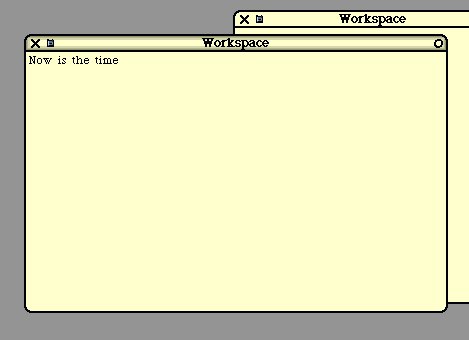
Figure 1
When the cursor is over any window, a scroll bar pops up on the left. In the next image, we see a scroll bar, some highlighted text, and a pop-up menu showing some useful operations.
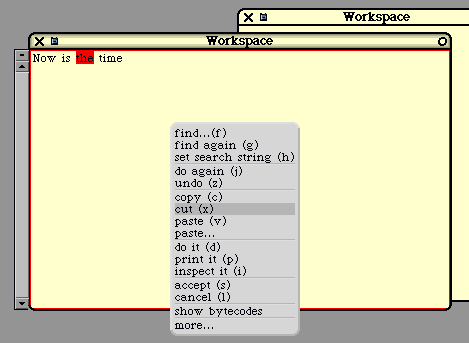
Figure 2
We can execute menu options directly or, in the case of some options, we can use a control key sequence as a short-cut. For example, we can "cut" text with control-x. You can do more in a workspace than just edit text. You can also directly execute pieces of Smalltalk code from a workspace. Typically, a Smalltalk user will type in some expression, highlight it, and then push the "print it" button. Let's evaluate the following Smalltalk expression:
2 + 3We'll type it, highlight it, and select the "print it" command.
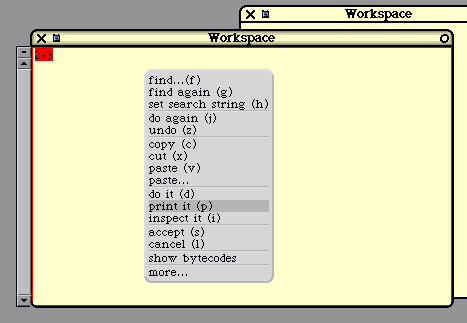
Figure 3
The expression will then be compiled and executed and the result will be inserted directly into the workspace. We'll see this:
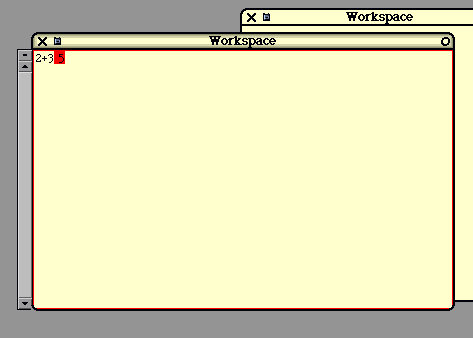
Figure 4
Sometimes the user will type in a simple expression, like the following, which will simply get some complex body of code running. From then on, the code will interact with the user through additional windows, menus, etc.
myObject startupOr the programmer might type in a series of statements, perhaps including flow-of-control constructs. In the next example, we will type some code into a workspace to create a new "Set" object and add some items to it.
Each workspace has its own "namespace", so that any variables used are local to the workspace. In this example, we'll use the variable "mySet" to refer to the new object. (In workspaces, variables need not be declared before use.)
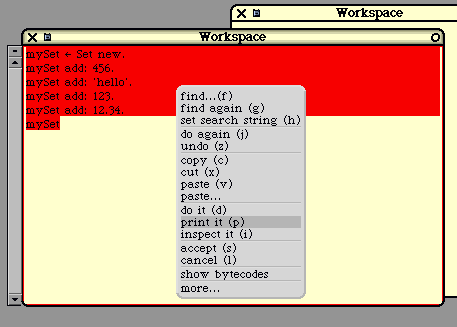
Figure 5
The "print it" button causes the highlighted code to be compiled, executed, and the result displayed. The "print it" command inserts the result directly into the workspace and leaves it highlighted.
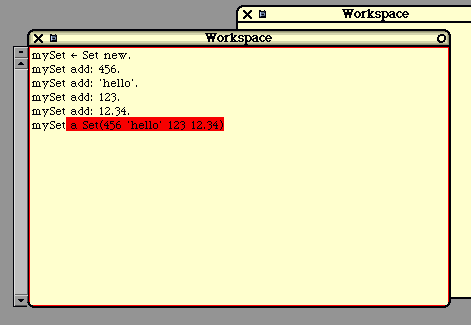
Figure 6
Typically, the programmer might use a workspace to write a code sequence. Perhaps the programmer will execute it several times, changing it until the effect is just right. At this point, the code might be saved to a file, or discarded, or pasted into some method. Or the programmer might just leave the code in the workspace forever, going back to execute it whenever he or she wishes.
When you create a new class, you do not give any methods initially. In other words, the creation of a class is a separate step from the addition of a method to a class. In fact, once the class is created, you can immediately begin using the class, before a single method has been written. A class with no methods may not be terribly useful, but remember that every class will inherit methods from its superclass, even if it has none of its own.
The browser can be used to do the following kinds of actions:
    Create a class
    Delete a class
    Add a new method
    Recompile an existing method
    Delete a method
    Add or delete fields
    Search for classes and methods
Above we discussed the syntax for methods, statements and expressions. In C++ and Java, there is also
a syntactic construct for an entire class, but in Smalltalk there is no syntactic construct for the class as a
whole. Instead, there is only the sequence of actions that lead to the creation of the class. Once the class
has been added to the system, the programmer may begin to add methods to the class.
To create a method, the programmer will type in the entire method and then push the "accept" button. At that point the method is compiled. If there are compile-time errors, they are shown immediately and the class is not modified. If the compilation succeeds, then the method is added to the class.
When a method is accepted, it is installed into the existing class hierarchy immediately, replacing the previous version if there was one. This is a huge difference between Smalltalk and other languages: Existing instances of the object continue to exist after the compilation. Objects that, in the past, used the old version of a method (or failed to understand a message if there was no method) will, after the new method is "accepted", use the new method without any special action.
What this means is that, in Smalltalk, the programmer can change the program while it is running, whereas in Java or C++, a program cannot be changed once it has started execution. Effectively, a change to some method, in Java or C++, will only affect objects created after the change is made, since any change will involve another iteration in the compile-load-and-go cycle. In Smalltalk, the objects alive and active, even while methods are added or recompiled. Consequently, any change to a method will effect all the objects in that class, even objects created before the method was compiled.
The Smalltalk programmer may also change the class by adding or deleting fields. When this action is taken, the system will immediately modify all existing instances of the class. For example, adding a new field to a class will cause all the objects in the class to be enlarged. (The new field will be initialized to "nil".)
In Smalltalk, the compile-load-and-go process that programmers are familiar with does not exist. Instead, the objects are persistent and survive changes to their behavior. The concept of a "program" is not well-defined or important. Instead, we just have the current "image" with its collection of classes, objects and running threads.
In practice, the programmer will create objects and exercise their behavior (i.e., send messages to them). If their behavior is not what is desired, the programmer will alter their behavior by modifying their methods. The programmer will then re-send messages, re-testing the behavior of the same objects.
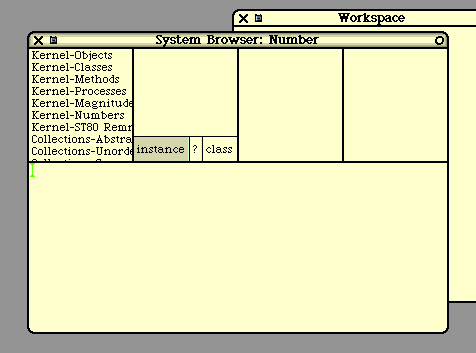
Figure 7
Now let's assume we want to look at the "rounded" method in class "Number". There are a number of ways to locate a class or a method. Since we know the class name, we'll use the "find" menu option to locate it. In the next figure, you'll see a menu and we are selecting the first option.
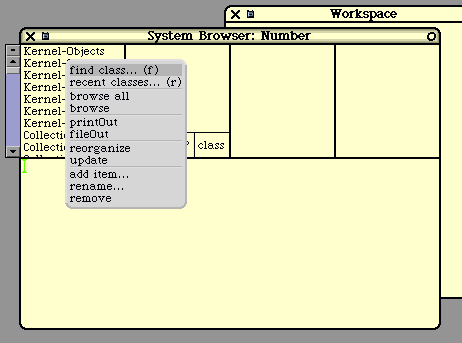
Figure 8
In the next figure, a "prompter" pops up, asking us to enter some text.
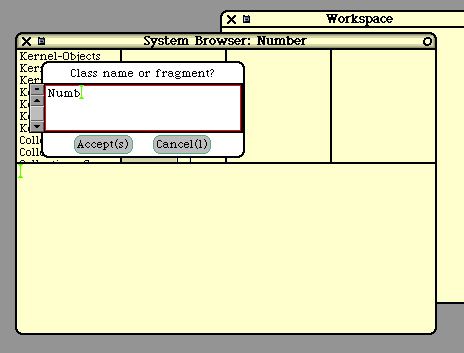
Figure 9
After we enter the class name, the browser locates the class and displays a list of its methods. This is shown in the next figure below.
Classes are grouped into "categories". The "Number" class happens to be grouped into "Kernel- Numbers". Within a class, all the methods are grouped into categories. "Number" has a bunch of methods, grouped into categories like "arithmetic", "mathematical functions", etc. These categories make it easier to organize and locate methods, especially in classes with lots of methods.
In the following figure, we see 4 sub-windows across the top of the browser. Each is a list and we can scroll and select. The first sub-window is a list of all class categories. The second sub-window shows all classes in the selected category. The third sub-window shows all method categories, and the fourth window shows all methods in that category. Since we didn't remember the category of "rounded", we just selected "all" categories. next, we scroll down looking for the desired method.
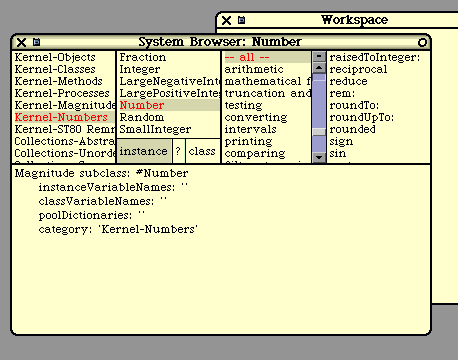
Figure 10
Upon selecting a method, we see its text in the bottom sub-window, as shown next.
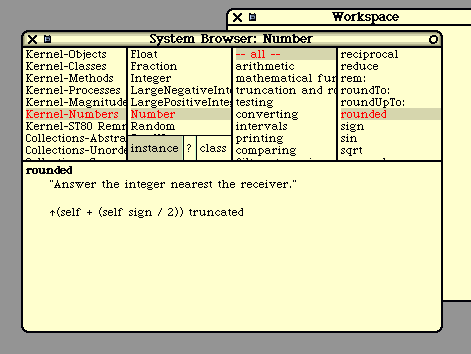
Figure 11
This method happens to be a fairly short method. We can also alter and recompile the method, if we wish. There is no distinction between "system" methods and "user" methods, but altering the "rounded" method is going to have widespread unpleasant consequences.
We can also use the browser to view the class tree. Pushing the button marked "?" will show us the following. We see all superclasses of "Number" above it and all subclasses of "Number" below it.
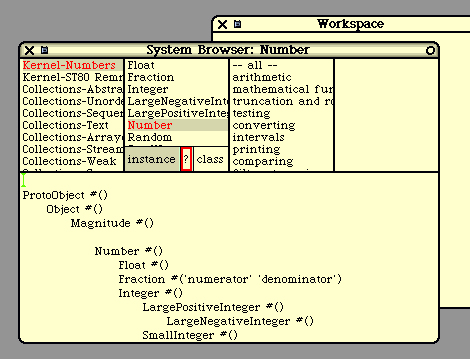
Figure 12
If we push the "?" button again, we would see a documentation comment associated with this class. We can also use the browser to view and edit "class methods", by pushing the button marked "class".
Next, we will use the browser to create a new class. At the time we create a class, we must give it a name. We must also specify its superclass and must enumerate all the fields in the new class. Let's assume we've already created a new category called "White-Examples". After doing this, we'll see this:
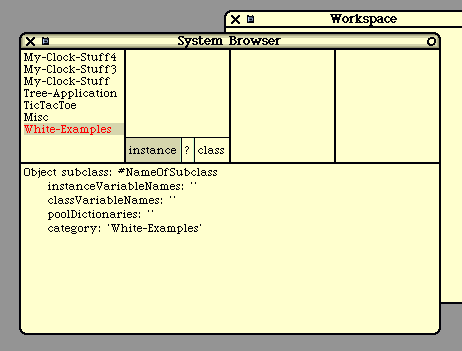
Figure 13
The text in the bottom sub-window is a template. In the next figure, we will modify it, filling in the new class name and instance variables. We could also modify the superclass, but we'll just leave it as "Object". When we have finished typing, we "accept". At this point, the class is created.
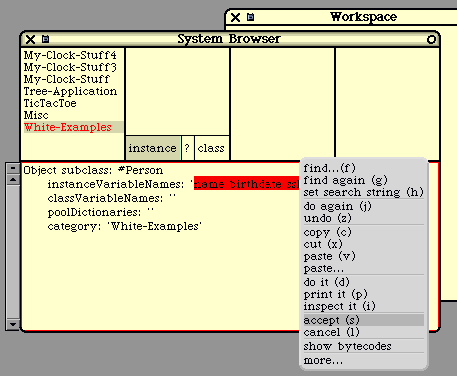
Figure 14
After the class is created, we can create some methods. The browser begins by presenting a template, like this.
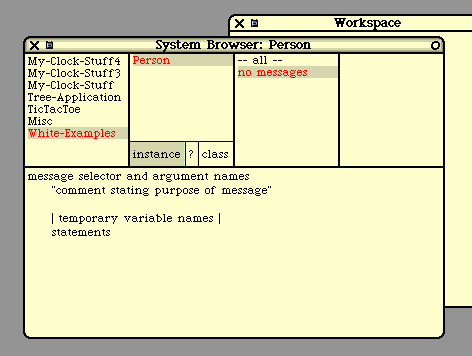
Figure 15
We'll replace this text by typing in our method code and "accept" it, as shown next.
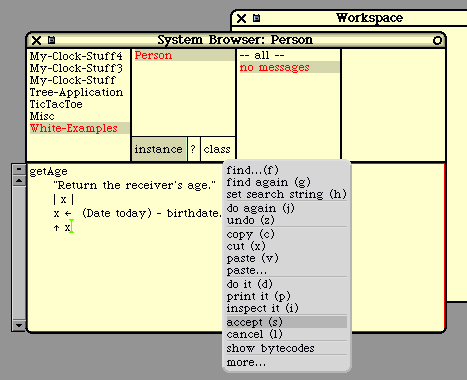
Figure 16
If there are compile-time errors, they are shown immediately and the method is not installed. Here is how a parsing error would be shown:
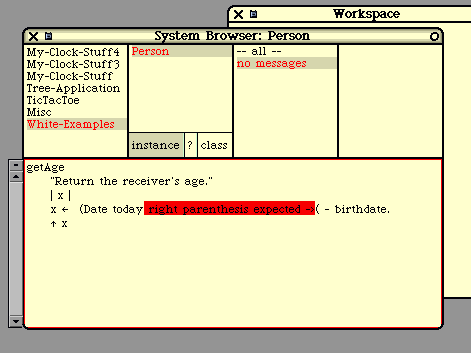
Figure 17
If you misspell a message, the compiler will flag the error by popping up the following menu, suggesting some possible corrections. If you select a new spelling, the method text will be altered and the compilation will continue. Or you can select "cancel" to terminate the compilation.
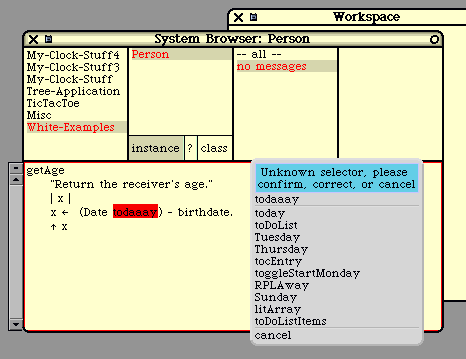
Figure 18
A similar menu pops up if you misspell a variable name.
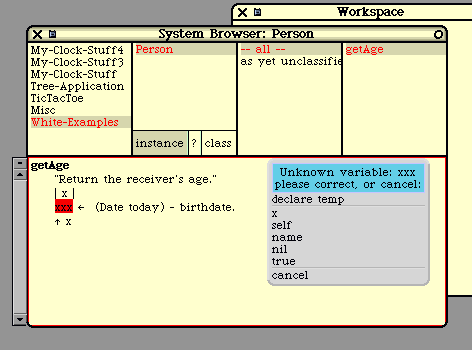
Figure 19
If the variable is spelled correctly, but we have forgotten to declare it, we can select "declare temp". For the "getAge" method, this is not really what we want to do, but for the sake of exposition, let's select "declare temp". The compiler will modify the method text and will continue. Next, the compiler will notice that we are using variable "x" without first assigning it a value, so it will pop up a message to the effect.
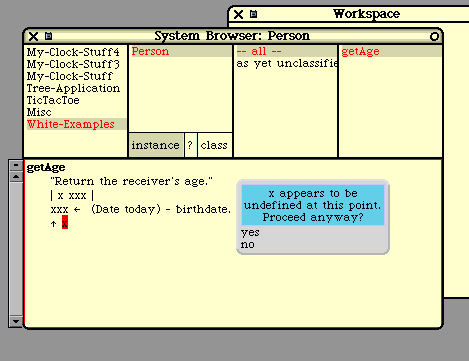
Figure 20
When an error occurs, a debugger window will pop up with the error message. The program is not terminated; instead the offending thread is merely suspended. While it is often the case that the offending thread will need to be terminated, there are times when the programmer wishes to fix the program and keep running it.
In some situations, a bug may arise only in very strange, complex cases that are difficult to re-create. Upon encountering a bug, the Java or C++ programmer will first make sure the bug is repeatable. Often, the programmer will first try to determine exactly which cases or data causes the bug to be manifested.
In Smalltalk, when an error arises, the thread is suspended but the data remains untouched and available for inspection. The Smalltalk programmer will often start by looking at the data values immediately and asking exactly where in the code was execution suspended.
The debugger allows the programmer to look at all the variables and look through the methods that are currently suspended.
When a method is suspended, there is a calling stack (the stack of activation frames) for all the methods that are currently active. Assume that method M1 was invoked by method M2, which was invoked by M3, which was invoked by M4, and so on. Each of these involved a message-send and each is now suspended.
The debugger can be used to browse this activation stack. The error itself arose in the method at the top of this stack (M1), but the actual mistake (the bug) is often in another method buried a little deeper in the stack (like M3 or M4). For example, an "array index out of bounds" error will occur in a method in class Array, yet the problem may be in the method that called it, providing a faulty index value. Or the bug may be in a third method that called the second method. This third method may have performed a faulty calculation that lead to the faulty index value. It is convenient to be able to jump up and down in the activation stack when looking for a bug.
Whenever the debugger displays a suspended method, the programmer can view the values of the receiver's fields and the values of the formal parameters and local variables for that method. These are displayed by name at the bottom of the window showing the method's code. The programmer can just click on a name to see the value of that field or variable.
The debugger also allows the programmer to single step execution. When debugging, it is often necessary to watch the program execute step by step to see where some faulty behavior first occurs. By inserting this message-send in any method
self halt: 'Point one reached'the programmer can invoke the debugger. The programmer can then look at variables or single-step through the method. The method can be re-compiled or data values can be altered by hand and execution can be resumed. Or the thread can simply be terminated.
    name
    birthdate
    ssNumber
Also assume that we have an "initialize" method, which will set these fields to default values.
The following code will create a Person and send it the "initialize" message.
    p := Person new.
    p initialize
Let's assume that the "initialize" method also sends a message called "computeTaxes". This method
performs some computations. For the sake of this example, let's assume that the "computeTaxes"
method tries to send a message ("computeAdjustedIncome:") that is not understood by Person objects.
Perhaps we have not yet written it. This is the bug we would like to find.
What happens when we send "initialize"? We see the result below. An "error notifier" pops up and we see 3 buttons and the stack of activation frames. The top frame has to do with the error processing itself and can be ignored. The second frame is for the "computeTaxes" method. The third frame is for "initialize", which called it. Below that, we see a bunch of other methods concerned with the windowing system and compiler, which led up to the execution of the "initialize" method. We can ignore these.
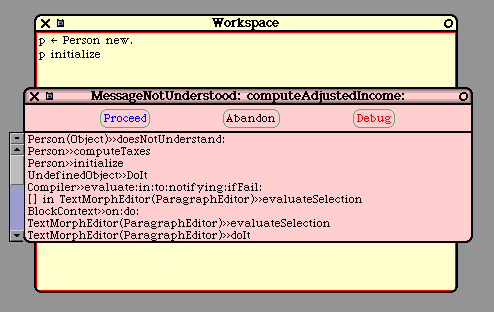
Figure 21
We have options to "proceed" or "abandon" this computation altogether, but we will choose to "debug" it. We will then see the following debugger window. In the top sub-window, we see the stack of activation frames, again.
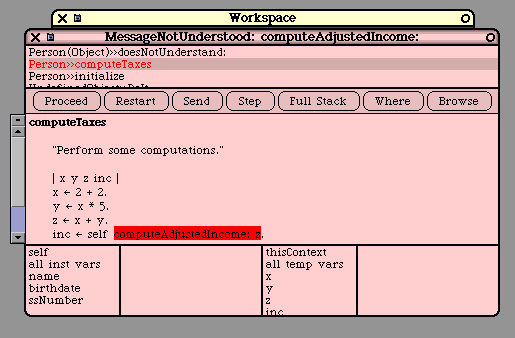
Figure 22
The expression that was being executed when the error occurred is automatically highlighted. At this point, the programmer would probably realize the problem and fix it, but let's go on to demonstrate the debugger's features.
Often, it is the case that the error is in another method. Perhaps (we might think), the bug is in the method that called "computeTaxes". If we go to the top sub-window and click the "initialize" method, we'll see the following. Notice that the expression currently being executed is highlighted. This shows us exactly where in "initialize" we are executing.
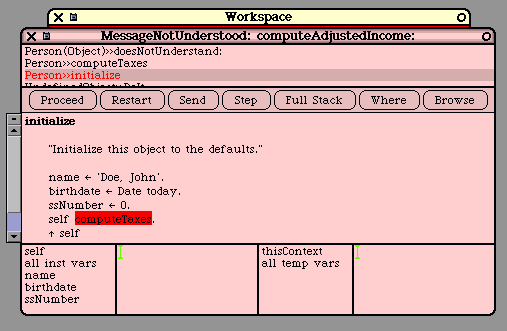
Figure 23
Let's go back to the "computeTaxes" method. This is shown in the next figure.
In the sub-windows at the bottom, we see the fields of the object on the left and the local variables on the right. By clicking on them, we can see their values. Let's click on the "name" field and on "x" to see their values.
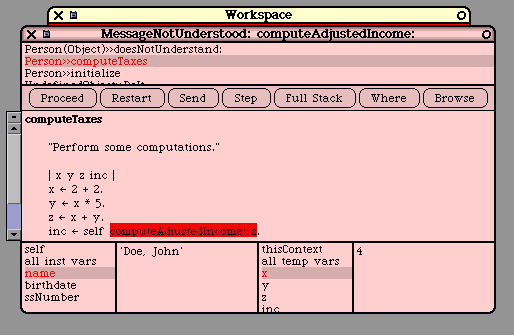
Figure 24
We can alter a field or variable by typing in a new value. Let's change "x" to 3. We just replace the "4" with "3" and hit accept. In general, we can type in any expression here; it will be evaluated and the result will be assigned to the variable or field.
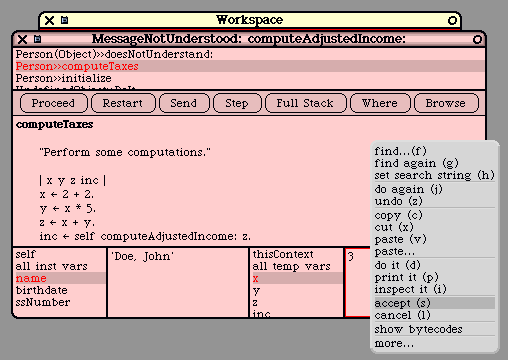
Figure 25
Next, let's assume that we have located the bug and we now want to fix it by modifying the method. In this example, let's just delete the statement that caused the problem. We can edit the method text directly and then "accept" the modified method.
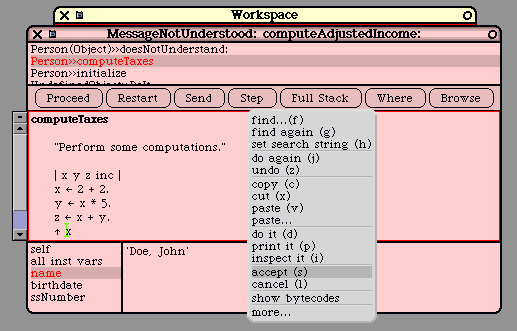
Figure 26
At this point, execution of this method has been interrupted by its recompilation. The system will back up execution to the beginning of the method. After "accept"ing the new method, we see that execution is suspended on the first message-send in the method, as shown next.
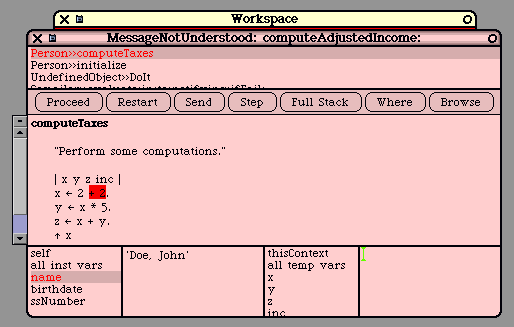
Figure 27
At any time, we may "single step" execution by repeatedly pressing the "step" button. To finish off this example, we'll press the "proceed" button. Execution will resume and the debugger window will disappear.
For example, here is how an instance of class "Set" would display itself:
a Set(456 'hello' 123 12.34)Here is how an instance of class "Array" would display itself:
#('abc' 'def' 'ghi')
There is a method in class Object that provides a default implementation for "printString", but this
method is often overridden to provide a nicer, more human-readable string. For example, if we create a
class called "Person", we might override "printString" to print something like this (using the "name"
field):
aPerson(Porter,Harry)However, some objects contain pointers to other objects. How are these objects to be displayed? One approach is just to use the "printString" method, which will send "printString" recursively on the "sub- objects". For example, here is how an Array containing other Arrays will display:
#(123 #('a1' 'a2' 'a3') #('b1' 'b2') 456)
This approach breaks down when either the data structures are recursive (i.e., they contain cyclic pointer
loops) or when the data structures are big. When the data structures are big, the system code works fine,
but the strings become incomprehensibly long.
To address this problem, Smalltalk provides a tool called the "inspector" that allows objects to be viewed. For each object, the programmer can open an "inspector window" on the screen. These windows are each independent and the programmer can have as many on the screen at once as he or she needs.
Here is an example, showing 3 inspector windows, each looking at different Person objects:
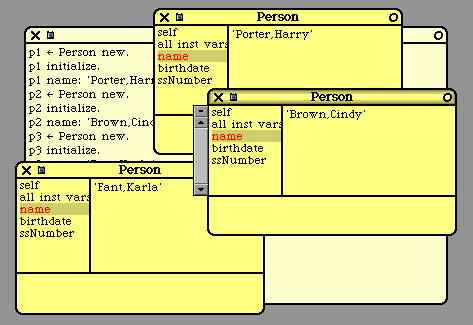
Figure 28
Each inspector window is used to examine a single object. The inspector may also be used to modify objects. An inspector window will list all the fields of the object by name. The programmer can click on any field and see the value of that field using its "printString".
Alternatively, when the field points to some other object, the programmer can ask for a new inspector window on the object being pointed to. A new inspector window will pop up showing the object being pointed to.
The programmer can also update objects by simply typing in a new value for some field.
During debugging, a programmer might typically walk through a huge data structure (with 1000's of objects) looking for some specific object related to the bug. Inspector windows will momentarily litter the screen as the programmer moves through the objects, occasionally backtracking to chase down a different path in his search through the data. At any time, the programmer can send any message to any object he or she encounters, perhaps to test various parts of his code.
All the tools (the "browser", the "debugger", and the "inspector") are well-integrated with each other. For example, from the debugger, any variable or field can be inspected with the inspector at the click of a button.
For example, Smalltalk includes a "process scheduler" which implements threads and thread scheduling. Smalltalk also includes code for accessing hardware I/O devices (disk, network, mouse, etc). It includes a complete window system. In fact, the window interface provided back in 1980 served, in some sense, as the initial prototype for all the window-based user interfaces that subsequently followed.
Almost all of the code in the Smalltalk system is written in Smalltalk itself, but there are several "primitive routines" which are part of the virtual machine and which are coded in "C" or assembly language. It is through these primitive routines that high-level Smalltalk code can get at the underlying hardware.
In short, Smalltalk provides all the "system code" normally provided in an operating system. As such, Smalltalk has been ported to several bare machines. In fact, given a bare machine with no OS, the easiest approach to getting something fancy running might be to port Squeak.
But Smalltalk is usually run on top of an existing "host" operating system like Unix/Linux, Windows, or the Mac OS. In this situation, Smalltalk sits on top of the OS and passes all calls to manipulate disk- files, network-communication, and other devices straight-through to low-level OS interface routines. As for the display screen, Smalltalk can run either in "full-screen mode", in which the underlying OS is entirely hidden or it can run within a host OS window.
The Smalltalk virtual machine runs as a single process in the host OS. All of the Smalltalk threads are completely invisible to the host OS. From the host OS, about all you can do is either "startup" Smalltalk, "suspend" it, or "terminate" it altogether.
While Smalltalk is active, the keyboard and mouse have their own special Smalltalk behavior, which is similar to, but slightly different from, the host OS behavior. For example, Unix/Linux, Windows, Mac OS, and Smalltalk all use various "control key" combinations to make editing easier, but each OS uses a slightly different set of key combinations. The mouse sprite (i.e., the "cursor arrow" that tracks the mouse) looks slightly different in Unix/Linux, Windows, Mac OS, and Smalltalk.
Smalltalk "plays well" with the host OS and the outside world. For example, you can easily cut and paste between a MSWord document and a Smalltalk "workspace". Common control keys sequences (like "cut" and "paste", for example) are the same as in the host OS.
When Smalltalk-80 was introduced, it required an entire computer to use. This was very ambitious, given hardware costs at the time. Computers were relatively expensive and uncommon. Of course another factor was that Smalltalk was not mass marketed to the public at the time, while Microsoft, IBM, DEC, and Apple were installing a lot computers because of their extensive advertising campaigns.
In the early days of Smalltalk, several deliverable systems were programmed in Smalltalk, but the high cost of a dedicated Smalltalk machine was a barrier in many applications. At that time, the memory footprint of Smalltalk was considered absolutely huge (as much as 1 or 2 megabytes). This large memory requirement was a "show stopper" for a large number of applications, in days when computer memory was measured in "Kbytes" not "Mbytes".
Today, the memory requirements of Smalltalk are roughly the same as for (say) MSWord. Even though memory size is no longer the slightest barrier, Smalltalk developed a reputation as a "memory hog". Squeak has even been ported to handheld "palm" devices and is now being used in embedded applications. Although this problem is now "solved", it accounted for slow early adoption of Smalltalk and, consequently, fewer users today.
Smalltalk is an interpreted system, and in 1980 there was a very negative stigma against interpreted languages. Interpreted languages will always be slower than truly compiled languages like "C++", but today the climate is different. Processors are much faster, and programs are much more complex. The added programmability and reliability of an interpreted language often outweighs the speed of a truly compiled language, allowing languages like Java to succeed, where they would not have stood a chance in 1980.
One shortcoming of Smalltalk is that it is an operating system (as well as a language) and is therefore often viewed as being in direct competition with Unix/Linux, Windows, and the Mac OS, rather than being just another application running on top of the OS. Smalltalk will never win in that competition. Consumers seem to choose an OS based on (1) what applications the OS has, (2) marketing appeals, (3) price and availability, and (4) what other consumers are doing. Many first-time computer consumers feel they don't know much about operating systems and are unable to evaluate them. They are more-or- less afraid of the OS and usually prefer the safety of going with the herd. (The PC marketing exploits this effect most effectively.)
Smalltalk was never pushed by any corporation; it has always been "grass-roots software", used by experienced programmers who are looking for something better, something innovative. In the 1980's and 1990's its use spread widely among this group, but nothing in comparison to computer use in general.
Over the last two decades, a lot of code has been written for Unix, the PC, and the Mac. Today there is a huge installed base of Unix, PC, and Mac application software and a huge number of consumers who have managed to learn the Unix, Windows, or Mac systems. These people will not abandon their investments without a fight.
Smalltalk has not really kept up in the applications area. Today Smalltalk comes with a web browser, an email reader, a text editor, and a drawing/painting tool. Although these tools are clean and simple and quite serviceable, they lack the maturity, elaboration, and fine-tuning that years of widespread use have brought to programs like MSWord or Internet Explorer, or the main-line operating systems themselves.
Frankly, I do not foresee Smalltalk, as an operating system, making any headway against the entrenched giants of Unix/Linux, Windows, and Mac OS. Instead, I see the future of Smalltalk occurring on top of another OS.