My ultimate goal is to help you break into the data engineering field and become a more impactful data engineer. To take this a step further and dedicate even more time to creating in-depth, practical content, I’m excited to introduce a paid membership option.
This will allow me to produce even higher-quality articles, diving deeper into the topics that matter most for your growth and making this whole endeavor more sustainable.
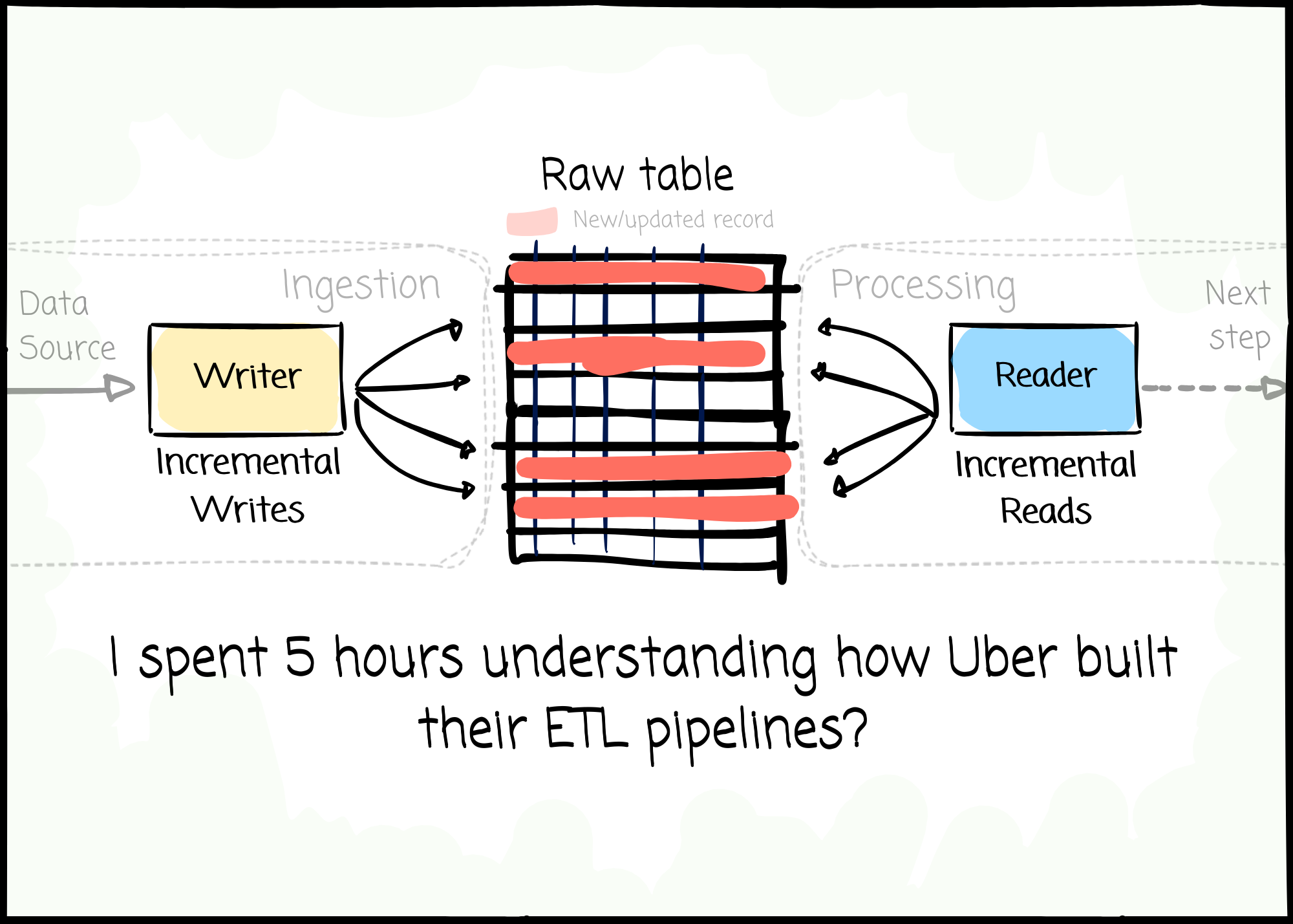
This week, we will explore how Uber engineers build ETL pipelines to support the internet-scale business.
Uber is the tech company that transformed the taxi market in the early 2010s. In 2023, 137 million people used Uber or Uber Eats once a month, and Uber drivers completed 9.44 billion trips.
This article will first discover the company business's requirements for data pipelines and how Uber delivered the solution.
At Uber, data is unified in a centralized petabyte-scale data lake. The Global data warehouse team is in charge of building foundation fact and dimension tables on this lake, acting as Lego pieces for all the data use cases, from reporting to machine learning.
The data is not only used for common analytic cases; Uber also uses data to power critical functions of their services and applications, such as rider safety, ETA predictions, or fraud detection.
For Uber, data freshness is the backbone of the business; they invested heavily in the ability to process data as soon as it’s captured to reflect changes in the real world.
They build, evolve, and manage their data lakehouse to ensure it can do one thing efficiently: handling data incrementally.
Let’s review a typical use case at Uber to understand why incremental data processing is essential.
The use case is the driver and courier earnings. Imagine Uber had a dataset containing daily driver earnings for every driver. A rider can tip the driver hours after a trip is completed. A driver earned $10 for the trip on Monday night and got an extra 1$ tip on Tuesday morning.

With batch processing, Uber doesn’t know if the driver’s earning data will be changed. They have to assume that “Data was changed in the last X days“ and reprocess all X data partitions to update the driver earnings. A small change can cost them a lot of time and resources to re-process the whole month of data (for example)

With another use case where merchants can update the menu whenever needed, Uber has to ensure these changes are reflected on the Uber Eats app. For a given day, Uber observed 408 million delta changes compared to 11 billion total entities, roughly 3.7%.
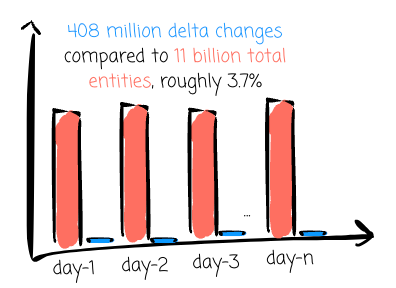
The batch approach could result in the same problem as the use case above: a small fraction of updates can waste time and resources running the pipeline over a large amount of data, leading to data freshness SLA violation.
What if they could extract only the update (e.g., the event where the rider tipped $1$) and apply it to the target table?
To bring the incremental processing capability to the lakehouse, Uber developed the Apache Hudi table format. In the scope of this article, I won’t dive deep into the story behind Hudi. If you want to read more about its story and features, check out my previous article:

In short, Hudi has a very special design compared to the Iceberg or Delta Lake format. The ultimate goal of it is what you see over and over again in this article: processing data incrementally as efficiently as possible. To achieve this, there are Hudi’s characteristics that we need to be aware of:
Two file formats: The base files store the table’s records. To optimize data reading, Hudi uses a columnar-oriented file format (e.g., Parquet) for the Base Files. The log files capture changes to records on top of their associated Base File. Hudi uses a row-oriented file format (e.g., Avro) for Log Files to optimize data writing.

Timeline: Hudi Timeline records all actions performed on the table at different times, which helps provide instantaneous views of the table while also efficiently supporting data retrieval in the order of arrival.

Primary key: Each record in a Hudi table has a unique identifier called a primary key, consisting of a pair of record keys and the partition's location to which the record belongs. Using primary keys, Hudi ensures no duplicate records across partitions and enables fast updates and deletes on records. Hudi maintains an index to allow quick record lookups.

Image created by the author.


This section will explore in detail how Uber implements Hudi for their Lakehouse.
Hudi supports these types of queries:
Snapshot: The queries will see the latest snapshot of the table.

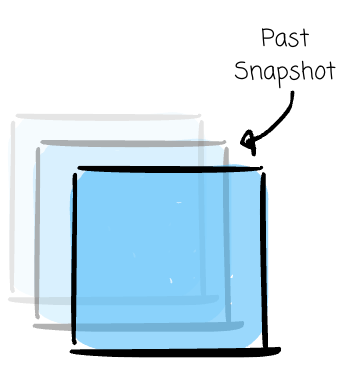
Time Travel: The queries will read a snapshot of the past.

Read Optimized: This one is similar to the snapshot query but performs better because Hudi will read the snapshot using only the columnar files.
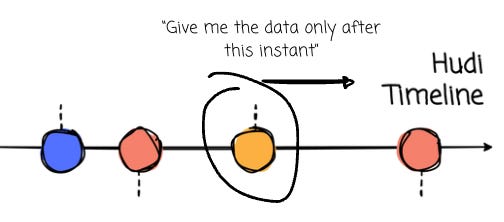
Incremental (Latest State): The queries only return new data written since an instant on the timeline.

A Hudi instant is a point-in-time marker in Apache Hudi’s timeline that captures a single atomic action (such as a data commit or compaction)
Incremental (CDC): This is a variant of the Incremental one where it provides database-like change data capture log streams out of Hudi tables


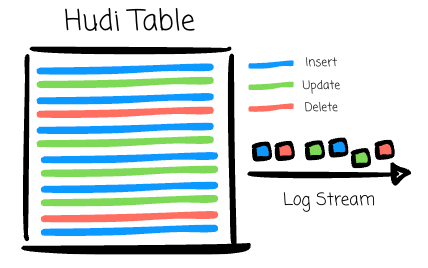
Uber uses Incremental (Latest State) most of the time to handle many types of reads and joins with Hudi:
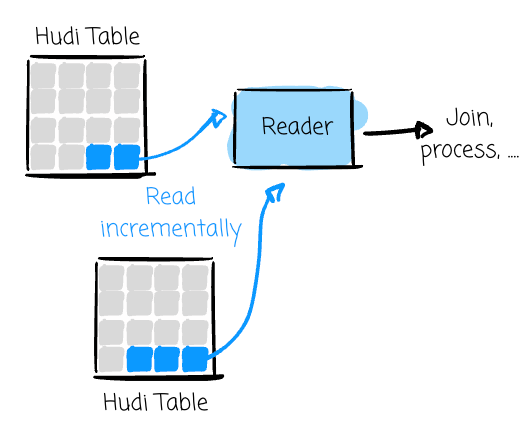
Incremental update from a single table: Uber reads data incrementally from the Hudi source table and uses this data to update the target table.
Consolidation from single table incremental update and other raw tables: To prepare for the updated data for the target table, Uber reads data incrementally from the Hudi source table and performs left outer join on other raw data tables with T-24 hr incremental pull data.
Consolidation from single table incremental update and other derived and lookup tables: Uber reads data incrementally from the Hudi source table and performs left outer join on other derived tables with only the affected partitions
Backfilling: Uber leverages Hudi’s snapshot read on single or multiple source tables using the backfill start and end date boundaries.
In Hudi, write operations can be classified into two types:
Incremental: Hudi applies only incremental changes to the table/partition.
Batch: Hudi overwrites entire tables and/or partitions entirely every few hours.
For each type, Hudi further categorizes operations into these types:
Upsert (Incremental): Hudi first looks up the index to check whether the record is tagged as inserts (new) or updates (existing). Then, Hudi determines how to pack the record in the storage. The target table will never show duplicates.

Insert (Incremental): This one resembles Upsert, but Hudi skips the index-look-up step. This option is faster than Upsert; however, the target table can show duplicates.

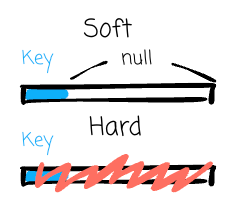
Delete (Incremental): Hudi supports two types of deletes on Hudi table data. Based on the record key, Hudi can soft delete where it retains only the record key and fills null for all the other fields. The other approach is hard delete, which entirely clears all evidence of a record

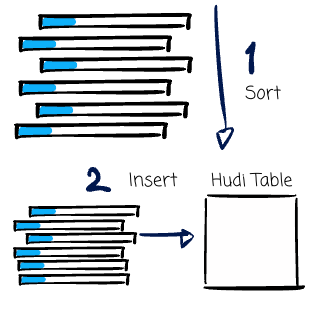
Bulk Insert (Batch): Insert or Upsert keeps data in the memory to speed up computations, which can cause some problems for initial data loading. Bulk insert has the same semantics as insert plus implementing a sort-based data writing algorithm, which can scale well for initial data load.

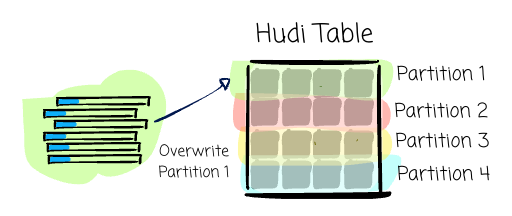
Insert Overwrite (Batch): Hudi will rewrite all the partitions that are present in the input.

Insert Overwrite Table (Batch): Hudi will rewrite the whole table.

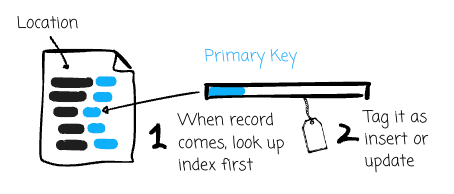
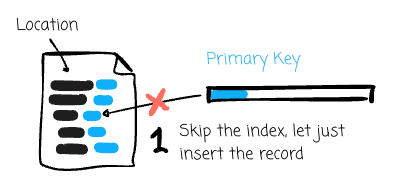

To write data to Hudi tables, Uber has to handle it differently based on whether the table is partitioned or not:
Hudi stores data files under partition paths for partitioned tables (like Hive table) or under the base path for non-partitioned tables. For example, Hudi organizes table_1, partitioned by date, in folders like table_1/date=2025-04-01, table_1/date=2025-04-02,….For non-partitioned tables, Hudi stores it using only the base path: table_2/.
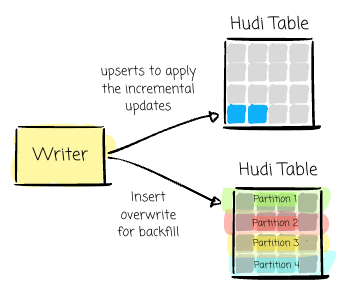
Partitioned tables: Uber uses upserts to apply the incremental updates. For backfilling, they use insert_overwrite to rewrite the affected partition. For non-incremental columns, they use Spark SQL targeted merge/update statements.
A non-incremental column is any column whose updates do not determine how a record changes over time in the sense of incremental data loads (e.g., a restaurant located in Las Vegas last year and later changed to New York).
Non-partitioned tables: Uber also uses upserts to apply the incremental updates. To update the incremental and non-incremental columns, they use insert_overwrite when joining (full outer join) incremental rows with the target table.
Uber handles the incremental ETL pipeline using Hudi, Spark, and its internal data workflow, Piper (think Airflow). They built a Spark ETL framework to manage ETL pipelines at scale, using Hudi’s incremental data processing tool called DeltaStreamer to power this framework.
Uber initially contributed to DeltaStreamer, and many organizations have used it to streamline incremental data processing with Hudi. In more detail, the tool provides ways to ingest from different sources, such as Kafka.
The Spark ETL framework abstracts all the complexity and lets users configure how their pipeline should run with simple steps. Users must give the framework a few inputs, like the table definition, DeltaStreamer YAML configs, and the SQL or Java/Scale transformation.
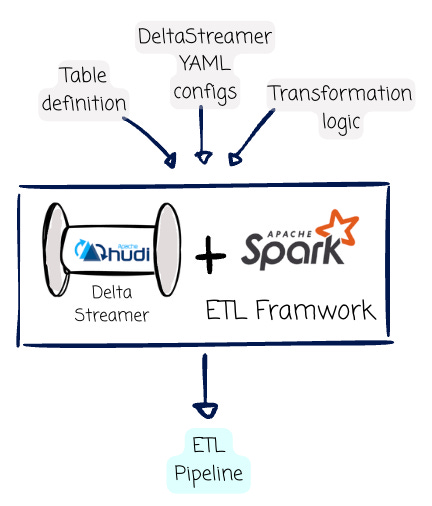
Table definition: A DDL definition file with the table’s schema information and Apache Hudi format.
DeltaStreamer YAML configs: This file will provide a list of configurations expected by the Apache Spark DeltaStreamer application. Some important ones are the
hoodie.datasource.recordkey.field, which declares the target table’s primary key. As mentioned, Hudi uses the primary key to perform data duplication (with the upsert write operation). The next important one ishoodie.datasource.write.operation, which expects one of the values listed in the “Data Write“ section above.Transformation logic: The user will provide a file with the SQL transformation logic. The DeltaStreamer will execute this logic using Spark SQL. Users must specify the incremental source from which the DeltaStreamer performs the incremental read operation. The tool will read from the latest checkpoint in the target table’s Hudi metadata to capture the new data. Users can express the transformation logic using Spark Scala/Java for more advanced use cases.
Because of migrating all the batch ETL pipelines to the incremental solution with Hudi, Uber decreased the pipeline run time by 50%. I captured the table from Uber’s article to show how efficient the new solution is:
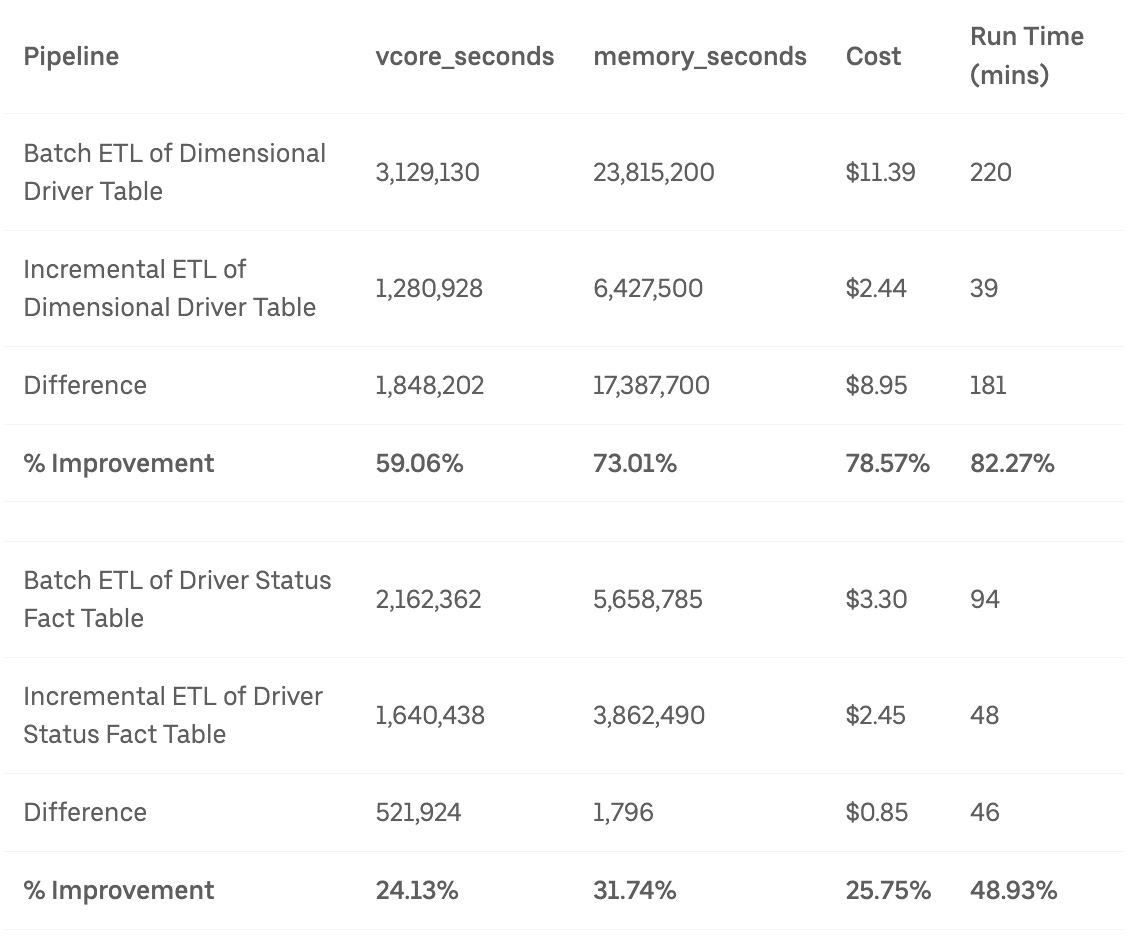
They used 59.06% CPU core and 73.01% memory less than the ETL approach for the Dimensional Driver Table. In the past, the pipeline would take roughly 3.7 hours to finish; with the incremental pipeline, it only takes Uber 39 minutes to finish.
To achieve availability, Uber organized data redundantly across multiple data centers. Achieving strong data consistency across tables in different data centers is critical to Uber’s business operations.
Hudi helps Uber consistently replicate data across data lakes in many data centers. After computing the table in the primary center, Uber replicates the data by using the Hudi metadata to move incrementally changed files across data centers.
Uber implement the write-audit-publish (WAP) pattern with Hudi to prevent low-quality data from entering the production environment. This approach requires users to run SQL-based data quality checks on the data before it gets pushed to the production dataset.
The Hudi’s DeltaStreamer outputs valuable metrics to provide insights during the incremental ETL processes. Uber can observe the number of Hudi’s commits in progress or the total records inserted/updated/deleted.
Thank you for reading this far.
In this article, we explored why incremental processing is critical to Uber’s business and how Uber solves the problems with Apache Hudi.
For me, Hudi is an exciting table format with many interesting technical designs. Although it does not get wide adoption like Iceberg or Delta Lake, Hudi will shine in the use cases it was originally designed for.
Would you like to read more Hudi articles? If yes, please let me know in the comment section or leave a reaction to this article.
Now, it’s time to say goodbye.
See you in my following articles.
[1] Uber Engineering Blog, Setting Uber’s Transactional Data Lake in Motion with Incremental ETL Using Apache Hudi (2023)