There is a lot of hype about Qwen3.8:27b model which can run full agentic loop, not chat, not autocomplete. I got down to verify it myself.
In early 2025, DeepSeek launched its R1 model, offering frontier-grade reasoning and open weights at a fraction of typical training costs. The release immediately wiped roughly $600 billion off Nvidia’s market value in a single day. This dramatic financial impact occurred not just because R1 was a highly capable model. Rather, it shattered the prevailing industry assumption that elite AI capabilities must always be rented from centralized big-tech datacenters.
The question I wanted to answer is whether the same break has now happened for models small enough to run on a desk.
For a local model to be useful it must be able to build a fully functioning webapp. I want to verify it’s tool-calling capabilities, using skills, ability to screenshot browser and visually verify the webapp, ability to think through and not lose sight of goal, ability to run for long time in a loop until goal is achieved, test the code after building the app.
Building a 3D tic-tac-toe app using threejs ticked all those boxes: 3×3×3 board, 49 winning lines, orbit controls, raycasting for clicks, a build step, a real browser, several rounds of look-at-the-screenshot-and-fix-it.
Now running Qwen3.8:27b locally means I have to choose which agent harness and inference engine to run it on. Tested claude code, qwen-code, pi as the harnesses. Ollama and LM Studio as the inference engines. For comparison, I ran the same test with Fable 5 (medium thinking effort).
Used this prompt in all the agent harness:
/goal Build a 3d version of tic-tac-toe using three.js. Test it using playwright-cli with chrome browser.
Note: Default pi agent does not have /goal so it was removed but the prompt was same.
The results ranged from 7 minutes to 4 hours 46 minutes to never finished.
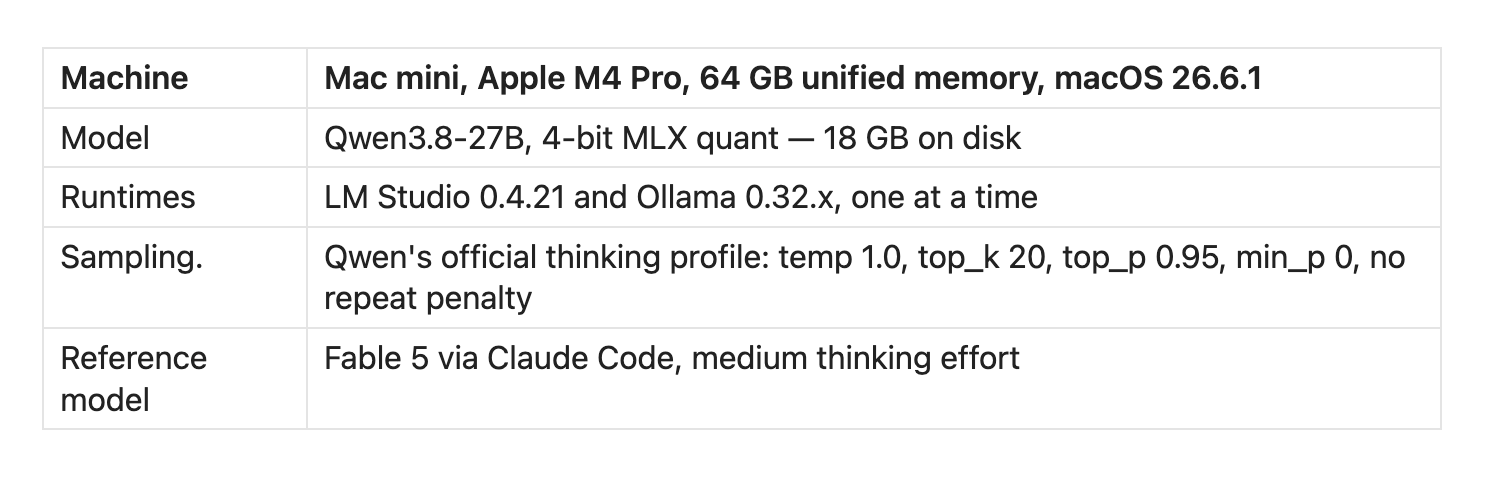
First thing I noticed was in my Mac mini the model prefills at roughly 111 tokens per second and decodes at 18–35 tokens per second depending on runtime and how full the context is.
In simpler terms, Prefill is the model reading and Decode is the model writing. In an agentic loop you re-send the entire conversation on every single turn, so unless the server can match what you sent against a cache it already holds, every turn starts with the model silently re-reading tens of thousands of tokens before it emits a single character.
In LM Studio developer logs, you can see Prompt Processing as a percentage which slowly runs until 100%. This “Prompt processing” in LM Studio is the prefill phase.
At 111 tokens per second, a 40,000-token agent harness prompt takes six minutes to complete. Your normal coding cli responses from OpenAI or Anthropic takes few seconds because they often use prefill-decode disaggregation, splitting the two workloads onto separate, specialized hardware pools to prevent long prompts from lagging active token streams.
Used Claude Code as my first harness as I use it the most. Configured Claude Code to call LM Studio which exposed /v1/messages format.
Pointing to a local model from claude code is straight-forward. Two export envs.
# Claude Code → LM Studio (Anthropic-compatible)
export ANTHROPIC_BASE_URL=http://<LM-Studio-server-IP>:1234
export ANTHROPIC_AUTH_TOKEN=<your-lmstudio-key>
claude --model qwen3.8-27b
After sending my first prompt and waiting more than 15 mins realized that I have found my first problem. What happened was the 44k token prompt took 6.5 minutes prefill but before it could complete claude code thought server is dead and resends the prompt again, which triggers the prefill again from zero.
I have set API_TIMEOUT_MS=1800000 and CLAUDE_STREAM_IDLE_TIMEOUT_MS=1800000 but those didn’t fix the issue. So abandoned running with Claude Code and moved onto Qwen-code.
Later, debugged it again and found that the root cause was Bun’s fetch hardcoded timeout value.
Here is the root cause analysis from Claude Code itself:
Root cause: Claude Code runs on Bun, and Bun’s
fetchhas a hard 300-second
idle timeout that sits below the Anthropic SDK. Both variables above are
SDK-level abort signals applied abovefetch; the Bun timer fires firstProof: a stub TCP server that answers Claude Code’s startup probes then goes silent
(reproduces a cold prefill, needs no GPU). Without the flag:CLIENT CLOSED after 300.1s, twice, identical to the tenth of a second. With it: still connected at 11.9 min
Server log:
cached_tokens=0 uncached_tokens=44005 lifetime_efficiency=0.00%
Prompt processing progress: 0.0%
...
Received request: POST to /v1/messages          <- client gave up, resent
Prompt processing progress: 0.0%                <- start over
(cached_tokens=0 on every retry means that nothing was reused)
Anthropic introduced API_FORCE_IDLE_TIMEOUT=0 as an official workaround. Setting this restores the “prior behavior” (no timeout) and forces the connection to stay open as long as your system allows.
Next I tried Qwen Code, Alibaba’s own CLI, pointed at Qwen3.8-27B in LM Studio. It uses Qwen’s native chat completion and function-calling protocols. This resulted in higher tool-calling reliability, there was not a single tool-call failure in the entire session.
Initial prompt was around 34,700 tokens and it took around six minutes of prefill time. Then it thought for a while, planned properly, and started writing. I was genuinely happy and was waiting for the first token :)
The model decided to write the whole game as one monolithic game.js in a single tool call, and got a good way into it before the client killed it:
Stream exceeded its 900000ms upstream-wait cap after 9646 chunks
without completing (wall clock: 901520.41ms).
StreamLifetimeExceededError
Had to prompt qwen code to build incrementally, so that the decode completes before it hits the ceiling of the total stream lifetime.
Prompt:
Do not retry the previous single-file write of game.js — it’s too large to generate in one response. Instead, build game.js incrementally across multiple separate tool calls... one section per tool call, max ~150 lines per call, no call may write the whole file. Keep your thinking brief before each write — the plan is already fixed.
It took around 4 hours 45 minutes in a continuous agentic loop until the game was finally built. It built a 3x3x3 3D cube for the tic-tac-toe game.
Tested the game and it was working perfectly, 3D animation was good, I was able to click, move the 3D cube, tic-tac-toe game also worked correctly.
Demo video of the game built by Qwen3.8:27b.
After the game was built came to know that Qwen3.8:27b sets xhigh as default thinking effort.
I wanted to check how Qwen3.8:27b with Low thinking effort performs. Gave the same prompt. It built the game surprisingly quickly in just 66 minutes. Low thinking effort results in less number of output thinking tokens. So less number of output tokens, so faster decode and hence faster completion.
The resulting game was a wrong game, a Flat 3×3 board, where the X and O were in 3D shape. So I think, you get better quality results with Qwen3.8 with xhigh thinking effort.
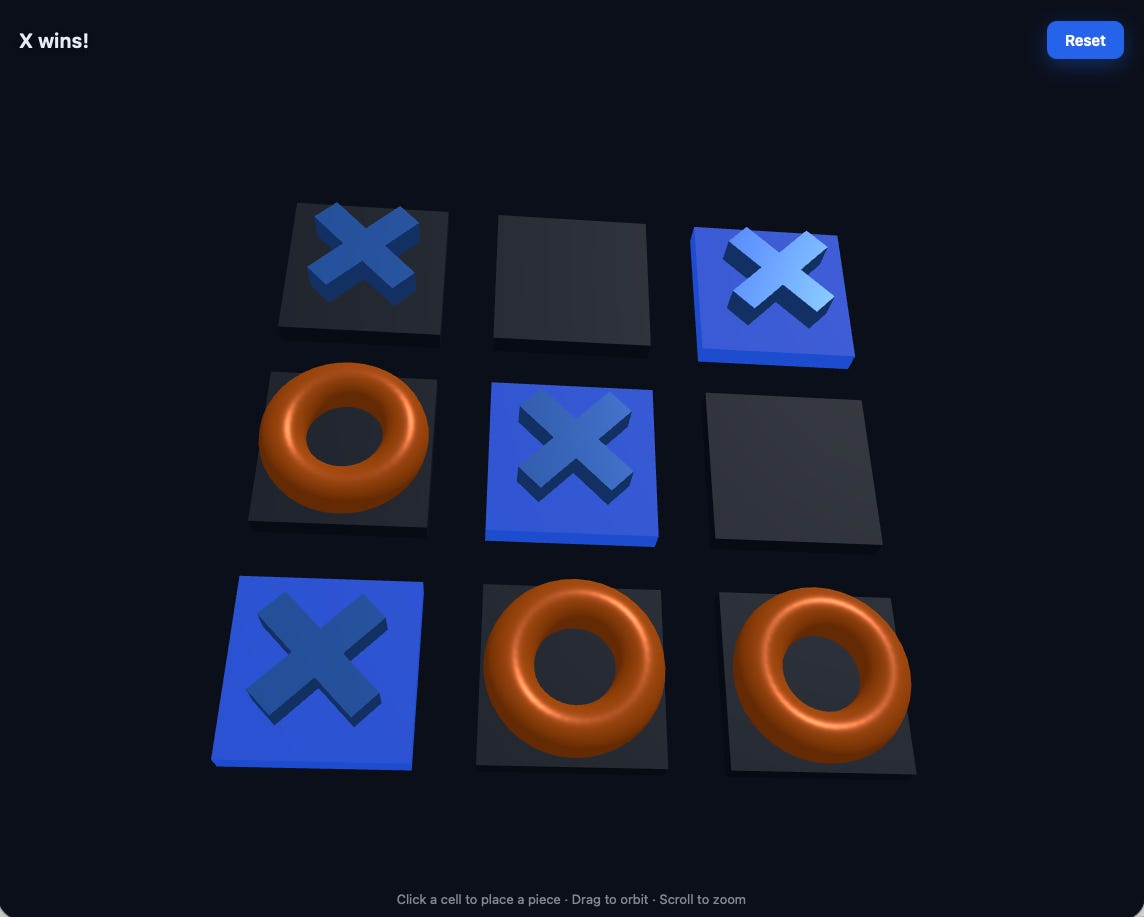
Since I got a working 3D tictactoe from Qwen3.8:27b model, decided to try the brand new open weights model from Meta, MuseGlimmer 30B on Ollama, through the same Qwen Code CLI.
First impression was that it felt much quicker, and it was: 60.4 minutes end to end, against Qwen3.8’s four hours and forty-six minutes of agent time.
Muse Glimmer built a flat 3×3 board. Wrong game. It was not working properly. Then I realized that not all 30B range open weight models are the same. Qwen3.8 indeed stood out.
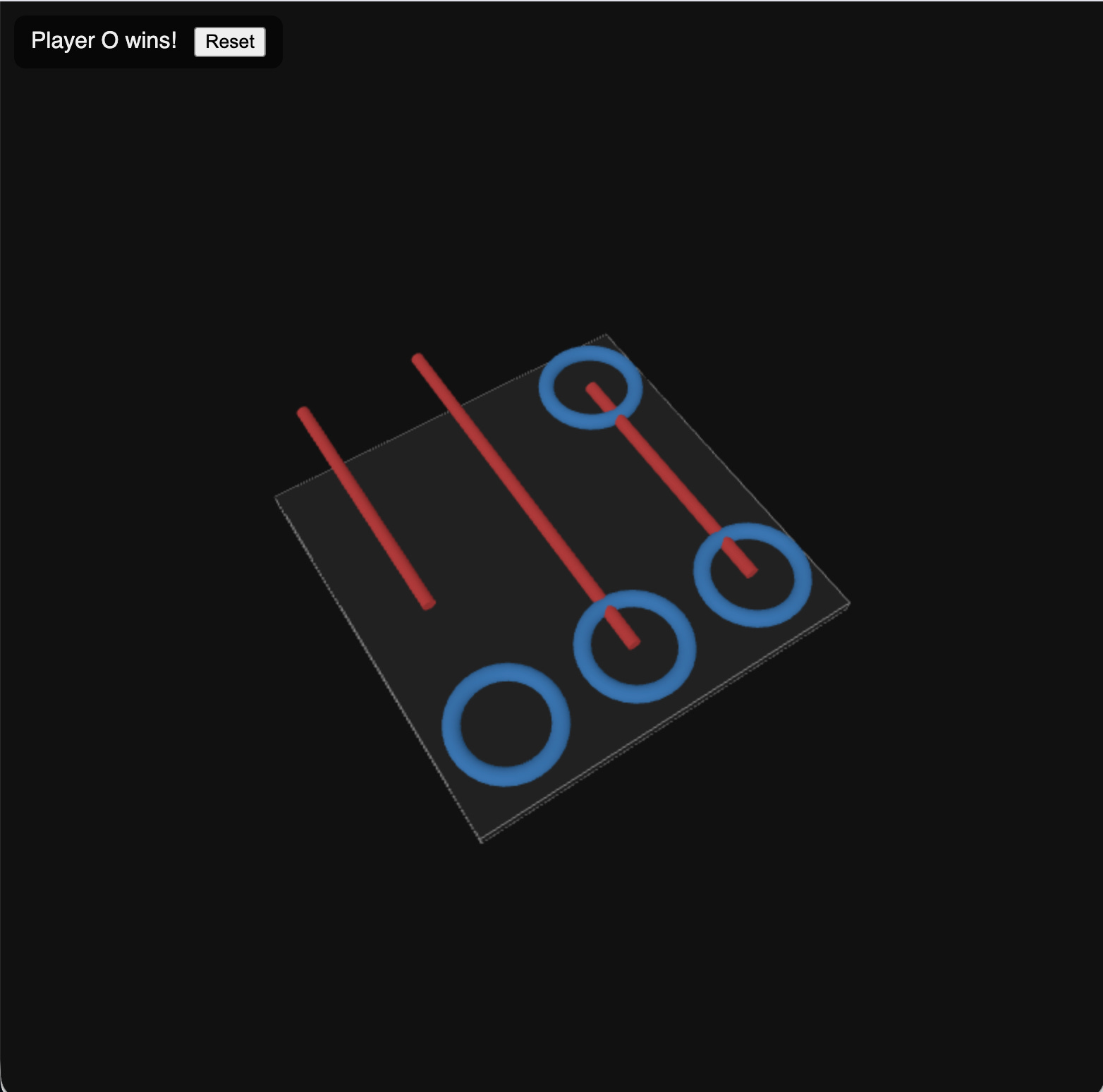
MuseGlimmer decode generation was faster because it uses Speculative Decoding (DFlash).
This is from Meta’s announcement blogpost:
Muse Glimmer ships with a lightweight “drafter” model based on DFlash — a small companion network that proposes entire blocks of tokens at once. The main model then verifies these proposals in parallel, accepting correct tokens and correcting wrong ones. This technique lets Muse Glimmer generate text significantly faster than standard token-by-token generation while producing identical output quality.
I already went on a detour finding out if Qwen3.8:27b supported Speculative Decoding (DFlash or DSpark), KV Cache Quantization, etc.
I believe, Inference Optimization for Local LLM models will be a big thing in the near future because generation speeds matter a lot in consumer hardware, where memory and GPU are smaller.
Now I wanted to compare, how will the frontier AI Intelligence perform on the same task.
I ran the same /goal through Claude Code with Fable 5 at medium thinking effort.
I wanted Qwen3.8 to look good so used only medium thinking effort :P
Goal set at 02:52:23. Final “Done.” at 02:59:42.
Seven minutes and nineteen seconds.
81 assistant turns, 71,859 output tokens, 5,292,363 total input tokens at 94.7% cache-read with just 162 uncached input tokens across the entire build, zero cache breaks over 100k. 3×3×3, 49 winning lines, src/game.js holding pure game logic with no DOM or three.js dependency, and a Playwright suite it wrote and ran itself: 9 of 9 green on Chromium. It also looked at its own screenshots, because Fable has vision wired through the whole stack, and confirmed the win state rendered with the winning row glowing.
Demo video of TicTacToe 3D generated using Fable 5.
By this time I came to a conclusion that server was the bottleneck. I had been tuning quantisation, speculative decoding, KV cache types, flash attention, wired memory limits. Most of them failed attempts.
After week of testing different models, tested Pi, a minimal agent harness. Honestly, I have never used Pi before. For the sake of testing, I installed it without any expectations.
Gave the same task using pi against Ollama running Qwen3.8:27b.
34 minutes.
55 model calls
27.2 tokens/sec sustained generation
1,443,470 billed input tokens — of which the server actually had to prefill 9,669
99.3% cache reuse
Final context: 49,200 tokens
Output:
index.html,src/game.jsat 327 lines, a real 3×3×3 board with 49 lines, its own test harness, a local server
Note: Used claude code to gather all those technical details from Ollama logs.
Thirty-four minutes, on the same model that had needed four and three-quarter hours of agent time the week before.
Here is the demo of the game built by pi.
I assumed Ollama was simply the faster runtime so I tested pi against LM Studio. 115.8 minutes wall clock — though only 48.5 of those were the model, with 67 minutes spent in tool execution.It also chose to build a 4×4×4 board instead of 3×3×3, so the two pi runs are not a token-exact replay of each other. I might write a detailed post about why pi was faster later.
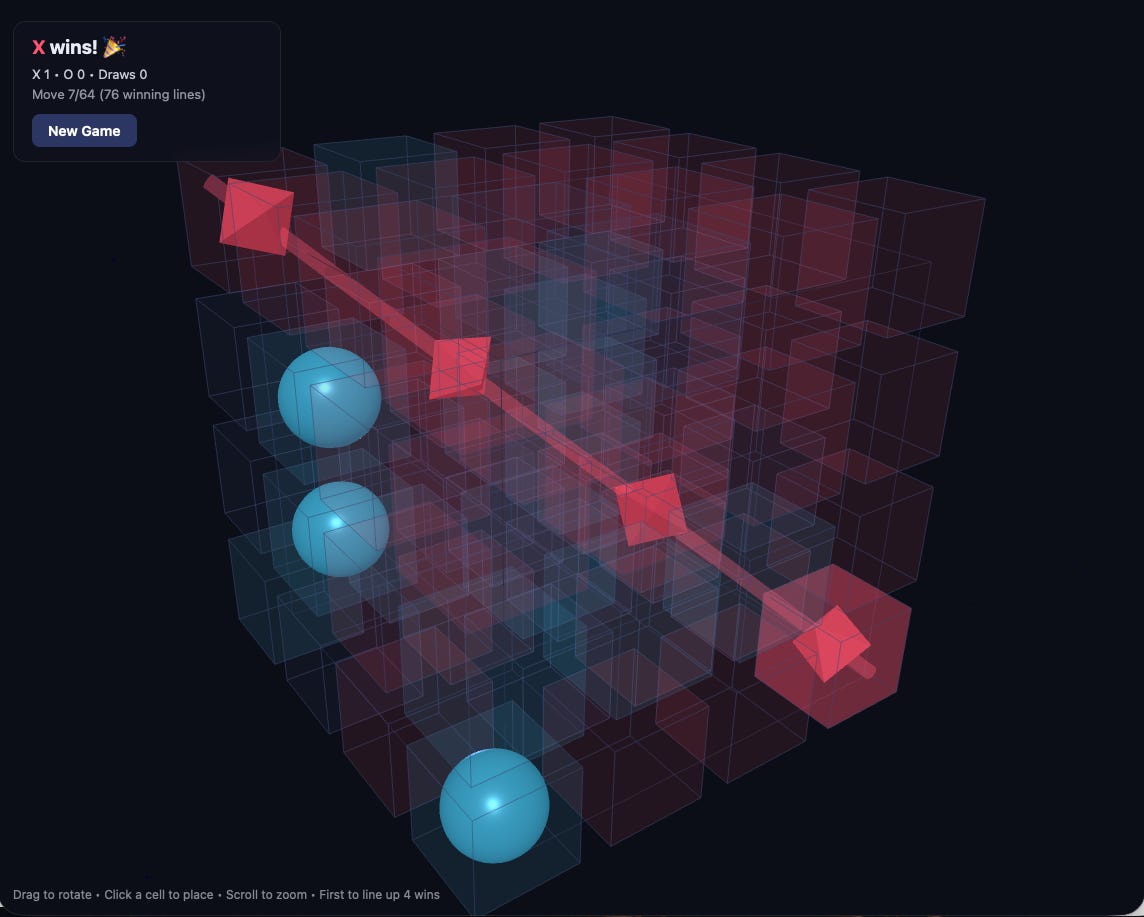
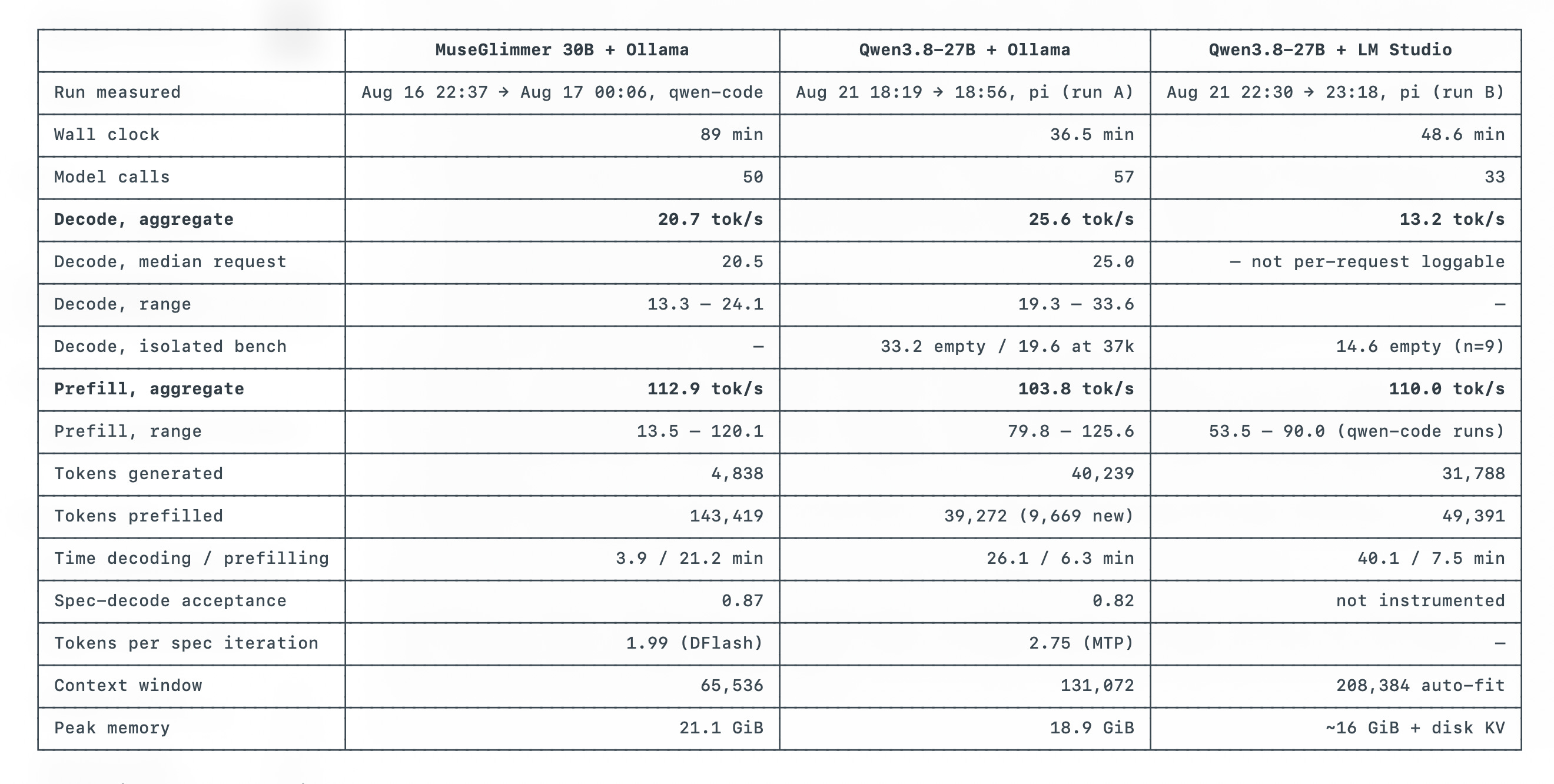
If you are running local models then decode and prefill generation speeds matter. Final quality beats the speed though, Thanks MuseGlimmer, for reminding me :P
Yes.
A 27b model could now run for hours in an agentic loop, executes hundreds of tool calls, and complete a goal, totally unattended. It can now do real agentic coding.
The 34-minute run drew maybe 0.04 kWh, around a cent of electricity. Fable 5 run consumed 7% of a subscription session window. I really don’t mind waiting 34 minutes instead of 7 minutes if a local model can complete a coding task.
The difference between frontier and local intelligence is present but shrinking constantly.
It is not perfect. Still needs a lot of work.
But I believe now that enterprises will plan for a hybrid mode where complex planning will be done by frontier intelligence and daily tasks, CI/CD pipelines, recurring debugging of AWS or Kubernetes issues could be handed over to local models.
What do you think?
I am Vijay Kodam, a Principal Engineer at Nokia and an AWS Community Builder with 20 years in production infrastructure, from 2G telecom to cloud-native Kubernetes.
This newsletter is where I write about using AI for daily AWS and Kubernetes work, running local models like the one in this post, and doing all of it safely in production, based on what I run into building a production AI platform myself.
If you work in AWS or Kubernetes and want to bring AI into that work without breaking things, subscribe and follow along.