Video To Image & Video Frame Extractor
Video To JPG is a Video To Image tool and video frame extractor built for fast results. Extract frames from video and convert video to frames — all processed directly in your browser with advanced frame selection and blur detection.
Video frame extractor tuned for clean Video To Image results
Extract frames from video in batch or by FPS
Convert video to frames as JPG, PNG, WebP
Browser-only processing for Video To JPG and Video To Image privacy
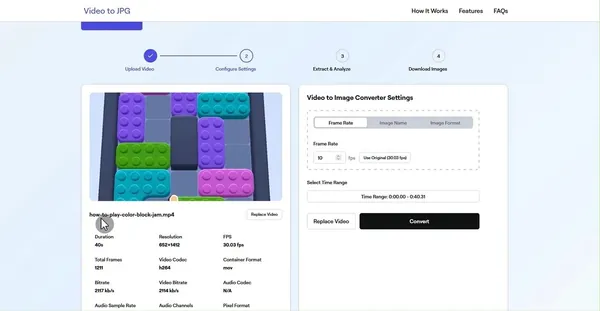
Drop your video here
or click to browse from your device
MP4, MOV, AVI, MKV, FLV, WebM, and 50+ formats supported
Broad Compatibility
Support for comprehensive array of video formats and codecs
| MP4 | MOV | AVI | MKV | FLV | WEBM | WMV | 3GP | MPG | |
|---|---|---|---|---|---|---|---|---|---|
| JPG | |||||||||
| PNG | |||||||||
| WEBP |
Verified support for all major video formats
How to Extract Frames from Video
Use Video To JPG — a Video To Image tool and video frame extractor — to extract frames from video in four simple steps.
1
Upload Your Video
Select any video file from your device. We support all popular formats including MP4, MOV, AVI, and more.
2
Configure Settings
Choose your preferred output format (JPEG, PNG, or WebP), frame rate, and other Video To Image extraction options.
3
Extract Frames from Video
The video frame extractor analyzes sharpness and picks the best frames for clean, consistent results.
4
Download Images
Preview the extracted frames, select the ones you want, and download them individually or as a ZIP file for your Video To JPG workflow.
All processing happens directly in your browser. Your videos are never uploaded to our servers.
Video To Image & Video Frame Extractor Features
Video To JPG helps you extract frames from video and convert video to frames with a fast, reliable video frame extractor.
Multiple Input Formats
Support for a wide range of video formats including MP4, MOV, AVI, MKV, WEBM and more. The Video To Image workflow handles any video type and keeps Video To JPG output consistent.
Multiple Output Formats
Save extracted frames as JPG, PNG, or WebP with customizable quality settings for reliable Video To JPG and Video To Image exports.
Custom Frame Rate
Choose exactly how many frames per second you want to extract, or use the original video frame rate for precise Video To Image and video to frames output.
Video Metadata Analysis
Your video frame extractor automatically analyzes and displays video information including resolution, duration, codec, and frame rate.
Custom Time Range
Set start and end times to extract frames from video segments that matter most for your Video To JPG results.
Custom File Prefix
Organize your extracted images with custom file name prefixes for better file management and organization.
Smart Clarity Detection
Our Video To JPG engine uses advanced analysis so the video frame extractor selects the sharpest, clearest frames from your video.
Batch Download
Download all your selected frames at once in a convenient ZIP package, saving you time and effort.
Image Preview
Preview extracted frames before downloading to confirm your Video To Image and Video To JPG results.
Frequently Asked Questions
Find answers to common questions about our Video To JPG and Video To Image tools.
Yes. Video To JPG and Video To Image are free to use, with no hidden fees, subscriptions, or limitations on the number of videos you can convert.
All processing happens directly in your browser for Video To JPG and Video To Image, so your videos are never uploaded to our servers.
Our tools support most popular video formats including MP4, AVI, MOV, MKV, WEBM, and more. If you encounter issues with a specific format, please contact our support.
Yes, you can extract frames from videos of any resolution, including 4K and higher. However, higher resolution videos may require more processing time and system resources.
Our advanced algorithm analyzes each frame for sharpness and clarity. It automatically identifies and filters out blurry frames, ensuring you get only the highest quality images from your video.
The Video To JPG and Video To Image converter supports JPG, PNG, and WEBP output formats. Choose the format that best suits your needs before downloading extracted frames.
Both. Video To JPG is a Video To Image tool and video frame extractor that helps you extract frames from video and export video to frames as JPG, PNG, or WebP.
Video to JPG Release History
Track our latest updates and improvements to the Video to JPG converter
v1.4.3
Wikimedia Commons Support
January 5, 2026
- NewSmart filenames with timestamps (e.g., MyVideo_at_1m02s.jpg)
- NewCopy Source button with Plain Text and Wikitext formats for Wikimedia Commons
- NewBatch metadata export (source_info.txt and source_info_wiki.txt) included in ZIP downloads
- NewLoad videos directly from URL (CORS-enabled sources)
- NewAdded friendly CORS error dialog with download guidance
v1.4.1
Video Thumbnail Generator
December 15, 2025
- NewAdded Video Thumbnail Generator - Create perfect thumbnails with frame-by-frame precision control
- NewSupport for batch capture with customizable intervals (1s, 5s, 10s, 30s, 1min, 5min, or percentage-based)
- NewAdded JPEG, PNG, and WebP output format options for thumbnails
- NewAdded H.265/HEVC video support for all browsers using FFmpeg WebAssembly fallback
- NewAdded FFmpeg WASM download progress indicator for first-time users
- ImprovedOptimized large video processing with chunked extraction to prevent memory issues
- ImprovedEnhanced pagination controls with top-positioned navigation
v1.3.0
Video to PNG Support
July 6, 2025
- NewAdded dedicated Video to PNG converter page with transparency support
- ImprovedOptimized ZIP file naming with domain and timestamp
- NewAdded WebP format support for image output
- NewAdded frame filtering options (by sharpness, selection status)
- ImprovedEnhanced pagination controls with direct page navigation
- FixedFixed pagination input not updating when changing pages
- ImprovedOptimized frame extraction process for faster performance
- ImprovedEnhanced sharpness detection algorithm for better results
- NewAdded ability to manually exclude frames from automatic selection
- FixedFixed memory leak when processing very large videos
- NewFirst public release of Video to JPG converter
- NewSupport for JPEG and PNG output formats
- NewFrame extraction with custom frame rate
- NewSharpness detection and smart frame selection
Ready to convert video to frames?
Video To JPG is a Video To Image tool and video frame extractor to extract frames from video in your browser.
Free forever. No signup required.
Lightning fast conversion
No data leaves your device