It’s possible you haven’t heard of air-gapped environments if you haven’t worked in enterprise software. Enterprises like running their workloads in controlled environments where the supply chain is monitored very closely to avoid any unnecessary side effects and vulnerabilites being introduced into the system due to unsecure network exposure.
Air-gapped systems are necessary security pre-requisite in enterprises but what are the tools we need which make a modern air-gapped system ? Getting data in and out of an air-gapped environment is already hard considering you have to transport the data to a server which has access to the system and then inject the data from there. This becomes even harder when we have to manage a complex distributed system like Kubernetes in an air-gapped environment.
In the context of Kubernetes, you will usually need access to a registry which will have all the necessary images you need to run your mission critical software.
What if we didn’t want the Kubernetes cluster to have any access to a unsecure network or an external network in it’s lifetime ?
What if we wanted the Kubernetes cluster to be self sufficient in an air-gapped environment from the get go ?
This is where Zarf comes in.
Zarf is a package manager for Kubernetes which specializes in software delivery to air-gapped environments.
Here, we are going to look at critical components required to make an air-gapped environment self-sufficient. When we say self-sufficient, we mean that the environment should have a local artifact registry and a git server which will ensure that the said system is GitOps enabled as well.
We are going to also look at this environment in the context of Kubernetes and what it takes to have a Kubernetes clusters initialize and successfully work and be self-sufficient to a particular extent in an air-gapped environment.
The reader will need to have an understanding of the following ideas/concepts/tools to be able to get through this article with minimal effort.
Kubernetes (basic working knowledge)
ConfigMaps
Pods
Mutating Admission Webhooks
Helm
Charts vs. Releases
Basic working of an HTTP Server
Container image internals
Git Server
Tools Used
minikube / kind / k3d etc.
zarf
Let’s go !
We first need a Kubernetes cluster which we can “air-gap” i.e. disconnect it from the internet (the most air-gapping we need right now to learn about software delivery on air-gapped Kubernetes clusters).
I am using a Mac so I am going to use Docker Desktop + minikube.
minikube start

😄  minikube v1.31.2 on Darwin 14.2.1 (arm64)
🎉  minikube 1.34.0 is available! Download it: https://github.com/kubernetes/minikube/releases/tag/v1.34.0
💡  To disable this notice, run: 'minikube config set WantUpdateNotification false'

✨  Using the docker driver based on existing profile

💣  Exiting due to PROVIDER_DOCKER_NOT_RUNNING: "docker version --format <no value>-<no value>:<no value>" exit status 1: Cannot connect to the Docker daemon at unix:///Users/vibhavbobade/.docker/run/docker.sock. Is the docker daemon running?
💡  Suggestion: Start the Docker service
📘  Documentation: https://minikube.sigs.k8s.io/docs/drivers/docker/
And now minikube runs happily on my system.
Next we need to install Zarf.
brew tap defenseunicorns/tap && brew install zarfOnce installed, contemplate on the nature of security in this world and then remember that you have another train of thought to complete and then create a folder which will be a safe space for this technical exploration.
mkdir zarf-test/explore-initContemplate for a bit whether you are a ‘-’ person or a `_` person and move on. Abandon minikube and start using kind.
minikube delete
kind delete cluster && kind create cluster

Deleting cluster "kind" ...
ERROR: failed to delete cluster "kind": error listing nodes: failed to list nodes: command "docker ps -a --filter label=io.x-k8s.kind.cluster=kind --format '{{.Names}}'" failed with error: exit status 1
Command Output: Cannot connect to the Docker daemon at unix:///Users/vibhavbobade/.docker/run/docker.sock. Is the docker daemon running?
Realize you haven’t started Docker Desktop, restart it and rerun the kind cluster creation commands.
kind delete cluster && kind create cluster

Deleting cluster "kind" ...
Creating cluster "kind" ...
 ✓ Ensuring node image (kindest/node:v1.29.2) 🖼
 ✓ Preparing nodes 📦
 ✓ Writing configuration 📜
 ✓ Starting control-plane 🕹️
 ✓ Installing CNI 🔌
 ✓ Installing StorageClass 💾
Set kubectl context to "kind-kind"
You can now use your cluster with:

kubectl cluster-info --context kind-kind

Not sure what to do next? 😅  Check out https://kind.sigs.k8s.io/docs/user/quick-start/
Let’s initialize the air-gapped environment for usage. Before that we are going to check our zarf version.
zarf version

v0.41.0
Awesome.
Learning about air-gapped environments through Zarf
Zarf makes it easy for us to dig deeper into deploying an air-gapped Kubernetes cluster and understanding
Installing the Init Package
Now that we have Zarf installed, let’s initialize our kind cluster so that it will be a self reliant Kubernetes cluster who does not need help from the outside world when it comes to mission critical services.
zarf init

NOTE  Saving log file to
       /var/folders/v7/yqyq_d6x2996hfnnwvgs5f080000gn/T/zarf-2024-10-11-00-44-29-2167645169.log

It seems the init package could not be found locally, but can be pulled from
oci://ghcr.io/zarf-dev/packages/init:v0.41.0

 NOTE  Note: This will require an internet connection.
? Do you want to pull this init package? (y/N)
zarf is trying to pull a particular init package from oci://ghcr.io/zarf-dev/packages/init:v0.41.0. Let’s have zarf pull it by pressing `y` and enter and try to see what this init package is. You should see a progress bar like the one below as you go ahead with this.
? Do you want to pull this init package? Yes
    Pulling (63.19 MBs of 325.30 MBs) ███████████████████████████████████████████████████  19% | 12s
Once the package is pulled we will see the below output. For this specifically we needed the init package to be pulled but in an air-gapped environment, we can have this init package be pulled before hand so that it can be used without requiring the user to have an internet connection.
 NOTE  Note: This will require an internet connection.
? Do you want to pull this init package? Yes
  ✔  Pulling "oci://ghcr.io/zarf-dev/packages/init:v0.41.0" (325.30 MBs)
  ✔  Validating full package checksums
  ✔  Loading package from "/Users/vibhavbobade/.zarf-cache/zarf-init-arm64-v0.41.0.tar.zst"
  ✔  Loading package from "/Users/vibhavbobade/.zarf-cache/zarf-init-arm64-v0.41.0.tar.zst"
In the output we also have a Package Definition which we can go through.
  📦 PACKAGE DEFINITION

kind: ZarfInitConfig

━━━━━━━━━━━━━━━━━━━━━━━━━━━━━━━━━━━━━━━━━━━━━━━━━━━━━━━━━━━━━━━━━━━━━━━━
metadata:  information about this package

  name: init
  description: Used to establish a new Zarf cluster
  version: v0.41.0
  architecture: arm64
  aggregateChecksum: a1e37c97567a64c8067e1c3886914bc040f5179c9b6703ce793272eddd80b360

━━━━━━━━━━━━━━━━━━━━━━━━━━━━━━━━━━━━━━━━━━━━━━━━━━━━━━━━━━━━━━━━━━━━━━━━
build:  info about the machine, zarf version, and user that created this package

  terminal: fv-az1501-989
  user: runner
  architecture: arm64
  timestamp: Thu, 03 Oct 2024 18:40:17 +0000
  version: v0.41.0
  migrations:
  - scripts-to-actions
  - pluralize-set-variable
  lastNonBreakingVersion: v0.27.0
The first two sections of the Package Definition as we can see about are the metadata of the package and the build section which contains information about the build of this package. The package definition also contains different components that are present in the init package which would be installed. Let’s go component by component.
━━━━━━━━━━━━━━━━━━━━━━━━━━━━━━━━━━━━━━━━━━━━━━━━━━━━━━━━━━━━━━━━━━━━━━━━━━━━━━━━━━━━━━━━━━━━━━━━━━━━                                                                                                00:47:51 [293/710]
components:  components selected for this operation

- name: k3s
  description: "*** REQUIRES ROOT (not sudo) *** Install K3s, a certified Kubernetes distribution built for IoT & Edge computing. K3s provides the cluster need for Zarf running in Appliance Mode as well as can host
 a low-resource Gitops Service if not using an existing Kubernetes platform."
  only:
    localOS: linux
  files:
  - source: packages/distros/k3s/common/zarf-clean-k3s.sh
    target: /opt/zarf/zarf-clean-k3s.sh
    executable: true
  - source: packages/distros/k3s/common/k3s.service
    target: /etc/systemd/system/k3s.service
    symlinks:
    - /etc/systemd/system/multi-user.target.wants/k3s.service
  - source: https://github.com/k3s-io/k3s/releases/download/v1.28.4+k3s2/k3s-arm64
    shasum: 1ae72ca06d3302f3e86ef92e6e8f84e14a084da69564e87d6e2e75f62e72388d
    target: /usr/sbin/k3s
    executable: true
    symlinks:
    - /usr/sbin/kubectl
    - /usr/sbin/ctr
    - /usr/sbin/crictl
  - source: https://github.com/k3s-io/k3s/releases/download/v1.28.4+k3s2/k3s-airgap-images-arm64.tar.zst
    shasum: 50621ae1391aec7fc66ca66a46a0e9fd48ce373a58073000efdc278233adc64b
    target: /var/lib/rancher/k3s/agent/images/k3s.tar.zst
  actions:
    onDeploy:
      before:
      - maxRetries: 0
        cmd: ./zarf internal is-valid-hostname
        description: Check if the current system has a, RFC1123 compliant hostname
      - cmd: "[ -e /etc/redhat-release ] && systemctl disable firewalld --now || echo ''"
        description: If running a RHEL variant, disable 'firewalld' per k3s docs
      - maxRetries: 0
        cmd: if [ "$(uname -m)" != "aarch64" ] && [ "$(uname -m)" != "arm64" ]; then echo "this package architecture is arm64, but the target system has a different architecture. These architectures must be the sam
e" && exit 1; fi
        description: Check that the host architecture matches the package architecture
      after:
      - cmd: systemctl daemon-reload
        description: Reload the system services
      - cmd: systemctl enable k3s
        description: Enable 'k3s' to run at system boot
      - cmd: systemctl restart k3s
        description: Start the 'k3s' system service
    onRemove:
      before:
      - cmd: /opt/zarf/zarf-clean-k3s.sh
        description: Remove 'k3s' from the system
      - cmd: rm /opt/zarf/zarf-clean-k3s.sh
        description: Remove the cleanup script
As we see above, the first component is actually K3s. From the description above, we understand that K3s provides the cluster need for Zarf running in Appliance Mode as well as can host a low-resource Gitops Service if not using an existing Kubernetes platform.
To understand Appliance Mode I had to go to this github issue where Jeff McCoy has described Appliance Mode perfectly.
Zarf deploys a K3s cluster with some pre-configured technologies in a simple, low-resource, declarative way we have been calling Appliance Mode.
This means that we didn’t have to run our own kind cluster and could have just run zarf in Applicance Mode for the purpose of this, but is that even true.
I searched the Zarf docs for Appliance Mode and got 2 hits. Both of them mention using this mode during CLI E2E tests. This is a good way to make development easy for zarf by building in the required components for testing, making it a developer friendly application as well.
Let’s move on to the next three components. There are a total of five.
- name: zarf-injector
  description: |
    Bootstraps a Kubernetes cluster by cloning a running pod in the cluster and hosting the registry image.
    Removed and destroyed after the Zarf Registry is self-hosting the registry image.
  required: true
  files:
  - source: https://zarf-init.s3.us-east-2.amazonaws.com/injector/2024-07-22/zarf-injector-arm64
    shasum: b905e647e0d7876cfd5b665632cfc43ad919dc60408f7236c5b541c53277b503
    target: "###ZARF_TEMP###/zarf-injector"
    executable: true

- name: zarf-seed-registry
  description: |
    Deploys the Zarf Registry using the registry image provided by the Zarf Injector.
  required: true
  charts:
  - name: docker-registry
    version: 1.0.0
    localPath: packages/zarf-registry/chart
    namespace: zarf
    releaseName: zarf-docker-registry
    valuesFiles:
    - packages/zarf-registry/registry-values.yaml
    - packages/zarf-registry/registry-values-seed.yaml
  images:
  - library/registry:2.8.3

- name: zarf-registry
  description: |
    Updates the Zarf Registry to use the self-hosted registry image.
    Serves as the primary docker registry for the cluster.
  required: true
  manifests:
  - name: registry-connect
    namespace: zarf
    files:
    - packages/zarf-registry/connect.yaml
  - name: kep-1755-registry-annotation
    namespace: zarf
    files:
    - packages/zarf-registry/configmap.yaml
  charts:
  - name: docker-registry
    version: 1.0.0
    localPath: packages/zarf-registry/chart
    namespace: zarf
    releaseName: zarf-docker-registry
    valuesFiles:
    - packages/zarf-registry/registry-values.yaml
  images:
  - library/registry:2.8.3
  actions:
    onDeploy:
      after:
      - wait:
          cluster:
            kind: deployment
            name: app=docker-registry
            namespace: zarf
            condition: Available
You can read the Core Components documentation, but we are trying to read the docs and trying to read these package manifests to understand this more intuitively. So, hang on.
In a Kubernetes cluster you cannot just inject an image into the cluster. First, the cluster needs to have a registry and if you want to run a registry in a Kubernetes cluster you are going to need to have an image already available in a nearby registry to be able to do that.
The Chicken and Egg Problem: I need a registry in the cluster, but I can’t create a registry in the cluster because the cluster doesn’t have a registry which contains an image for the registry.
In our scenario where we have no access to the internet and the Kubernetes cluster is airgapped, you cannot get access to the internet and pull the registry image with docker and then run the image in a Pod on the cluster. Here we have two problems :-
No registry running in the cluster
No image available to be be pulled from a registry
A classic chicken and egg problem. But what if the image for the registry didn’t have to be an image.
All images are datablobs and can be represented as tarballs and can be moved around as we please. All kubernetes clusters also have ConfigMap support regardless of whether they are EKS, AKS, K3S or Vanila Kubernetes. We could divide this registry image up between multiple configmaps and install it into the cluster. But once installed these configmaps need to be reassembled. This is where the zarf-injector comes into the picture.
The below is from the documentation itself :-
The zarf-injector binary serves 2 purposes during 'init'.
It re-assembles a multi-part tarball that was split into multiple ConfigMap entries (located at
./zarf-payload-*) back intopayload.tar.gz, then extracts it to the/zarf-seeddirectory. It also checks that the SHA256 hash of the re-assembled tarball matches the first (and only) argument provided to the binary.It runs a pull-only, insecure, HTTP OCI compliant registry server on port 5000 that serves the contents of the
/zarf-seeddirectory (which is of the OCI layout format).
The zarf-injector binary’s job is to re assemble the registry’s image basically. But, once the zarf-injector and the registry’s images as ConfigMaps are already present in the cluster what happens now ? We have a total of 11 relevant ConfigMaps here now. 10 for each MB of the registry image and 1 for the zarf-injector binary.
The zarf-injector component unlike the other components is just an executable file and nothing more. It is hence of type Files and is copied from source to target where the source is a AWS S3 bucket and target is ###ZARF_TEMP###/zarf-injector. From this comment we understand that
###ZARF_TEMP###is also a special internal variable that can only be used withfiletargets and nothing else...
Zarf searches for an image which is already running onto the cluster and uses it as a base from where it can run the zarf-injector binary.
This is where the injection Pod build executes, and this is what the build looks like. As you can see, this piece of code which is run by the CLI generates a Pod manifest which is then created onto the cluster. The zarf-injector binary here is running in an unknown environment and this is what it was created for. The injection here is complete. The injector binary also executes the assembled registry image as you can see here. Cool.
We basically have fragmented binaries which were brought into a Kubernetes Cluster via ConfigMaps. A Pod created to run one of the ConfigMaps as a binary which assembled the other ConfigMaps into a tarball and then unpacked again to get the files that were part of the tarball, and then we start the Axum http server which serves the a docker registry containing the registry image we just assembled.
If you notice the seed-registry and the registry components above, you can see that the only difference in the value files is the seed-registry having an extra values file provided.
image:
  repository: "###ZARF_SEED_REGISTRY###/###ZARF_CONST_REGISTRY_IMAGE###"
  tag: "###ZARF_CONST_REGISTRY_IMAGE_TAG###"
###ZARF_SEED_REGISTRY### is temporarily set to the location of the injector which is serving the seed image in this release. This is then overriden when the zrf-registry component executes and the value is set to ###ZARF_REGISTRY### as you can see here. Once this component runs and executes it’s marked as completed, after making changes to the newly deployed registry chart. At this point the cluster would be using this registry as the default registry and with that the cluster has been initialized with a docker-registry.
Now that the cluster has been initialized with it’s own docker-registry we can run services inside the cluster which are necessary for us to run our GitOps applications and that brings us onto our next component. The Zarf Agent.
- name: zarf-agent
  description: |
    A Kubernetes mutating webhook to enable automated URL rewriting for container
    images and git repository references in Kubernetes manifests. This prevents
    the need to manually update URLs from their original sources to the Zarf-managed
    docker registry and git server.
  required: true
  manifests:
  - name: zarf-agent
    namespace: zarf
    files:
    - packages/zarf-agent/manifests/service.yaml
    - packages/zarf-agent/manifests/secret.yaml
    - packages/zarf-agent/manifests/deployment.yaml
    - packages/zarf-agent/manifests/webhook.yaml
    - packages/zarf-agent/manifests/role.yaml
    - packages/zarf-agent/manifests/rolebinding.yaml
    - packages/zarf-agent/manifests/clusterrole.yaml
    - packages/zarf-agent/manifests/clusterrolebinding.yaml
    - packages/zarf-agent/manifests/serviceaccount.yaml
  images:
  - ghcr.io/zarf-dev/zarf/agent:v0.41.0
  actions:
    onCreate:
      before:
      - dir: .
        cmd: test "v0.41.0" != "local" || make build-local-agent-image AGENT_IMAGE_TAG="v0.41.0" ARCH="arm64"
        shell:
          windows: pwsh
        description: Build the local agent image (if 'AGENT_IMAGE_TAG' was specified as 'local')
    onDeploy:
      after:
      - wait:
          cluster:
            kind: pod
            name: app=agent-hook
            namespace: zarf
            condition: Ready
This component is a Mutating Admission Webhook and it’s job is to intercept any workload creation request to see if the images which are being requested have an alternate image in the internal registry. This way the user doesn’t have to update the name of the image everytime they are deploying an application on Zarf.
The zarf-agent does the same internal renaming of git servers as it does for images. With that let’s move onto the final component which is the git-server.
- name: git-server
  description: |
    Deploys Gitea to provide git repositories for Kubernetes configurations.
    Required for GitOps deployments if no other git server is available.
  manifests:
  - name: git-connect
    namespace: zarf
    files:
    - packages/gitea/connect.yaml
  charts:
  - name: gitea
    version: 10.1.1
    url: https://dl.gitea.io/charts
    namespace: zarf
    releaseName: zarf-gitea
    valuesFiles:
    - packages/gitea/gitea-values.yaml
  images:
  - gitea/gitea:1.21.5-rootless
  actions:
    onDeploy:
      before:
      - mute: true
        cmd: ./zarf internal update-gitea-pvc --no-progress
        setVariables:
        - name: GIT_SERVER_CREATE_PVC
      after:
      - wait:
          cluster:
            kind: pod
            name: app=gitea
            namespace: zarf
            condition: Ready
      - maxTotalSeconds: 60
        maxRetries: 3
        cmd: ./zarf internal create-read-only-gitea-user --no-progress
        description: Create the read-only Gitea user
      - maxTotalSeconds: 60
        maxRetries: 3
        cmd: ./zarf internal create-artifact-registry-token --no-progress
        description: Create an artifact registry token
      onFailure:
      - cmd: ./zarf internal update-gitea-pvc --rollback --no-progress
Here, zarf installs a git server backed by Gitea which brings GitOps capabilities to this air-gapped Kubernetes clusters. Users can now use GitOps enabled tools like ArgoCD on an air-gapped cluster like this out of the box.
Now that we have understood what each of these components are, let’s move past the constants and variables for now and initialize our Zarf enabled Air-Gapped Kubernetes Cluster.
...
━━━━━━━━━━━━━━━━━━━━━━━━━━━━━━━━━━━━━━━━━━━━━━━━━━━━━━━━━━━━━━━━━━━━━━━━
 Software Bill of Materials   an inventory of all software contained in this package

 NOTE  This package has 5 artifacts to be reviewed. These are available in a temporary
       'zarf-sbom' folder in this directory and will be removed upon deployment.

- View SBOMs now by navigating to the 'zarf-sbom' folder or copying this link into a browser:
/Users/vibhavbobade/go/src/github.com/waveywaves/zarf-test/zarf-sbom/sbom-viewer-docker.io_gitea_gitea_1.21.5-rootless.html

- View SBOMs after deployment with this command:
$ zarf package inspect /Users/vibhavbobade/.zarf-cache/zarf-init-arm64-v0.41.0.tar.zst

━━━━━━━━━━━━━━━━━━━━━━━━━━━━━━━━━━━━━━━━━━━━━━━━━━━━━━━━━━━━━━━━━━━━━━━━━━━━━━━━━━━━━━━━━━━━━━━━━━━━

? Deploy this Zarf package? (y/N)¸
I was asked if I want to install the git server compoent after saying yes above. I obliged and said yes please.
  ✔  Zarf deployment complete

     Application          | Username           | Password                                 | Connect               | Get-Creds Key
     Registry             | zarf-push          | P3TgKAGniPUajPzMzcEJ58Jt                 | zarf connect registry | registry
     Registry (read-only) | zarf-pull          | sz4qG~Pe-9eGxDGwJcnySzjD                 | zarf connect registry | registry-readonly
     Git                  | zarf-git-user      | EhtJClcvRzq2jggrlw~dEsgA                 | zarf connect git      | git
     Git (read-only)      | zarf-git-read-user | 0j7Y8zE1S8svuV7ZTpkBV7pr                 | zarf connect git      | git-readonly
     Artifact Token       | zarf-git-user      | ea148bb0776c14424d578703018720805e156c34 | zarf connect git      | artifact
This is the final part of the output after running zarf init and smashing the “y” button over and over again.
Now to test some of these fun connect commands
zarf connect registry

 NOTE  Using config file /Users/vibhavbobade/go/src/github.com/defenseunicorns/zarf/zarf-config.toml

 NOTE  Saving log file to
       /var/folders/v7/yqyq_d6x2996hfnnwvgs5f080000gn/T/zarf-2024-10-11-03-45-17-208292671.log
  ⠹  Tunnel established at http://127.0.0.1:51632/v2/_catalog, opening your default web browser (ctrl-c to end)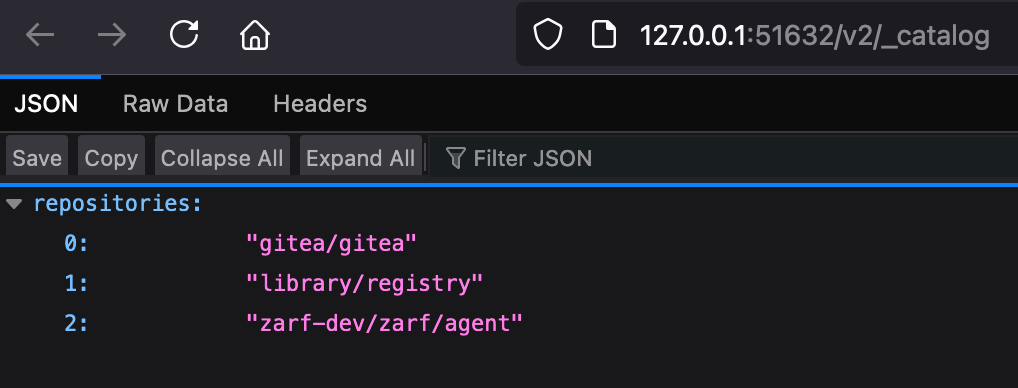
Cool.
The agent, and the gitea images were pushed into the registry after deployed registry from the injector hosted seed-registry.
And these are the components required to run Kubernetes in an air-gapped environment and also have it be GitOps enabled.