25th October 2024
I have been writing operators for a while, but along the way I have forgotten what SharedInformers, Informers etc. are. As a refresher I want to understand what these are and understand this more intuitively so that I never forget it. Anything that I might not have mentioned here is something that I already know or any beginner or intermediate Kubernetes engineer would. The notes given below are a mix of notes from Eddie’s talk and a bit of personal exploration on these topics.
by Eddie Zaneski.
I watched the video above by Eddie Zaneski to aid in some of this sweet pre-winter refreshment. We are starting from the very basics of the resource model which I really appreciate here.
We start off with using React as a parallel framework of thought, against which we are comparing the Kubernetes Resource Model. Here the state = etcd and input = api request and output = changed state of the cluster which is reflected appropriately.
So, we are going to see how the change in state of the cluster, the change and propagation of that state works in Kubernetes.
We are going to talk about each of the different parts of a Kubernetes API to understand how this data is handled inside the cluster.
Kind is an object, Resource is an API endpoint and can have kinds which can be queried from the API endpoint. A Group is when multiple api endpoints are exposed together eg: apps/v1. A Group can also have multiple Versions.
/apis/apps/v1/namespaces/default/deployments/nginxif we had to mark individual components of the api endpoint it would look like the one below.
/apis/<group>/<version>/namespaces/default/<resource>/(here “namespaces” are also a resource, hence the plural)
Now that we understand how this terminology fits, we are going to look at some datatypes which help us work with this data a little better. These being :-
GroupVersion (GV)
GroupResource (GR)
GroupKind (GK)
GroupVersionResource (GVR) (location for the endpoint)
GroupVersionKind (GVK) (dataformat submitted to the endpoint)
we can remember the above with the little node diagram below.

Using this data schema Kubernetes is able to query resources for us.
schema.GroupVersionResource{Group: "apps", Version: "v1", Resource: "deployments"}When we don’t know all parts of the GVR or GVK, we will figure this out with REST Mapping. This helps Kubernetes take the Kind and map it to a Go Type.
The following commands give us all the resources and versions registered in the cluster.
kubectl api-resources
kubectl api-versions
To make raw api calls to the Kubernetes cluster you can use the —raw flag as shown below.
kubectl get --raw /apis
kubectl get --raw /apis/apps/v1/namespaces/default/deployments/nginx
Before, the API request is actually called, kubectl actually checks ~/.kube/cache to see if any API Responses have been cached. When calling the Kubernetes API endpoint for the first time, the available APIs need to be discovered. After, the information of available endpoints is stored in the discovery cache (~/.kube/cache/discovery). This cache has a default TTL (TimeToLive) of 10 minutes.
When we make a GET deployments call to the Kubernetes API Server with a verbosity of 8 I get the a pretty verbose (obviously) output of what is happening behind the scenes of this call.
k get deployments -v 8
I1025 18:13:36.250454   35874 loader.go:395] Config loaded from file:  /Users/vibhavbobade/.kube/config
I1025 18:13:36.254921   35874 cert_rotation.go:137] Starting client certificate rotation controller
I1025 18:13:36.265068   35874 round_trippers.go:463] GET https://127.0.0.1:52112/apis/apps/v1/namespaces/interlink/deployments?limit=500
...
NAME                     READY   UP-TO-DATE   AVAILABLE   AGE
multipass-vk-node-node   1/1     1            1           41h
Let’s delete the appropriate discovery cache (or wait 10 minutes) and run the get deployments command again.
kubectl config view

...
- cluster:
    certificate-authority: /Users/vibhavbobade/.minikube/ca.crt
    extensions:
    - extension:
        last-update: Wed, 23 Oct 2024 23:51:37 IST
        provider: minikube.sigs.k8s.io
        version: v1.31.2
      name: cluster_info
    server: https://127.0.0.1:52112
  name: minikube
...
Our server is at https://127.0.0.1:52112. Cool. The below is how we can see and then delete specific kubernetes cache for a particular GroupVersion.
cat ~/.kube/cache/discovery/127.0.0.1_52112/apps/v1/serverresources.json

rm -f ~/.kube/cache/discovery/127.0.0.1_52112/apps/v1/serverresources.json
Now, when we run the kubectl get deployment command, we get a longer response and the below API calls related to discovery are made before the actual API calls for getting the deployment.
k get deployments -v 8

I1025 18:23:14.840194   41980 loader.go:395] Config loaded from file:  /Users/vibhavbobade/.kube/config
I1025 18:23:14.844954   41980 cert_rotation.go:137] Starting client certificate rotation controller
I1025 18:23:14.851155   41980 round_trippers.go:463] GET https://127.0.0.1:52112/api?timeout=32s
...
I1025 18:23:14.884205   41980 round_trippers.go:463] GET https://127.0.0.1:52112/apis?timeout=32s
...
26th October 2024
Till now we have discussed how these resources are organized and then queried by a client. When it’s time to work with these resources in a controller and when we would have to write our own custom controller we would use some primitives which would help us process the Kubernetes Objects with ease.
Workqueue - A thread safe work queue
Informer - NewInformer is deprecated and NewInformerWithOptions should be used if it has to be.
Has an Made from Watchers on Listers.
We return a Store interface and a Controller while creating a new Informer.
SharedInformers are preferred to be used as multiple controllers can use the same informer. If we are using just an informer for every controller then multiple controller calling the same API can put stress on the API Server.
Scheme - a type registry for converting G,V and K to Go types
runtime.Object - every API type implements runtime.Object interface. Was created before generics were introduced in Golang.
Allows users to add a new Kind in their Kubernetes cluster by extending the Kubernetes API.
Controllers make sure that the current state of the spec in a Kubernetes object reaches the desired state. The current status is evaluated through the status of the object and the desired state is given by the user in the spec.
The below is how a Kubernetes controller works.
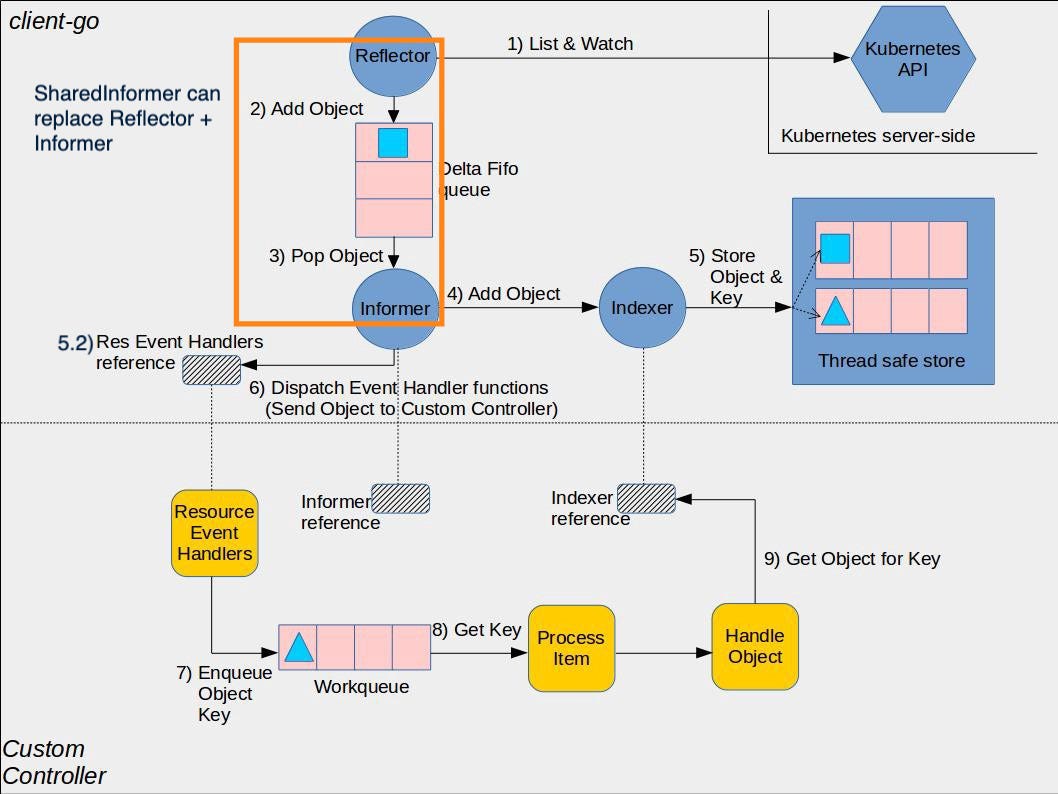

Reflector: The Kubernetes API endpoint is polled by the Reflector (Store + ListerWatcher) , and new created resources are picked up.
Reflector: The details of this event are added to a queue.
(3.1.x) Sharednformer: Provides event notifications.
(3.1.y) SharedIndexInformer: Provides event notifications and the object in question is then sent to the Indexer (implements the Store interface).
(3.2) Store them in the cache.
(5.2) We have a reference for the Resource Event Handlers which can be called when there is a relevant Add, Update, Delete event is registered.
These functions are dispatched aka object is sent to the controller.
The handler is going to take that object, take it’s Name and Namespace (the ObjectKey), and enqueue the ObjectKey to a Workqueue.
Controller pops the workqueue, processes the object.
After which, it is sent back to the Indexer and after which the Indexer writes it back to the Kubernetes API.
With this we are halfway through the video and understand the theory and some of the code behind the magic.