In the last company I worked at, our final crisis came from our managed key–value store, Redis. The main problem was memory fragmentation in Redis, and this issue has lived rent-free in my mind ever since. I eventually decided to dive into Redis and its index system, and that’s when I finally found my answer.
simply holes in your memory, let’s try to understand with illustrations
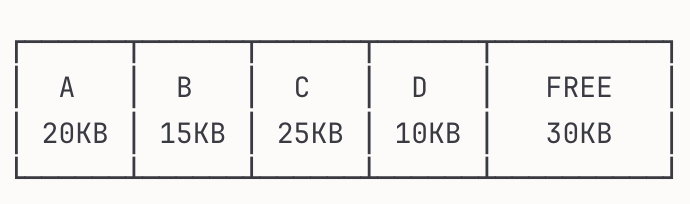
we have 4 different keys and 30 kb free memory, let’s delete B and D keys
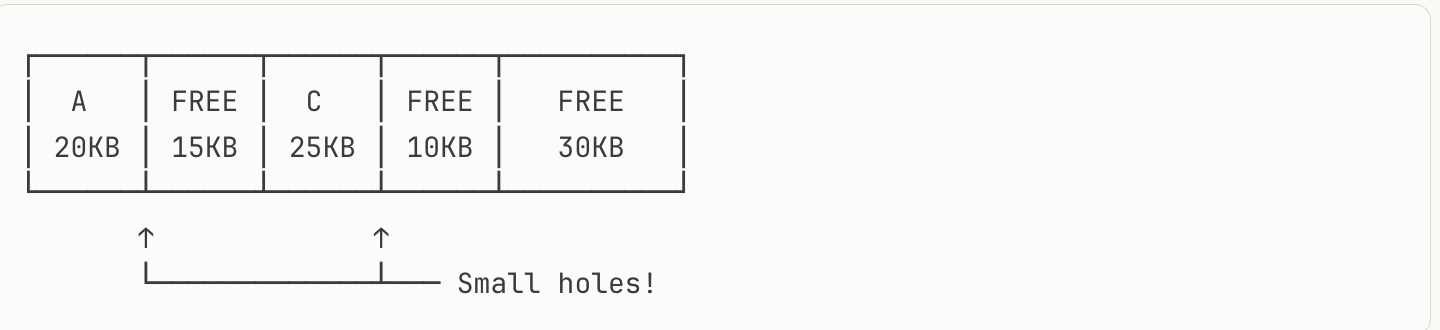
as you see even we deleted our records still those spaces did not reallocated to free memory. this is simple introduction into memory allocation/deallocation. but why does that matter? This seems like an OS-level problem, not a Redis problem but it affects Redis significantly because of how Redis manages memory in-memory and its allocation patterns.
Note: Memory fragmentation occurs at the OS level, but Redis’s in-memory nature and frequent allocation/deallocation patterns make it especially vulnerable to this issue.
Hash indexes are generally used in key–value databases, and they simply work with hash maps. No need to dive deep into hash maps here, but if you want, there is a great video by Brandon Rhodes: The Mighty Dictionary. It’s about Python’s dictionary implementation, but you will easily understand how hash maps work from it.
Now let’s imagine our data storage is a simple file. We will only append new records, and when we read, we simply load the data. Let’s implement that.
import json

def append_record(filename, record):
    with open(filename, ‘a’) as f:
        f.write(json.dumps(record) + ‘\n’)

def load_by_key(filename, key, value):
    results = []
    with open(filename, ‘r’) as f:
        for line in f:
            record = json.loads(line.strip())
            if record.get(key) == value:
                results.append(record)
    return results

append_record(’data.txt’, {’id’: 1, ‘name’: ‘Alice’})
append_record(’data.txt’, {’id’: 2, ‘name’: ‘Bob’})

load_by_key(’data.txt’, ‘name’, ‘Alice’) # [{’id’: 1, ‘name’: ‘Alice’}]Note: This is a conceptual example. Redis actually operates in-memory using pointers to RAM addresses, not file offsets. The hash index principle is the same, but the implementation is memory-based, not file-based.
This works like a charm. It’s resilient to crashes, and writing to a file is very cheap in this simple implementation. But there is a problem: what are we going to do when we have millions of records? Right now, our load_by_key function has O(n) complexity. And that’s the moment when hash indexes enter the stage.
The idea is simple: we write everything sequentially into a file, but to solve the read-complexity problem, we store the byte offset in a hash table.
Hash Index Example
KEY              OFFSET          FILE
───              ──────          ────
cms-content-1  →    0  ────→  [<h1>Welcome</h1><p>...]
42             →  322  ────→  [The meaning of life is...]
user:alice     →  644  ────→  [email: alice@example.com...]
post-2024-11   →  966  ────→  [Blog post content here...]
cache:home     → 1288  ────→  [<html><body>cached page...]
It seems simple, but it’s a totally viable approach. Now we can instantly access the records we want. But this design still comes with some limitations.
The hash table must fit in memory, and range queries become a headache. But it’s not the right time to dive into SSTables or LSM-Trees let’s stay in the Redis ecosystem for now.
Now that we understand how hash indexes work and how memory fragmentation creates those holes we discussed earlier, the problem becomes clearer. Redis uses a memory allocator called jemalloc (by default) to manage these allocations. When keys are deleted, jemalloc marks the memory as free but doesn’t immediately reallocate it that process is expensive.
We had too many keys with very close TTLs, so we were deleting a lot of records and writing new ones aggressively. Auto memory defragmentation was disabled on our Redis servers, and this created too many holes in memory with no contiguous free space. That eventually caused a total system crash. To defragment, Redis needs to move active data into contiguous blocks and rebuild all the pointers for complex data types, which takes a long time when you have millions of keys.
We solved the crisis by setting activedefrag to true and letting Redis handle defragmentation automatically. This increased CPU usage and caused some latency spikes. So after stabilizing the system, we added alerts for defragmentation rates and set activedefrag back to false.
AI Disclaimer: Illustrations created by Claude (ASCII). Post written by me, with grammar improvement and slight editing by Claude.