

Security-focused, offline-only password vault for Android.
VeilVault stores your vault locally on your device — no accounts, no cloud sync, no servers. Your data stays on your device.
Control stays where it belongs — with you.

Scan to open VeilVault on Google Play
No accounts. No cloud. No background sync.
What VeilVault Does
VeilVault stores sensitive data locally on the device.
No accounts. No sync. No background traffic.
Clear boundaries, defined behavior, and clear failure modes.
- Stores vault data locally on the device
- Works fully offline
- Protects access with a master password you control
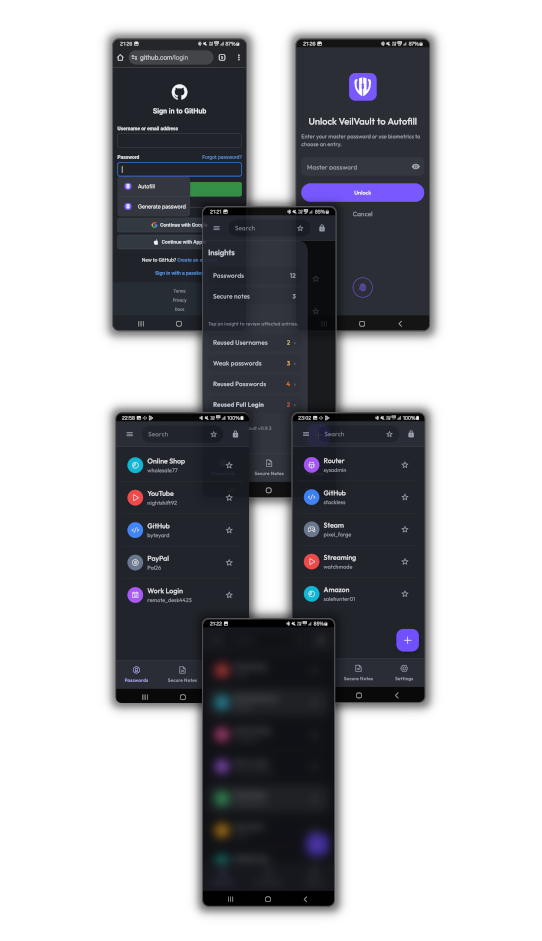
- Supports autofill with explicit user authentication
- Offers safety tools like Insights, PanicHold, and an optional Decoy Vault
Your data is yours — and so is the responsibility.
What VeilVault Does Not Do
VeilVault does not assume added convenience comes without security costs.
It avoids hidden systems that expand your attack surface over time.
- No cloud sync or online backups
- No accounts
- No “forgot password” or recovery flows
- No web vault or browser extensions
- No trackers or analytics
If you forget your master password, the vault cannot be recovered.
Features
Autofill (optional)
Autofill reduces manual password handling without turning VeilVault into a background service. It must be explicitly enabled, and authentication is always required before credentials are provided.
Insights (local security overview)
A local overview that highlights weak or reused credentials and basic vault stats. No tracking, no telemetry — results reflect your current vault only.
Decoy Vault (optional)
An alternate unlock path that presents non-sensitive data in coercive or high-pressure situations. It is a risk-reduction measure, not a guarantee of plausible deniability.
PanicHold + Emergency Wipe
PanicHold obscures content and locks the vault quickly. Emergency wipe permanently deletes local vault data — irreversible by design.
Security Model
Security Boundaries
VeilVault is built around clear boundaries — not vague promises.
- Offline-only operation (no servers to trust)
- Encrypted vault with integrity enforcement (tampering causes unlock to fail)
- No partial unlock states or degraded modes
- Keys exist only in memory while unlocked
- Optional biometrics (convenience only, never a replacement)
VeilVault does not claim to protect against compromised or rooted devices,
kernel-level malware, or advanced hardware extraction.
Security is strongest when expectations are explicit.
Security model →
Threat model →
Limitations →
Privacy & permissions →
Why VeilVault Draws Hard Lines
Many password managers keep adding convenience until a password vault turns into a more complex system with more dependencies and more attack surface.
VeilVault goes the other direction:
fewer moving parts, less unnecessary attack surface.
- No accounts so identity and access can’t be reset remotely
- No cloud sync so there’s no central target and no background traffic
- No recovery because recovery always means a second key you don’t control
- No web vault because browser-based access increases attack surface significantly
- Explicit failure: if something is wrong, unlock fails — it doesn’t “degrade”
That is the trade-off: you get stronger boundaries and less unnecessary attack surface — and you take responsibility for your master password and your backups (exports).
Security-first means making restrictive decisions by default.
Who VeilVault Is For
VeilVault is for people who prefer clear control over added convenience.
- People who want an offline password manager
- People who value their privacy
- People comfortable managing their own backups (exports/imports)
Not for you if…
- You need sync across devices
- You expect password recovery
- You want web access or browser extensions
VeilVault sets clear boundaries by design.
Pricing
Try VeilVault first.
When the trial ends, unlock the full app with a one-time purchase — or export your data.
- No subscriptions
- One-time purchase (lifetime)
- Your vault stays local either way
No account required. Not a free product built around data collection.
Download
VeilVault is an Android app. Download it from Google Play.
Prefer reading first? Start with the documentation.