Claudette — The open-source desktop companion for Claude Code

5 min read Original article ↗

Claude's missing better half

The open-source desktop companion for Claude Code.

Run agents in parallel across git worktrees, watch token usage in real time, and drive remote sessions over an encrypted connection — all from one focused desktop app.

Download View on GitHub

macOS Linux Windows

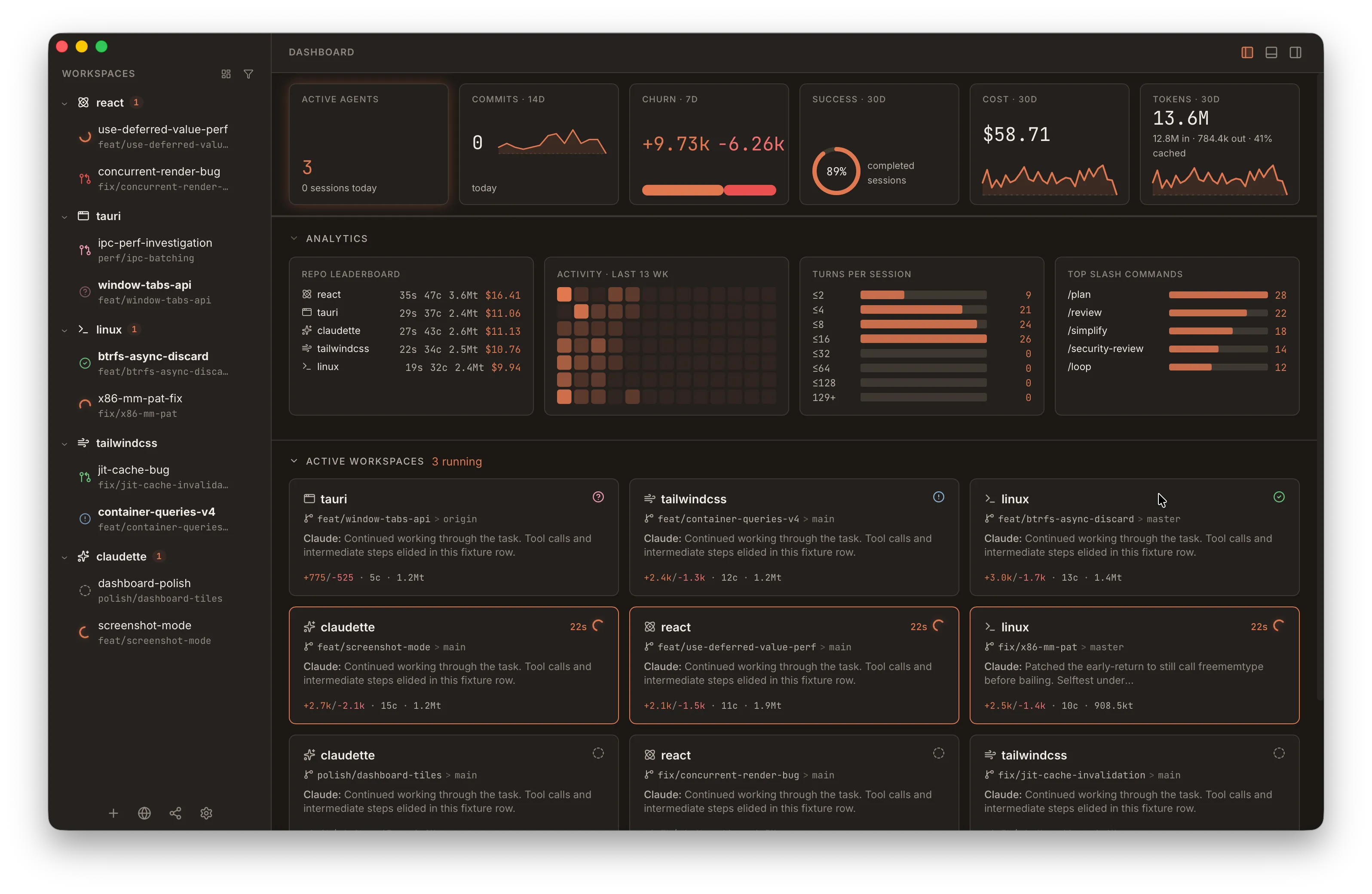
Claudette dashboard with workspace metrics, repo leaderboard, and activity heatmap
Two things you won't find elsewhere

Built for how you actually work with Claude Code.

One app, multiple agents on the same repo, and real visibility into what the model is doing.

01 / Parallel sessions

Run Claude Code on every branch at once.

Each agent gets its own git worktree, its own session, its own terminal. Spin up an experiment without stashing — and switch between them like browser tabs.

  • Worktree per agent — no merge conflicts mid-conversation
  • Multi-session tabs per workspace
  • Auto-named branches from your first prompt
02 / Live context tracking

See your token budget as it happens.

Claudette reads streaming usage events and shows a segmented context meter on every turn. When you’re nearing the wall, hit /compact — the timeline marks it, and history stays intact.

  • Per-turn token usage with input / output / cache breakdown
  • Compaction divider in the timeline so nothing gets lost
  • Per-workspace analytics — tokens, sessions, hot files
The rest of the toolkit

Everything else you'd expect — and a few things you wouldn't.

Integrated terminal

A real PTY per agent with split panes. The sidebar surfaces running commands automatically — no shell-RC edits, works with any shell.

zsh · bash · fish

Plugin ecosystem

SCM providers (GitHub, GitLab), env-providers (dotenv, mise, direnv, nix-devshell), language grammars, and a sandboxed Lua runtime that's user-extensible.

runtime kinds · per-repo env panel

Agent providers

Choose Claude Code, Ollama (local), LM Studio (local), the OpenAI API, or Codex as first-class agent backends. Gateway and app-server paths adapt chat controls to whichever provider is active.

Claude Code · Ollama · LM Studio · OpenAI · Codex

Diff viewer

Side-by-side or unified, with rich Markdown and Mermaid rendering for plans and reviews. Diffs open as tabs alongside chat sessions.

syntax-highlighted · hunk-staging

Full Monaco editor

The same editor that ships in VS Code, embedded next to the chat and diff. Type-aware highlighting, language services in workers, runs entirely offline.

theme-synced · offline

Notifications + sound packs

Per-event sound selection, including the OpenPeon community pack. Optional system tray icon with light, dark, and color variants.

tray · per-event audio

Native cross-platform

Tauri-built binaries for macOS (Intel + Apple Silicon), Linux (x86_64 + aarch64), and Windows. Stable and nightly update channels.

macOS · Linux · Windows

Local metrics

Workspace cards show total tokens. Drill into a per-workspace heatmap, leaderboard, and session history — entirely on disk in SQLite.

stays on your machine

Themeable

14 built-in themes spanning warm coral, deep navy, Solarized, Rosé Pine, and high-contrast — switch instantly from the command palette, or roll your own with CSS custom properties.

11 dark · 3 light

Remote access

Drive your local Claudette from another machine on the same network. WebSocket transport with mDNS discovery — no cloud round-trip, no third-party relay.

WebSocket · mDNS

Voice input

Push-to-talk dictation with Apple Speech (macOS) or bundled Whisper. Runs entirely on-device — your microphone audio never leaves your machine.

Apple Speech · Whisper · on-device

Scriptable

A `claudette` CLI drives the GUI over a local socket. Script workspace creation, fan a YAML manifest out across N workspaces, resolve plan approvals from a pipe, or hand the wheel to the bundled Claude Code skill.

CLI · YAML manifests · agent-driven

Local-first Your data stays on your machine

Open source MIT licensed on GitHub

No telemetry No accounts, no tracking

Internationalized UI translated for global users

Built with Tauri 2 Rust backend, React frontend

And more, quietly.

A lot of small things that add up over a long week of use.

  • 14 built-in themes, fully re-themeable
  • Pinned slash commands in the composer
  • Native /review, /plan, /compact, /usage
  • Stable + nightly update channels
  • Voice input — Apple Speech, on-device Distil-Whisper, or Web Speech API
  • Drag-and-drop file attachments
  • SCM status persistence + PR integration
  • Typewriter-style streaming reveal
  • MCP server supervision + connectors
  • Conversation forking + rollback per turn
  • Cmd/Ctrl+F search across the chat session
  • Localized UI for non-English users

Anatomy of a session.

One workspace, one agent, one chat. The sidebar tracks every parallel session by SCM status; the header shows your context budget; the composer drives the model.

Session state

  • Running — agent is producing tokens
  • Done — agent finished, work ready to review
  • Ask — agent is waiting on you to answer
  • Plan — running in plan mode (read-only)
  • Stopped — user stopped or session errored
  • Idle — session exists but inactive

PR state

  • Open / Ready
  • CI running
  • CI failed
  • Draft
  • Merged
  • Closed

Building from source?

Most people just download. If you want to hack on it, three commands get you there.

1

Install toolchain

Rust, Bun, and the Tauri CLI. Full guide in the docs.

2

Clone & build

git clone and cargo tauri dev — a native binary for your OS.

3

Open a workspace

Point at any git repo. Claudette spawns a worktree and you're in.

Read the install guide

Claudette mascot — a pixel-art pig with a pink bow

Ready to meet your better half?

Open source, MIT licensed, runs entirely on your machine. No account, no telemetry, no cloud.