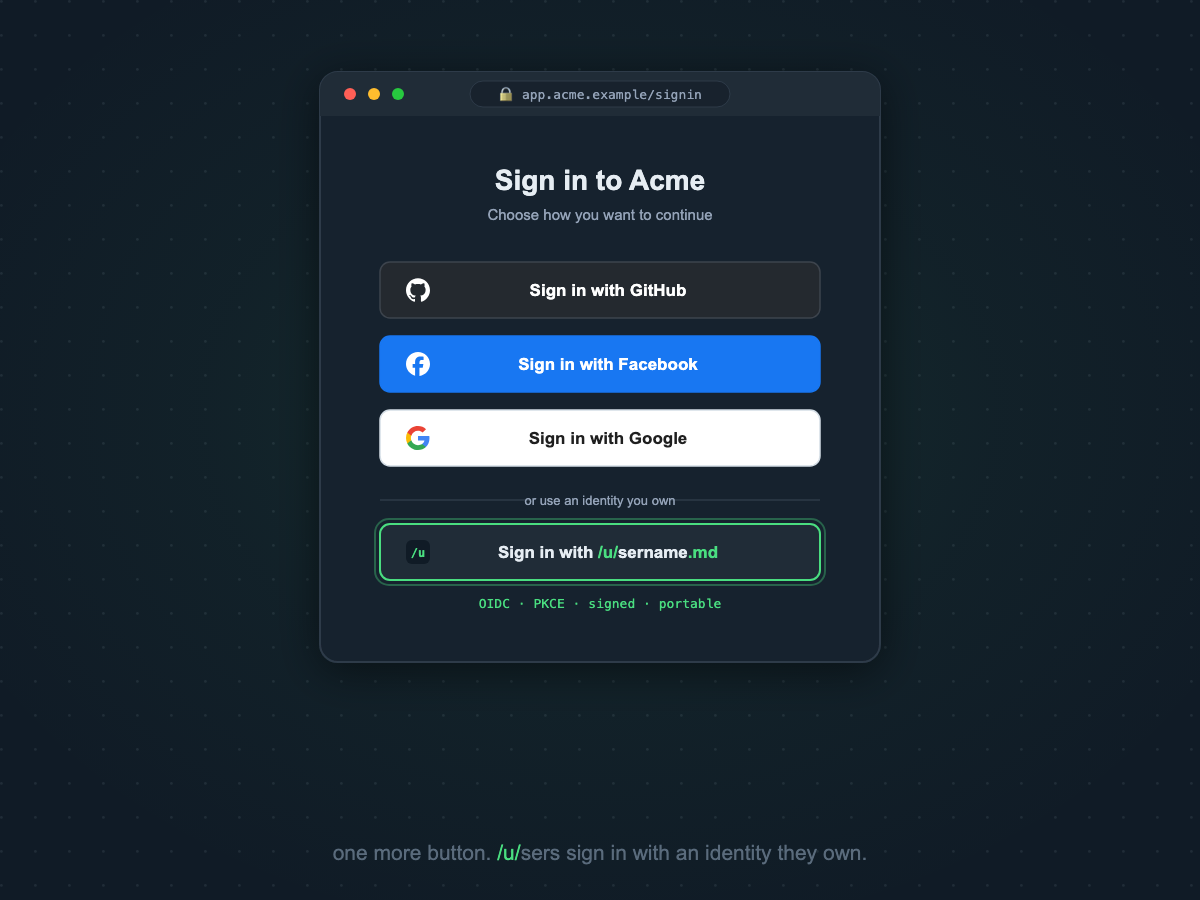
One more sign-in button.
A lot less to own.
Your customers already sign in with GitHub, Facebook, or Google. Sign in with username.md adds a fourth option: standards-based OIDC single sign-on backed by an identity your customers own — portable, cryptographically verifiable, and ready for their agents as well as their browsers.
Why offer it
The case your security and support teams will make for you.
standards
It's just OIDC
Authorization Code + PKCE against a standard OpenID Connect issuer. It drops into any OIDC-compatible identity stack the same way your GitHub and Google buttons did — no proprietary SDK, no new vendor runtime in your critical path.
verifiable
Identity you can prove
Every handle carries signed, verifiable claims — domain ownership, linked accounts — under the handle's own Ed25519 key. "Is this really them?" becomes a cryptographic check, not a support ticket.
data-minimal
Store less, leak less
You receive standard OIDC claims and resolve the rest from the handle's public, content-negotiated profile on demand. Less PII at rest on your side is a smaller breach surface and a shorter compliance story.
portable
No platform hostage-taking
A GitHub or Facebook identity exists at the pleasure of that platform. A username.md handle belongs to your customer — suspended socials don't lock anyone out of your product.
agent-ready
Sign in their agents, too
Handles are machine-resolvable (did:web, agent handshake surfaces,
per-handle llms.txt). When your customers send agents to use your product,
the same identity that signed in can be verified programmatically.
support
Fewer password tickets
Every federated sign-in you offer trims password resets and account-recovery load. This one also gives support a verifiable identity to check before they act on "I'm locked out" — see the use cases.
The rollout, end to end
Built to be an afternoon for your engineers and a one-pager for your security review.
Scope and provision your client
Tell us your app name, redirect URIs, and client type (public PKCE for SPAs and
native apps, confidential for server-side). We provision your client_id
against the live issuer login.username.md during onboarding — usually
within a business day.
Add the button
Two paths: drop the dependency-free badge script on your sign-in page, or add the issuer to your existing OIDC configuration exactly like your other providers. Copy-paste gateway quickstarts for common edge platforms are in the integration guide.
Verify and launch
Validate ID tokens against the published JWKS; discovery is standard
(/.well-known/openid-configuration). Platform API responses are additionally
signed end-to-end (RFC 9421, Ed25519) — your auditors can verify what your systems
consumed. Worked examples live in the developer docs.
Scale it with a contract
Volume identity resolution, bulk handle provisioning for your workforce or your fleet of agents, uptime SLAs, priority support, and a DPA are the Enterprise tier.
Kick the tires before you email anyone
The issuer is live. Discovery is public — point your identity stack at it right now.
$ curl -s https://login.username.md/.well-known/openid-configuration | jq { "issuer": "https://login.username.md", "authorization_endpoint": "https://login.username.md/oauth/v2/authorize", "token_endpoint": "https://login.username.md/oauth/v2/token", "jwks_uri": "https://login.username.md/oauth/v2/keys", "code_challenge_methods_supported": [ "S256" ], ... } # standard OIDC discovery — the same handshake your other providers use
| Question | Answer |
|---|---|
| Protocol | OpenID Connect — Authorization Code + PKCE (S256) |
| Issuer | https://login.username.md (live) |
| Discovery | /.well-known/openid-configuration — standard |
| Token validation | JWT ID tokens, verified against the published JWKS |
| Client types | Public (PKCE, no secret) and confidential (server-side) |
| Client registration | Provisioned during onboarding — email us your redirect URIs |
| The button | Drop-in badge script (no dependencies) or your own markup |
| Response signing | Platform API responses Ed25519-signed (RFC 9421) |
| At volume | Metered resolution, SLAs, DPA — Enterprise tier |
Put the fourth button on your sign-in screen.
Send us your app name and redirect URIs and we'll come back with a provisioned client and a rollout checklist — usually within a business day.