If you’re interested in frontier cost-efficiency for your AI agents, we’d love to work together! Get in touch: contact@unreallabs.ai.
While deploying agents in the wild, we wanted them to respond to users quickly and be cost-effective to run. We’ve noticed that agents spend a lot of time and tokens managing tool calls, which motivated us to build Unreal Agent with a harness that would reduce the model’s tool-management overhead.
The Unreal Agent harness manages tool calls in a completely asynchronous way, relieving the underlying model of the need to manage waits, polls, and heartbeats for tools.
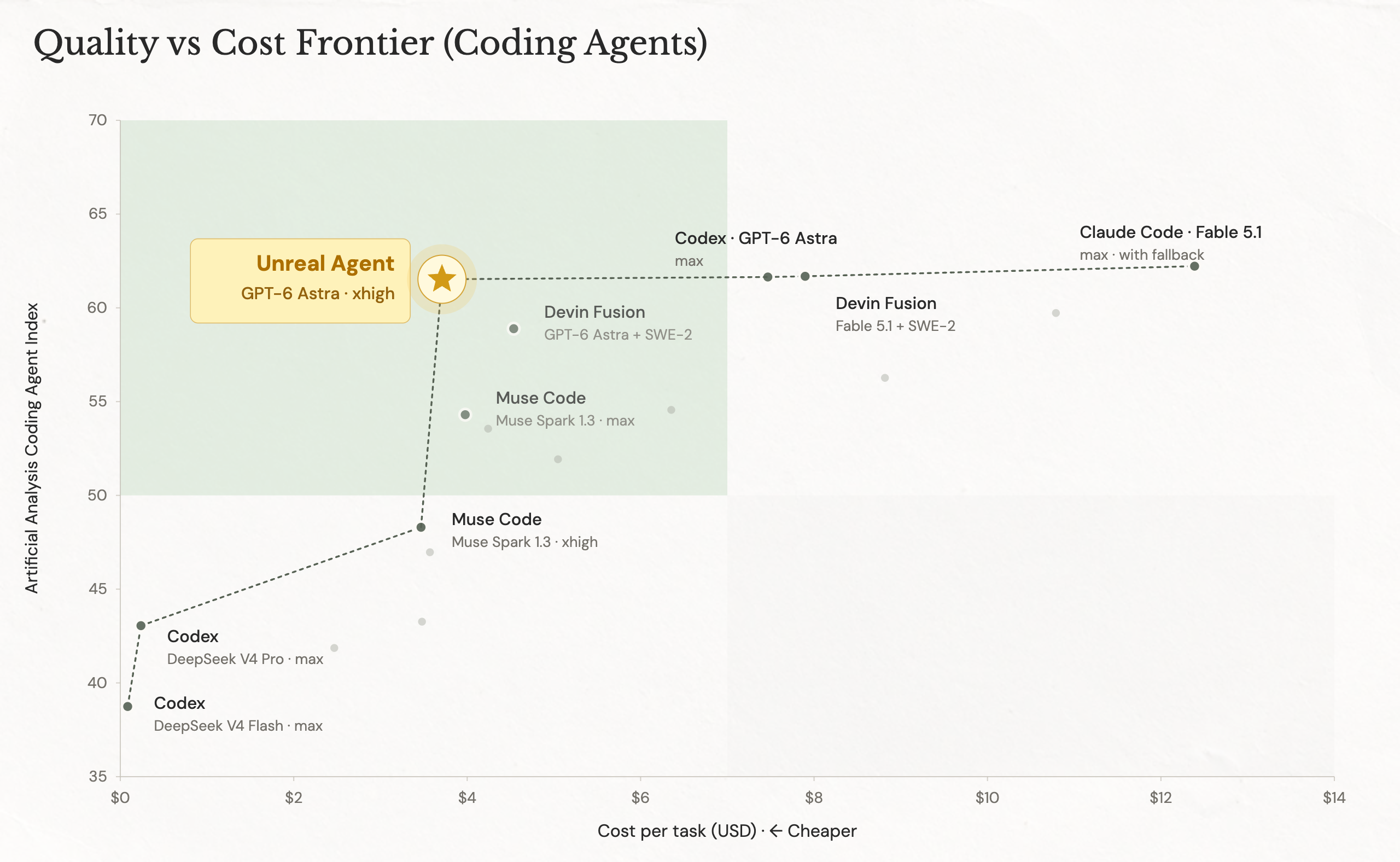
This approach drives two major benefits. First, it always allows users to steer the agent without the need to wait for tool calls to finish. Second, it allows the agent to schedule more useful tool call work between model calls, driving frontier cost efficiency. The current version achieves up to 40% cost savings compared to Codex and up to 20% compared to Pi in real workloads and on agentic benchmarks, which we share here.
We believe harness design is a research area in its own right, with many promising ideas still to be researched and implemented.1
Motivation and Architecture
If you try to build an agent-first product, you’ll quickly realize that there’s no golden path for implementing one. Big-brand vendors offer different SDKs to build agents, each with a different set of trade-offs that might not be immediately apparent.
At Unreal Labs, we have built a number of agentic products and learned a few things about popular SDKs along the way.
For example, CLI-oriented SDKs such as Claude’s Agent SDK carry assumptions about local sessions, subprocesses, and resource limits that don’t translate neatly into production use. Handling completion, cancellation, and background tasks reliably often means building your own lifecycle management around them.
Supporting other providers adds compatibility work: switching API modes can break tools or compaction, while SDK upgrades can change message formats and force integration rewrites. Heavy dependency trees add maintenance and supply-chain risk to a runtime we already need to understand and patch ourselves.
Security and approvals that rely on harness hooks and specialized tools, in our experience, tend to require more maintenance and be less robust than deterministic environment or sandbox constraints, outside the harness: allowed/disallowed hosts, granular access tokens, proxies with approval gates.
Along with these technical motivations, we also wanted to build a harness that could always accept user steering messages without delay and juggle heterogeneous tool calls without extra cognitive load for the model. For example, we wanted the agent to be able to kick off a dev environment setup that might take minutes, while exploring the codebase and searching the web in parallel, all without extra token tax.
Every time Unreal Agent issues a tool call, we immediately append an event-log record that the tool has returned in the “in-progress” state, while continuing its execution in the background. Once a tool actually finishes, we append the result into the session log and call an LLM. Making this work without breaking cache was an interesting engineering challenge in itself.2
Cost Efficiency
On the surface, Unreal Agent achieves the same outcomes with fewer model turns and fewer input tokens.
We attribute cost savings to two factors:
-
Minimal harness footprint and careful engineering of tool output usage. Unreal Agent has simple prompts, token-optimized tool results, and no sub-agents or workflows.3
-
More tool work per model turn. Unreal Agent has a straightforward asynchronous tool-calling model that is clearly explained to an LLM. This allows it to issue more heavy tool calls per model turn without wasting tokens on polling or waiting for them.
Benchmarks
We’ve built Unreal Agent to deliver real production workflows for us, but it looks good in the benchmarks too. We tested it with GPT-6 Astra xhigh and compared it with Codex and Pi. Here are some of the results.
There are marginal differences in pass rate, which we attribute to benchmark variance.
Terminal-Bench 4.0
GPT-6 Astra · xhigh. Codex (lb) is the leaderboard baseline; Unreal Agent and Pi runs are linked below.
| Agent | Rate | Total $ | In/trial | Out/trial | Turns | Tools | Harbor |
|---|---|---|---|---|---|---|---|
| unreal-agent | 57.9% | 1428 | 1.73M | 32k | 28 | 37 | 27133053 |
| Codex (leaderboard) | 57.9% | 2350 | — | — | — | — | — |
| Pi | 55.0% | 1827 | 2.83M | 35k | 44 | 57 | 6ccd097a |
SWE-Atlas Codebase QnA
| Agent | Rate | Total $ | In/trial | Out/trial | Turns | Tools | Harbor |
|---|---|---|---|---|---|---|---|
| unreal-agent | 65.8% | 936 | 898k | 15k | 16 | 27 | 3d2fa057 |
| Codex | 63.3% | 1303 | 1.69M | 17k | 22 | 21 | 11a440fb |
| Pi | 64.0% | 1033 | 1.29M | 16k | 24 | 60 | da4ac972 |
DeepSWE 1.1
| Agent | Rate | Total $ | In/trial | Out/trial | Turns | Tools | Harbor |
|---|---|---|---|---|---|---|---|
| unreal-agent | 72.4% | 1367 | 1.60M | 28k | 26 | 38 | 2311ca63 |
| Codex | 69.0% | 1633 | 2.19M | 30k | 30 | 29 | e20ecafd |
| Pi | 69.6% | 1584 | 2.21M | 30k | 40 | 75 | cd7d8de6 |
Agents’ Last Exam · ALE-CLI
Full pass rates and mean scores are listed below. These runs are not on Harbor.
| Agent | Full pass | Mean score | Total $ | In/task | Out/task | Turns | Tools |
|---|---|---|---|---|---|---|---|
| unreal-agent | 30.0% | 59.7 | 217 | 0.76M | 18k | 18 | 23 |
| Codex | 29.0% | 58.1 | 292 | 1.59M | 15k | — | 21 |
| Pi | 29.0% | 59.2 | 262 | 1.19M | 19k | 27 | 37 |
We run mostly coding benchmarks because they are available on Harbor, which makes reproduction and verification easier, but the harness is domain-agnostic.
Getting started with Unreal Agent
The Unreal Agent SDK currently offers:
- Go library that you can integrate directly into your codebase
- Runner executable similar to
claude -p/codex exec - Benchmark runner compatible with Harbor
Check out our github repo if you want to try it for yourself