Fuse content and scripting to make your documents reactive. In the realm of a Typst document, there is nothing you can’t automate.
= Markup <markup>
With built-in syntax for the most common document elements, Typst markup is designed to be pleasant to write and read:

- *Strong* and _normal_ emphasis
- A reference to @markup
- Math: $a, b in { 1/2, sqrt(4 a b) }$

But that's just the surface!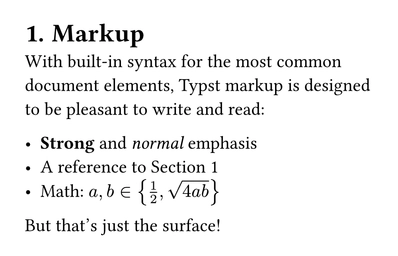
#set heading(numbering: "1.")
#show strong: set text(red)

= Styling
The asterisk syntax is just a shorthand for the `strong` function. And with *set* and *show rules,* you can style that emphasis however you like, separating content from formatting.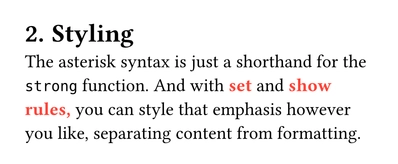
= Scripting
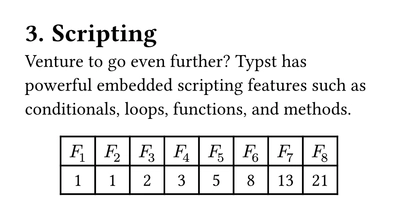
Venture to go even further? Typst has powerful embedded scripting features such as conditionals, loops, functions, and methods.

#let count = 8
#let nums = range(1, count + 1)
#let fib(n) = (
  if n <= 2 { 1 }
  else { fib(n - 1) + fib(n - 2) }
)

#align(center, table(
  columns: count,
  ..nums.map(n => $F_#n$),
  ..nums.map(n => str(fib(n))),
))
= Introspection <introspection>
A Typst document is self-aware! You can find things on the pages, measure their sizes, and more, giving you the tools to build rich automations.

#let find(l) = context [
  The element labelled
  #raw(repr(l)) is on slide
  #locate(l).page().
]

#find(<introspection>)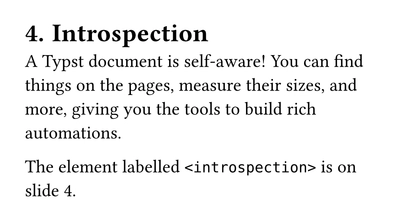
= Data loading
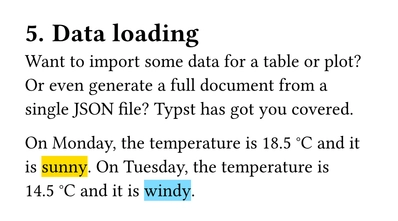
Want to import some data for a table or plot? Or even generate a full document from a single JSON file? Typst has got you covered.

#for (day, data) in (
  "Monday": json("monday.json"),
  "Tuesday": json("tuesday.json"),
) [
  On #day, the temperature is
  #data.temperature~°#data.unit
  and it is #highlight(
    fill: (
      sunny: yellow,
      windy: aqua,
    ).at(data.weather),
    data.weather,
  ).
]