A waterloo intern's bet, with the head of infrastructure, of America's biggest inference company:

I miss the comfort in the old division of labor. I wrote the code, somebody else got it to run on some server somewhere, and the seam between us was opaque. This ended last week, when our head of infrastructure returned from a five-day, front-row, all-expenses-paid trip to the Miami Grand Prix. And that got me thinking. I wanted that too.
I told him that.
So we made a bet: I would complete one DevOps ticket, just one. If done successfully, I'd have his job title on Slack for one minute. By the end, in exactly 67 words, I will walk you through my speedrun with Docker, K8s, and GitHub workflows.

The Bet
Our model performance team maintains private forks of open-source inference engines (e.g. SGLang, TensorRT-LLM). We add our own kernels, our own runtime optimizations, and other things we don’t upstream. When it is time to deploy, someone has to:
- build a Docker image containing the code
- push said image to registry
- ping our FDEs with the correct image tag
- they then pull the image and verify correctness / speed
- deploy it to the customer
There is no reason why this process cannot be automated. On every push, steps 1-4 should run with no human in the loop needed.
There's a catch in step 4. Verify correctness and speed means actually running the image on the hardware we ship to, which in our case is a B200. GitHub-hosted runners are Ubuntu VMs in Azure; they don't have GPUs, let alone B200s.
That one constraint is what turns this from a GitHub Actions tutorial into a tour through Docker, Kubernetes, and self-hosted runners.
How hard could it be?
Except that up until six days ago, that was all I knew. How any of that happened was not my problem: perf engineers rarely think about production/infra. At least, not unless they make a bet.
Two definitions to start us off:

Docker: Packages an application, its filesystem, and its runtime dependencies into an image that can run consistently on any compatible machine. It reduces environment conflicts, but it does not eliminate all errors or performance differences.
CI: Continuous Integration. Every time someone pushes code, a computer automatically runs a script. If the script completes successfully, it’s a pass, else it fails.

Where should these scripts run? Locally works, in the same environment the code was developed in. But if the whole point is automation, and GitHub already has the code, why can’t GitHub just… run it? Turns out, it can. GitHub gives you runners: machines that exist to execute your scripts. The scripts are bundled into workflows. A workflow is a set of jobs. A job is a set of steps. A step is a shell command. That’s the whole hierarchy.
GitHub has its own runners (GitHub-hosted runners). These are Ubuntu VMs somewhere in Azure, which we never see, worry about, or maintain; that's all abstracted to GitHub.

Running something on these runners is as simple as doing:
yaml
name: part1
on: [workflow_dispatch]
jobs:
  job1:
    runs-on: ubuntu-latest
    steps:
      - run: echo "Hello, World!"
Which then run and output the result:
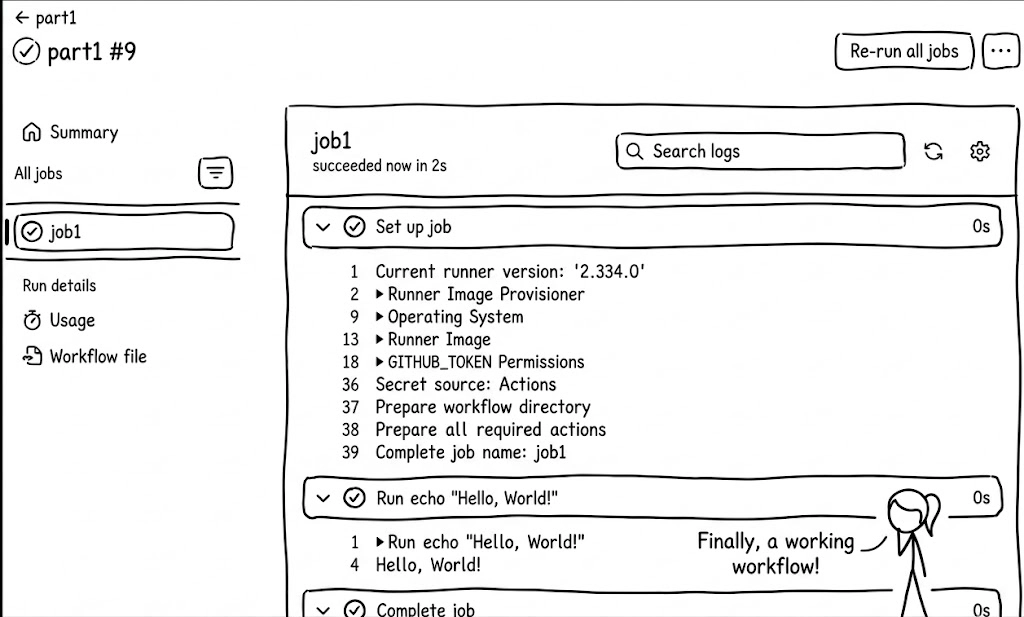
Let us move on to a more complicated YAML file, introducing variables, and passing them from one job to another (multiple runners):
text
name: workflow5
on: [workflow_dispatch]
jobs:
	#job 1 runs first
  build:
    runs-on: ubuntu-latest
    outputs:
      a: $ steps.save-var-a.outputs.a
    steps:
      - run: echo "Hello, World!"
      - run: echo "now saving var a"
      - name: save var a
        id: save-var-a
        run: echo "a=1" >> "$GITHUB_OUTPUT"
  #job 2 needs job 1
  smoke-test-other-build:
    runs-on: ubuntu-latest
    needs: [build]
    env:
      a: $ needs.job1.outputs.a
    steps:
      - run: echo "Hello, World!"
      - run: echo "a=$ env.a "
Two jobs now. Job one runs. Job two waits. Job one tells job two something, job two listens. The needs keyword does the work of ordering them, so that they do not run at the same time.

It is now time to build the Docker image.
What is Docker?

Traditional deployment couldn't enforce resource boundaries: one greedy app starved its neighbors, and isolating them meant a server per app. VMs fixed isolation by carving one machine into many disposable guests, but each VM dragged a full guest OS along for the ride.
Containers cut the OS out. They share the host kernel but keep their own filesystem and resource share: same isolation, a fraction of the weight.

Docker boils down to two commands: an image gets pulled and a container gets run.
docker pull busybox and docker run busybox
The Docker client (the CLI I typed into) sent a request to the Docker daemon. The daemon checked its local cache, didn't find busybox, pulled it from the registry (Docker Hub by default), unpacked it into a new container, executed the container's default command, and streamed the output back to my terminal.
An image is a read-only packaged filesystem plus a default command, built in layers. A container is a running instance of that image with a thin writable layer on top. The Docker client is the CLI you type into, and the Docker daemon (dockerd) is the background server it talks to: it pulls images, creates containers, runs them, and streams logs. The registry is where images live remotely, and by default is DockerHub.
A container lives only as long as its main process; when the command exits, the container exits. And every docker run creates a new container. You can wreck the filesystem inside one, delete /bin, even sudo rm -rf, then run it again, and it comes back pristine. The underlying image was never touched.
So where does an image actually live on the host filesystem? Let's go find one:

1. Get the image ID
bash
$ docker image ls busybox --digests --no-trunc
REPOSITORY   TAG       IMAGE ID
busybox      latest    sha256:925ff61909aebae4bcc9bc04bb96a8bd15cd2271f13159fe95ce4338824531dd
2. Find Docker's root directory
bash
$ docker info | grep "Docker Root Dir"
Docker Root Dir: /node-storage/var/lib/docker
3. Read the image config to get the layer's diff_id
bash
$ cat image/overlay2/imagedb/content/sha256/925ff61909ae.../
{
  "rootfs": {
    "diff_ids": ["sha256:7f74ca72855668453fc4207c1e5c50bb5653e72bb9939eb1d5512c001624e927"]
  }
}
4. Look up the cache-id for that layer
bash
$ cat image/overlay2/layerdb/sha256/7f74ca72.../cache-id
9e9d5b91f5c599695c352d4f0b06fe6f55d4893bb57013b879d76a4821b34e3b
5. Go to the overlay2 directory and find the actual binary
bash
$ ls overlay2/9e9d5b91.../diff/bin/busybox
-rwxr-xr-x 1 root root 1017416 Sep 26 2024 busybox
6. Run it
Here we literally run the binary:
bash
$ ./overlay2/9e9d5b91.../diff/bin/busybox
BusyBox v1.37.0 (2024-09-26 21:31:42 UTC) multi-call binary.
That binary at the end of the path is the same one that runs inside the container. This is the same as running docker run busybox. That is, containers aren’t special, they just run ELF files, sitting in a regular directory, directly on the host.
Now the other direction: how do we build an image? Start with a trivial Go program.
bash
package main
import "fmt"
func main() {
	fmt.Println("hello from my own tiny scratch image")
}
Compile and run it locally first, just to confirm it works:
bash
(exp_env) ➜  docker-scratch-demo go build main.go
(exp_env) ➜  docker-scratch-demo ./main
hello from my own tiny scratch image
(exp_env) ➜  docker-scratch-demo
Now wrap it in a multi-stage Dockerfile:
dockerfile
FROM golang:1.22-alpine AS build
WORKDIR /src
COPY main.go .
RUN go build -o main main.go

# this is the end of the build stage
FROM scratch
COPY --from=build /src/main /main
CMD ["/main"]
Two stages. The first uses an image that already has the Go compiler, and builds the binary. The second starts FROM scratch - literally an empty filesystem - and copies the compiled binary in. The final image is one Go binary. No compiler. No shell. No OS.
And we can run that binary directly off the overlay on disk.
Now for the actual task: package our private fork of SGLang into an image our customers can pull.
We start from an NVIDIA-maintained PyTorch image, pulled from NVIDIA’s registry at nvcr.io. It already ships the CUDA/PyTorch/NVIDIA GPU runtime stack we need for SGLang on B200s, so our Dockerfile only has to add SGLang-specific dependencies on top instead of rebuilding the whole GPU stack from Ubuntu.
dockerfile
FROM nvcr.io/nvidia/pytorch:25.11-py3
WORKDIR /workspace

RUN git clone flash-attention.git /workspace/flash-attention \
 && git clone quack.git /workspace/quack


RUN git clone --branch master --recurse-submodules \
      https://${GITHUB_TOKEN}:x-oauth-basic@[redacted] \
      /workspace/baseten

WORKDIR /workspace/baseten/private
RUN uv pip install -e "python[diffusion]"

WORKDIR /workspace/quack
RUN uv pip install -e .

RUN uv pip install flash-attn
RUN uv pip uninstall nvidia-cutlass-dsl
RUN uv pip install \
      "nvidia-cutlass-dsl==${CUTLASS_DSL_VERSION}" \
      pytest matplotlib accelerate

ENV PYTHONPATH=/workspace/flash-attention \
    SGLANG_DIFFUSION_USE_CUTE_DSL_FLASH_ATTN=1 \
    SGLANG_DIFFUSION_ENABLE_CUDA_GRAPH_CAPTURE=1

WORKDIR /workspace
CMD ["sglang", "serve", "--help"]
We then clone the dependencies we need (flash attention, quack kernels) and our private fork, copy both into the container, run docker build, and, upon compilation, push this image to our registry.

When we’re confident it works, we push it all into a workflow:
yaml
name: workflow_build
on:
  push:

jobs:
  build:
    runs-on: ubuntu-latest
    steps:
      - uses: actions/checkout@v4
      - name: setup docker buildx
        uses: docker/setup-buildx-action@v3 #installs Docker Buildx on runner

      - name: login to registry @ dockerhub
        uses: docker/login-action@v3
        with:
          username: ${{ secrets.DOCKER_USERNAME }}
          password: ${{ secrets.DOCKER_TOKEN }}

      - name: extract metadata for docker
        id: meta
        uses: docker/metadata-action@v5
        with:
          images: baseten/private

      - name: build image and push
        id: push
        uses: docker/build-push-action@v5 #builds docker image
        with:
          context: .
          file: ./dockerfile.test
          push: true
          tags: ${{ steps.meta.outputs.tags }}
          label: ${{ steps.meta.outputs.metadata }}
And that's it.
The GPU problem: integrating our own machines
The tradeoff for all the above is that we pay per minute for CPU machines with standard specs and no GPUs. What if we already owned machines that we wanted to use though? A good rule of thumb is your own self-hosted runners will cost you about half as much for the same specs… if you put in the work of integrating them yourself.
Even if we were cost-insensitive, we'd still hit a missing hardware piece at this point: a GitHub Actions runner that lives on a B200 node to test our image on GPUs.
That runner will just be a Kubernetes Pod, living on one of our GPU nodes, with two containers: a runner container that talks to GitHub, and a DinD container to run dockerd (the Docker daemon).
We will pick one of our internal Baseten nodes to work on. The end goal can be described in one image:

How do we do this, in code:
yaml
apiVersion: apps/v1
kind: Deployment
metadata:
  name: atrun
  namespace: baseten
  labels:
    app: atrun
spec:
  replicas: 1
  strategy:
    type: Recreate
  selector:
    matchLabels:
      app: atrun
  template:
    metadata:
      labels:
        app: atrun
    spec:
      nodeName: b200-node-X
      securityContext:
        fsGroup: 1000
        fsGroupChangePolicy: OnRootMismatch
      containers:
        - name: runner
          image: baseten/private
          imagePullPolicy: IfNotPresent
          command: ["/bin/bash", "-c"]
          args:
            - |
              set -euo pipefail
              ...
              exec ./run.sh
          env:
            - name: GITHUB_TOKEN
              valueFrom:
                secretKeyRef:
                  name: atrun-github-token
                  key: github_token
            - name: DOCKER_HOST
              value: unix:///local/var/run/docker.sock
          volumeMounts:
            - name: runner-work
              mountPath: /runner
            - name: docker-socket
              mountPath: /local/var/run
        - name: dind
          image: private/image
          args:
            - dockerd
            - --host=unix:///local/var/run/docker.sock
            - --group=$(DOCKER_GROUP_GID)
          env:
            - name: DOCKER_GROUP_GID
              value: "123"
          securityContext:
            privileged: true
          resources:
            requests:
              cpu: "16"
              memory: "64Gi"
          volumeMounts:
            - name: docker-socket
              mountPath: /local/var/run
            - name: docker-storage
              mountPath: /var/lib/docker
            - name: runner-work
              mountPath: /runner
      volumes:
        - name: docker-socket
          emptyDir: {}
        - name: docker-storage
          emptyDir: {}
        - name: runner-work
          emptyDir: {}
We kubectl apply it. The Deployment comes up, the Pod starts, and within seconds GitHub sees a new runner appear in the org.
It works. Now let me explain why it works, and what Kubernetes is actually doing here, since that's the part I didn't understand going in.
Kubernetes
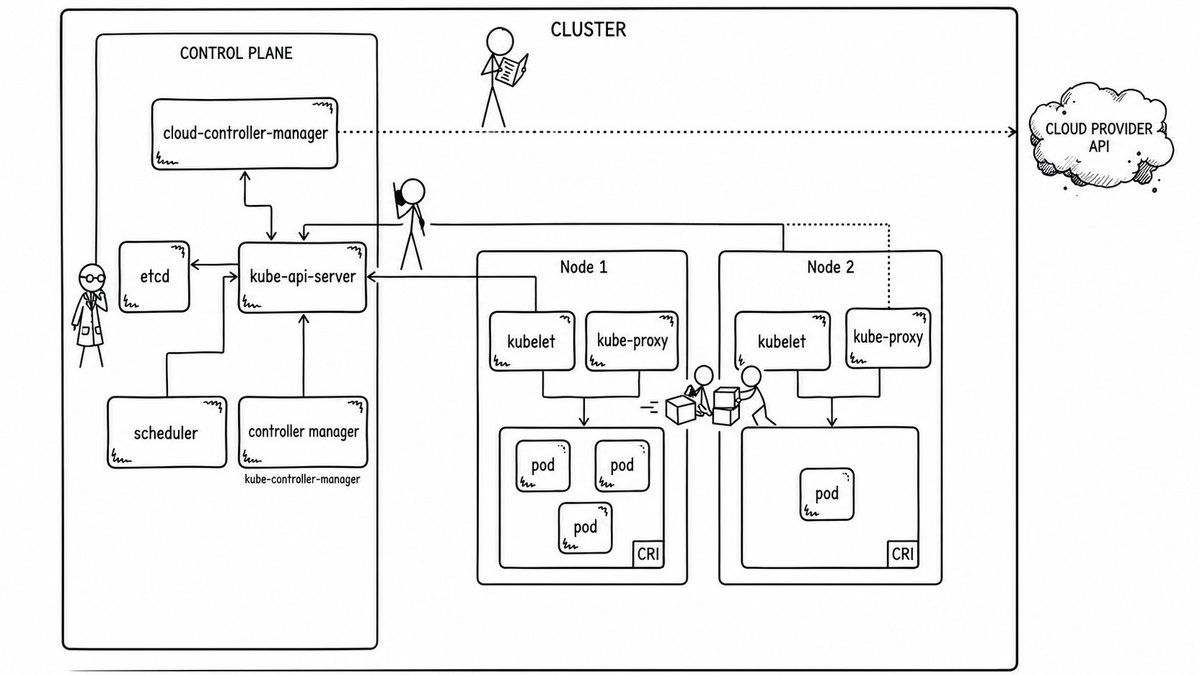
The manifest is short, but a lot happens behind it. When I ran kubectl apply -f atrun.yaml, my laptop sent an HTTPS request to the cluster's API server, a process called kube-apiserver running on the control plane. I don't hit it directly; I go through Rancher to get verified first.
Our platform/SRE team set that control plane up. I am only a user of an existing cluster, not its operator. They provisioned the control-plane machines, etcd, kube-apiserver, the scheduler, the controller-manager, the networking, the node bootstrap, the Rancher access. They did all this work for me.
The API server is only the front door, and it is the only door, through which we can access the node. The control plane itself usually runs across several machines for fault tolerance, so the brain of the cluster doesn't die when one box dies, but it is tied to our cluster (not node).
When my YAML hit the API server, with the right authentication via Okta, the server validated it and wrote it to etcd, the cluster's key-value store.
Etcd is the memory. Every deployment, secret, node, and pod record lives there. It's the cluster's identity: the Soul.md, if you will. The manifest we wrote to launch one more pod is just another row in etcd, the desired state:
Please let there be a Deployment called atrun in namespace baseten with one replica on our node, with a GitHub runner container and a dind container.
That's my ask to it.
Control loops
Kubernetes is a system of control loops: controllers that compare desired state (what's in etcd) to observed state (what's actually running), and nudge reality toward intent. Essentially, the controllers do the work of serving my ask.
Some controllers are "normal", and they read and write objects through the API server and never leave the cluster. The Deployment controller, the ReplicaSet controller, the Job controller, the Node controller (which notices when nodes go down and evicts their Pods). Others are "cloud" controllers, and they talk to things outside Kubernetes, like AWS, GCP, Vultr. We won’t index into these, since they’re not important for my ticket.
The Deployment controller (and the ReplicaSet underneath)
The Deployment controller sees a new Deployment named atrun, namespace: baseten, replicas: 1.
The Deployment owns a ReplicaSet. The ReplicaSet owns the Pods. There is only one Pod (replicas=1). Why not just launch one pod? Because a bare Pod that dies is just dead. A Deployment with one replica says I must always keep one matching Pod alive. If the runner crashes at 3am, the Deployment notices the Pod is gone, the ReplicaSet creates a new one, and the kubelet brings it back before I notice. Self-healing.
In other words, if the pod is sick, the deployment takes it behind the barn, shoots it, and starts a new, healthy, pod.

The kubelet
The kubelet on our node is the one doing the actual work. It's an agent process running on every node in the cluster. It watches the API server for Pods assigned to it, and when it sees one, it asks the local container runtime (containerd, on this cluster) to pull the images and start the containers. Containerd then runs the containers in our pod (the DinD container and the GitHub runner container).
The Pod itself
A Pod is the smallest deployable unit in Kubernetes: one or more containers that share a network namespace, share volumes, and live and die together on the same node. The runner and dind containers in my manifest share the docker-socket volume. That is the entire reason they're in the same Pod: the runner container's Docker CLI writes to, and the dind's dockerd listens on, the same socket on the same filesystem on the same network.
Recall:
yaml
containers:
 - name: runner
	 - volumeMounts:
		 - name: docker-socket
			 mountPath: /local/var/run
 ...
 - name: dind
	 - volumeMounts:
		 - name: docker-socket
			 mountPath: /local/var/run
And finally
The 67 words
I launch the deployment on the API server. The deployment owns the replicaset. The replicaset owns the pod. The scheduler places the pod on my node. The kubelet tells containerd to start the pod's two containers: the runner and the DinD. The runner gets a job to test the image. It tells the dockerd inside the DinD to spawn a third container. The smoke test runs. Easy.
The final workflow
Now we glue everything together in one workflow.
The workflow has three stages:
- Build the SGLang serving image on a normal CPU runner.
- Run a cheap CPU smoke test.
- Run the real GPU smoke test on the B200 self-hosted runner.
The important parts look like this:
yaml
name: Build sglang serving image

on:
  push:
    branches: [at_sglang]
  workflow_dispatch:

jobs:
  build:
    # Use a normal large CPU runner.
    runs-on: ubuntu-8

    outputs:
      short_sha: ${{ steps.tags.outputs.short_sha }}
      digest: ${{ steps.push.outputs.digest }}

    steps:
      - name: Checkout monorepo + sglang submodule
        uses: actions/checkout@v4
        with:
          submodules: recursive

      - name: Compute image tag
        id: tags
        run: |
          SHORT_SHA="$(git -C third_party/sglang rev-parse --short HEAD)"
          echo "short_sha=${SHORT_SHA}" >> "$GITHUB_OUTPUT"

      - name: Set up Docker Buildx
        uses: docker/setup-buildx-action@v3

      - name: Login to Docker Hub
        uses: docker/login-action@v3
        with:
          username: ${{ secrets.DOCKERHUB_USERNAME }}
          password: ${{ secrets.DOCKERHUB_TOKEN }}

      - name: Build and push serving image
        id: push
        uses: docker/build-push-action@v5
        with:
          context: third_party/sglang
          file: ...
          push: true
          tags: ...
          cache-from: type=registry,ref=...
          cache-to: ...
...

  gpu-smoke:
    # This job runs on the self-hosted B200 runner.
    needs: build
    runs-on: atrun
    timeout-minutes: 30

    env:
      HF_TOKEN: ${{ secrets.HF_AUTH_TOKEN }}

    steps:
      - name: Checkout monorepo + sglang submodule
        uses: actions/checkout@v4
        with:
          submodules: recursive
          token: ${{ secrets.BASETENBOT_GITHUB_TOKEN }}

      - name: Login to Docker Hub
        uses: docker/login-action@v3
        with:
          username: ${{ secrets.DOCKERHUB_USERNAME }}
          password: ${{ secrets.DOCKERHUB_TOKEN }}

      - name: Pull image
        run: |
          docker pull "baseten/private-${{ needs.build.outputs.short_sha }}"

      - name: GPU smoke test
        env:
          HF_CACHE_HOST: ${{ runner.temp }}/hf-cache
        run: |
          bash third_party/sglang/docker/test_image.sh \
            "baseten/private:${{ needs.build.outputs.short_sha }}"
...
Six days. One ticket. No Miami.
But…
For one minute…
I was head of infra.
