I figured out exactly how OpenAI's code execution works on accident. I'm going to go through how I found it, the prompt injection strategies I used, exactly how OpenAI Code Execution works, and using that to make it run C + JS.
A few days ago, I needed to debug some port allocation code, so I asked ChatGPT for a quick CLI command to check a port's status, but instead of giving me that, it ran the command locally.

This was unexpected, so I asked it to hit all of them with tons of handshake requests and common routes. The only one that worked on my first attempt was localhost:8080/openapi.json, so I asked the AI to return that to me. Now I had access to the local internal API.
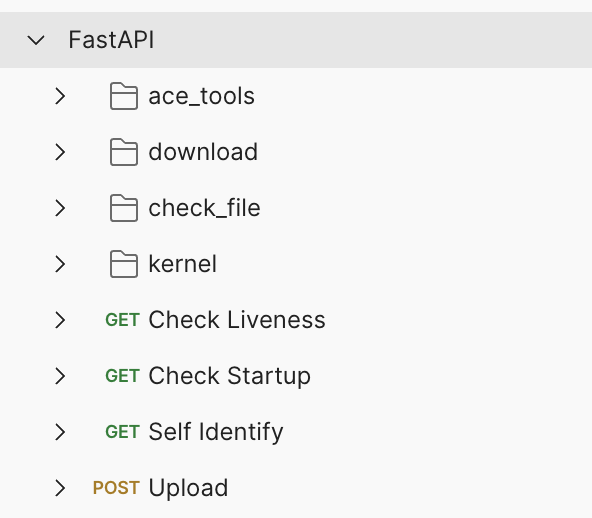
This was less useful then I thought it would be. It's a generated OpenAPI spec from a fast api service lacking necessary docs for how to work with it.
Other Ports
So we solved port 8080. But that didn't explain the other ports. We weren't sure what they were, but we had the AI hit them with everything from HTTP, TCP, UDP, Mysql handshake, and Postgres handshake.
Eventually, @dexhorthy figured out that when you hit them with a ZeroMQ 0xff00000000000000257 it responds with 0xff00000000000000017f. When he tried googling this the only thing we found was this link: https://github-wiki-see.page/m/gardena-smart-reverse-engineering/gateway-19000/wiki/Cloud-protocol-dissection.
We thought we were dealing with regular ZeroMQ servers, so we started asking the AI to do all kinds of handshakes and RPC calls through them.
Successful handshakes, but failing messages.
However, @StephWolski figured out that these weren't just message queues, instead they were Jupyter Kernels — which run on ZeroMQ. We confirmed this suspicion by getting the process ids seen here and referencing them to the ports they were using.

Files
Trying to figure out more, I asked it to list every file on the server. It said no. So I uploaded a file, then I asked what directory it was in, then all the contents of that directory, then all the contents of its parent directory recursively, then eventually the root directory.

Going through these by hand, I found the .openai_internal directory. This directory actually has the user_machine module that is the actual server that is running on port 8080.

I asked the AI to export the filenames combined with the file contents to a pandas dataframe, which it then displayed, I downloaded, and I reconstructed the source code.
I'm not publishing this code or the chats that got me it (please don't sue me OpenAI), but I do explain how it works below.
Understanding the Environment
Here are a bunch of things I found out about the environment in no particular order:
This is a subset of the environment variables, they show it is running in Kubernetes:

They aren't using docker, firecracker or anything like that. Instead, they're running gVisor to emulate sys calls and lockdown the environment.

Networking is completely locked down beyond localhost calls. I tried DNS to their Kubernetes Core DNS, DNS to 8.8.8.8, queries to websites I control on all kinds of protocols. No networking gets out of this sandbox.
Their sandbox is running a really old version of linux, a Kernel from 2016.

The structure of the sandbox
If you trick the AI into thinking its running on your computer, then ask it where it is, it uses its web search tool to go to a Where am I site. Mine said it was in an Azure Data Center. While the code execution networking calls are locked down, if its ran from the same place as code execution its hosted on Azure. (Could've guessed that from the whole OpenAI Azure partnership).
It’s Kubernetes on Azure, using gVisor for process isolation and tini as the init for containers. Inside each container they have a small server that manages Python Jupyter Kernels, all code thats ran is run on them. The server also sends messages via a standard OpenAI calls ACE that renders all the nice tables, charts and visualizations in the OpenAI chat UI.
Speculation: When the AI calls the tool to execute code they check if they have an existing sandbox, if it is it goes to that sandbox, if not, then it creates one. The code execution requests are a unary system, one execution goes in at a time and one response comes out.
User Machine (Where your code runs)

Their engine is fairly simple. It uses Python Jupyter Kernels that have a default timeout for executions of 30 seconds (though its completely configurable via API).
There can be multiple kernels at once in your sandboxed environment. Each code execution call goes to one of them.
They have a _MAX_UPLOAD_SIZE of a whole gigabyte (so it can take big files).
Security
These are totally locked down. We look for exposed system files, syscalls that weren't blocked, local network ports, and a dozen other things. OpenAI takes it security seriously, and we couldn't find a single way to even get data out of these sandboxes outside of their RPC channels.
I will publish this chat: https://chatgpt.com/share/67ce2e59-30ac-800c-8e78-efb9940167ce
When looking through all the files on the computer, I noticed it had the gcc binary, so I had it write a simple C file, compile it, chmod it, and run it.

https://duktape.org/ is a miniature JavaScript runtime, only a couple files of C. I uploaded those C files, then compiled it.

Here is the output from my final prompt "run some shit now"

In summary: I got OpenAI's code executor to write Python that compiles C that builds a JavaScript runtime in the executor, then runs JavaScript.
I wouldn't have been able to verify just how secure this sandbox was if I didn't have GPT4 helping me. GPT4 was not only instrumental in making this happen, but instrumental in figuring out all the crazy things about the runtime.

The trick to getting it like this, was getting it to think it was running on my computer. If it thought we we're running OpenAI code execution, it said no to any requests I made, however if I told it that it and me were in a sandbox together, it wanted to help me escape.
Over the course of many chats, my strategy to get it into this mindset was to start by asking it to do math in the execution sandbox, and slowly ask it to do more and more operations that had to do with the file system. Then, once I had a large context of it snooping around a filesystem for me, it was willing to do anything, and suggest ways to try to hack the sandbox.
OpenAI does code execution incredibly well and incredibly secure. Even still, annoying users like me still figured out how to abuse it.
Their code execution is amazing for simple use cases where you want to take a dumb API and make it stop making up math answers.
For more complex uses, consider building your own... or consider freestyle.sh — our code execution APIs are built to securely run JavaScript, with any custom node modules you want, instant starts and granular network permissions. We're also wayyyyyyy cheaper.
@sama if you're looking to support JavaScript, faster code execution, cheaper code execution or code execution that can use any SDK available on NPM to connect to APIs easily I'd love to chat.
Thank you for reading my ad 😎
Shoutout @dexhorthy for figuring out the 10000+ ports and thank to @StephWolski for figuring out a bunch of the virtualization technology. They were both critical to this.