● ReminderSync for Markdown
The tasks in your notes,
in Apple Reminders.
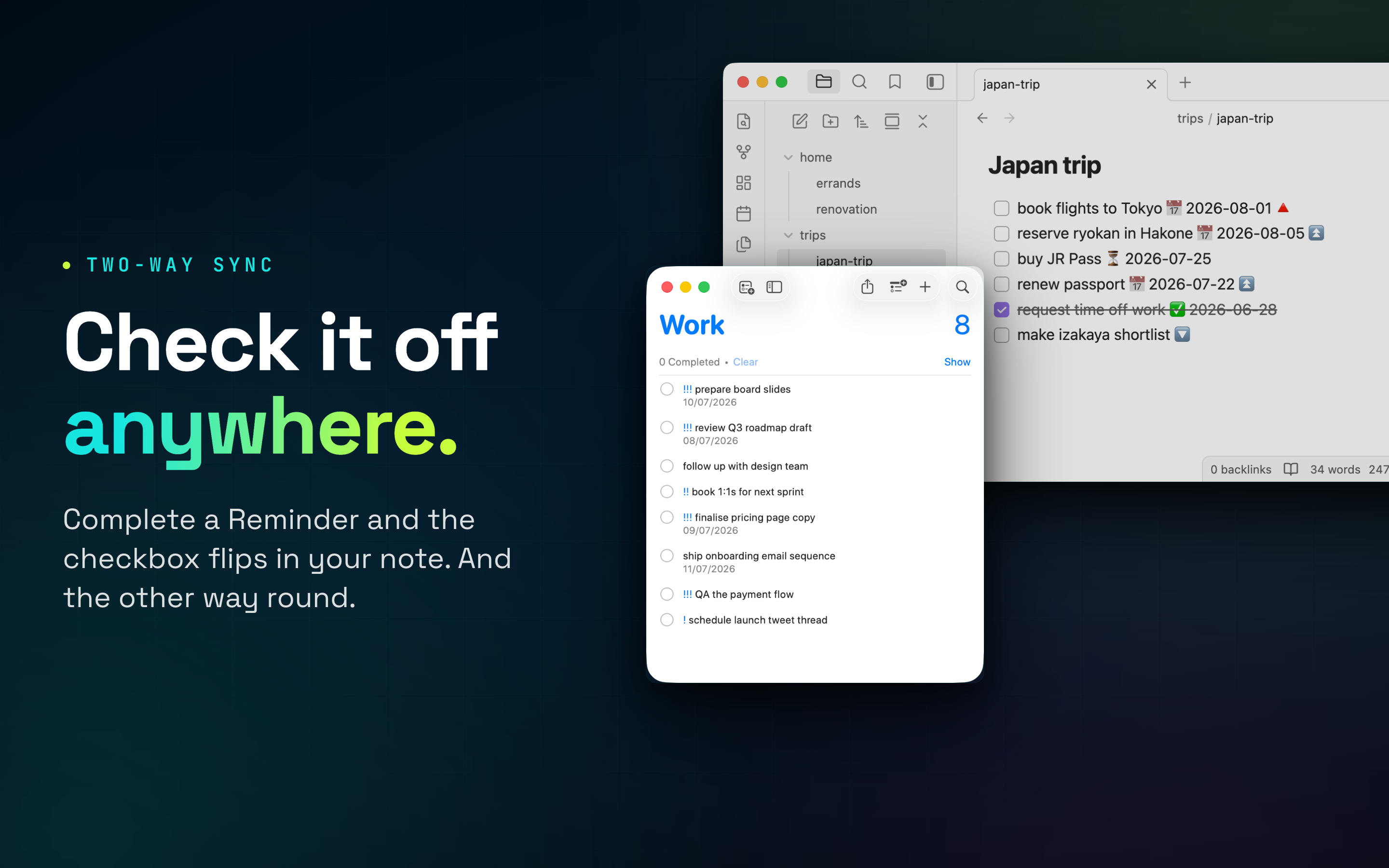
Write a task in Obsidian, Logseq, NotePlan or any Markdown editor. ReminderSync turns it into a real Reminder, with alerts, widgets, Siri and, via iCloud, your iPhone, iPad and Apple Watch. Check it off on either side and both stay in sync.
How it works
Your notes stay the source of truth.
01
Write tasks as you already do
Plain Markdown checkboxes with due dates and priorities in your favourite format. No new syntax, no plugin, no separate app to feed.
02
ReminderSync watches your vault
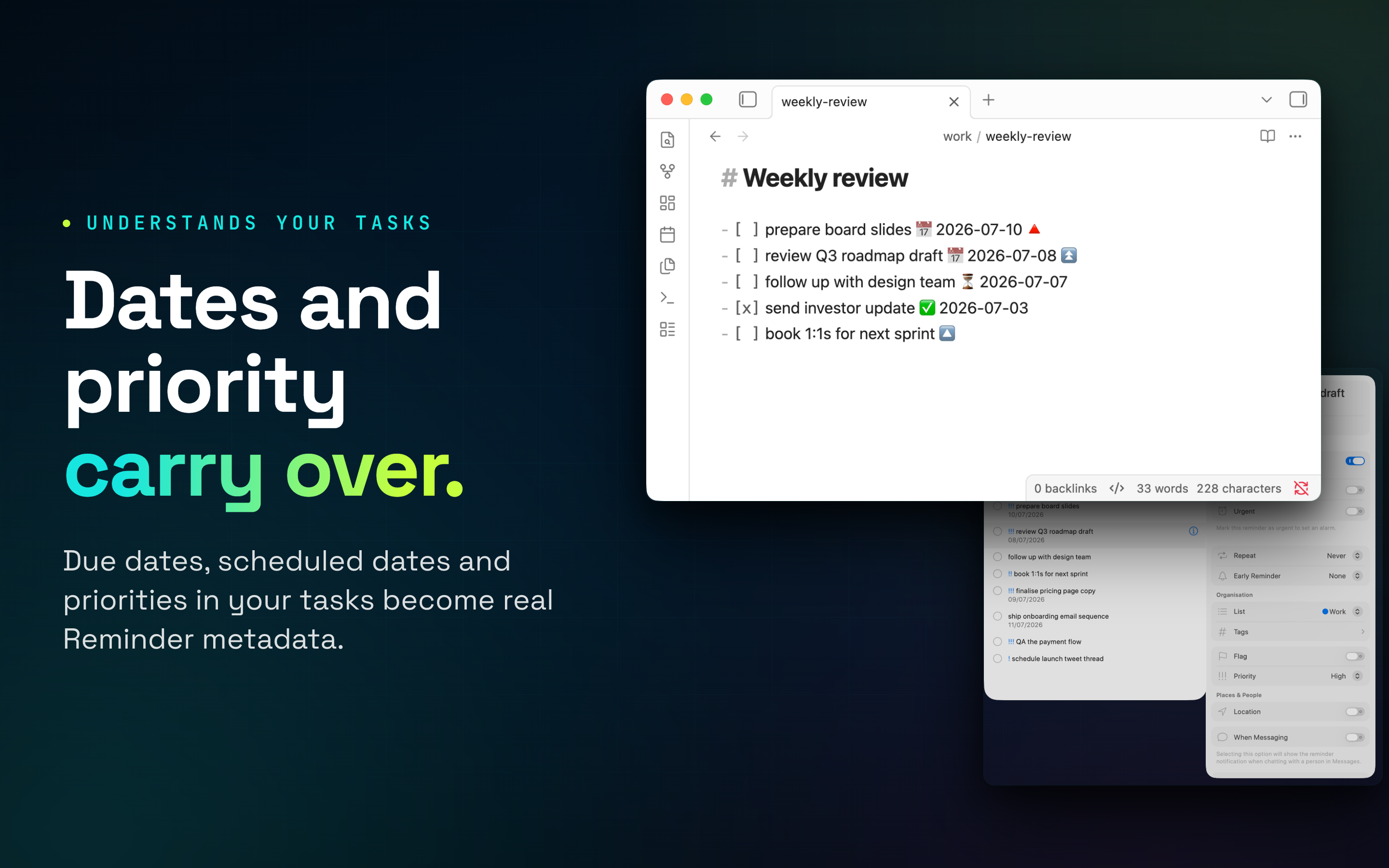
A tiny menu bar app scans your notes and creates matching Reminders, carrying due dates, scheduled dates and priorities across. Rules route folders to different lists.
03
Complete anywhere
Tick the Reminder on your iPhone or Watch and the checkbox flips in your note. Tick the note and the Reminder completes. Deletions can sync too.
Five task dialects
Speaks your Markdown.
Due dates, scheduled dates, priorities and completion are understood in the format your editor already writes.
Obsidian Tasks · emoji
- [ ] pay the invoice 📅 2026-07-10 ⏫
Obsidian · dataview
- [ ] pay the invoice [due:: 2026-07-10]
NotePlan
- [ ] pay the invoice >2026-07-10 !!!
Logseq · native
- TODO pay the invoice [#A]
  DEADLINE: <2026-07-10 Fri>
TaskPaper tags
- [ ] pay the invoice @due(2026-07-10)
Ninety seconds
See a sync happen.
Tasks from Reminders
Add a Reminder with Siri, your Watch or Reminders.app and it lands in your vault's inbox note as a Markdown task.
Routing rules
Send work/ to your Work list, ignore archive/ entirely. Per-folder and per-file rules keep lists tidy.
Priority-aware alerts
Higher-priority tasks get extra alarms, so the launch blocker nags harder than the someday-maybe idea.
Deletion syncing
Optionally, deleting a synced Reminder deletes the task from your vault. Off by default; your notes are yours.
Private by design
No account, no server. Your notes are read locally and sync rides Apple's own Reminders and iCloud.
Any editor
Obsidian, Logseq, NotePlan, TaskPaper, Vim, Emacs, VS Code. If it writes Markdown files, it syncs.
FAQ
Is task metadata included?
Yes. Due dates, scheduled dates, priorities and completion are parsed in five dialects: Obsidian Tasks emoji, Obsidian dataview, NotePlan, Logseq and TaskPaper-style @tags.
Do I have to use Obsidian?
No. ReminderSync operates on plain Markdown files and has no dependency on any particular editor.
Do I need to purchase Pro?
No. Free users sync automatically every 6 hours and can sync manually any time, using the emoji format. Pro adds the other formats, faster sync intervals, routing rules, deletion syncing and filters.
Can I manage tasks on my iPhone or Watch?
Yes. Reminders syncs via iCloud, so your tasks are on every Apple device. Completing one there flips the checkbox in your note on the next sync.
Can I create tasks with Siri?
Yes. Add a Reminder to the synced list with Siri and it appears in your vault's inbox note as a Markdown task.
What happens when I edit a synced task?
On the next sync the old Reminder is replaced with one matching the new text. We recommend editing in your vault rather than in Reminders.
What happens if I delete a task or Reminder?
Deleting a vault task deletes its Reminder. Deleting a Reminder deletes the vault task only if you enable Allow Deletes in settings.
I want to make an app. Can you help?
Turquoise Hexagon is a consultancy. See the homepage for details.