T — Reproducible Pipelines for Polyglot Data Science
Use Julia, Python, and R for what they’re really good at — whatever that is for you. T orchestrates them.
Simulations in Julia, ML in Python, statistics in R — or the exact opposite. It doesn’t matter how you divide the labor: the hard part of polyglot data science was never the languages, it was the fragile seam between them.
A language for the LLM era, T is designed to be piloted by both humans and AI models. It gives you one hermetic dependency graph where your tools communicate without glue and execute consistently through space and time: on your laptop today, on a cluster tomorrow, and five years from now without bitrot.
Status: Version 0.56.1 “L’Empire du ruban rouge”.
Quick Setup (For People in a Hurry)
Install Nix (installs Nix and configures the
rstats-on-nixcache in one step):curl --proto '=https' --tlsv1.2 -sSf -L https://install.determinate.systems/nix | \ sh -s -- install --no-confirm --extra-conf " trusted-users = root $USER substituters = https://cache.nixos.org https://rstats-on-nix.cachix.org trusted-public-keys = cache.nixos.org-1:6NCHdD59X431o0gWypbMrAURkbJ16ZPMQFGspcDShjY= rstats-on-nix.cachix.org-1:vdiiVgocg6WeJrODIqdprZRUrhi1JzhBnXv7aWI6+F0="Try T immediately in an ephemeral shell:
nix shell --accept-flake-config github:b-rodrigues/tlangScaffold a project and enter its pinned environment:
t init --project my_project && cd my_project && nix develop(See the Nix Installation Guide and Getting Started Tutorial for full platform instructions).
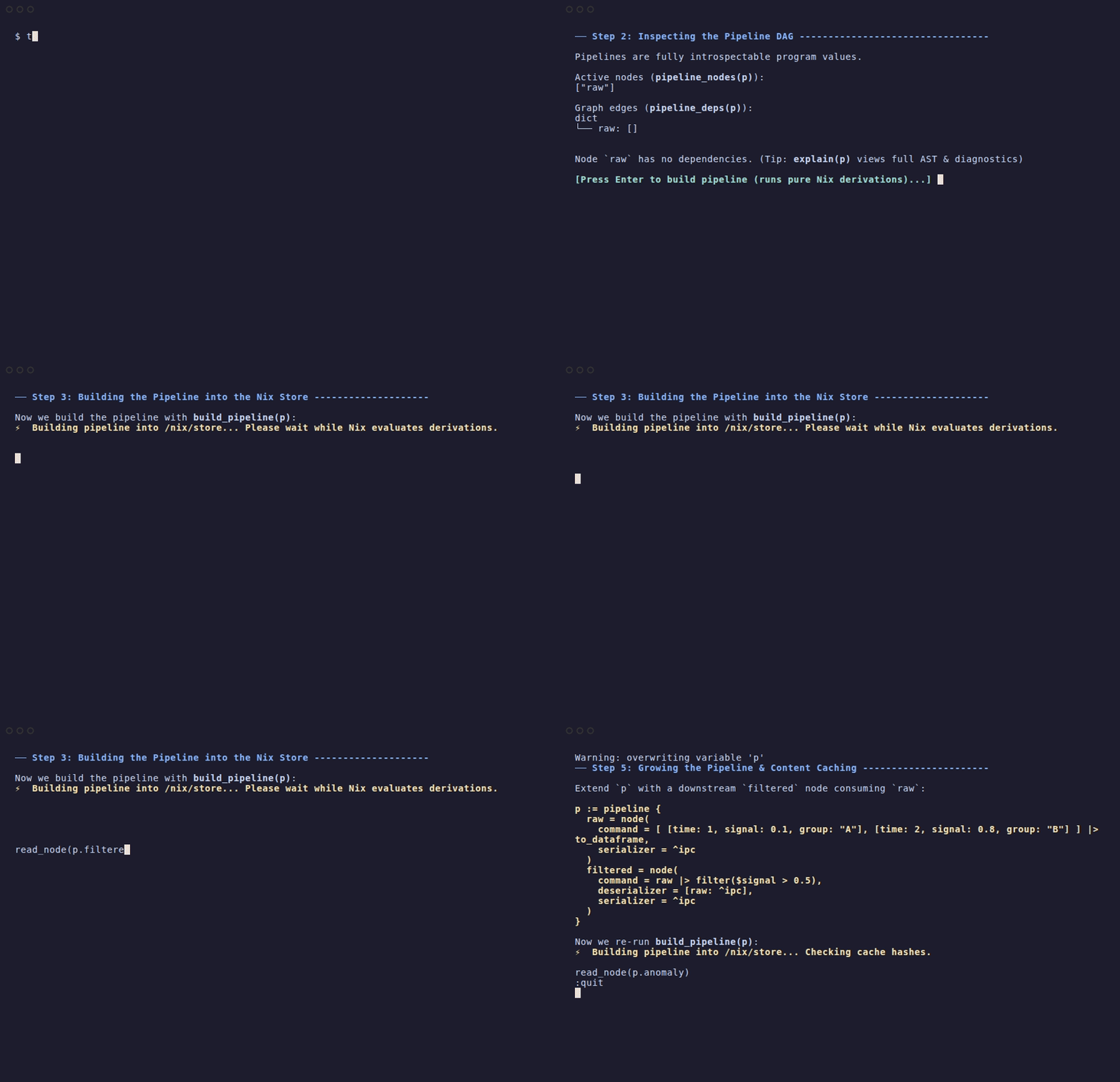
Interactive Demo in 30 Seconds
Run t demo right in your terminal to see pipeline
introspection, hermetic Nix builds, Arrow in-memory inspection, caching,
and first-class error handling in action. The demo builds in a scratch
directory under your current directory (so it resolves your project’s
flake) and removes it on exit:
How It Looks in Practice
A complete analysis that simulates non-linear data in Julia, fits a gradient-boosted regressor in Python, plots ground truth vs predictions in R, and compiles a Quarto report:
p = pipeline {
  -- 1. Simulate non-linear DGP in Julia (seeded)
  sim_data = jln(
    command = <{
      using Random, DataFrames
      Random.seed!(42)

      t = 1:500
      shock = cumsum(randn(500))
      DataFrame(time = t, shock = shock, signal = sin.(t ./ 20) .+ shock .* 0.2)
    }>,
    serializer = ^ipc
  )

  -- 2. Train non-linear model & predict in Python (scikit-learn)
  predictions = pyn(
    command = <{
from sklearn.ensemble import HistGradientBoostingRegressor

X = sim_data[['time', 'shock']]
y = sim_data['signal']
model = HistGradientBoostingRegressor(random_state=42).fit(X, y)
sim_data['pred'] = model.predict(X)
sim_data
    }>,
    deserializer = [sim_data: ^ipc],
    serializer = ^ipc
  )

  -- 3. Publication figure in R (ggplot2)
  plot = rn(
    command = <{
      library(ggplot2)

      ggplot(predictions, aes(x = time)) +
        geom_point(aes(y = signal), alpha = 0.3, color = "#7f8c8d") +
        geom_line(aes(y = pred), color = "#e74c3c", linewidth = 1) +
        labs(title = "Julia Simulation + Python ML Predictions", y = "Value") +
        theme_minimal()
    }>,
    deserializer = [predictions: ^ipc]
  )

  -- 4. Render reproducible Quarto report
  report = node(script = "src/report.qmd", runtime = Quarto)
}

build_pipeline(p)- Zero manual I/O: R returns the
ggplotobject directly; T’s runner automatically renders and caches the visual artifact withoutggsave(). DataFrames pass between nodes via Apache Arrow IPC (^ipc) withoutread.csv()orto_csv()glue. - No vendor lock-in (use standalone scripts): You
don’t have to embed code in
<{ ... }>blocks. Nodes accept external script files directly (jln(script = "sim.jl"),pyn(script = "train.py"),rn(script = "plot.R")). Your Julia, Python, and R scripts remain ordinary standalone files that your team can run or reuse anywhere with standard tooling. - First-class polyglot errors (no pipeline crashes):
If an error or exception occurs inside a node—whether in Python
(
raise), R (stop()), Julia (error()), or T (error())—it does not crash the entire pipeline build. T captures the error at the sandbox boundary, serializes a structuredVErrorartifact, and allows independent branches to complete. Downstream nodes can inspect the error withread_node()orexplain(), or recover programmatically. - Literate reporting: The Quarto node compiles
src/report.qmdinto an HTML or PDF report inside the Nix sandbox, directly embedding upstream metrics and figures. - Hermetic sandboxes: Every node executes in an isolated Nix sandbox with pinned runtimes.
- Seeded & cached: Julia and Python draws are explicitly seeded. Unchanged nodes resolve instantly from the content-addressed store.
Why Polyglot Pipelines Break (And How T Fixes Them)
Most modern quantitative projects in research, central banks, official statistics, and regulated industries are polyglot by necessity: - Julia is unmatched for raw numerical simulation, ODEs, and heavy optimization loops. - Python is the standard for modern machine learning and deep learning tooling. - R remains the gold standard for survey statistics, econometrics, and publication-ready reporting.
Connecting them today forces you to choose between three bad options:
| The Status Quo | The Failure Mode |
|---|---|
In-process FFI (reticulate,
PyCall, RCall) |
Shared memory between multiple runtimes with competing garbage collectors and conflicting OpenMP/BLAS threads causes unexplained segfaults. Upgrading one runtime breaks the other. |
| Ad-hoc Bash scripts & CSVs | No caching: tweaking a title in an R ggplot re-runs your 3-hour Julia simulation. Column types and missing values silently mutate during CSV export. |
| Chained Docker containers | Huge container images, slow local development, impossible for an analyst to inspect or debug interactively on a laptop. |
How T handles the seam:
- Process-level isolation: Each foreign language node runs in its own isolated process. Julia’s memory cannot corrupt R; Python’s C-extensions cannot conflict with Julia’s OpenMP threads.
- First-class data exchange: Data passes between
nodes using Apache Arrow IPC (
^ipc) and standard model serialization (^onnx,^pmml,^csv). No custom serialization glue scripts. - One pinned environment: Under the hood, Nix locks your R packages, Python wheels, Julia depot, and underlying system C/Fortran libraries in one declarative manifest. When paired with seeded execution, your pipeline builds and executes deterministically across machines.
- Polyglot soft-failures: In conventional workflow
engines, an uncaught exception in a single script aborts the entire DAG
run. In T, errors are first-class values across all runtimes: failing
nodes capture full tracebacks into structured
VErrorartifacts while independent parallel branches continue uninterrupted.
How T Compares
| Feature | {targets} | {rixpress} | Snakemake | Docker (packaging only) | T |
|---|---|---|---|---|---|
| Interface & Engine | R package (_targets.R),
host environment |
R package API, Nix engine | Python / CLI DSL, Conda/host | Container image, Docker daemon | Dedicated pipeline language, Nix engine |
| Cross-language seam | R-native (polyglot is bolted on) | R-native (Python nodes via
rixpress helpers) |
Shell scripts & CLI wrappers | Manual entrypoints & volume mounts | Process-isolated IPC across R, Python, and Julia |
| Intermediate I/O | Automatic | Automatic | Manual file paths | Manual volumes & files | Automatic (zero-boilerplate boundary transfer) |
| Node caching | Content-addressed (R) | Content-addressed (R) | Timestamp / file hash | Docker build layer cache | Content-addressed (all nodes) |
| System library locking | ❌ (Delegates to host) | ✅ (Hermetic Nix) | ⚠️ (Optional Conda) | ✅ (Per image) | ✅ (Hermetic per-node Nix sandbox) |
| Interactive inspection | ✅ (tar_read()) |
✅ (read_node()) |
⚠️ (File inspect only) | ❌ (Container attach) | ✅ (read_node(),
explain()) |
| Error resilience | ❌ (Aborts run) | ❌ (Aborts run) | ❌ (Aborts run) | ❌ (Container exits) | ✅ (First-class polyglot soft-failures) |
Foreign Language Nodes & Deserialization
When you define a node using node(), rn()
(R), pyn() (Python), jln() (Julia), or
shn() (Shell), T treats the result as a first-class
Node object. These objects transition through two main
states:
- Unbuilt Node: A specification of what to run (command, runtime, environment variables).
- Computed Node: After
build_pipeline(), the node points to a concrete, immutable artifact in the Nix store.
Automatic (De)serialization
When you call read_node(p.node_name) in the REPL, T
looks at the node’s serializer and attempts to
automatically load the data back into the T environment:
| Serializer | Resulting T Type | Backend |
|---|---|---|
default /
serialize |
Varies | Native T binary serialization |
arrow |
DataFrame |
Apache Arrow IPC (zero-copy) |
csv |
DataFrame |
Native CSV parser |
json |
Dict / List |
JSON parser |
pmml |
Model |
Native T model evaluator |
Inspecting Built Nodes with
explain()
You can use explain() to look inside a built node:
-- Example: Inspecting a built R node
> model_node = p.model_r
> explain(model_node)
{
  `kind`: "computed_node",
  `name`: "model_r",
  `runtime`: "R",
  `path`: "/nix/store/...-model_r/artifact",
  `serializer`: "pmml",
  `class`: "lm",
  `dependencies`: ["data"]
}
The path field is the escape hatch: it gives you the
absolute path to the node’s output in the Nix store. You can inspect the
artifact directly or pass it to external tools.
Documentation: The Theoretical Foundation
- Theoretical Paper: Reproducibility-First Programming Languages — the core philosophy and design principles of T.
Getting Started
- Getting Started Guide — first steps with T
- Your First Pipeline — declare R,
Python, and Julia packages, run
t update, and build a hello-world pipeline - Installing Nix for T — recommended Determinate Systems installer and setup
- Language Overview — types, syntax, functions, and standard library
- Type System — detailed guide to T’s type hierarchy and semantics
- Numerical Arrays — tutorial on N-dimensional arrays and linear algebra
- Editor Support — setup guide for Vim, Emacs, VS Code, and the Atelier TUI IDE
User Guides
- API Reference — complete function reference by package
- Data Manipulation Examples — practical examples with core data verbs
- Data I/O & Formats — loading and saving CSV, Parquet, and Arrow IPC files
- Factors & Categorical Data —
to_factor creation, level ordering, and
fct_*helpers - String Manipulation — naming rules, examples, and exceptions for text helpers
- Pipeline Tutorial — step-by-step guide to T’s pipeline model
- The Pipe Operator —
|>forwarding semantics and short-circuiting - Serializers in T — first-class
^serializersystem for data interchange and materialization - Agent Pairing Tutorial — building a T pipeline interactively with an AI agent
- Advanced Pipeline Tutorial — node manipulation, set operations, DAG transformations, composition, and validation
- Pipeline Materialization & Nix Orchestration — building pipelines into reproducible Nix artifacts, orchestration, archives, CI/CD, branching, and custom flakes
- Literate Programming with Quarto — rendering reports from pipelines
- Statistical Models — linear regression, GLMs, and broom-style output
- Plotting & Visualization — ggplot2, matplotlib, and visual metadata capture
- PMML Tutorial — move supported models between R, Python, and T
- Handling Dates — parsing, extraction, and date arithmetic
- Error Handling Guide — error patterns and recovery strategies
- Comprehensive Examples — real-world analysis patterns
- T Pipeline Demos — interactive reports for T demo projects
- Magic Commands — REPL-only
%shortcuts (%cd,%env, and more) - External Helper Packages — reading T artifacts from R, Python, and Julia
Advanced Topics
- Technical Presentation — DSL design, formal semantics, Arrow IPC, and Nix sandboxing architecture
- Reproducibility Guide — Nix integration and reproducible workflows
- LLM Collaboration — intent blocks and AI-assisted development
- Quotation & Metaprogramming — capturing and generating code
- Statistical Formulas — formula syntax for modeling
- Performance — Arrow backend and optimization
- Performance Analysis — in-depth analysis of T’s performance metrics
- Composable Lenses — functional updates for nested structures
- Nix Build Options & Orchestration — passing low-level nix arguments to the build
Developer Resources
- Architecture — language design and implementation
- Contributing Guide — how to contribute to T
- Code of Ethics — principles and values for the T community
- Development Guide — building, testings, and debugging
- Project Development — managing T projects and workspaces
- Package Development Guide — creating and publishing T packages
Reference & Support
- Function Reference — exhaustive per-function guide
- FAQ — frequently asked questions
- Troubleshooting — common issues and solutions
- Changelog — history of changes and releases