On September 3, 2026 at IFA, NVIDIA shipped the first beta of Personal AI Router (PAIR), a free, Apache 2.0 tool at NVIDIA/Personal-AI-Router on GitHub (version 0.1.1). PAIR discovers the compatible machines on your local network - GeForce RTX 20-series or newer, RTX PRO workstation cards, DGX Spark, and Macs with M4 or newer silicon - and exposes a single local endpoint that speaks the Ollama and OpenAI protocols. Every request your agent sends gets routed to whichever paired machine has capacity. Nothing leaves the network: prompts, files, and responses stay on the LAN between paired nodes.
The tweet carries NVIDIA’s announcement video; the demo shows two paired machines sharing inference traffic with live per-node reporting.
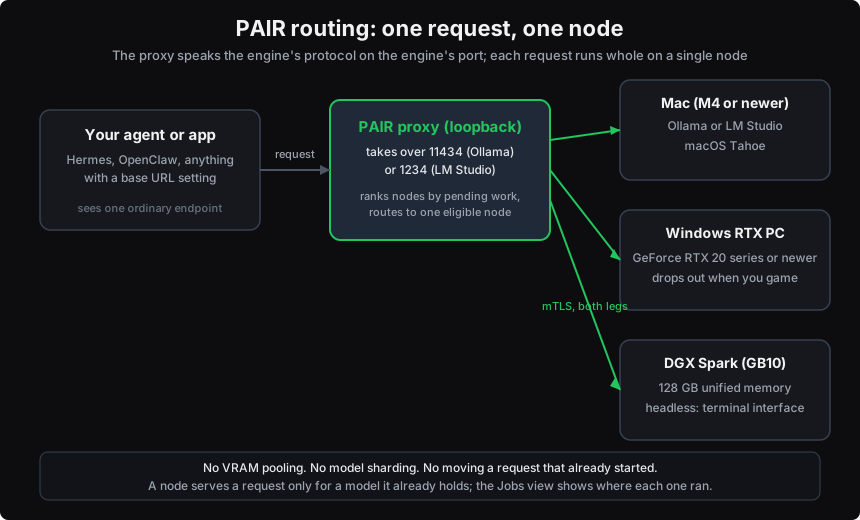
PAIR’s request flow: the app sees one ordinary endpoint; the proxy ranks nodes by pending work and sends each request whole to exactly one of them.
What PAIR actually is
The name invites a wrong assumption, so the docs state it first: PAIR is a router, not a pool. It does not merge GPUs, does not combine VRAM, and does not split a model or a request across machines. Per the project overview, “each request runs whole on a single node,” and a request that already started never moves to another node. What adding machines buys you is concurrency - more requests at once - not a faster single request.
The trick is in the port. PAIR’s proxy takes over the default ports Ollama and LM Studio already listen on - 11434 and 1234 - and the real engine moves to the next free port. Any agent or app with a base-URL setting keeps pointing at the address it already used and never learns PAIR exists. NVIDIA’s technical blog splits the responsibility cleanly: “the agent decides what work to request; PAIR decides where it runs.”
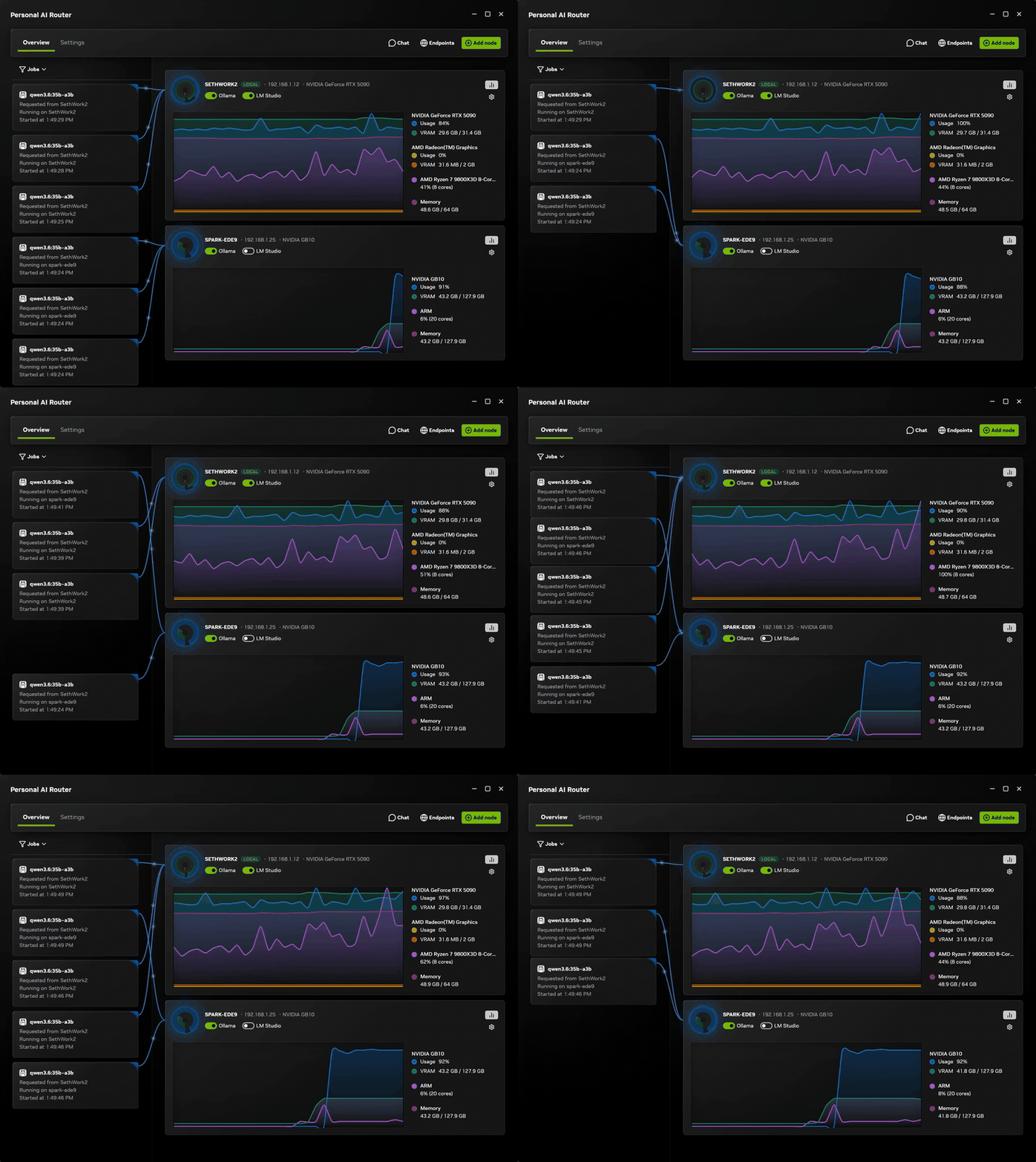
From the project’s own assets: two paired machines serving routed requests, with live GPU and memory reporting on each node card.
Routing is model-aware. A node serves a request only if it is online, its engine is enabled, and that engine’s inventory advertises the exact model requested. Nodes do not share models, and they do not need matching sets - replicating one model tag across two nodes is what makes those nodes interchangeable. When nothing is eligible, the proxy returns a local 502 rather than sending work to a wrong machine.
How a request gets placed
The beta ships one scheduling policy. The proxy ranks eligible nodes by total pending work, counts the requests it just dispatched so a burst spreads out before workload reports catch up, and falls back to a deterministic default when ranks tie. The known-issues doc is blunt about what the scheduler ignores: GPU model, available memory, current utilization, measured latency, and how expensive a request looks. On a mixed cluster, “expect work to land on a slower node about as often as a faster one.” NVIDIA’s README calls smarter routing the clearest roadmap item and asks users to report which signals matter on their hardware.
Routing is a decision, not a guarantee, so the verification tool is the Jobs view: one row per routed request, naming the node that served it.
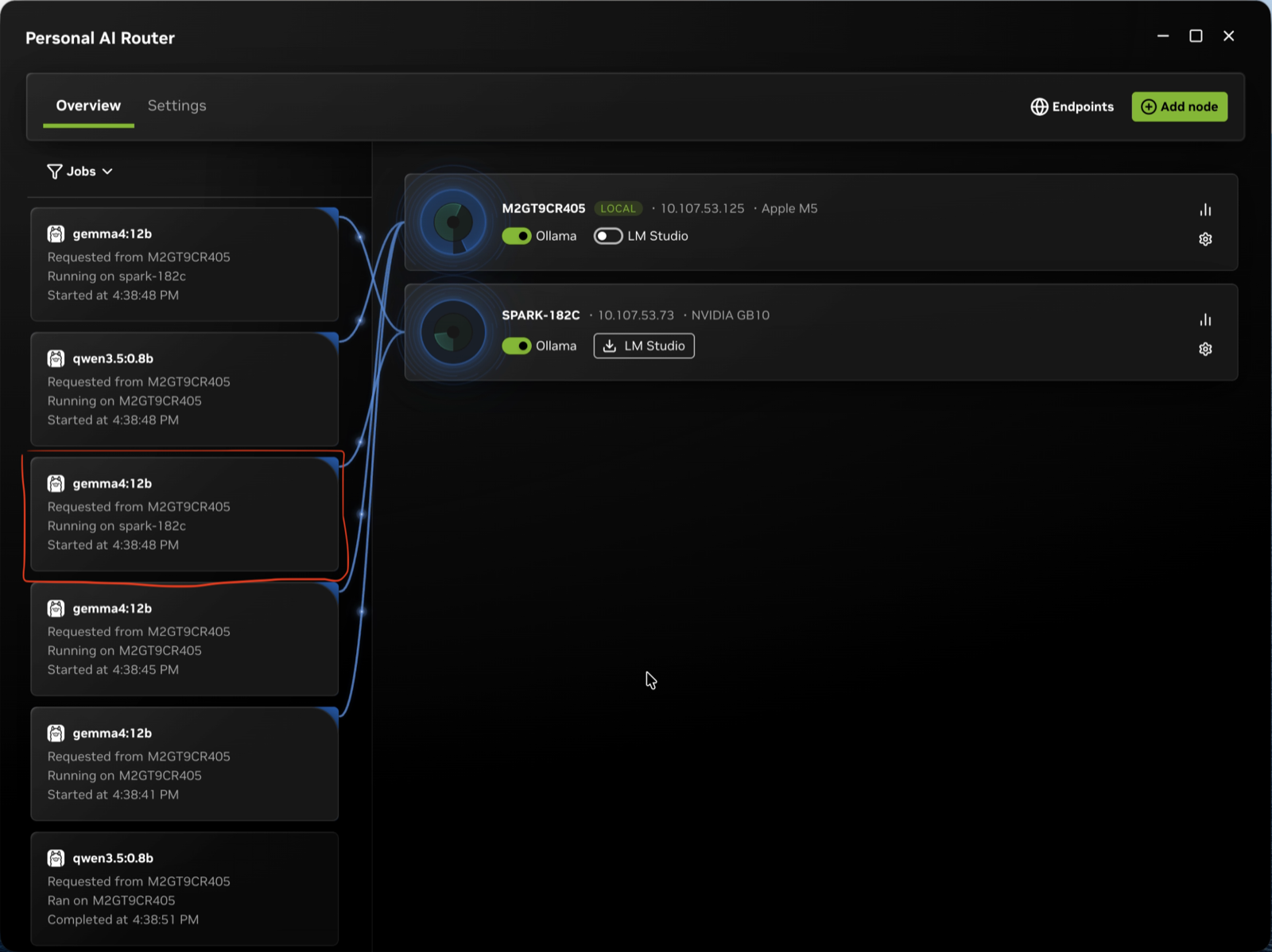
The Jobs view is the ground truth for placement. NVIDIA notes agent count does not equal job count - one agent can fire many model requests.
Setting up a two-machine cluster
Install PAIR on every machine that will contribute compute. There is no controller node; every node runs the same software, a desktop app plus background services, and headless machines get a terminal interface with the same services behind it.
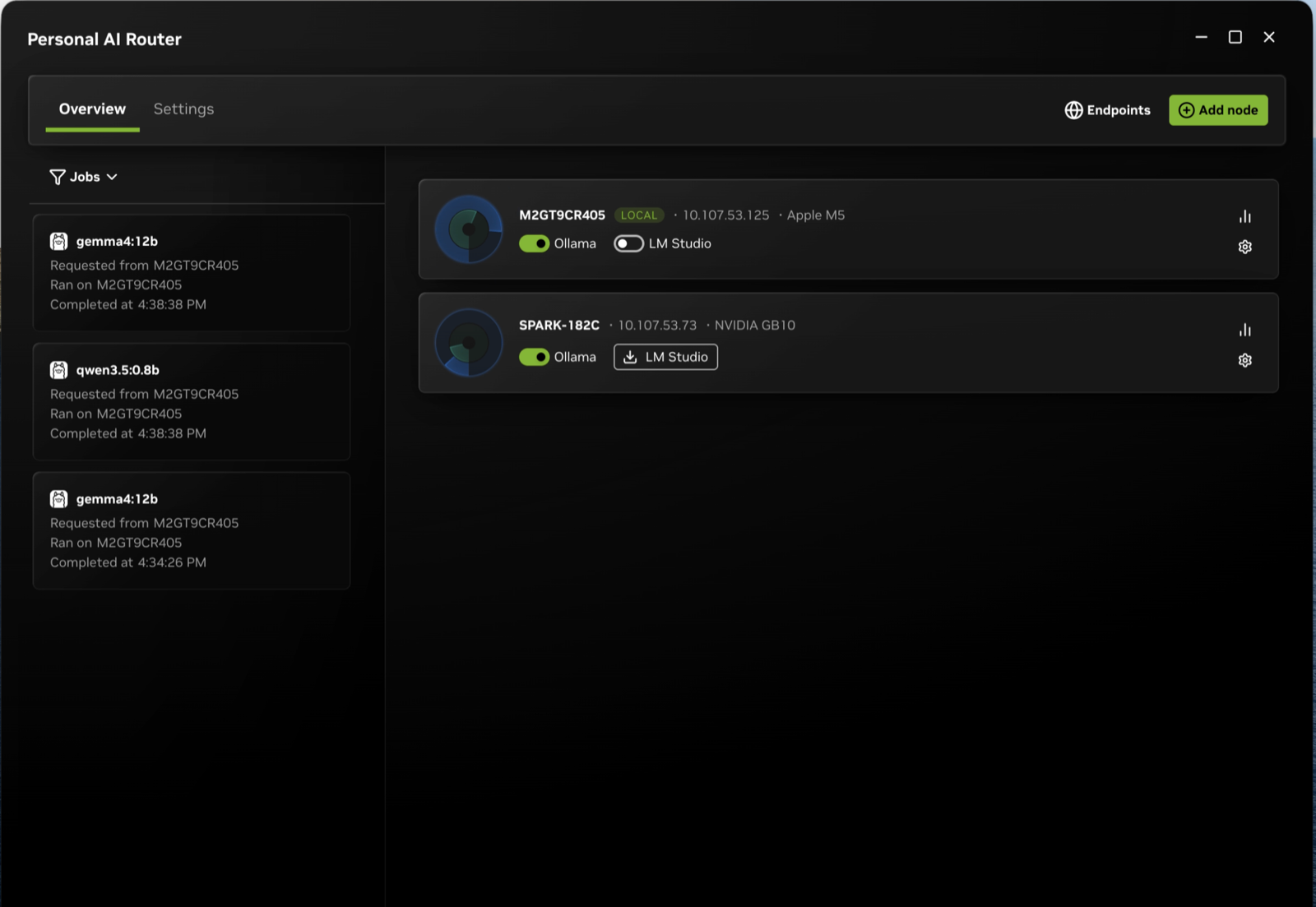
The overview screen on a two-node cluster, with both node cards and the jobs that ran across them.
Pairing is the trust step. PAIR finds candidates over mDNS (manual IP entry works behind restrictive firewalls), but discovery grants nothing - a node joins the cluster only after someone accepts an invitation and types a six-digit PIN on the other machine. All node-to-node traffic stays blocked until pairing completes, then runs over mutual TLS with generated certificates; non-members are refused.
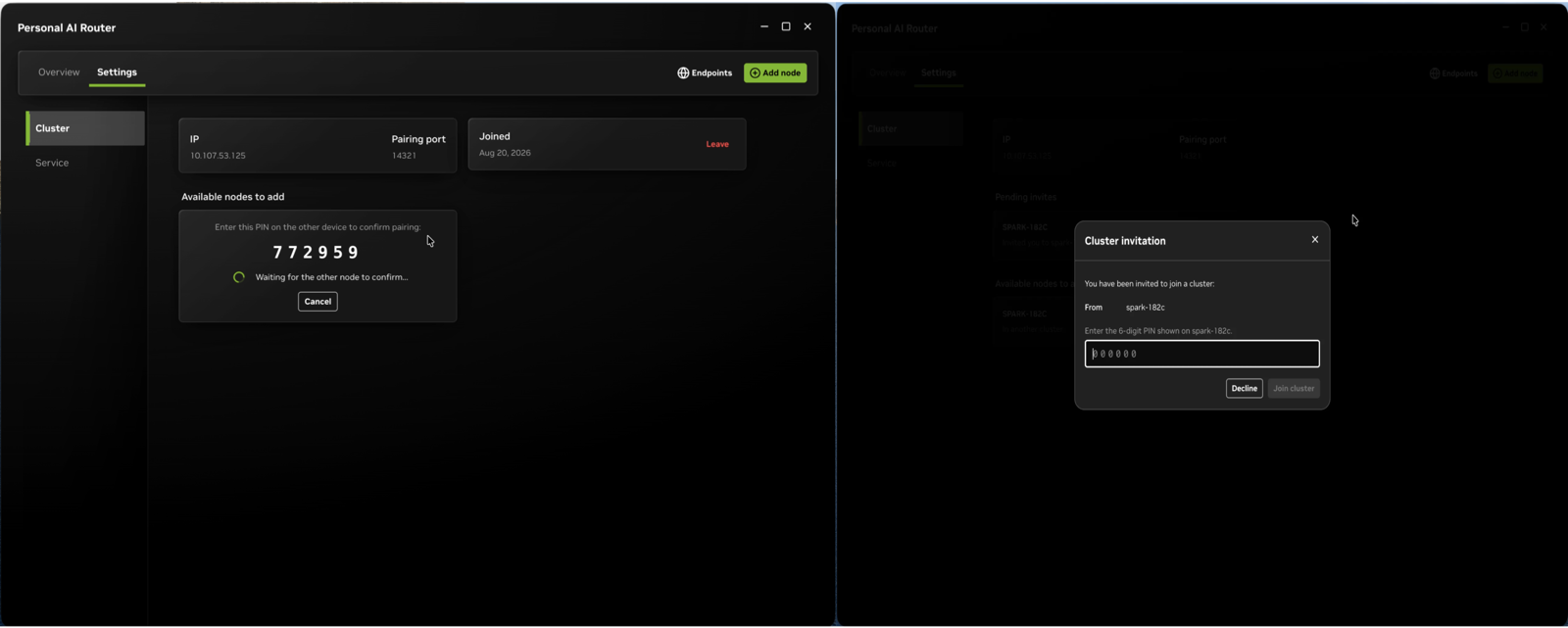
The six-digit pairing modal. NVIDIA’s docs call the PIN “a short-lived setup code, not a long-term credential” and advise reading SECURITY.md before pairing on shared networks.
Then prepare each node: install Ollama or LM Studio through PAIR’s engine settings (it can also adopt engines you already run) and pull the models that node should serve. Model weights live in the engine’s own storage, so uninstalling PAIR never touches them.
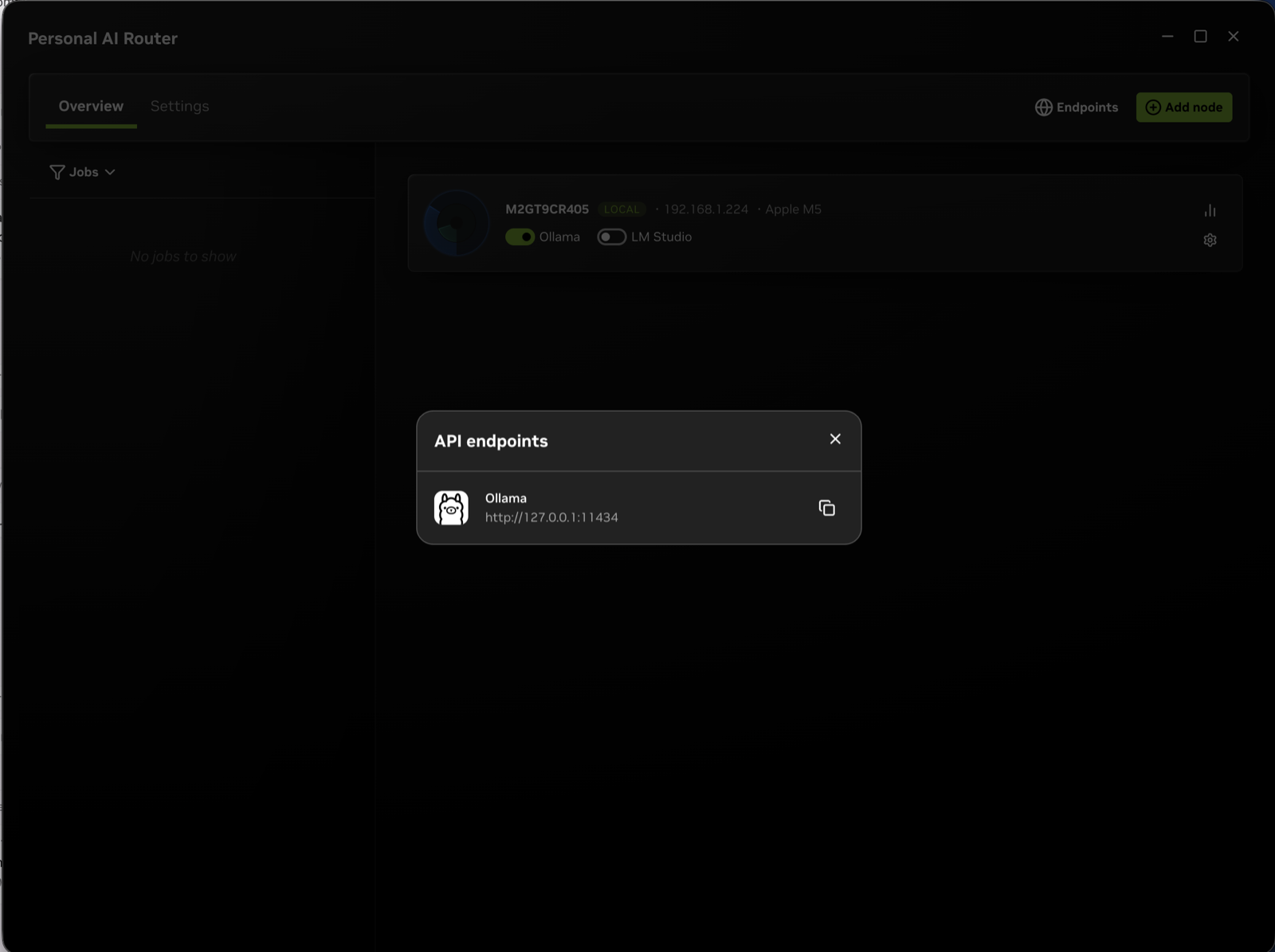
The endpoints view lists one copyable http://127.0.0.1:<port> URL per engine. Point your agent here instead of at the engine directly.
NVIDIA rates the whole flow at about ten minutes plus model download time. Internet is required only for pulling models, not for operation afterward.
The numbers NVIDIA showed
Two unofficial demo configs, from the technical blog with NVIDIA’s own caveat that these are config-specific and not a scaling promise:
- Single RTX Spark laptop: a five-subagent Hermes workload (Qwen 3.6 35B A3B) averaged 18 minutes.
- Three-node cluster (the same laptop plus a DGX Spark plus an RTX 5090 desktop): 8 minutes 48 seconds.
- Two RTX 5090s: the same workload went from 6:18 alone to 3:48 clustered, roughly 1.66x.
Reviewers flagged the fine print: part of the first gain comes from adding a 5090, not from routing itself, and a cluster of identical machines will see smaller gains than the demo implies. Tom’s Hardware added the QoS caveat: spare cycles are not reserved capacity, so this fits long-running work without deadlines, not latency-critical paths.
What shipped alongside it
The IFA announcement paired PAIR with the client side of the same story. Hermes Agent from Nous Research got one-click local setup on Windows: it auto-detects the RTX GPU, picks a model and configuration, and runs through an integrated llama.cpp build - Windows now, Linux to follow. OpenClaw, “the largest AI project on GitHub, with more than 380K stars” per NVIDIA, got an OpenClaw Windows App built with Microsoft that targets any RTX GPU with 24 GB or more of VRAM. Both feed PAIR’s thesis directly: these are the multi-request agent harnesses that a household cluster exists to serve.
The inference-stack numbers went from teaser to installable on September 4, and they flow through LM Studio and Ollama now: llama.cpp up to 1.9x higher throughput on an RTX 5090 (kernel optimizations, enhanced speculative decoding, faster prefill), and vLLM 1.2x on an RTX PRO 6000 Blackwell plus up to 1.4x on two-DGX-Spark clusters via new XQA attention kernels in FlashInfer. PAIR spreads requests across nodes; these make each node faster. They compound rather than overlap.
One reply on the announcement asked the question most readers will: what are the optimizations, and how do you install them? NVIDIA’s blog limits its answer to availability: the gains are “available now directly and through LM Studio and Ollama,” with no separate installer named.
The mechanics behind the llama.cpp number: speculative decoding
The “enhanced speculative decoding” inside that llama.cpp gain has its own technical writeup (September 2, 2026). The mechanism: a small draft model proposes several next tokens, and the target model verifies them in one parallel pass, keeping only accepted tokens. Because only target-accepted tokens are retained, the output “matches standard decoding unless acceptance criteria are deliberately relaxed” - this is a throughput lever that does not trade away accuracy.
The post’s five practical guidelines, with the numbers that matter:
- Grow the draft until compute saturates. Raising draft length D multiplies the tokens verified per pass without growing KV cache pressure; with D=7, one-eighth of the batch size reaches the compute-bound region versus plain decoding.
- Attention-bound workloads: D = 128/G - 1, where G is the group size. G=8 gives D=15; G=32 gives D=3.
- Tile alignment beyond that. If D exceeds 128/G - 1, pick values where G x (1 + D) is a multiple of 128 - the kernel tile size - or partially utilized tiles cost as much as full ones.
- At very low latency, grow D only while acceptance length pays for drafting. Kernel launches dominate; speedup approximates AL / (1 + rho D).
- Pick the draft mechanism for your hardware and workload, weighing acceptance length, draft latency, and training cost. NVIDIA’s benchmarks show external draft models beating other mechanisms above D=3, while n-gram acceptance is lower but suits repetitive patterns.
The benchmark pair is itself a local-AI setup: target model Qwen 3.5 122B A10B, with a Qwen 3.5 35B A3B external draft reaching an acceptance length of 6 at D=9, and a 4B draft above 5. The mechanism tradeoffs map to hardware you likely own: MTP (built into the checkpoint during pretraining) is the pick for larger models on GPUs; DFlash and DSpark win for smaller models at batch size 1; n-gram needs no training at all and fits repetitive workloads. One quote worth keeping: “Higher AL does not equal higher speedup. You also need to consider how much it costs to generate the draft.”
For hands-on work, ready-to-run training examples for EAGLE-3, DFlash, and DSpark live in NVIDIA/Model-Optimizer, and NVIDIA’s SPEED-Bench is their recommended yardstick for acceptance-length comparisons.
Setups this makes real
NVIDIA’s positioning number: “More than half of U.S. households have two or more PCs, and much of that computing power sits idle throughout the day.” Seth Schneider, NVIDIA product manager, told The Verge that an “extreme household” of machines carries about 165 teraflops of underused compute - “a treasure trove of free tokens just sitting in homes.” Coverage citing NVIDIA’s estimates puts a typical household’s idle compute at roughly $1,200/month in equivalent cloud API spend, processing around 120 million tokens per day with a mid-sized model. Schneider’s realistic target user is more modest: one MacBook or Windows laptop plus one gaming PC.
The Mac inclusion is the surprise. PAIR routes to Macs with M4 or newer silicon on macOS Tahoe - which excludes the M3 Ultra Mac Studio - and a Mac can serve as the machine running your app while engines run elsewhere, since a node without a GPU can still reach the cluster. NVIDIA says it tested up to 18 devices in a cluster.
It also formalizes setups people were hand-rolling. Before PAIR, a MacBook-plus-Spark build meant Tailscale, Remote SSH, and vLLM tuned by hand (Qwen3-Coder-Next-FP8 at roughly 43 tok/s versus 9 on Ollama). Home racks of Sparks were already a thing - Lucas Fulk’s 4x Spark rack with window-ducted exhaust, TechMDAI’s vertical 4x cluster on a 1U switch - but those pools served one endpoint each. PAIR turns multi-box homelabs into a single endpoint that games, laptops, and Macs float in and out of: start gaming on the 5090 and that node drops out of the cluster until you are done.
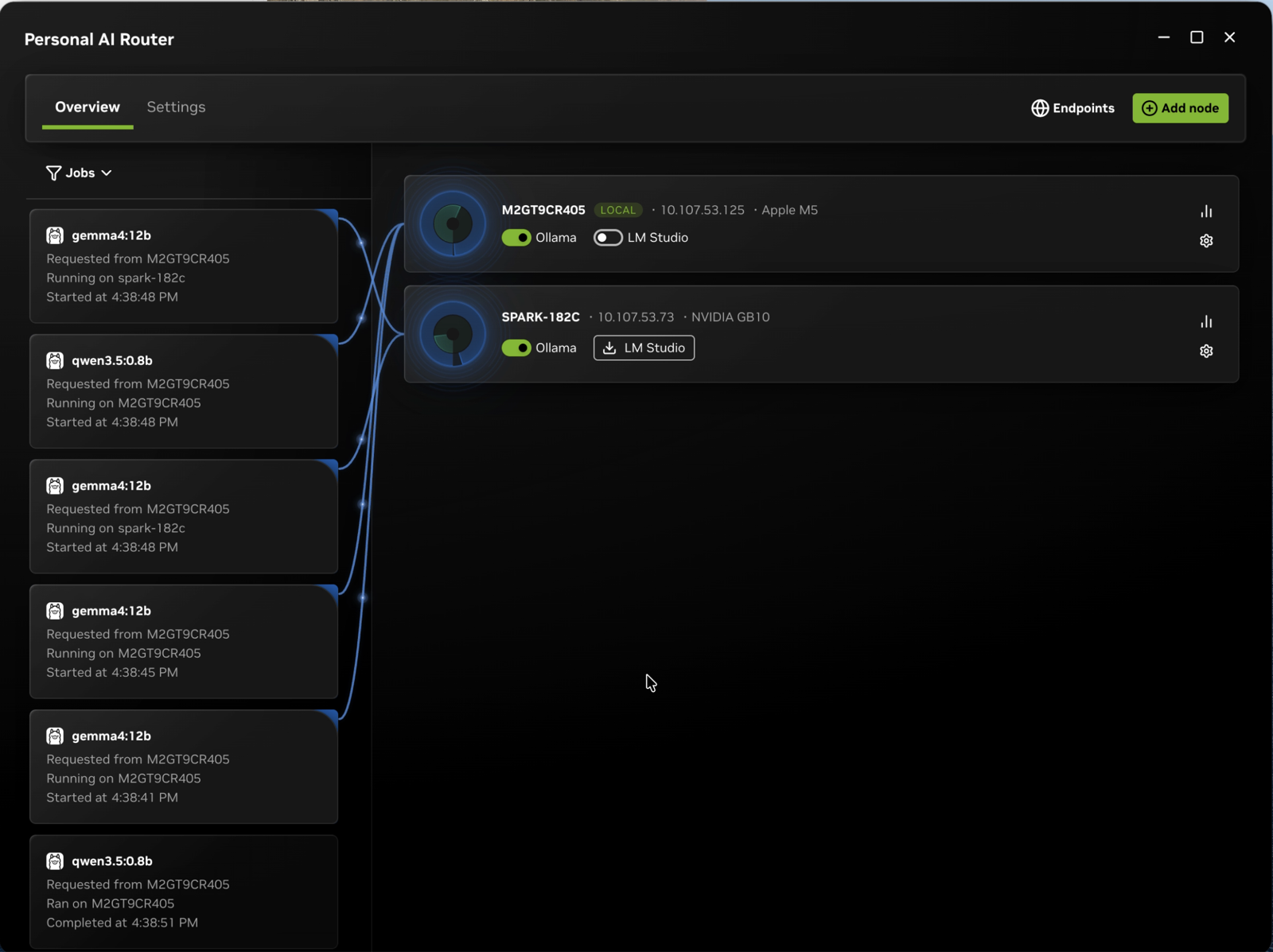
Demo traffic across a cluster: the routing view shows which node handled each job as nodes join and leave.
The October wave matters here too: RTX Spark Windows PCs from Lenovo and Acer (1 petaflop Blackwell GPU, up to 128 GB unified memory, 20-core Grace CPU) land in October 2026, and a household with one of those plus existing RTX desktops and Macs is exactly the mixed cluster PAIR routes across.
Gotchas the docs admit to
The known-issues page is unusually honest. The ones that matter for a home deploy:
- Scheduling counts jobs only. It does not consider GPU model, memory, warm models, or request cost. Mixed clusters of a Spark, a 5090, and a Mac will route work to the slow node about as often as the fast one until the policy improves.
- Unified-memory reporting is wrong on some platforms. DGX Spark figures are correct, Windows integrated GPUs are understated, and Linux machines without an NVIDIA driver show no memory figure at all. It is display-only - routing ignores VRAM - but judge large-model placement from the machine’s own tools.
- No stuck-service detection. A hung service keeps running but stops updating state; nodes never refresh and jobs never complete. Fix is Settings > Service > restart. On macOS there is a rarer variant: an unclustered PAIR can stop answering LAN connections while looking healthy.
- The terminal interface is an operations tool, not a replacement. It cannot list or delete models, change engine ports, update engines, or show which node served a workload.
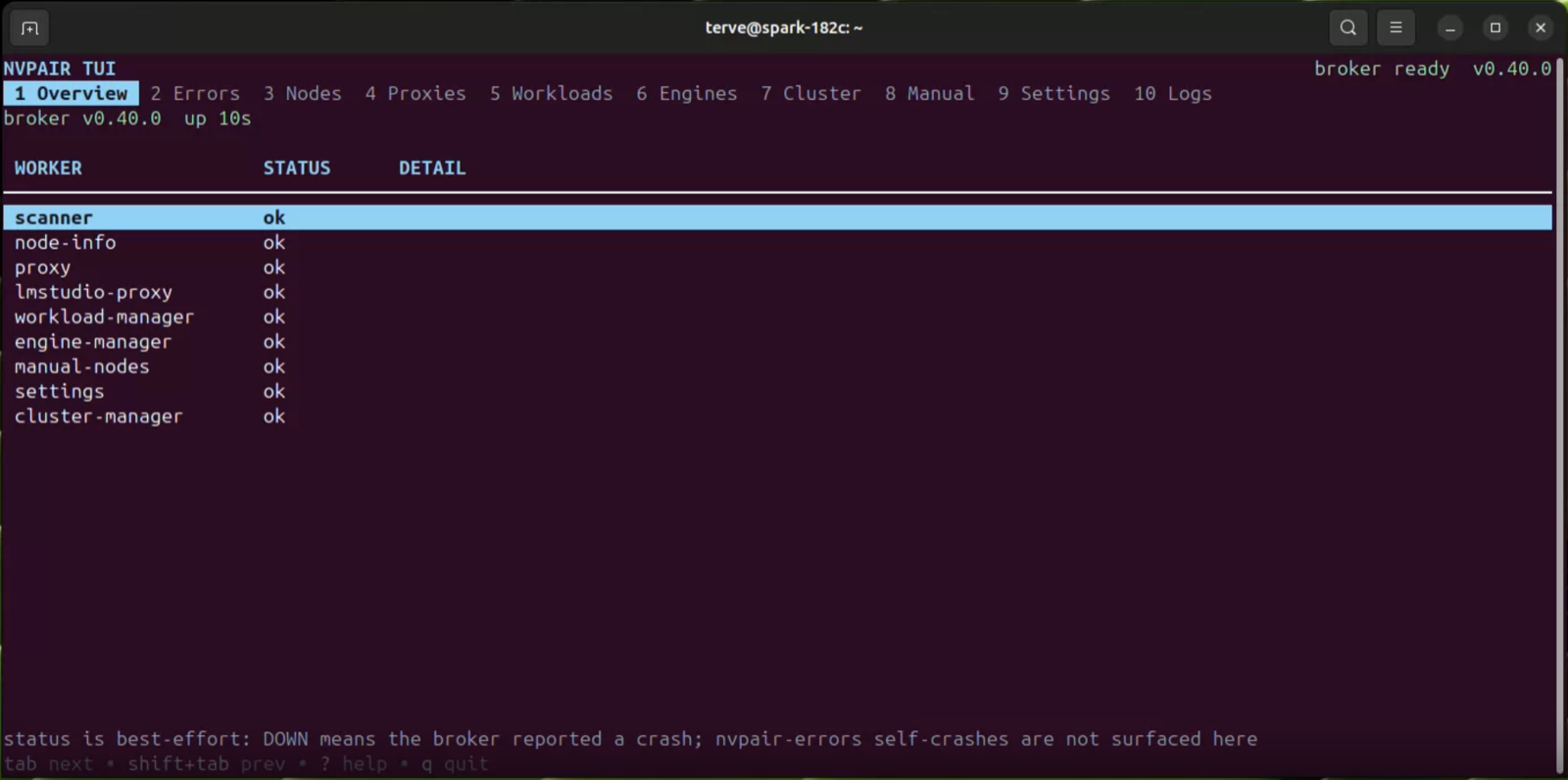
The terminal interface for headless machines, driving the same services as the desktop app.
-
Linux ships as a
.debonly - RPM distros build from source - and Windows on ARM is experimental.
Security posture
Everything is LAN-scoped by design: local HTTP endpoints, loopback access for local apps, mDNS discovery, PIN-paired membership, mTLS between nodes with both legs encrypted (request out, response back). NVIDIA’s own caution is about the bootstrap: the PIN is convenience, not strong authentication, so pair only on networks and with machines you trust, and read SECURITY.md before deploying on a shared network like an apartment building or office LAN. PAIR accepts requests only from the local system; there is no exposed remote surface by default.
Who should wait
Three configs get little from PAIR today: sequential workloads that fire one request at a time; anything latency-critical, where unreserved spare capacity is a liability; and a cluster where only one node holds the model. And PAIR cannot grow a model - a 200B-class model still needs one machine that fits it in memory, no matter how many laptops pair in. For households running multi-agent stacks - Hermes, OpenClaw, anything spawning parallel subagents - across two or more machines, this is the first tool that makes the whole LAN one endpoint without config files. Version 0.1.1 beta is the right time to try it and the wrong time to build anything load-bearing on the scheduling order.
Sources
Primary: NVIDIA PAIR product page · NVIDIA technical blog · NVIDIA IFA announcement · Personal-AI-Router docs and SECURITY.md.
Coverage: The Verge · Tom’s Hardware · Hardware Busters · AppleInsider · Engadget.
Related on this site: DGX Spark benchmarks 2026 · Self-host AI on DGX Spark, RTX, and Mac