When I want to learn a new topic quickly, I usually do not start with books or long courses. I start with YouTube.
YouTube is one of the fastest ways to get up to speed on almost anything. The problem is that videos are slow to search, hard to skim, and easy to forget. That is where transcripts and AI become incredibly useful.
Here is a simple workflow I use to research almost any topic faster.
Step 1: Find a good YouTube video
Start by searching YouTube for the topic you want to learn. Look for a recent video with solid engagement that seems focused on the exact problem you are trying to solve.
For example, if you want to learn about SEO, do not just search for SEO. Search for something more specific, like technical SEO for beginners, SEO audit tutorial, or how to rank blog posts in Google.
The more specific the video, the better the transcript will be.
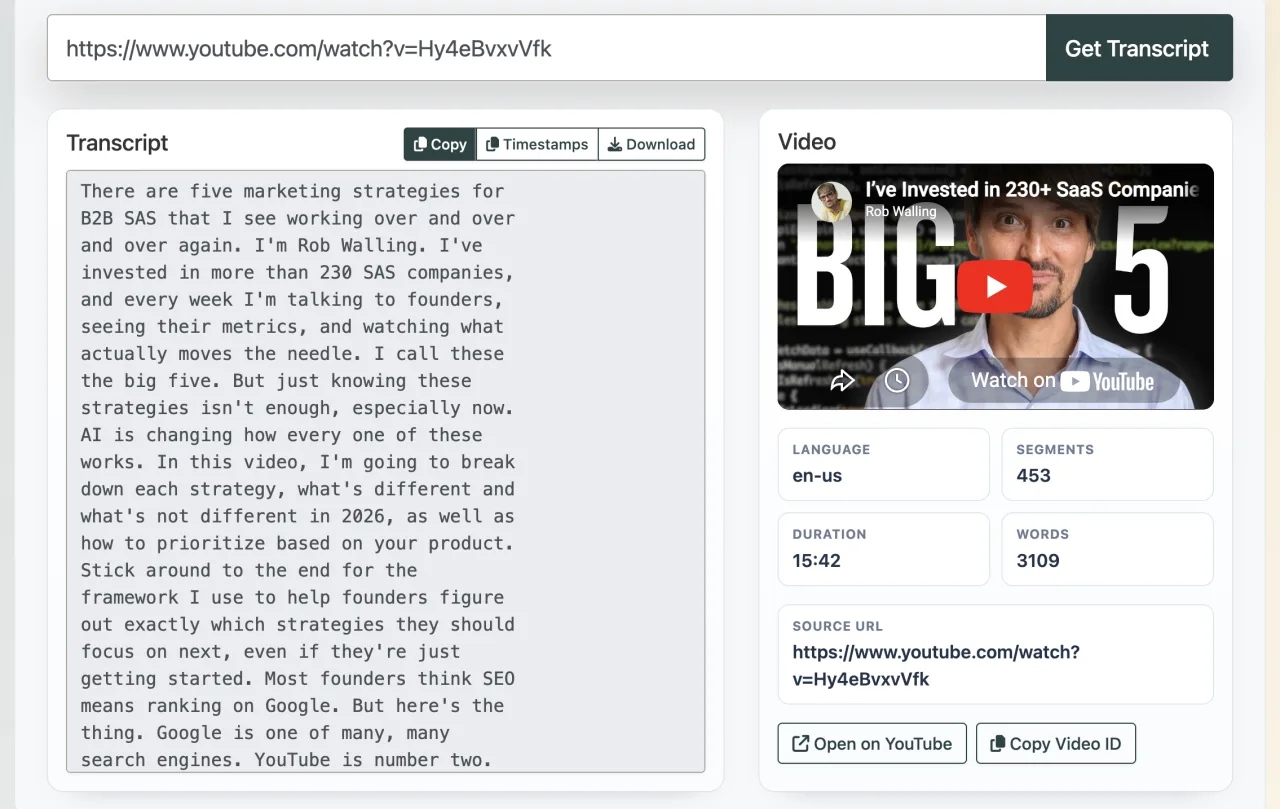
Step 2: Get the video transcript
Once you find a good video, copy the YouTube URL and paste it into the YouTube Transcript Extractor.
This tool pulls the public caption track from a YouTube video and turns it into clean, timestamped text. That is much easier to search, skim, save, and reuse than scrubbing through the video repeatedly.
This is the step that saves the most time. Instead of watching the same video three times, you can quickly scan the transcript and jump straight to the most useful sections.
Step 3: Paste the transcript into AI and ask questions
After you have the transcript, paste it into your AI tool of choice, such as ChatGPT, and ask it to summarize the video.
But do not stop there. The real value comes from asking follow-up questions.
Here are a few prompts that work well:
Summarize this video in plain English.

What are the 5 most important ideas from this transcript?

Explain this like I am a beginner.

What parts of this transcript are outdated or need to be verified?

Turn this into a step-by-step checklist.

Create a glossary of important terms from this transcript.

Quiz me on this topic so I can test what I learned.

What should I study next after understanding this video?How can I apply this video to my company?
This turns one YouTube video into something much more useful: a summary, a study guide, a checklist, and a personalized tutor session.
Additional tips to learn even faster
The 3-step workflow above is already powerful, but a few extra techniques make it even better.
Use more than one video
Do not rely on a single source. Find 2 or 3 strong videos on the same topic and compare them. If the same idea appears in multiple videos, it is probably important. If one video says something very different, that is a sign to dig deeper.
Ask AI what the expert assumed you already knew
This is one of my favorite tricks. A lot of educational content skips over basics without realizing it. Paste the transcript into AI and ask:
What does this speaker assume I already know?
That one question can reveal the missing foundation slowing your learning.
Turn the transcript into notes
Ask AI to convert the transcript into bullet point notes, key takeaways, and action items. This makes it much easier to review later without going back through the full transcript again.
Create a cheat sheet
If the topic is practical, ask AI to create a one-page cheat sheet. This is great for coding, marketing, SEO, design, finance, or really any skill where you want a quick reference.
Ask for examples
Understanding improves a lot when you see concrete examples. Ask AI to give you real-world examples, analogies, or beginner-friendly explanations based on the transcript.
Use timestamps to jump back into the video
One nice thing about a timestamped transcript is that you do not lose the original context. If one part of the transcript stands out, jump back to that exact moment in the video and rewatch only that section.
Build a personal learning loop
A simple loop looks like this:
- Watch or skim one good video
- Extract the transcript
- Summarize it with AI
- Ask follow-up questions
- Turn it into notes or a checklist
- Apply what you learned right away
The last step matters the most. The fastest way to learn is to use the information immediately.
Should you build a tool to analyze an entire YouTube channel?
Maybe. If you find yourself researching the same creator, niche, or industry repeatedly, a channel-level tool could be incredibly useful.
Instead of extracting one transcript at a time, imagine pulling transcripts from an entire YouTube channel and combining them into a searchable dataset. Then you could ask AI much bigger questions, such as:
What topics does this channel talk about the most?

Summarize this creator's main ideas across their last 50 videos.

What opinions have changed over time?

What videos mention SEO, link building, or blogging?

What are the most repeated tips across the entire channel?

Create a beginner roadmap based on everything this channel teaches.
That would be powerful because it turns a channel into a knowledge base instead of a list of videos.
This could be useful for:
- Researching experts in a niche
- Studying competitors
- Learning from educators with large back catalogs
- Finding content gaps or repeated ideas
- Turning a channel into a searchable library
The main challenge is volume. Large channels can have hundreds or thousands of videos, which means lots of transcript data to clean, store, chunk, and summarize properly. You would also need to think about missing captions, duplicate content, and how to let users ask questions without overwhelming the AI context window.
Still, I think it is a great tool idea. A single-video transcript extractor is already useful, but channel-level analysis would make this much more powerful. It would let you learn from a creator’s full body of work instead of just one video.
If you are serious about learning quickly, this is the natural next step: move from analyzing one transcript to analyzing an entire collection of transcripts.
Why this works so well
Videos are great for discovery, but transcripts are better for research. AI makes the transcript interactive.
Instead of passively watching, you are turning content into a conversation. You can ask for summaries, clarification, examples, quizzes, next steps, and even opposing viewpoints.
That is a much faster way to learn than just watching a 30-minute video and hoping you remember it later.
Final thoughts
If you want to research almost any topic quickly, this is one of the best workflows I have found:
- Find a good YouTube video
- Extract the transcript
- Paste it into AI and start asking questions
It is simple, fast, and works for just about everything from learning SEO to understanding coding concepts to researching a new business idea.
If you try this workflow, let me know which topic you use it on first.