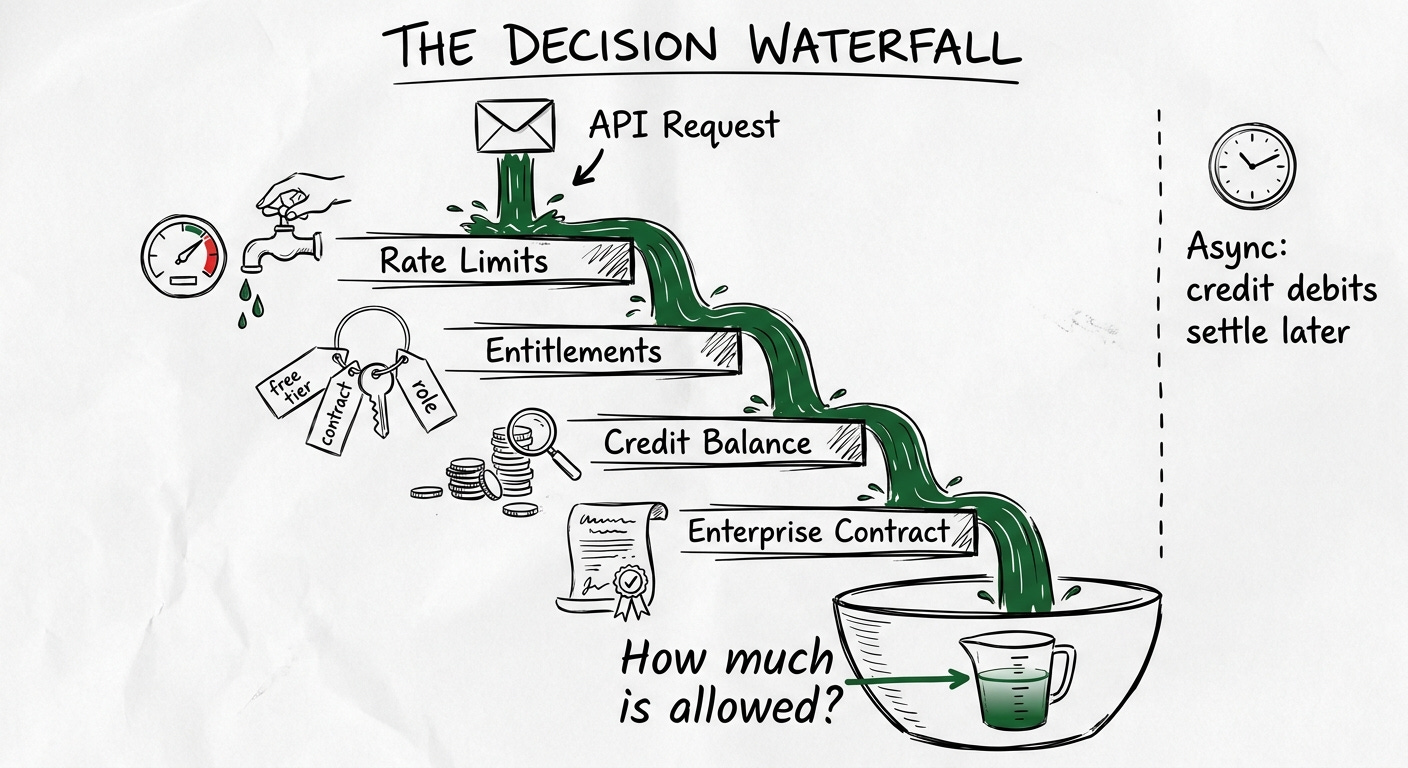
OpenAI published a blog post in February called “Beyond Rate Limits” that might be the most architecturally revealing piece of writing any AI company has released about its billing internals. I’ve read it three times. The key concept is something they call a “decision waterfall”: instead of asking is this request allowed?, the system asks how much is allowed, and from where? Every request passes through a single evaluation path that synchronously checks rate limits, verifies credits, and returns one definitive outcome. Credit debits settle asynchronously. Rate limits, free tiers, credits, promotions, and enterprise entitlements are all layers in the same decision stack, and from the user’s perspective, they never switch systems.
The post also says something that stopped me: “We evaluated third-party usage billing and metering platforms to handle credit consumption. They’re well-suited for invoicing and reporting, but didn’t meet two critical requirements.” Requirement one: when a user hits a limit and has credits available, the system must know immediately. Requirement two: this capability needed to be tightly integrated into the decision waterfall rather than solved in isolation.
Those two requirements are a blueprint. Not just for OpenAI’s scale. For anyone building enterprise credit governance. And the reason I’m writing about this now is that over the past few weeks, as I’ve been covering credit system internals in this newsletter, the question I keep hearing from readers is: “This is great for a single customer. But how does it work when my customer is a 500-person organization with teams and budgets and a procurement process?”
That question led me to spend the last week pulling apart the credit governance architectures of four AI-native companies: OpenAI, Cursor, Clay, and Vercel. Each encodes a different answer to the hierarchy-and-enforcement problem, and each teaches something transferable to your own implementation. This post is a test drive through all four.
In my previous posts, I covered how credits work as an abstraction layer and the trade-off engineering behind ledgers, wallets, and consumption ordering. Everything I described operated on a single customer entity: one account, one credit pool, one balance.
Enterprise changes the problem in three compounding ways. First, an enterprise customer is a hierarchy, not an account. A parent company has divisions, divisions have teams, teams have individual users. The contract is signed at the top; consumption happens at the bottom. Second, enterprise buyers need spend governance before they’ll commit to large prepaid deals. The procurement team writing a six-figure check needs assurance that credits won’t evaporate in six weeks because one team ran unoptimized agent workflows. Third, the accountability model inverts: in PLG the payer is the consumer, but in enterprise the signer is layers away from the engineer running inference calls. Without a hierarchy reconnecting cost signal to usage signal, every team optimizes for its own velocity and nobody owns the bill.
In my work at Stigg, I see this pattern every week. Companies that have built elegant self-serve credit systems discover that enterprise requires a fundamentally different governance layer. The question isn’t whether to build it. It’s which architectural model to follow.
These four companies offer four distinct answers. Let me walk you through what each one teaches.
OpenAI’s architecture is the one to study if you’re building a platform where users consume AI directly and you need to unify multiple entitlement types (rate limits, free tiers, credits, enterprise contracts) into a single enforcement layer.
The API platform uses a clean three-level hierarchy: Organization → Projects → API Keys. Every organization includes a “Default project” that can’t be deleted. API requests target specific orgs and projects via headers (OpenAI-Organization and OpenAI-Project), and usage is attributed accordingly. Rate limits, virtual model permissions, and spend budgets are all configurable at the project level.
The project-level rate limit APIs are worth studying as a design pattern. You get programmatic access to per-model limits:
If you’re building your own project-level governance, this is a good API shape to copy. It separates rate limiting from budget enforcement, gives each model its own limit pool, and makes everything programmatically accessible so platform teams can automate governance.
The usage tier system is another pattern worth understanding: six tiers from Free ($100/month cap) to Tier 5 ($50,000/month cap), with automatic advancement based on cumulative spend and account age. This is trust-based progressive governance. New accounts are constrained not because OpenAI doesn’t want their money, but because a leaked API key on a high-tier account is a financial liability. The tier gates are a form of organizational risk management that most teams building credit systems overlook.
On the ChatGPT Enterprise side, the model is a shared credit pool at the contract level. All users draw from the pool for advanced features. Credits only apply to advanced models like GPT-5.2 Thinking (~10 credits/message) and GPT-5.2 Pro (~50 credits/message). Core features are unlimited. This is a deliberate design: credit governance applies to the expensive tail, not the common case. When ChatGPT auto-routes to a mini model for lightweight tasks, zero credits are deducted. Smart cost containment baked into the routing layer, not imposed on users.
The RBAC-based usage limits are where it gets interesting for enterprise governance. Workspace owners can set default limits for the whole workspace and specific limits per custom role: “Power users - Engineering” gets a different weekly credit allowance than “Light users - Contractors.” Two enforcement modes are available: admin alerts (weekly email digest, users aren’t warned) and hard caps (blocks advanced model access at the weekly limit). OpenAI recommends using admin alerts as the default and hard caps only in exceptional cases, because strict caps can reduce experimentation during early AI adoption.
The engineering detail that matters: weekly spend limits reset on a rolling basis starting from each member’s first credit-consuming message. And if a user holds multiple roles, the “most permissive wins” rule applies. If any assigned role has no limit, the user effectively has no limit. This is a design choice that prioritizes access over constraint. If you’re implementing RBAC-based spend limits in your own system, you need to decide whether your resolution rule is most-permissive-wins (user-friendly, higher risk) or most-restrictive-wins (safer, more friction). There’s no universally correct answer, but you need to make the choice explicitly and document it, because it will surprise your enterprise admins either way.
What to take from OpenAI: The decision waterfall pattern. Model access as a single evaluation path through layered entitlements, not as separate systems checking separate things. The three-dataset billing architecture (usage events, monetization events, balance updates) for auditability. And the principle that credits should feel invisible: they’re just another element in the waterfall, not a separate experience.
Cursor’s story teaches a different lesson: what happens when you migrate a large user base from one credit model to another, and how per-user and pooled credit architectures serve different organizational needs.
Before June 2025, Cursor’s Pro plan cost $20/month with 500 fast premium requests per month. On June 16, 2025, they rolled out dollar-denominated credit pools. Every paid plan now includes a credit pool equal to the subscription price: Pro gets $20 in credits, Pro+ gets roughly $60-70, Ultra gets roughly $400. Credits are consumed at the same rate as direct LLM API costs, with no markup.
The rationale was sound. As CEO Michael Truell wrote in the July 4, 2025 pricing clarification: “New models can spend more tokens per request on longer-horizon tasks. Though most users’ costs have stayed fairly constant, the hardest requests cost an order of magnitude more than simple ones. API-based pricing is the best way to reflect that.” Under the old system, a Sonnet request cost 2 “fast requests” regardless of token count. A 10-token prompt and a 10,000-token agent chain cost the same. That’s economically unsustainable when frontier models keep getting more expensive per inference.
The backlash taught the industry a real lesson about credit migration UX. Cursor launched without a usage meter, gave no transition window, and caused confusion about “unlimited” applying only to Auto mode rather than all models. Auto mode routes to cheaper models automatically and remains genuinely unlimited on all paid plans. Manual model selection draws from credits. The $20 Pro pool translates to roughly 225 Claude Sonnet requests, 550 Gemini requests, or 650 GPT-4.1 requests. Those numbers vary with prompt length and output complexity, which is exactly the point: dollar-denominated credits expose the true cost variance that flat request pricing hid.
“Dollar-denominated credit pools are economically honest in a way flat request pricing can’t be. But economic honesty without usage transparency is a betrayal. Build the meter before you build the pricing.”
The governance architecture differs meaningfully between tiers. On Teams ($40/user/month), credits are per-user and don’t transfer between members. Each seat gets $20/month in included usage. Admins can set email spend alerts at both individual and team levels, and Dynamic Spend Limits scale the team’s on-demand cap up or down with team size. Note that per-user hard limits were deprecated in December 2025, replaced by alerts that don’t block.
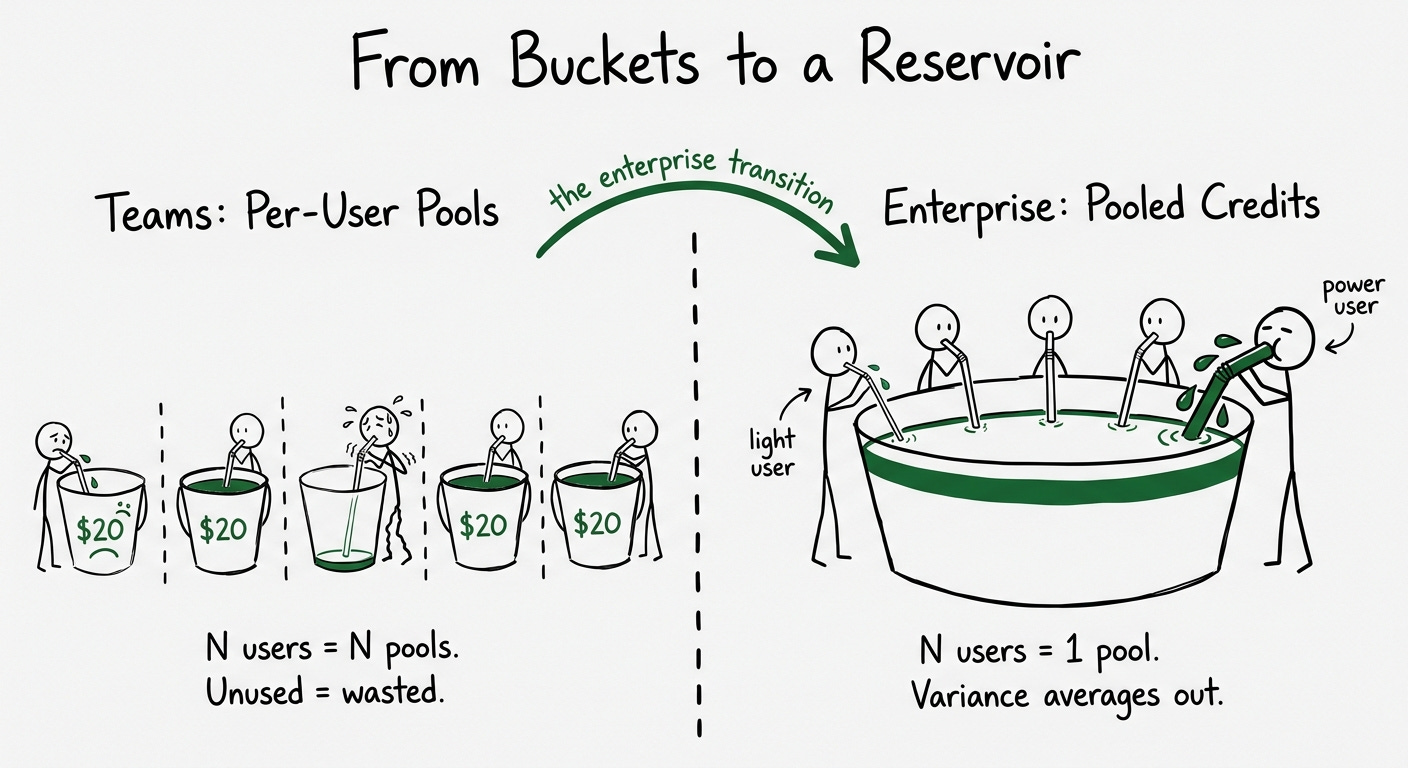
Enterprise shifts the model fundamentally: credits become pooled across the organization. This is the key architectural transition. On Teams, N users have N independent pools. On Enterprise, N users share one pool. The economics change: power users (senior engineers running large agent chains) can consume more without hitting individual limits, while lighter users (PMs checking in on code occasionally) contribute their unused allocation. If your product has wildly variable usage across roles, pooled credits at the enterprise level almost always make more sense than per-user allocation.
Cursor’s Enterprise also adds Hooks, introduced in Cursor 1.7. Six lifecycle hooks (beforeSubmitPrompt, beforeShellExecution, afterFileEdit, beforeMCPExecution, afterMCPExecution, stop) let enterprises observe, control, and extend the Agent loop using custom scripts. Each hook maps to an executable that receives JSON on stdin and returns JSON on stdout. Cloud distribution of hooks is enterprise-only.
As an infrastructure pattern, hooks are worth stealing. They’re not a billing feature. They’re a governance extension point. An enterprise can write a beforeSubmitPrompt hook that checks the requesting user’s team against an internal budget system and returns a stop signal if the team’s quota is exhausted. The credit system doesn’t need to know about your org chart. The hook is the bridge. If you’re building credit governance and don’t want to model every possible organizational hierarchy natively, exposing lifecycle hooks lets your enterprise customers build the last mile themselves.
The analytics dashboard updates every two minutes and tracks AI lines of code at the commit level, filterable by Active Directory group. That’s the right level of attribution for engineering teams trying to understand ROI per organizational unit.
What to take from Cursor: Dollar-denominated credit pools align your pricing with your economics, but require real-time usage visibility from day one. The per-user-to-pooled transition is a known enterprise requirement. Design for it early. And lifecycle hooks are a powerful governance primitive that lets enterprise customers build custom enforcement without requiring you to model their org chart.
Found this useful? Share it with an engineering leader who’s evaluating enterprise AI spend controls. This is the kind of cross-functional problem that breaks when only one side understands the architecture.
Clay’s credit model is architecturally unique, and it teaches a lesson that applies to any product where different capabilities have fundamentally different cost structures.
Clay uses two separate currencies. Actions measure platform orchestration: enriching data, running AI models, sending data to third-party tools. Each enrichment costs exactly 1 Action regardless of type. Data Credits buy data from Clay’s marketplace of 150+ providers: emails, phone numbers, company firmographics. Data Credits vary from 0.5 to 10+ per lookup depending on the data type, and a fully enriched record typically costs 6-20 Data Credits depending on enrichment depth.
The split exists because Actions represent Clay’s own compute costs (predictable, relatively cheap) while Data Credits represent pass-through costs from third-party data providers (variable, expensive). If you bring your own API keys, you skip Data Credits entirely and only pay Actions.
The rollover rules encode this distinction. Actions reset each billing cycle and don’t roll over: they represent platform capacity, not stored value. Data Credits roll over with limits: on monthly plans, unused credits accumulate up to 2x the monthly allotment. On annual plans, 15% of unused credits roll over at renewal. One-time top-ups carry a 30% premium over plan pricing (except Enterprise, which gets custom rates). That premium is a deliberate incentive: upgrade to a higher plan instead of buying ad hoc.
For AI specifically, Clay offers two pricing modes: fixed-price (flat Data Credits per task for about 80% of models) and variable (token-based for frontier models like GPT-5.1 and Claude 4.6 Sonnet, charged for exact tokens consumed with no markup). This is a hybrid that’s rare in the wild: a credit system where some operations have deterministic costs and others have runtime-variable costs depending on the underlying model’s token consumption.
The enterprise governance layer is where Clay’s model becomes instructive. Enterprise includes per-workbook credit spend limits: admins set Data Credit caps on individual workbooks, and when the limit is reached, an error prevents further Actions from running. Only workspace admins can modify these limits; editors and viewers cannot. The credit usage dashboard breaks down spend across workbooks, tables, and integrations, with time-series, column-level, and per-run views, all exportable as CSV.
Here’s the design decision that surprised me: every Clay plan includes unlimited users. Pricing is based entirely on credit consumption, not team size. Enterprise RBAC includes workbook-level credit budgets and viewer roles, plus admin/editor/viewer role separation and user groups for batch-sharing workbooks. This is the purest “credits not seats” model among the four companies, and it creates an interesting governance dynamic: since there’s no per-seat cost, the only budget constraint is credit consumption. Adding the 50th user to your workspace is free. What matters is how many credits they all burn together.
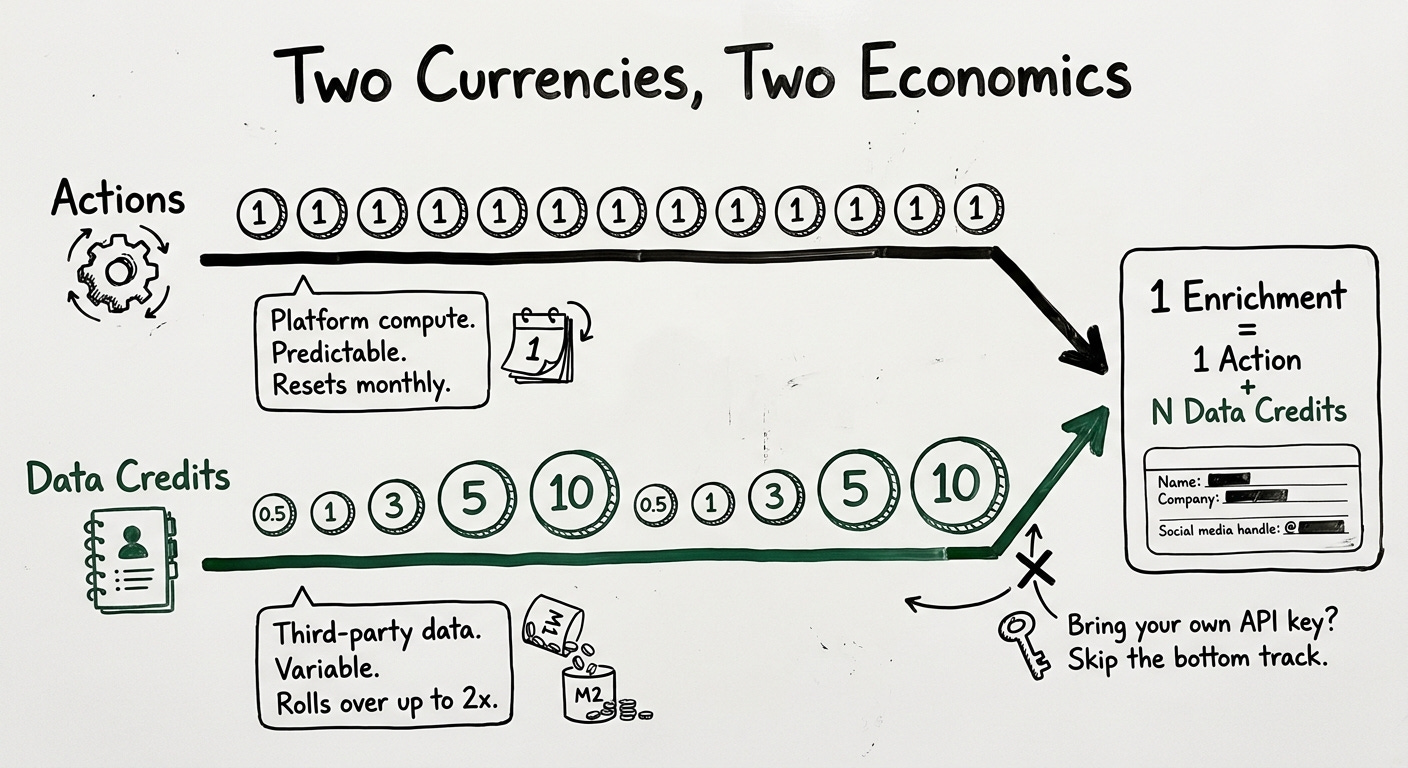
If your product has a similar cost structure (cheap orchestration + expensive external resources), the dual-currency model is worth serious consideration. A single credit that averages across both cost types will either overprice the cheap operations (discouraging usage) or underprice the expensive ones (destroying margin). Two currencies keep the signal clean.
What to take from Clay: When your product has heterogeneous cost structures, a single credit currency creates cross-subsidization that misleads both you and your customers. Two currencies with different rollover and governance rules map to two different economic realities. Per-workbook spend limits are a pragmatic form of project-level budget enforcement that doesn’t require modeling a full organizational hierarchy. And “credits not seats” is a viable enterprise model when usage variance matters more than headcount.
Vercel teaches a different lesson from the other three. Instead of building a deep credit governance hierarchy, they invested in making spend deeply observable and programmable, and then gave customers the primitives to build their own enforcement.
The AI Gateway provides a unified API endpoint to hundreds of models with zero markup on token costs. If you bring your own key, there’s no fee at all. Every Vercel account gets $5 in free credits per 30 days with no model restrictions. Model routing supports fallbacks configured as an ordered list of providers, and requests are billed based on the model that completes successfully. Vercel imposes no rate limits on top of upstream provider limits.
The Custom Reporting API (currently in beta for Pro and Enterprise) is the real engineering contribution. The endpoint GET https://ai-gateway.vercel.sh/v1/report returns structured spend data with six groupBy dimensions: day, user, model, tag, provider, or credential_type. An additional datePart parameter supports hourly granularity. The response includes input tokens, output tokens, cached input tokens, reasoning tokens, request count, and both total_cost and market_cost per group.
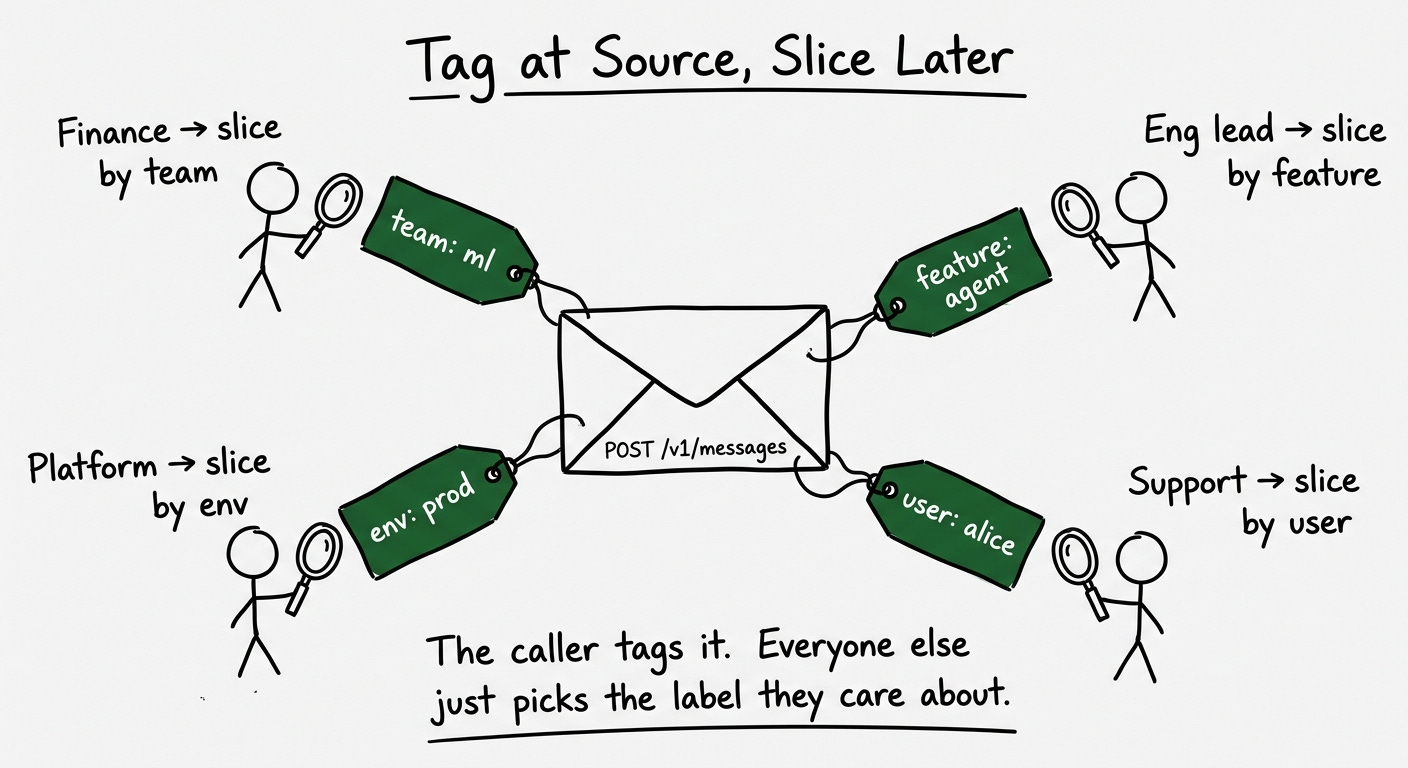
The user and tags parameters are set per request, which means your application code controls the attribution taxonomy. Tag a request with team:ml-infra, feature:agent-v2, env:production, and the reporting API can slice your spend along any of those dimensions. This works across both BYOK and Vercel-managed credentials, giving you a single view of all AI spend regardless of who holds the API key.
If you’re building spend attribution in your own product, this is a good design to study. The insight is that attribution dimensions should be set by the caller at request time, not configured centrally in an admin panel. The application code knows which team, feature, and environment are making the call. A central admin panel doesn’t.
The spend management system for platform resources (separate from AI Gateway) is where Vercel’s enforcement gets serious. The spend amount covers metered resources beyond the Pro plan’s included credit. Three actions are configurable at threshold: receive a notification (web, email, SMS), trigger a webhook, or pause all project deployments. Notifications fire at 50%, 75%, and 100% of the spend amount.
The webhook payload is minimal and clean:
An end-of-billing-cycle event ({”type”: “endOfBillingCycle”}) lets you build automation to resume paused projects at cycle boundaries. Paused projects return a 503 DEPLOYMENT_PAUSED to visitors and must be resumed individually. They don’t auto-unpause when you increase the spend amount. This is a deliberate friction: resumption requires an explicit human decision, not just throwing more money at the problem.
Two design decisions stand out. First, spend management is enabled by default for new customers with a $200 default budget. Most platforms make governance opt-in. Vercel makes it opt-out. That’s a strong opinion about where the safe default should be. Second, Vercel checks metered usage every few minutes, not hourly or daily. Real-time enough for practical enforcement, cheap enough to not require per-request checks.
What to take from Vercel: Request-time attribution tags are more flexible than centralized admin configuration. Six groupBy dimensions (day, user, model, tag, provider, credential type) is a good minimum for enterprise spend reporting. Webhooks at spend thresholds let customers build enforcement automation without you modeling their organizational structure. And opt-out spend management is the right default for any product where a misconfigured workflow can run up a four-figure bill overnight.
Here’s a reference comparison across the dimensions that matter when you’re evaluating which model to learn from or combine. I built this table from public documentation and API references for each company.
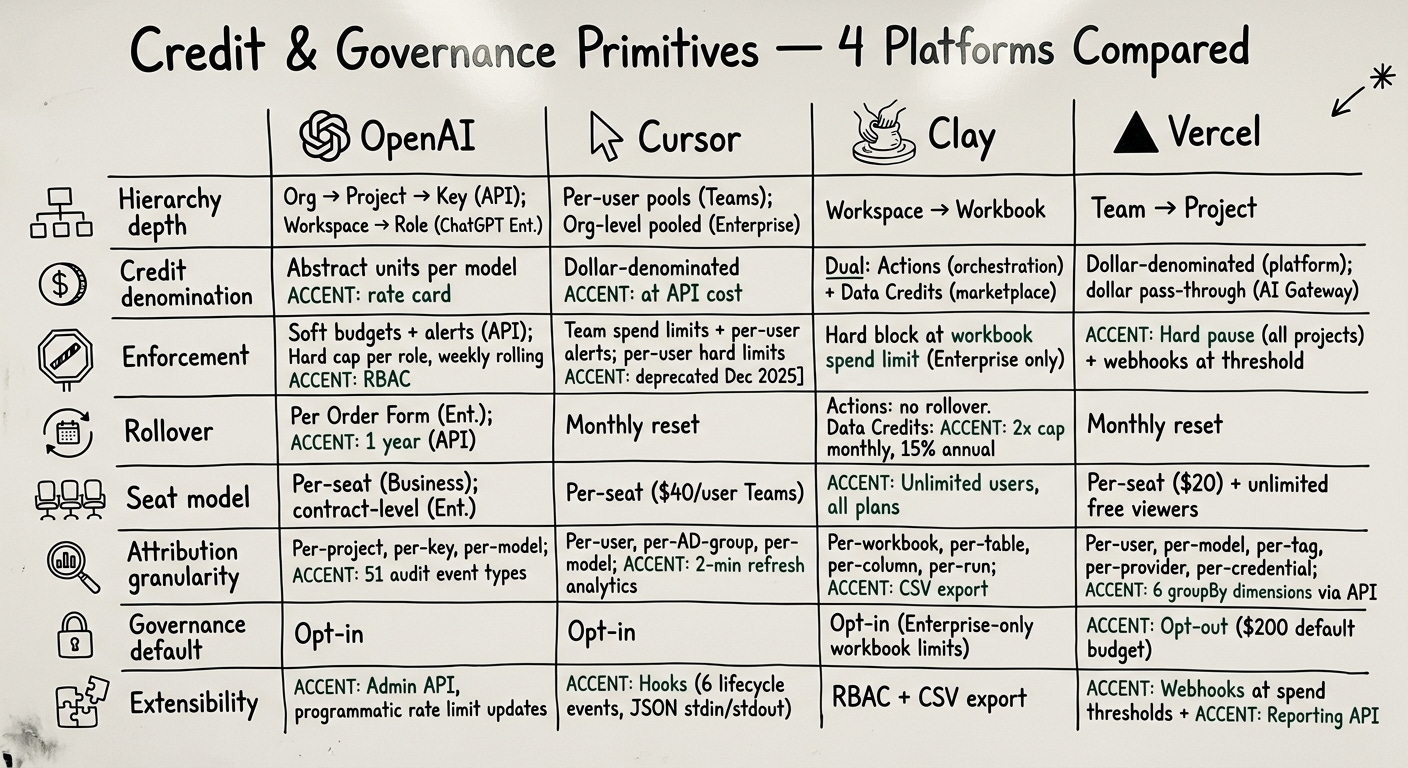
A few things jump out when you see them next to each other. Every company has real enforcement at exactly one level of the hierarchy: OpenAI enforces per-role weekly caps, Cursor enforces per-org pooled limits, Clay enforces per-workbook Data Credit caps, Vercel enforces per-team spend thresholds. The level below that gets alerts or analytics. The level above doesn’t exist.
That’s the gap. And it brings us to the question I’ve been building toward.
The enterprise version of every credit problem is harder than the self-serve version, and it’s where the larger contracts live. Self-serve credit systems are well-understood primitives at this point: ledgers, wallets, exchange rates, enforcement, customer-facing balance widgets. Enterprise credit governance is the frontier, and the four companies I’ve examined here each contribute a piece of the answer.
If you’re building this for your own product, here’s my priority order. First, get the evaluation path right: a single decision waterfall that resolves rate limits, entitlements, and credits in one pass. Second, make it hierarchical: budget nodes at org, department, team, and user levels, all checked sequentially. Third, make the enforcement programmable: webhooks, hooks, attribution tags, reporting APIs. Your customers’ org charts are more complex than anything you can model natively, so give them the primitives to extend. Fourth, build the meter first. Before you ship the pricing, ship the visibility.
Next week I’m going to show you how to build the hierarchical piece yourself. The data model for nested credit pools, the enforcement pipeline that resolves budgets across organizational tiers in real time, the concurrent deduction problem when a single request touches multiple hierarchy levels, and the revenue recognition implications when a parent entity’s prepaid credits flow through child entities with different cost bases. If the single-entity credit engineering I covered in previous posts was the foundation, hierarchy is where it compounds.