One of the joys of studying computer science is spotting a familiar concept in new surroundings. It’s a wonderful “aha!” moment as you almost literally feel your mind reaching some deeper insight.
In this post, we will answer the common question “what is an API in computer science?”. API stands for Application Programming Interface. I’ll illustrate it with various examples of APIs throughout the software stack so you can build a practical intuition for what the term means and why APIs are so useful.
Short answer: an API is the public interface a piece of software offers to other software. It says what you can ask for, what shape the request must take and what behaviour you can rely on in return. The implementation behind that interface can be neat, messy, elegant or held together with grim determination. As a user of the API, you ideally do not need to know.
I want to get across three key points:
- APIs are extremely useful and crop up all over the place.
- When you write code you are designing APIs, whether you realise it or not.
- API design is hard!
The textbook definition of an API is that it defines the services one bit of software provides to others. Though accurate, this answer falls into the trap of being so generic that you can’t really grasp what it means.
Let’s begin with something more concrete. Imagine you’re out for a meal in a restaurant. You sit out front at a nice table. The server gives you a menu listing the available options. You can’t order anything not on the menu (unless you are notoriously obnoxious), but equally you aren’t required to know the precise details of how your food is prepared. You simply make your order and wait for the server to bring it out to you.
The menu forms the interface between the restaurant kitchen and the front of house. The restaurant commits to providing the items on the menu when asked. By only offering a limited range of options, the kitchen can optimise its operations and deliver better quality food more quickly. Everything is easier all round.

An API is like the menu for a software unit. It tells you what you can do with the software and how it behaves. The only information the software intentionally provides is through its API. An API is therefore conceptually very simple, though individual APIs may have lots of complex details.
The API defines the boundary between the internal and public parts of the software. The goal is to enable abstraction: the software can change its internal implementation or structure so long as it still implements the same public interface. APIs occur so frequently because this design allows us to write simpler, more composable software.
Ideally, an API is explicitly designed and documented. Anyone can come along, look at the documentation and quickly understand how the API works. Twitter’s HTTP API docs are a good example of how public APIs are documented. Sometimes an API might be undocumented. This is unpleasant because it means that the only way to understand the API is through trial and error. Worst of all is when an API is implicit. That means the author wasn’t even aware they were writing an API and didn’t think about how people would use it. We’ll see how that can occur later.
Above I said the only information the software intentionally provides is via its API. Software frequently has some observable behaviour that isn’t intended to be part of its public API. Perhaps the authors weren’t aware of it or considered it merely a quirk of the current implementation. Hyrum’s Law warns us that someone will end up depending on any observable behaviour, thus making it part of the public API. During the development of Windows 95, Microsoft found that some popular programs depended on buggy behaviour in Windows 3.1. To maintain compatibility, Microsoft was forced to emulate the buggy behaviour in Windows 95. Though Microsoft clearly didn’t intend bugs to be part of the Windows API, the behaviour was observable and therefore became part of the API when programs started expecting it.
All of this to say: API design is hard!
API vs web API
A web API is just an API implemented over the web. The API defines the operations and behaviour; HTTP, URLs, JSON and all the other webby bits are a common way to expose that interface to other computers. Important, useful, everywhere. But still only one example.
Not every API is a web API. A function has an API. A React component has an API. A data structure has an API. An operating system has an API made up of system calls. The web version gets the attention because people are usually trying to fetch some data from a server and get on with their day.
Let’s now dive into some examples.
Data structure operations
In the section on data structures, we see how abstract data types define a set of permitted operations on their underlying data. Arrays let you index into a given location, stacks let you push and pop values and so on. In an object oriented language, these would be implemented as methods on the data structure’s class.
Here’s an (extremely) simplified set of methods available on C++’s std::unordered_map, a form of hash map. emplace is a fancy way to insert an item.
| method | complexity |
|---|---|
| size() | constant |
| emplace(key, value) | constant on average |
| find(key) | constant on average |
| erase(key) | constant on average |
These methods form the data structure’s API. By requiring all data accesses and modifications to go through its API, std::unordered_map can ensure useful safety invariants and guarantee performance characteristics. For example, std::unordered_map internally organises its items into buckets so it can offer constant performance on average for find, insert and deletion operations.
These invariants and performance characteristics are themselves part of the data type’s API and ideally would be explicitly documented.
Invariants and performance are examples of observable behaviour forming part of the API, whether documented or not. That is because users will write code relying on that behaviour and changing them may break existing code. Imagine changing an Array’s indexing operation from constant to linear time. Even if you did not document it as running in constant time, users would have written algorithms relying on that behaviour. Changing to linear time would cause performance issues sufficient to break existing code.
API design is hard!
OS system calls
In the operating systems chapter we see how OS kernels severely limit what unprivileged programs running in user space can do. Kernels must therefore provide a set of system calls (aka syscalls) so that user programs can ask the kernel to perform privileged operations.
The set of available syscalls forms an API between the kernel and userspace code. This is an abstraction layer that’s great for everyone involved.
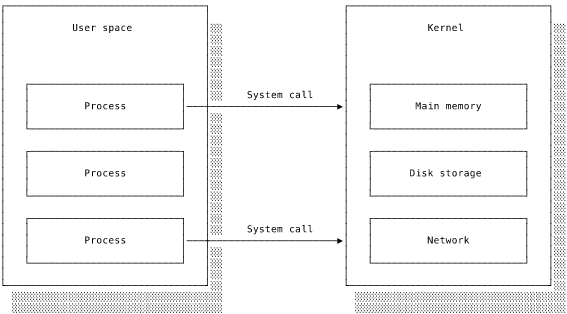
Syscalls allow the kernel to protect the computer and its data from errant user programs. Access to the computer hardware and data is only permitted through a syscall, giving the kernel the opportunity to inspect all requests and block anything harmful.
User programs benefit from having a interface consistent from machine to machine that abstracts away all of the nitty gritty details. If you had direct access to the hardware, reading a file would mean you’d need to handle all kinds of different storage devices, know where the file is located, how to access it and all of those tedious details. It’s so much easier to use the read syscall and have the kernel spit the file data into your buffer.
(And it’s even nicer to call the C standard library’s fread function, which wraps OS-specific syscalls in a consistent interface with additional functionality. Guess what the C standard library is!).
Over the years people have identified limitations in the design of various syscalls. Where it is not possible to change the syscall without breaking existing code, developers have had to introduce numbered versions (see clone3 as an example). Ugly, but changing existing APIs means breaking code.
API design is hard!
Backend web services
I believe people find APIs bewildering because of imprecise language. You’ll often find developers saying things like “we can fetch that data from the API!”. That causes confusion, since an API is an abstract concept and how exactly are you getting data from an abstract concept? I certainly got muddled by this.
To be completely accurate we should say “we can fetch that data from the server implementing the API”. A server is just a program running on a network-connected computer that responds to requests (HTTP, gRPC, whatever). The API defines which kinds of requests it should respond to, how it should process them and what it should output. It is up to the authors of the server program to ensure that it accurately implements the API.
A popular approach nowadays is for web servers to implement REST APIs over HTTP. All that means is that the API’s operations are defined in terms of HTTP resources and verbs. See the networking chapter for further information.
Though HTTP REST APIs are extremely common and you need to be familiar with them, remember that not all APIs are web services. The concept is much broader. Remember too that the web service itself is not the API. It is a program that behaves according to the API. The difference is subtle but important.
Join the mailing list
Get occasional updates about the book and new computer science articles.
No spam. Unsubscribe anytime.
Writing code means designing APIs
By now we’ve seen a few APIs and I hope you’re developing some sense of their common attributes. But please don’t think that API design only matters when you’re some fancy architect writing OS kernels or designing backend systems. Every programmer is constantly making APIs, whether they realise it or not.
At the start of this post I used the term “software units”. That was deliberately vague because I didn’t want to tie your thinking to web services or any other application. In fact, APIs occur within programs too. Any time you create a boundary between code units (e.g. defining a class, module or function) you are defining an interface and you should be thinking in terms of APIs.
Let’s say you are working on a program. You’ve identified some repeated code and extracted it into a function. The function’s name, parameters and return value are all part of its API (known in this context as its declaration). Depending on the language, this API is documented to some degree. Typed languages have more explicit documentation of the parameter and return types than untyped languages, for example. Most languages have limited documentation of side effects even though these are observable behaviour.
Regardless of the details, the whole point of a function is that the rest of your codebase only has to know the function’s declaration. Its implementation details are hidden away in the definition. What kind of API do you want to offer to the rest of your program?
Here’s how you might define an input handler for down arrow key presses:
function handleUserInput(inputEvent) {
  if (inputEvent.keyCode === 'down') {
    // ... trigger some behaviour
  }
}
handleUserInput(event);
This function has a very restrictive API that doesn’t allow any configurability. What happens if, later on, you need to trigger the same behaviour on ’enter’ as well as ‘down’? The naive approach is to just add to the if clause:
function handleUserInput(inputEvent) {
  if (inputEvent.keyCode === 'down'
      || inputEvent.keyCode === 'enter') {
    // ... trigger some behaviour
  }
}
handleUserInput(event);
But now the function is even more brittle and specialised. A more fruitful approach is to think in terms of the function offering a keypress-handling service to the codebase. At each call site we will know the keys we want handled so can pass them as a parameter:
function handleUserInput(inputEvent, keys) {
  if (keys.find(inputEvent.keyCode)) {
    // ... trigger some behaviour
  }
}
handleUserInput(event, ['down', 'enter']);
Our function is now much more useful and reusable!
What if you want different behaviour for different keys? It might be tempting to pass in some kind of configuration object mapping a key code to a handler. That might be appropriate in some situations, particularly if handleUserInput included general logic common to all key codes, but often its better to create separate functions rather than do everything in one. Knowing where the dividing line is takes experience.
API design is hard!
We’ll finish with an example of a React component:
const Confirmation = (props: ConfirmationProps) => (
  <div className="confirmation">
    <p>{`Greetings, ${props.user.name}! Click below to confirm`}</p>
    <form onSubmit={props.handleSubmit}>
      <button class="confirmation-button" type="submit">Confirm</button>
    </form>
  </div>
)

interface ConfirmationProps {
  user: User;
  handleSubmit: (event: React.FormEvent) => void
}

const StyledComfirmation = styled(Confirmation)`
  .confirmation {
    background-color: #fafafa;
  }
  .confirmation button {
    color: red;
  }
`
There are a few things going on here. Most obviously the component is unnecessarily tied to the currently implemented string. Changing its API to accept the string as a prop would make it usable in many more situations.
Do you see the more subtle issue? The CSS rules here are an example of an implicit API. The component author intended to provide default styling of the button with the option to configure by styling the confirmation-button class. That’s good because it means that consumers only need to know the two class names to apply their styling.
But due to CSS specificity rules the red colouring will take precedence over styles on confirmation-button. To overcome this, consumers will need to write more specific style rules such as .confirmation button, thus leaking knowledge of the component’s internal implementation into the wider codebase. The component’s actual API doesn’t match what the author expected.
API design is hard!
FAQ
A few API questions are really vocabulary questions, which is fair enough because the vocabulary is half the battle.
What is an API in computer science?
In computer science, an API is the public interface one piece of software offers to other software. It defines what you can ask for, what information you need to provide and what behaviour you can rely on in return.
What does API stand for?
API stands for Application Programming Interface. In plain English, it is the public interface one piece of software offers to other software.
Is every API a web API?
No. Web APIs are common because so much modern software communicates over networks, but APIs are much broader than that. They show up in functions, classes, modules, data structures, operating systems and programming languages.
Conclusion
So, what have we learned? An API defines a service’s public interface. As well as indicating how to use the service, the API separates public behaviour from internal implementation details and thus provides abstraction. A real life example is ordering from a menu in a restaurant.
APIs are preferably explicit and documented, though the software world frequently falls short of this ideal. APIs occur at all levels of the software stack because they’re just so useful. Once they are in use, APIs become difficult to modify. Any observable behaviour forms part of your system’s API, whether you intend it or not.
Even making something as small as a function or a component means designing an API. It’s important to grasp this, because thinking in terms of APIs will help you to write cleaner, more modular code. Designing a clear, extensible API is not trivial and takes careful thought.
API design is hard!
Join the mailing list
Get occasional updates about the book and new computer science articles.
No spam. Unsubscribe anytime.