When you return one of the products I sell to Amazon, I have a few options for what to do with it. First, I can have the Amazon warehouse staff determine its condition. If it’s as good as new, they put it back into inventory to be sold again. If it’s in less-than-perfect condition, they can:
Dispose of it
Mail it back to me
Grade the condition and resell it at a discount based on that grade
Liquidate it for 5-10% of the sale price
Alternatively, I can skip the whole process and just have it disposed of or sent back to me.
The big problem one encounters when it comes to having Amazon employees evaluate quality is that they have absolutely no idea how to evaluate quality. I am exaggerating, but only slightly. For very simple items, they’re okay. But for products that contain more than a couple of items, they’re not going to notice if one is gone.
Also, if your product is tightly packed into custom, opaque packaging, they will not open the packaging at all and will simply decide whether the product is resellable condition based on the exterior. Ask me how I know this.
So glad you asked. One of the products I sell is an indoor swing; basically a big loop of nylon fabric and a hardware kit to hang it from the ceiling. It comes in a custom, opaque bag. Once, someone bought one and then returned it, except what they actually returned was a dark blue bedsheet. Since the swing they ordered was beige, it probably would have been clear that this was the wrong product had whoever processed the return opened up the bag.
This all happened while I was still having Amazon evaluate everything that came in, so the way I found out was when someone left a one-star review because they ordered a beige swing and received a dark blue bedsheet. (If you order something from Amazon and get the wrong product, I beg you not to leave a bad review — it is almost certainly on Amazon, not the company selling the product.)
I spent a great deal of time getting that review removed — doing so is very difficult and requires one to utter the correct incantations and request specific escalations with no guarantee of success. Unfortunately, I very naively failed to address the root cause, so you can imagine how I felt when I received another one-star review from someone upset that they ordered a beige swing and received a dark blue bedsheet. Sigh.
At that point, I did the correct thing and turned off Amazon quality evaluation. Since this product is low volume, high price point, and relatively high return rate, I started having every unit sent back to me. Once a month or so, I go through all the ones I’ve received, check for missing parts/blue bedsheets, then repack the like-new ones and send them back to Amazon to be sold.
When the customer returns either the wrong product or the right one but missing parts, I can get reimbursed by filing a case with support. To do this requires providing:
The LPN — I had never actually thought about what this stood for until looking it up right now, and apparently it’s License Plate Number? At least that’s what the Google AI Overview says, and I don’t care enough to confirm. Anyway it’s a unique barcode/string that gets stuck on every return.
The removal order ID — Twice a month, Amazon creates an order to mail back all of the units that have been returned, and that order gets assigned a unique ID.
The return shipment ID — Removal orders typically come in multiple shipments, since the returns are held in different fulfillment centers, so each shipment gets its own ID.
The FNSKU — This is the catalog ID of the product.
A description of what I received
The obnoxious thing about all of this is that Amazon knows the removal order ID, shipment ID and FNSKU based on the LPN, but they make you pull all of those off of a tiny sheet of paper that comes back in the box. If you lose that piece of paper, you can’t get reimbursed. This is what it looks like:
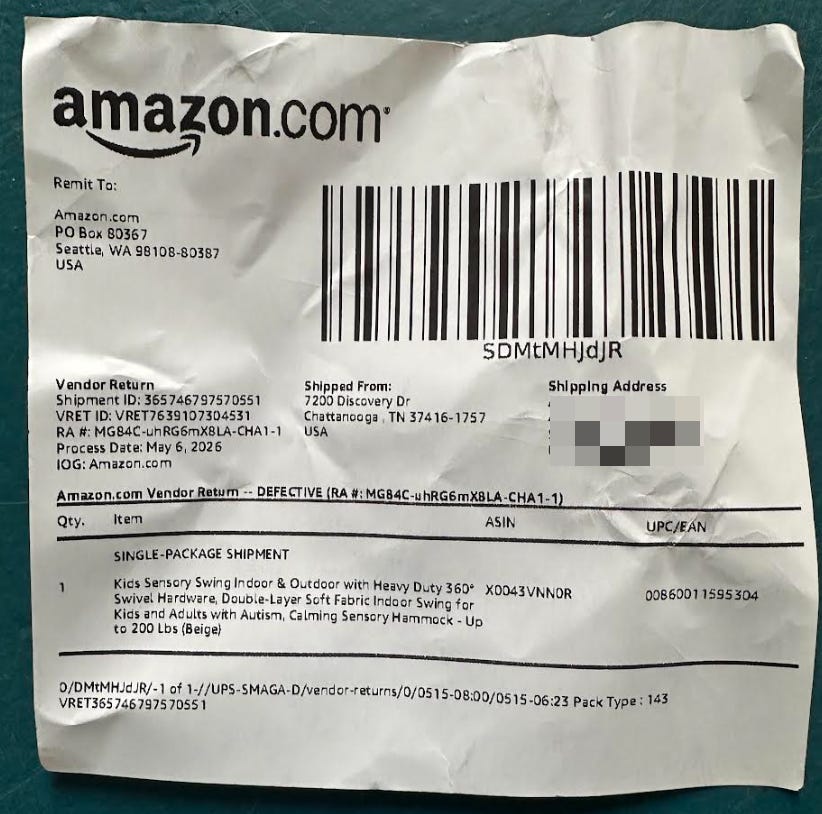
A couple of fun little quirks here:
The actual paper is much smaller than it looks here, and the font size must be 5 or 6.
The FNSKU is in the column incorrectly labeled ASIN (which is a different product identifier).
The return ID is the string of letters and numbers between the first and second dashes in the string after “RA #:”. If you include the whole thing, support will have no idea what to do with that.
But hey, who can blame the scrappy little checks stock price 2.76 trillion dollar company, right?
Anyway: I must gather all of these pieces of information, along with a photo of the LPN sticker, the piece of paper pictured above, and the product that I received. (And again, you must provide them all of the information in text along with photos of the papers you copied it from or no reimbursement for you!). I used to do this by emailing myself photos, copying the text by hand and putting it all into a template, but with AI there is, of course, a better way.
A few weeks ago, I did what I assume every AI-pilled dad does and built a bot to keep family stuff straight. It accepts messages via Telegram or email and can store information to a shared memory or add calendar events. Since it already has access to Claude and the ability to send and receive messages, I just used that to start my return bot.
I began by putting together a Google Doc with all of the photo inputs and the desired output:
Input Photos
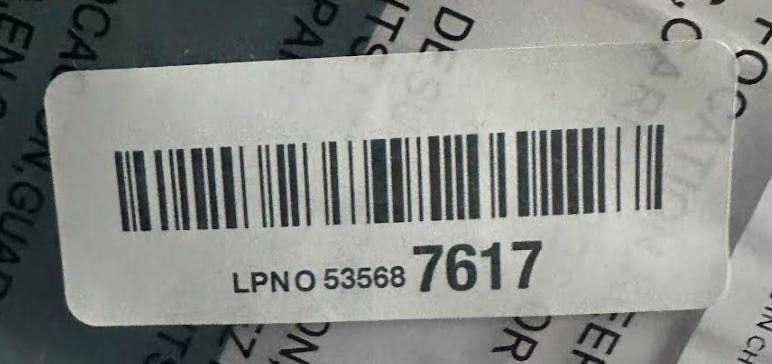
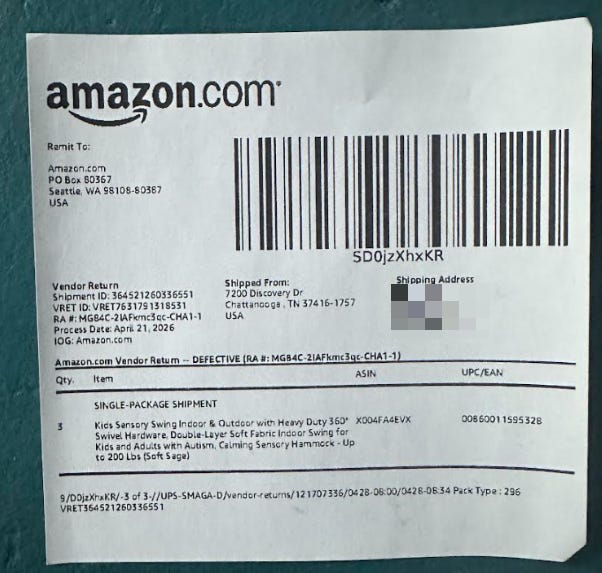

Output Text:
Return Shipment ID: 364521260336551
LPN: O 53568 7617
Removal Order ID: SD0jzXhxKR
FNSKU: X004FA4EVX
Condition: Returned missing all of the hardware needed to install the product.
Then a quick spec:
I want you to add functionality to the Willen Bot that helps me get reimbursed for Amazon returns. I should be able to send it photos of the returned product, the LPN sticker and the return slip via either Telegram or email. It should extract the relevant information, then send me an email titled: “<Brand name> reimbursement: <LPN>” with the information in the body and the three input photos attached. This doc has an example of input images and output text, plus some explanation of where to extract the relevant info from the inputs: <doc link>. Ask me questions then build a plan before implementing.
It raised a few good points:
I use the bot for multiple things, so how will it know when I’m using the reimbursement functionality?
For email, I’ll use <bot’s email>+returns@gmail.com, and for Telegram I’ll start the return functionality by sending the word “return.”
How should it determine when it’s received all the inputs for a return and start processing them?
Via email, each message will have every necessary piece of info. If I’m interacting via Telegram, one return might involve multiple messages from me, so I’ll send the word “go” when it should start processing. I did consider the option of having it process each input as it comes in and then automatically fire off the email to me once it had determined it had everything, but I figured the simple route was fine here.
How does it know what to use as the string describing what I received?
Since the swings are the product I’m using this for the most, I broke that down into the two most common cases based on the photo.
If it’s the swing, it’ll write “Returned missing all of the hardware needed to install the product.” (I gave it a bunch of pictures of the swing from prior cases as examples.)
If the picture is of anything else, I will also include a text description of what was returned, in which case it will write “The customer returned <text description I provided>, which is not what they purchased.”
For other products, I’ll describe what was returned or what was missing via text, and it’ll just add appropriate grammar and punctuation before inserting it.
With all that done, Claude started building, I walked my dog, and when I came back I did a bit of testing. After resolving a couple of minor issues, it worked!
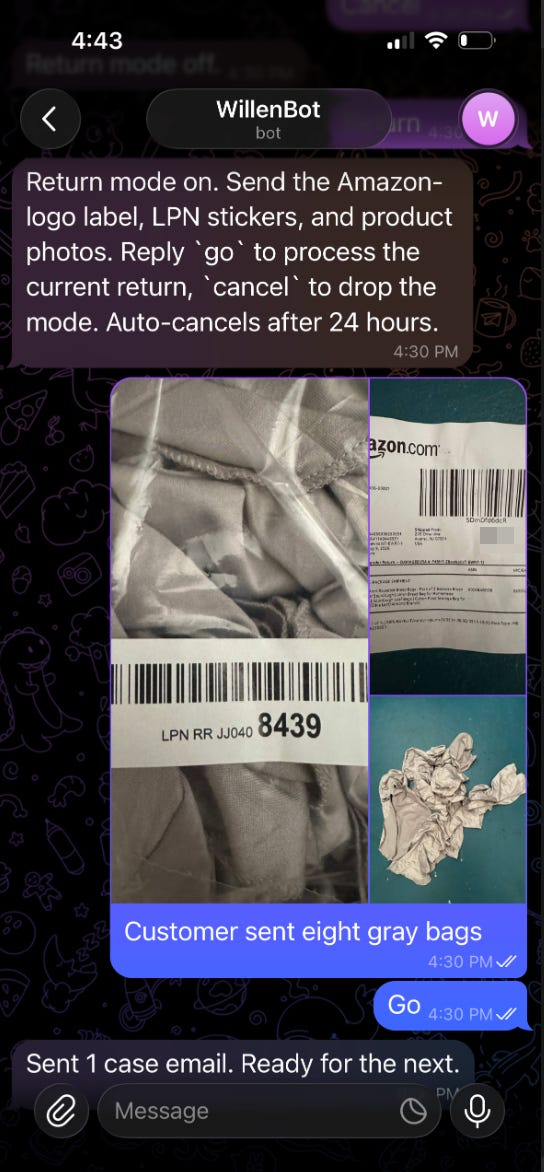
Since the Claude -pocalypse (the name hasn’t caught on yet, but I’m still trying…), I am doing my best to avoid throwing machine intelligence at problems that could just be handled by deterministic code. This one is almost entirely the latter.
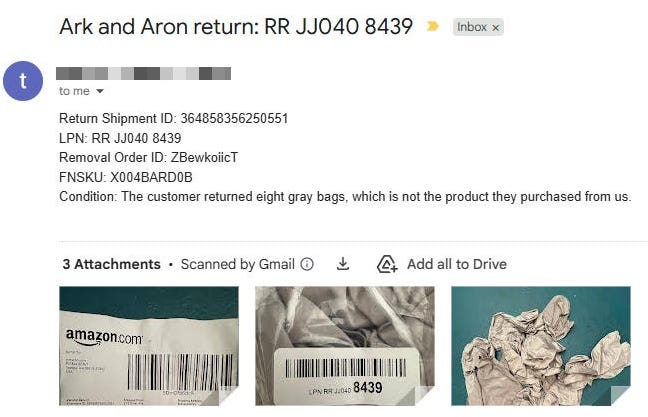
Invoking the functionality is done via a simple regex that just checks for “return” (or the inbound email addressing having “+returns”), and processing starts when it sees “go.” At that point, it uses the Agent SDK to have Claude process the photos and text. It does vision OCR to pull out the relevant text and classify the image, and it analyzes the text I’ve sent to pull out the right noun or phrase to insert in the Condition field (e.g. if I send “customer sent back eight gray bags, which is not the right thing” it will extract “eight gray bags” as the returned item). That’s the extent of AI usage in processing. Though I feel compelled to note, as someone who spent a bunch of time at my last job PMing a product that extracted text from PDFs and images, that being able to ask Claude and reliably get the text back is more miraculous than most people imagine.
From there, it does some validation of the return shipment ID, removal order ID and FNSKU. Because the shipment ID and removal order ID are printed in tiny font, and particularly because the latter can have lowercase Ls and uppercase Is, I want to make sure the OCRed text is correct.
For the shipment ID, since it’s entirely numeric and not prone to OCR failures, it just checks that it has the right number of characters. These have always been correct so far in my testing, but if one is ever wrong, I’ll find out when a support agent tells me they can’t find the ID. If that happens, I’ll implement an API lookup to confirm it exists before submitting.
The removal order ID is tougher and has been wrong a couple of times in testing, so for that we validate against order IDs returned by Amazon. To keep things snappy, there’s a job that runs first thing in the morning to pull new IDs and store them locally, and we check against the local list. If the ID matches something on that list, then it uses that. If not, then it does a fuzzy match check, basically looking for the longest substring that matches something from the list, then uses the winner.
The FNSKU is more straightforward — since that doesn’t change, it keeps a list of FNSKUs for each brand and makes sure the OCRed text matches an item from that list. If not, it does a fuzzy match there as well.
It doesn’t do anything with the LPN except to strip the actual letters “LPN” out of the beginning. There is no way to validate that because it doesn’t have a consistent structure or length, and there’s no way to check it via the API. Since it’s on its own label and printed in relatively large font, that’s not an issue.
Once it has those, it determines the Condition text based on the image classification (if it’s the swing brand) and/or the text I’ve sent. With all of that, it constructs the block of text, creates the email, attaches the images and fires that off to me.
The output of this is an email to myself with all of the information structured in my prescribed format and all images attached. I take that, open a case with Amazon and get reimbursed.
Ideally the bot would just open the case for me, but Amazon does not have an API for support cases. I assume this is because the friction of having to do it by hand is very much a feature from their perspective. I’m sorely tempted to have Claude do it via either Playwright or Claude for Chrome, but I don’t know if Amazon would look kindly on that. Seems imprudent to take any risk there, since with the bot in place the actual case-filing portion of this takes a few minutes a month. Maybe once I’ve got an Optimus that can sort through the returns, I’ll have it sit down at my desk and open the case with my mouse and keyboard, so Amazon really can’t detect that it’s a bot…