If you use Claude Code, you probably received this email recently:
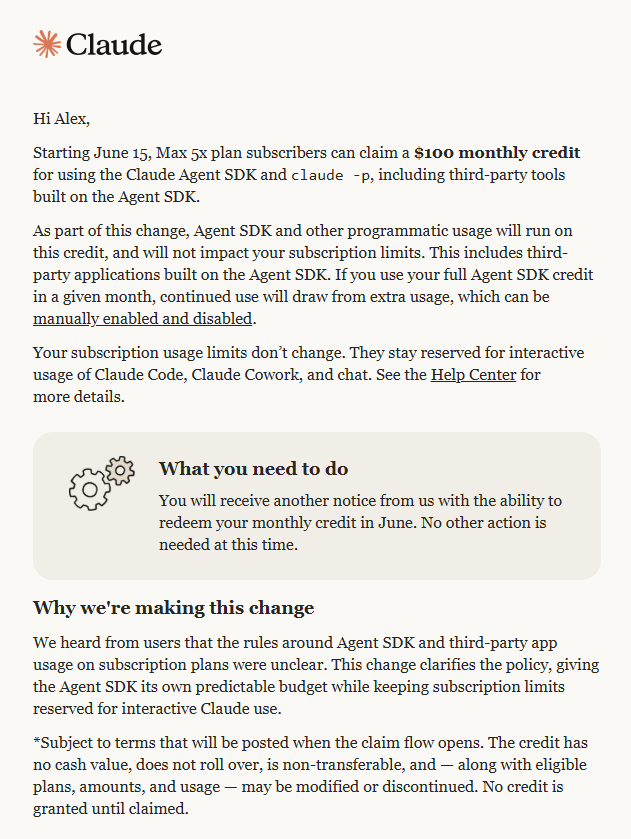
If you’re unfamiliar, claude -p is used to run a headless Claude Code session. Basically, if you have an application that needs to have Claude Code do something, it can silently fire up a session, send it a command and use the output. This is useful if you want to have Claude reason over something as part of a programmatic process, but you are cheap and don’t want to pay to use the API.
I make frequent use of claude -p in daily tasks, like running updated inventory projections for my cashflow dashboard, so this is something of a bummer.
A quick aside on communicating with one’s customers: this email is extremely bad. It claims that they’re implementing the change because the rules weren’t clear. But if the problem is a lack of clarity, the right solution would be to, y’know, clarify, not create a new usage policy that drastically reduces the value of the subscription. I’m pretty sympathetic to the labs’ challenges with soaring usage against a limited supply of compute, so if this email said, “Hey, we’re sorry but this feature we implemented has kinda blown up in our face, so we need to start charging for it at API rates,” I would understand! But please don’t treat me like I’m a moron. Also, why are you making me click a link in an email that’s coming later to get my credit? Just put the link in this email! Or don’t require me to click a link at all!
Anyway, I asked Claude what it would cost me per month if I leave everything in its current state. Answer:

Oh okay cool just a casual increase from $100/month to $3,000/month. No biggie.
So, how do we get costs back down to sub-$100, so they’re covered by my subscription, ideally without losing functionality?
The first fix is easy. I actually forgot the amazon_ads judge thing was still running (old experiment, oops), so I’ll just go ahead and turn that off.
Beyond that, I have two daily processes and then my family assistant, which my wife and I use to add things to our collective calendars and store memories via a dedicated Gmail account and a Telegram bot.
The daily processes fire via GitHub runners, which then invoke claude -p. The good news there is that I only use that setup because I started creating these sorts of recurring jobs before Claude had scheduled tasks. While the update isn’t 100% clear, it looks like if I install Claude Desktop and set them up to run daily from there, that’ll still use my subscription. Let’s start with my inventory projection skill, which runs once per week for each brand (the actual skill runs daily but only does 1-2 brands each time). It gathers sales and inventory data from Amazon, then follows a process to project my sales by month for the next 18 months. Those projections flow into my cashflow dashboard, so I know when I’ll need to place future orders and how much money will be required.
Skills aren’t automatically shared between Claude Code and Claude Desktop, so there is a bit of work to do here. The skill.md file needs to be copied from its project directory into Cowork’s skill directory. In doing this, I learned that Claude will mislead you about what directory this is — it told me it was \.claude\skills but then couldn’t find the skill directory or file in there. The best solution here is just to explain what you need to Claude Code, tell it to search the internet for relevant context and find the appropriate directory on your machine, then copy the skill over. (I would point you to the right place, but I’m on a PC and odds are good you’re on a Mac, so just let CC handle it.)
Once you’ve got the skill in the right place, open Claude Desktop, go to Cowork → Scheduled, click New Task, then select Set up manually. (I should note that Claude tells me Cowork scheduled tasks and Claude Code Desktop local routines are exactly the same thing, in case you’re wondering why I didn’t go with the latter.)
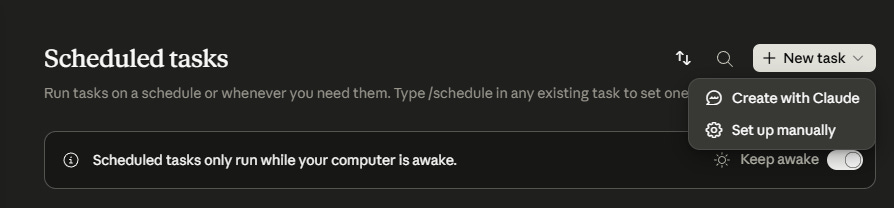
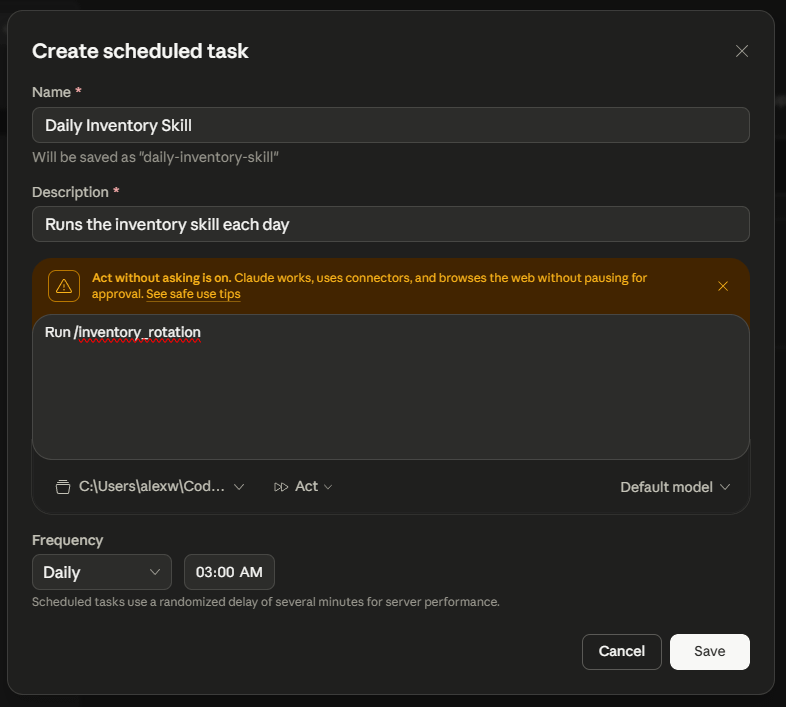
Enter a name and description. For instructions, since everything it needs is already in the skill, just tell it to run <slash command>. If the skill needs to access any files on your hard drive, point it to the folder where those live. Set it to act without asking. Choose the schedule on which you want it to run. Once it’s all configured, click Save.
Once that’s done, click on your newly-created task, then click Run now. That’ll create a new entry in the History section — click on that to watch the skill execute.
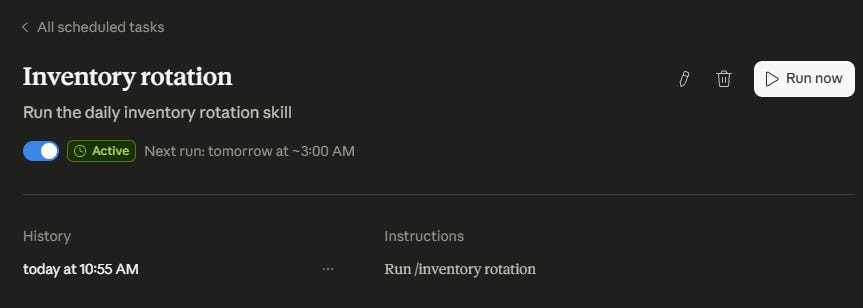
If everything is set up correctly and Claude can access the skill, it should go off without a hitch. If it runs into any problems, it’ll let you know.
Here’s the big one I ran into: Claude Desktop scheduled tasks run in a sandbox that is only able to access whitelisted external endpoints. My /inventory skill needs to access the Amazon and Google Sheets APIs, but that’s not possible.
The good news is that this is fixable for my particular case — I just need to split off the parts that hit the APIs, run those in advance, then have the inventory projection skill pick up the data they retrieve. Accessing the APIs just involves running a script and doesn’t require Claude, so I can continue to handle that via a GitHub runner. I’ll set that up to run far enough in advance that it’ll definitely complete before the scheduled run of the skill starts.
This is, in fairness, a better way to do things. I mentioned last week that the /inventory skill had become quite long, and I had updated it to spin up subagents for the API calls in order to save the main agent’s context window. Doing it this way is even better, because it reduces the skill to just the parts that require Claude.
My comms ingestion task (which is the process that gathers all of the messages to/from my suppliers to create my supplier dashboard) is similar. It uses Playwright and Microsoft UI Automation to get my supplier messages, and Claude Desktop blocks both of those. Since those are just Python scripts, they’ll remain on a GH runner and drop the text and images they gather into a folder. A Cowork scheduled task will pick up from there to handle the information extraction and updates to my dashboard.
Now we’re all set — two GH runners, two scheduled tasks, and all of my Claude usage still happening on my Max plan.
The family assistant is a bit thornier, because every time it gets an email or a Telegram message, it sends it to Claude Code for processing, so it’s definitely not suitable for scheduled tasks. The structure is also wildly inefficient, because it involves firing up the Claude Code harness, which consumes a lot of tokens, every single time.
While I am critical of Anthropic’s messaging, this is a good example of why they’re making this change — there is absolutely no need for either the full Claude Code harness or Opus here, and it’s completely wasteful. The right way to do this is to hit a smaller model via the Messages API, since the core of what I’m using Claude for here is message parsing that handles a few simple cases:
If I’m asking it to add something to the calendar, take the relevant information and convert it to the payload for a GCal API call.
If I’m telling it to remember something, determine the category (restaurant preferences, information about a kid, etc.), check the memory .md file to see if it already exists in that category, and if not then add it.
For anything that’s not clearly one of the above two cases, ask for clarity.
The only issue there is that the Messages API isn’t covered under the new credit. I would have to pay something like a double-digit number of cents each month to use it here. Quelle horreur! (But seriously if anyone from Anthropic ever reads this, you should probably just include all API usage.)
Keeping claude -p but switching to Sonnet would probably be sufficient to keep my usage under the amount of the credit, but if only for the sake of this post, I’ll see what else I can do. First: drop the Claude Code harness.
Whenever you launch a new Claude Code session, it loads the harness’s system prompt, descriptions for all of the built-in tools, the contents of your claude.md, and all of the skills and MCP servers you’ve installed. Claude ballparks that at 15-30k tokens depending on your exact setup. If I switch to the Agent SDK with none of that, we’re looking at ~2k.
Our next improvement is to wire up an MCP specifically for this case. I have historically been pretty blasé about MCPs that just act as translation layers between my agent and an API. Claude doesn’t need a translation layer! It’s fully capable of just reading the API docs and making the appropriate calls with bash! But that is, of course, the attitude of a person with limitless tokens. Now that Anthropic’s cracking down and GPUs are in short supply, it’s time to tighten our proverbial token belt.
For the Google Calendar case, we just need an MCP that takes in the relevant event info, turns it into an appropriately-structured API call, fires it off to Google, parses the response and sends the relevant parts to Claude, which in turn reports back to me.
Saving notes is a little bit more complicated, because it requires searching to see if there is already an existing note on whatever topic I’ve asked it to remember before writing. If there is, it needs to let me know and ask how I want to proceed — do nothing or modify the existing note. Modifying the existing note might involve rewriting text rather than just appending my update, so there’s some intelligence required there. I could create a simple MCP to handle the case of writing a new note, but that’s just not especially token-heavy anyway. We’ll just let Claude handle notes directly.
Now that we’ve got the details figured out and the calendar creation MCP ready, the next step is to migrate it to use the Agent SDK. Not a lot to say here; I just asked Claude to handle that for me, making sure it has access to only the new MCP created and whatever tools it needs to handle searching and creating notes. The whole thing took a couple of minutes and worked on the first try. However much I dislike that Anthropic’s suddenly forcing me to update my workflows in order to avoid a large bill, I am mollified by the fact that they’re providing me the tools to make it all happen magically on my other monitor while I draft this post.
With that, we should be well under the monthly credit limit.
Two other features to note that I haven’t used here but might be relevant if you’re looking to reduce token usage for this sort of thing:
--bare
At some point, Anthropic introduced --bare, which, when used with claude -p, skips auto-discovery of hooks, skills, plugins, MCP servers, memory and claude.md. If you’re going to continue to use headless mode but don’t need the whole harness, this will save a lot of tokens.
Prompt Caching
If you’re using the Agent SDK, then caching your system prompt and tool definitions will likely reduce your token usage. There are, though, some caveats that mean it’s not worth doing for my family assistant.
First, writing to the cache costs more than making a regular call — 1.25x to cache for five minutes, and 2x to cache for one hour. I usually send one message to the bot at a time, so most of the time caching would be wasteful.
There is also a minimum cacheable prompt length. This is either 4,096 or 1,024 tokens depending on which model you’re using, so if your instructions are shorter than that, this isn’t usable anyway.
It’s worth taking a moment to reflect on the enormous discrepancy between how much it would’ve cost me to run all of these things at API prices and what I have actually been paying on a Claude Max plan. There are not a lot of products where you encounter a 30x difference in cost for the exact same thing depending on how you implement it.
As I said earlier, I’m sympathetic to Anthropic and all of the other labs — they’re in a position of having to figure out a brand new pricing model (don’t forget that nobody even knew what a token was five years ago) while dealing with unprecedented demand growth and serious supply constraints. They have to balance their need for cash against the competition to gain market share among users. They’re selling to large enterprises, building harnesses and skills, and dealing with a flood of OpenClaws. This is all hard!
Ultimately, though, I feel like in the relatively near future, subscription plans are going to have to go the way of Ubers and DoorDash deliveries and all the other VC-subsidized goodies that the 2010s brought us. It doesn’t make sense to be selling $3000 of usage for $100, especially when you can barely keep up with demand that isn’t likely to slow down in the foreseeable future.
If the labs tighten the reins on flat-rate monthly plans, I strongly suspect people will be upset; that’s just human nature. But in fairness, the idea that I could have someone constantly keeping tabs on all of my brands’ inventory, maintaining an updated dashboard with the status of all of my supplier communications and sitting ready 24/7 to take down whatever notes I want to fire off about my family for $100/month would have been unimaginable in the very recent past. If you’d asked me what I’d pay for that before the labs anchored the pricing at a hundred bucks, I suspect the answer would’ve been a few hundred at least (and in fairness, that’s probably much closer to what the actual cost would be than the $3000 Claude quoted me if I chose lighter-weight models and optimized the workflows).
That said, I do think that in the long run, access to intelligence will be shockingly cheap. Over the last few years, we’ve seen the prices of older models drop once their successors are released, and we’ve seen small models come out that are as capable as the large models of the prior generation but faster and at a fraction of the price.
My daily tasks don’t need better models. They get the job done with the existing ones (and will probably still do just fine when I downgrade the models they’re using), so when Opus 5 comes out, there won’t be a point in upgrading. Even if labs crack down on subscription plan usage in the near term, the models I’m using will get cheaper and cheaper over time. People doing cutting-edge research will shell out top dollar for the latest and greatest, but my bot that makes calendar events will never need a better model than the ones it’s using today. If I do upgrade, it’ll be to Nano Haiku 5 (or in keeping with the theme, I guess a model smaller than Haiku would be… Couplet?) because that’s even cheaper than Sonnet 4.6.
This isn’t just true of my projects — the reality is that most of the white-collar work in the world does not require (or even benefit from) genius intellect. With each successive generation of model, there will be fewer and fewer jobs that actually need to upgrade. Eventually I suspect we’ll have a split where most business tasks are still running on the current generation of model, while Opus 10 solves yet-undiscovered questions of physics and uncovers the meaning of life.