Generally, the process of buying a new brand starts with an inbound email. The marketplaces I buy from (Flippa and Empire Flippers) send out periodic emails with listings of businesses for sale, and I review them as they come in to see if any are relevant to me. The overwhelming majority of listings are not.
The emails I get are a combination of:
Notifications that a new listing has come online that matches one of my search filters on a marketplace site
Notifications that a listing I’m watching has reduced its price
Broad, digest-type emails that just contain a bunch of listings, most of which are irrelevant to me
Unfortunately the first two types of emails can contain listings that aren’t worth pursuing, and the third type can contain listings that are, albeit very rarely. Given the high value of finding a good diamond in the rough to acquire, I just have to review everything.
When I review these emails, I disqualify listings for a number of different reasons. Most listings are for non-Amazon ecommerce businesses, which are no good (if you’re new to my Substack, I only buy businesses that sell on Amazon, and also welcome!). Others are FBA but selling on European marketplaces, which are no good because you need a VAT number, which I do not have, to take those over. Some are priced at crazy high multiples, and others are priced at crazy low multiples (I’ve looked at enough of the latter to be confident that this always means the listing is a waste of time for one reason or another). A lot are above my price range or below my minimum profit threshold.
Luckily for me, I live in the age of AI, so I can apply the most powerful technology ever created by humankind to my little email filtering problem.
My first instinct here was to use something like Zapier to send copies of all emails from Flippa and Empire Flippers to a script that used GPT via OpenAI’s APIs to review them, filter out irrelevant emails and then send me an email with only the ones I care about.
Before I went that route, I wanted to see what other options were available, both to make sure I ended up with the best solution and also to keep up with the latest AI tools. A few ChatGPT Deep Research queries gave me a handful of options, all of which were basically just variations of my original plan, but the simplest one from an implementation perspective was to use Google Apps Script, since the emails are coming my Gmail and no extra integration was necessary. And since I was doing all of this with Google tools, I decided to try Gemini for the filtering.
I made ChatGPT give me detailed instructions on how to do this, since it’s important to establish dominance over your LLM by reminding it that it’s not the only one you’re using. Setup was pretty straightforward:
Make sure all relevant emails are automatically tagged via Gmail filter.
Get a Gemini API key (and I have to say this was infinitely easier than I expected given what I have heard about getting Google API keys).
Create a new Apps Script project with a daily, time-based trigger.
Drop in the code that ChatGPT so kindly wrote for me.
ChatGPT generated ~600 lines of code for me, and I understood ~70% of it. The basic functionality:
Search my Gmail for emails with the indicated tags.
Send the contents of the email to Gemini with a prompt that tells it to:
Review each of the listings according to my rules.
For each listing, make a determination as to whether it passes all the rules.
For each listing that passes, output the information that I need in structured format.
Use the structured info to build and send an email to me.
There’s also a lot of code around parsing HTML. Spoiler: this will be a problem later.
This took maybe 3 hours from start to finish, most of which was dealing with issues in the filtering logic and generating the summary emails exactly as I want them. That was the original introduction to this section. It was hubristic!
The day before this post was set to auto-publish, I hit the strangest bug I have ever encountered with AI, and resolving that took my total time up to ~6 hours. But we’re telling this story chronologically, so more on that below.
Initially, the big challenge was handling differences across emails. There are ~10 different email templates that I need to review, each of which contains different information and uses a different structure.
They also present the financial information for different periods — Flippa provides monthly profit but annual multiples (e.g. price is 3x annual profit) while Empire Flippers uses monthly profit and monthly multiples (36x rather than 3x). On top of that, there’s a free text description field the seller can fill out, and they’ll sometimes include annual or even lifetime profit and revenue numbers.
I wanted to handle this via the most general possible instructions, mostly as a test of how well Gemini could handle the task given some ambiguity (and for context I am using 2.5 Flash here), so I started with instructions along the lines of:
You are an assistant that is screening inbound emails from Empire Flippers and Flippa, marketplaces where businesses are sold. Evaluate each of the below rules for each listing in each email. If you do not have enough information to evaluate a rule, then treat the listing as though it passes that rule. If there is ambiguity in whether a rule passes, err on the side of passing that rule.
The primary monetization method of the business should be Amazon FBA. It is acceptable if there are other sales channels, but FBA should be >85% of revenue.
The marketplace must sell primarily on the US Amazon marketplace. It is okay if it sells on Canada and/or Mexico as well, but if there are sales on any other marketplaces, fail this rule.
Monthly profit must be between $1,000 and $10,000.
Multiple of price to annual profit should be between 0.7 and 3.5 inclusive.
I ran this against a set of expected emails for which I knew what the right results would be, and it failed most of the listings that it should have passed plus passed several that it should’ve failed. Unfortunately, I was initially overoptimistic about how quickly this would work, so I didn’t bother to have the summary email include any useful info for debugging. I had ChatGPT update it to include every listing it evaluated rather than just the ones that passed, along with an explanation for each one that failed about which rule(s) failed.
Ran it again and found that it was making three major mistakes. First, it was including listings that passed most of the criteria but were non-FBA e-commerce brands. This was surprising to me, since this is easy to evaluate, and I felt like my instructions were pretty clear on this point.
Second, it was frequently assuming profit numbers were annual (even when explicitly stated as monthly), leading it to incorrect conclusions about annual profit and price/earnings ratio.
Third, when an email contained revenue but not profit numbers, it treated those as profit (even when very clearly labeled as revenue).
I considered switching to Pro, but that was pretty obviously overkill (though I may try at some point just to see how it handles the ambiguity). Instead, I upped the specificity of the instructions:
Monthly profit must be between $1,000 and $10,000. If profit is specifically noted as annual, make sure to adjust to monthly by dividing by 12. If there are numbers in the description field that conflict with other numbers in the listing, disregard those in the description field.
Do not treat numbers that are labeled as revenue as profit numbers. Some listings do not have profit numbers. In those cases, pass any rules that evaluate profit or profit/earnings ratio.
Multiple of price to annual profit should be between 0.7 and 3.5 inclusive.
If annual profit (may also be labeled SDE) is given: multiple = price / annual_profit.
If only monthly profit is given: annualize monthly_profit * 12.
If only sales is given and profit is absent: treat this rule as unknown → pass.
The listing must SPECIFICALLY mention ‘FBA’ or ‘Amazon’. If neither word appears, reject the listing. (Emails may include non-Amazon listings.) Note: mentioning Amazon alone is not sufficient. If it is an Amazon KDP business, for example, it should be rejected.
That got all the correct results for my test batch of emails, so I left it running daily, reviewing the emails from the prior 24 hours. I wrote this post and set it to publish, but then…
Here’s an email I received on October 21:
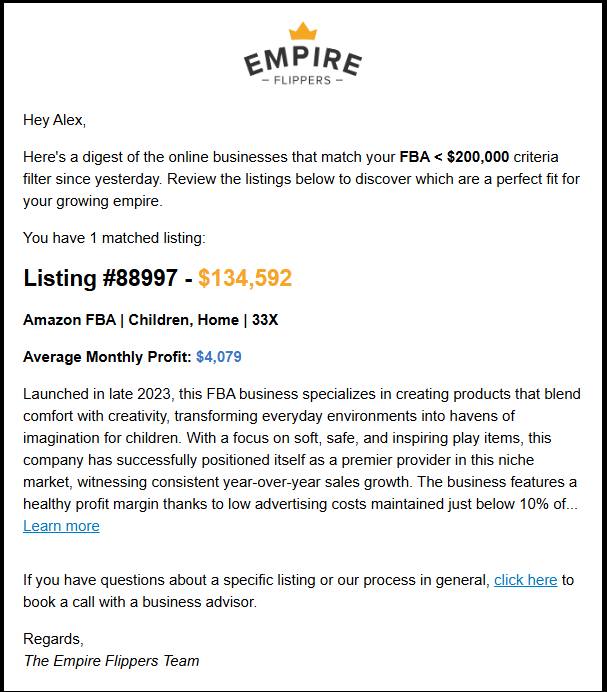
Great - right up my alley! Here’s what my filtering script outputted based on that email:
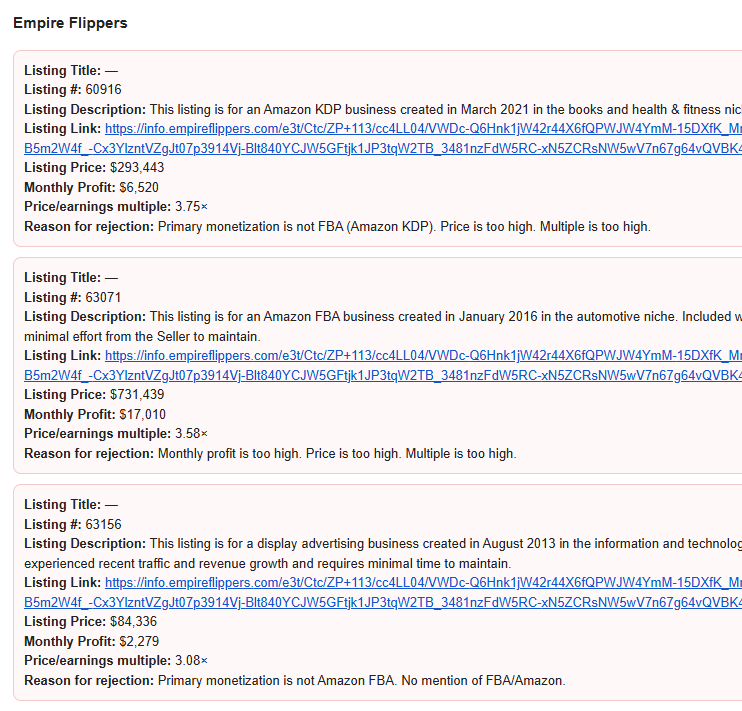
A couple of things you’ll notice:
These are red because they’re listings that the filter rejected.
None of these listings exist in the email above.
You’re probably thinking the same thing I was thinking — these must be getting pulled in from a different email. Nope nope nope. I tested extensively. Ran the script over a timeframe such that this was the only email it would pull in. Same result. Added a section at the bottom of the summary email to me containing a list of all emails that had been reviewed, including subject and all body text. Ran it again. Just this email, correct body text.
So I guessed that the AI must be hallucinating these? Except every single time I ran this (at least a couple dozen), I got the exact same set of three listings. I checked them on Empire Flippers, and they are in fact real listings. But there’s no way Gemini could’ve pulled this info from my email, because they’re from before I signed up for EF. Possible they’re in the training data, but you have to be logged into the site to access this info (and again, even if they’re in the training data, why these three every time?).
I tried to get ChatGPT to fix it, but it just kept trying to do email parsing stuff that was clearly not going to solve the issue because I am 100% sure that none of this information was contained in that email (or anywhere else in my Gmail).
The good news: I was able to solve it. The bad news is: in a deeply unsatisfying manner if you, like me, really want to know what the hell is going on here.
Update: I figured it out. After publishing this, I tried to make some changes to the email parsing to pull out additional information, and it started happening again. It turns out that for some inexplicable reason, the Content-Type: text/plain part of the email has the three listings that show up above rather than the correct one in the HTML version. Weird!
I just had ChatGPT rewrite the script from scratch. I had iteratively made tweaks and improvements to my original spec as it implemented, so I wrote an updated product spec, gave it that and let it rip.
The new script had problems. It worked pretty well for Flippa emails, except that for the Listing Description field it was just grabbing random chunks of text that were generally not the description of the relevant listing (this wasn’t a regression from the old script, as that had been having Gemini write its own descriptions where here I’d asked it to get the literal description text from the email). It extracted nothing from Empire Flippers emails (this, OTOH, was definitely not an issue with the old script).
I spent an hour with ChatGPT trying to get it to fix the Flippa description issue to no avail. Finally, out of curiosity, I opened up Google AI Studio, copied in the body text of one of the emails, set it to Gemini 2.5 Flash and asked it to extract each listing’s name/description/other info. The response was 100% accurate.
The problem, you see, was that ChatGPT thought it could write deterministic code to parse HTML better than Gemini could just read the body of an email and pull out basic info. I am of course anthropomorphizing here, and it does make sense that ChatGPT’s response would lean more on writing non-AI-invoking code given that that’s probably the overwhelming majority of its training data.
I told ChatGPT to stop with the fancy parsing, give the plain body text to Gemini and ask it to pull out the relevant info. Immediate, total success. Not only fixed the Flippa description issue, but also caused all Empire Flippers emails to be parsed perfectly.
At this point, I tested the cursed email from before. No longer cursed. Correct result. Please email me if you have even the faintest idea why.
I’ve already got everything in place to have GPT review any listings that match my criteria, so the next step here is to complete the flow by connecting this email screening to that review piece. To do that, for any listing that passes this initial filter, I need to:
Access the listing (requires authentication to the listing site)
Take a full page screenshot of it
Download any attachments
Access any links on the listing (generally links to the product(s) on Amazon) and take full page screenshots of those
Send all of that to GPT with my review prompt
Email myself the completed review
This is all definitely doable now, but I’d have to use RPA to get all of the information needed. I’m tempted to set that up just for the satisfaction of having the full flow completed, but I have worked enough with RPA to know it’s going to be kind of a pain. Plus the goal here is to use AI, and this is a good test case to throw at AI agents as they improve. So for now we move onto other things and wait for agents to improve.