When you’ve been selling on Amazon long enough, it becomes extremely apparent that they introduce needless friction to sellers in order to save money. Much like how the IRS knows exactly what you owe in taxes but makes you figure it out yourself, Amazon knows when they’ve screwed up and owe you compensation, but they’re most definitely not going to proactively reimburse you.
The most common case is that they lose inventory that you’ve sent into their warehouses. You ship 1000 units, they finish receiving and close the shipment having found only 950. Do they trigger an automated notification about this so you can investigate? They do not.
The good news is that if you do find out that inventory is missing, all you have to do is open a case with seller support and provide an invoice, and Amazon will reimburse you.
The bad news is you have to file that case within 60 days of the shipment being closed (that window was 18 months until they reduced it last year) in order to get reimbursed. So if you’re sending in a lot of shipments, you need to be checking regularly. Because I have ~10 brands on Amazon, each of which has its own account, and the Amazon Seller site is extremely slow, I’ve been spending a couple of hours on this at the beginning of each month. Not ideal, since that couple hours sometimes only yields a few bucks of reimbursement.
But now I am in my “hand all of my tedious tasks off to Claude Code” era, and it’s already got API access to my Amazon Seller accounts, so this one certainly fits the bill.
I gave the problem to Claude, and it whipped up a script that:
Pulls a list of all shipments in Closed status that have been updated since the last time the tool ran
For any shipments it finds, checks the list of units in the shipment plan vs. the list of units received by Amazon
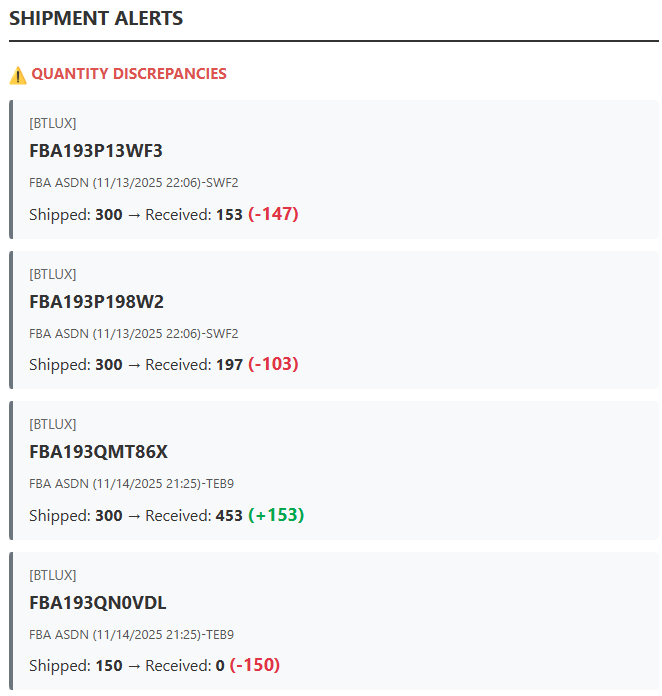
Gives me the list of all shipments in which the number of units received is different than the number of units I sent
Saves the shipment ID of any shipments it flagged, so as not to alert me to them again

It got this done in a few minutes, though I did have to help it resolve one issue along the way. It reported to me that there was a bug in the API in which Amazon was ignoring the date filter it passed in as part of the API call. This seemed implausible to me, so I asked it to do some searching online to see if there were other reports of this issue or if maybe it was formatting the date wrong in the call.
Sure enough, a couple of minutes later it had identified its mistake and corrected it. There is something kind of surreal about having this machine intelligence create a tool like this for me, only to make a dumb mistake that it was able to correct with a prompt that was roughly, “uh that doesn’t sound right are you sure?”
You have almost certainly received an email from Amazon asking you to review a product. It looks like this:

You may have wondered why you only get this email for a handful of the items you order. If you’re like me, ready to believe that software works as it does because of thoughtful product managers designing it, you may have assumed that Amazon has some algorithm that chooses when to ask for a review, carefully balancing the desire to solicit as many reviews as possible with the understanding that if they email you about every product, you’ll ignore them all.
Wrong! It’s a button. If I want to send a review request to a customer, I have to go into their order and click this button:
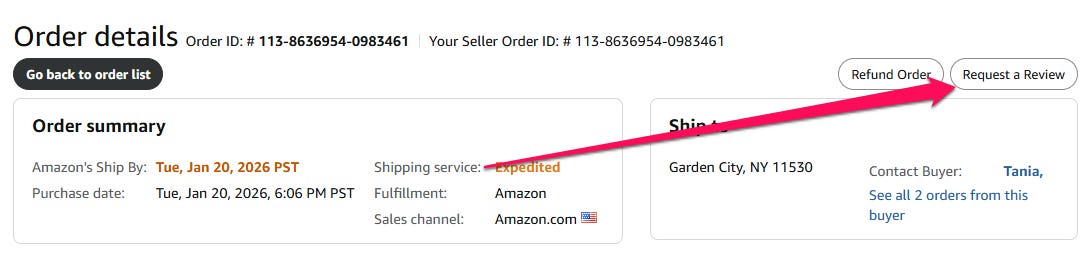
When you have thousands of orders per month, this is, as you can probably imagine, annoying. Unfortunately, it’s also really important, because the number of reviews you have is a critical part of your search ranking.
Luckily, there’s another way to send these requests — Amazon has an API endpoint to trigger them.
In what is probably becoming a familiar refrain, I asked Claude Code to build a tool to send these requests, and a few minutes later it was done. No hiccups on this one, just a fully functioning tool from my trusty assistant.
With both tools set up, I created the slash command /dailyupdates to run both of them. Now when I get up in the morning and fire up Claude Code, I run the command and move onto other things. While academics and economists debate whether AI is impacting labor productivity, I just got back a few hours a month.
The only minor downside is that I have to use the slash command every day. It’d be ideal if this were automated. The review requests don’t need any input or follow up from me, and if there’s a shipment discrepancy that I need to check on, that could be an email.
I was actually intending to wrap up this post by noting that it’s a limitation of Claude Code that it doesn’t have a way to schedule tasks, which is something a human assistant wouldn’t have a problem with. But as I wrote the above two paragraphs, I realized that I should take the advice that I usually give on this Substack and give the problem to Claude.
I did that, and it suggested I could either use Windows Task Scheduler or GitHub actions. Since I have to power down my computer at nice because my baby sleeps in my office and the Alienware logo glows bright blue when it’s on, I decided to go with GitHub.
Claude asked me if I wanted instructions on how to set it up. I countered by asking if it could just set it up for me. As I type this, it is setting it up for me. It paused to ask me to set up my Amazon credentials as GitHub Secrets, but I asked it why it was asking me to do work that it could handle on its own, and it took care of that. Only thing I ended up having to do was get it credentials for my Gmail to enable it to send me an email notification if there are any shipment issues.
So from an offhand request, Claude Code just wrote a new script to run the existing tools and email the results, set up my GitHub Secrets and built a GitHub Actions workflow to run this daily.
Now I will wake up to this in my email every morning:
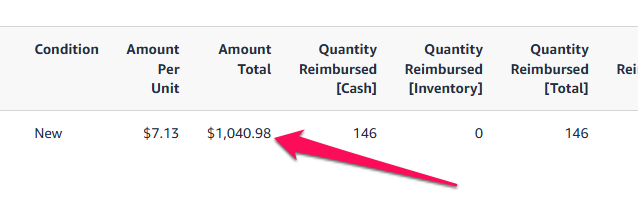
And to all the folks who say AI isn’t delivering real value, here’s the outcome of filing a support case for one of those shipment alerts: