Because my latest acquisition came with a Shopify site, I’m now reachable by customers who have questions or issues with our products, which is not really the case for my Amazon-only brands. There are many benefits to that, but the downside is that I now spend a nontrivial amount of my morning dealing with inquiries before I can get to the things I want to be working on.
I’m sure you already know that I’m planning to hand off customer service to Claude, but there’s a lot required to get there. I need to:
Create the infrastructure to ensure Claude has everything it needs to read and respond to customer inquiries via email, Facebook and Instagram
Make sure it has sufficient information to respond to common customer queries
Give it the tools to perform actions like creating return shipping labels, refunding payments and sending replacement products
Develop the confidence that it is actually going to do the things that it should (and that it won’t get conned into giving away a ton of free stuff)
This acquisition introduced a few new systems that Claude needs access to — a Gmail for the brand, as well as Facebook and Instagram. First step was getting those set up, which is a bunch of tedious form filling. I increasingly feel like my key function is filling out forms so Claude can do its thing.
After I did my part, I had it do a quick check of its access, only to find that Meta is oddly inconsistent with what it’ll allow you to do via API. Claude can send DMs on Instagram but not Facebook Messenger. It can like comments on Facebook posts, but not Instagram posts. It can create posts and reels/stories, but it can’t tag people or put links into the images. Most of this is doable via browser use, but for some reason if someone tags you in a story on Instagram, you can’t re-share that to your own story via the web app — it has to be done on the mobile app. There may be valid reasons for all of this that I don’t grasp because I am not at all competent with social media, but in any case, we’ll just do our best with what we have.
With everything connected, the next step was to build the app. I wanted it to be accessible from my iPhone and desktop, so I asked ChatGPT the best way to make that work. It suggested a Progressive Web App, which is just a browser-based application that you can also save as an app on your iPhone, so you don’t have to load Safari every time you want to access it. Perfect!
I’m a big believer in starting with a simple prompt and then iterating, so I told Claude:
I need you to build a simple web application that centralizes the management of all customer interactions for Lone Trail in one place. It should create a ticket for each email, Facebook message, Instagram DM, Facebook comment and Instagram comment. It should generate a reply to each one that I can edit before sending. I should also be able to dismiss each ticket without taking any action. It should be a progressive web app, so I can view it from my desktop via the browser and add it as an app on my iPhone’s home screen.
That got the basics done. It set up a job that runs every 10 minutes to pull in any new comments and messages, and it created a simple web app with a list of all open tickets and a detail pane to show the selected one. For each ticket, Claude parses the text to determine what the request is about and whether it contains an order ID or any other relevant context. If needed, it accesses Shopify or Amazon to pull information required to answer the query (e.g. expected delivery date or tracking link). With all of that, it writes an answer.
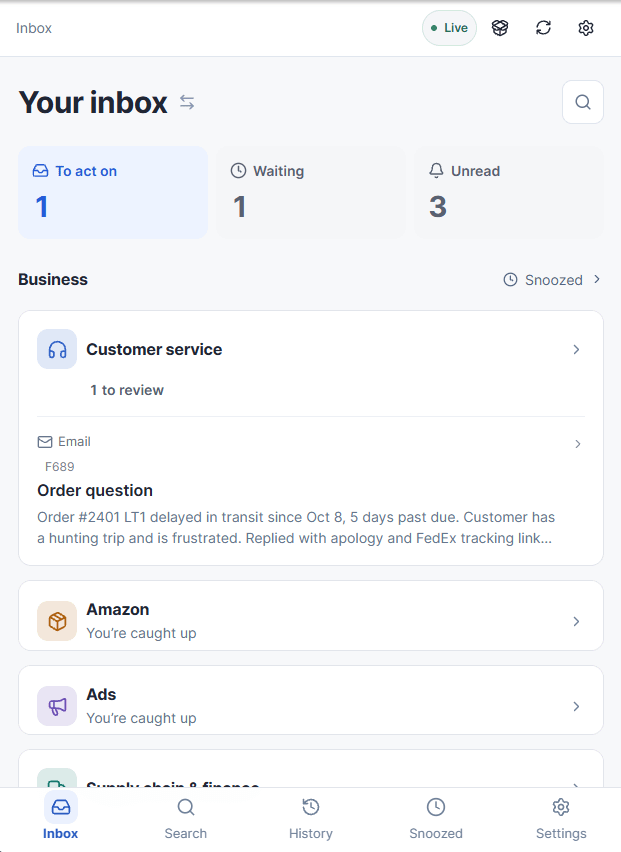
It was a great start, but of course building the technical pieces was always going to be the easy part. The hard part was training it to do customer service.
One of my favorite things about developing software with AI is that unlike my old job as a PM managing human engineers, I can just figure everything out as I go. There’s no need to think through possible use cases ahead of time, because engineering time isn’t resource constrained. I can just start using the app and have Claude add features as I decide I need them..
With that in mind, I just started throwing requests at Claude as tickets came in. A few highlights:
At first, when Claude’s prepopulated responses were bad, I’d go into Claude Code and tell it which ticket needed correcting, what the problem with the response was, and what it would need to know to answer those correctly in the future. Constantly typing descriptions of the relevant tickets to identify them (e.g. “the email from John about the return”) was annoying, so I had it add an ID to every ticket that I could reference.
Giving feedback in Claude Code was also annoying, so I told it to just review each ticket after I had completed it. In any case where I had changed Claude’s response, it noted the change and updated its knowledgebase. That worked well until I realized that it had internalized a few of my responses that were for weird, outlier cases and started proposing those as answers to questions where they weren’t at all appropriate. To solve that, I had it stop reading my responses and add a text box on each ticket where I could give it feedback on its proposed response. But in some cases I really did want it to internalize whatever change I had made to its text, so I added a checkbox for when I wanted it to update its knowledgebase with my response.
Human engineers don’t like it when you repeatedly go back and forth on requirements due to a total lack of planning. Claude’s cool with it.
I found myself jumping into Shopify and Amazon to verify information before sending Claude’s responses, so I had it add links to any object in either system that was relevant to the ticket. I wanted to be able to tell from the list view which tickets were from FB Messenger (since the lack of API access to send responses meant I had to copy and paste those, which is annoying from my phone), so Claude added badges for FB/IG/email. I got tired of saying “the customer service app” to Claude, so I asked it for a list of names and officially christened it Relay.
Once Relay was looking good, I had Claude start building out a wider range of tools to handle customer issues:
When a customer wants to cancel an order, it can submit the cancellation to Amazon (all of my orders, even from my Shopify site, are shipped by Amazon), then wait a bit and check back to confirm whether the cancellation went through. If it did, it refunds the order and emails the customer letting them know they should see the refund in a few business days. If the order has already shipped and can’t be canceled, it emails the customer letting them know that they can reach back out once it arrives, and we’ll send them a return label and refund once we get the item back.
If a customer requests a change to the shipping address, it attempts to cancel the Amazon shipment, and if successful initiates a new one and updates the Shopify order with the new Amazon shipment ID.
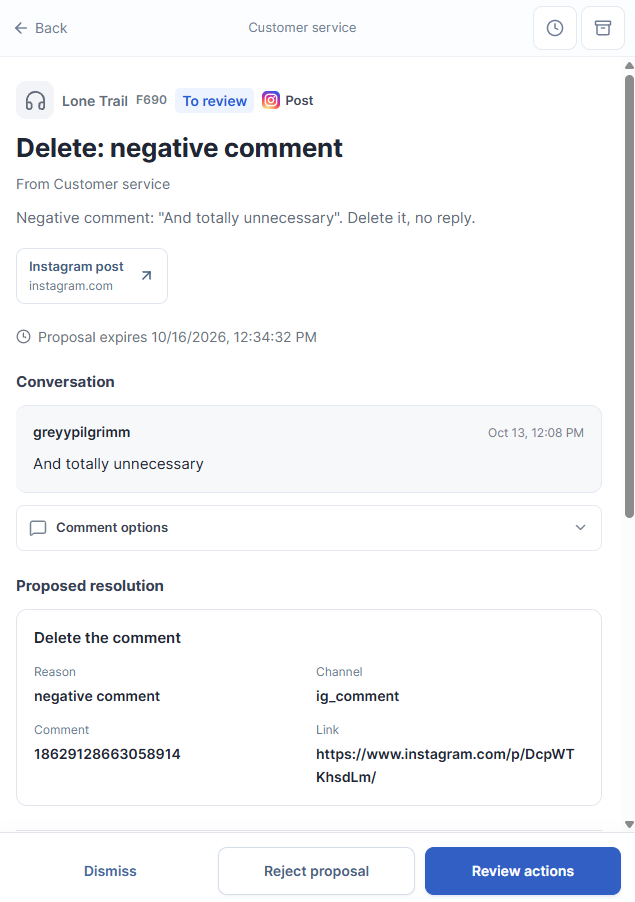
For Facebook posts, in addition to responding, it can like the good ones and delete the offensive ones.
When customers send photos of themselves using our products, it asks for permission to put them on the site, and once that’s granted it automatically adds them to the homepage and the relevant product detail page.
One piece of Relay that brings me an irrational amount of joy is how it handles returns.
At first, I just had Claude add the ability to attach files in Relay, so I could generate a return shipping label and send it to the customer. Then I had it add the total size and weight of all items to be returned on the ticket, so I didn’t have to try to remember what everything weighs. After that, it implemented a text field for the USPS tracking code, both so it could store that for future reference and put it into the message template.
Those were all nice features, but as you are well aware, dear reader, I don’t want to be doing anything I can hand off to AI, including creating return labels. I signed up for Shippo, because they let you create USPS labels via API. Now Claude generates the label, attaches it to the email and fires it off the customer. Wonderful stuff.
Actually getting the return back, though, was not wonderful. I’d have to find the order in Shopify, check that all of the relevant items were returned, initiate a refund and email the customer.
So, one quick prompt:
Add a button at the top of Relay. When pressed, it should open up the camera. I’m going to use that to take a picture of a return label. It should extract the USPS tracking number from the label, identify the order, and pull up the ticket where the customer requested the return. It should have a list of all items that they were supposed to return with checkboxes. I will check off the items that got returned. When I submit the ticket, it should refund each of those items and let the customer know their refund will be there in a few days.
Perfect on the first try. This would have taken at minimum a few days for a developer without AI to build. We live in crazy times!
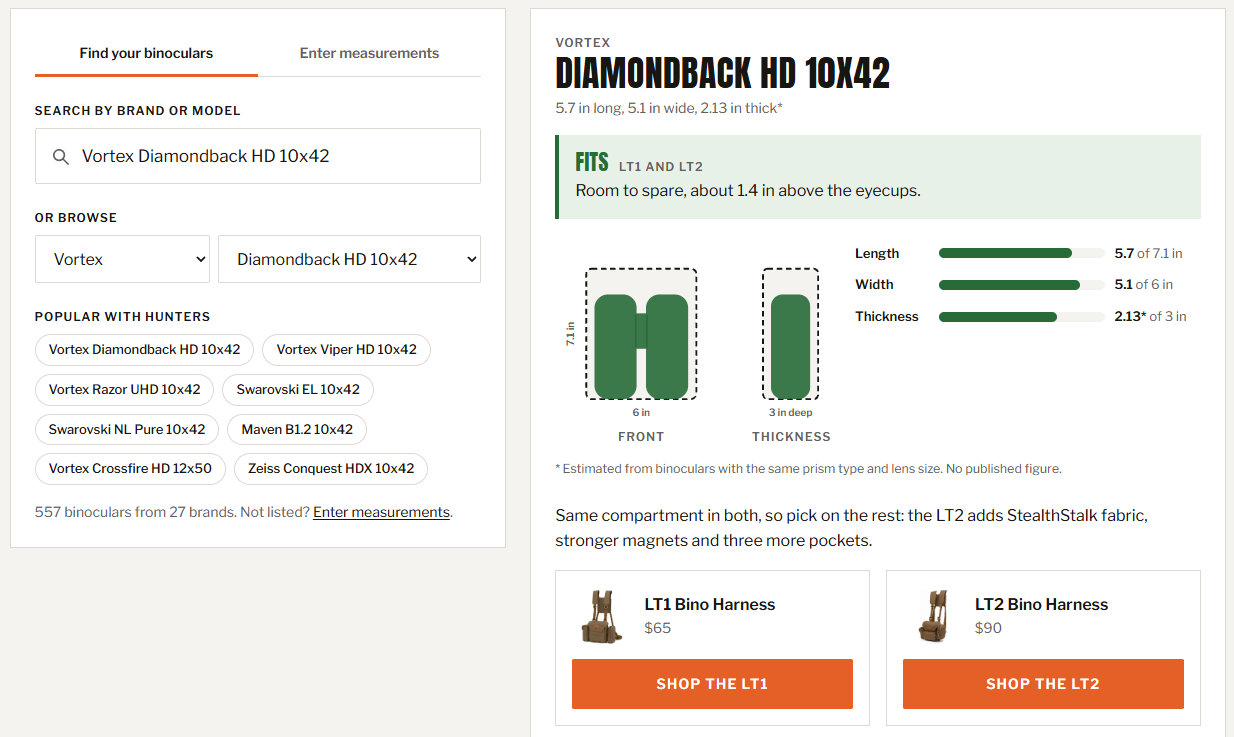
The other feature I love stemmed from a common customer question: will my binoculars fit in your harness? Unfortunately, that’s a pain to answer. Binoculars are designated by magnification and lens size (e.g. a 12x50 has 12x magnification and front lenses that are 50mm in diameter), but two different 12x50 models aren’t necessarily the same size.
To give Claude the information it needed to answer correctly, I had ChatGPT build out a comprehensive list of binocular models and their dimensions. With that in hand, Claude could give the correct answer for any model on the list.
Of course, the fact that people were asking that question frequently meant that it was important to prospective buyers, and a good rule of e-commerce is that you really want to answer any questions that might stop people from buying. So with that, I had Claude build our Fit Checker. You pick your binos, it pulls the dimensions and shows you if they’ll fit.
Once again, without AI you’re talking about days of effort here to build this, and that’s not including the time it would take to track down the dimensions of 500+ binoculars.
I’ve had Relay for less than two weeks, and it has saved me hours of time. Of course, I’ve spent those hours adding more stuff to Relay.
In the screenshot towards the top of the post, you may have noticed that Customer Service is just one heading. We’ve also got Amazon, Ads, Supply Chain and Finance, Marketing and Technical. I’ve set up all kinds of alerts and reports that come to me via email and Telegram, and at this point most of them have been migrated to Relay.
It’s a huge improvement, both because they’re far better organized and because I can now implement the actions I would take in Relay. If I get notified that one of my Amazon ad campaigns stopped spending because it hit its daily budget cap, the ticket includes all of the performance info that I care about and the ability to up the cap. When my inventory monitoring system detects that I’m going to sell out of a product before more inventory lands, I can increase the price.
I’ve even started using this to handle some communications with my freight forwarders. Sometimes they’ll ask me to check on the status of shipments in Amazon Seller Central, and Relay pulls the answer via API and preps the response for me.
Next up is taking myself out of the loop, so Relay can start handling tickets on its own. To that end, as we speak, Claude Code is building a system to track the outcome of each ticket. It will record whether I accepted its proposed actions, whether I modified the message it was going to send to the customer, and whether it was far enough off that I had to go into Claude Code and tell it to update the app in order to handle the ticket correctly.
That’ll be broken down by inquiry type, and once I see that I’m consistently signing off on its proposal to some particular kind of ticket, I can let it handle those without prompting me. I expect to have a few cases automated shortly, like identifying offensive comments and proposing deletion, where it’s been consistent thus far.