Hello and welcome back to my series on using Claude to run my Amazon ads via Claude Code! In part 1, I set it up to send me weekly reports on ad performance then put it to work on finding new search terms for me to advertise against.
I also ran into a bunch of issues with Claude: it does a pretty minimal job if you leave your instructions open-ended, it has very little common sense, and it’s really bad at doing research online. Nonetheless, it delivered useful results, including new ad targets that have since made me real money, so I can’t complain! There’s also a brief primer on Amazon ads in part 1, so worth reading if you missed it the first time and aren’t familiar.
I started this project much in the same way I start most of my explorations with Claude — just throw a problem at it, see what I get and iterate until either it produces something of substance or I’ve concluded that it’s not going to be helpful. Since this first go-round with one of my brands turned out well, today I’m going to focus on the process of turning it into a skill that works consistently, so I can apply it across all of my brands.
You almost certainly know this, but if you have a task that you want Claude to take on with any regularity, you’re going to want to create a skill.
Having just completed a run through of the process I wanted Claude to follow, I asked it to first write up a set of detailed, step-by-step instructions for me to review before actually creating the skill. It did a solid job here, breaking it down into the relevant sections:
Hit the Amazon Ads APIs to retrieve historical performance data.
Go through that data and:
Find any search terms in broad/phrase/ASIN campaigns that are yielding sales.
Identify keyword/ASIN targets that have a ROAS that is meaningfully higher or lower than what I’m targeting.
Identify keyword/ASIN targets that have not spent any money in the recent past.
Pull the search terms report from the Brand Analytics API.
Review that report for organic search terms that are leading people to click on/add to cart/purchase my product, then check those against the list of search terms I’m already targeting to find the ones that I am not yet targeting.
Search the Product Catalog API for similar products to advertise against.
Present the results in the terminal, along with recommendations for changes.
Got the basics, but when building skills it’s important to get into specifics in order to get the consistent output that you want. This includes both telling Claude what to do and what not to do, and you’ll want to keep adding to the list as you see it gets things wrong in order to ensure it doesn’t repeat its mistakes. I started with a list based on my first run through:
If you get a FATAL error from Amazon when attempting to generate a report, do not assume the report timed out; request more info to determine the cause. If it was a malformed request, make the request again correctly. If it was a timeout, try again up to three more times, backing off exponentially in between each.
When evaluating the performance of ad targets, make sure you have enough data to draw conclusions. If a keyword has a tiny amount of spend, then a very high ROAS doesn’t tell us it’s good, and a lack of sales doesn’t tell us it’s bad.
When pulling the Brand Analytics report, your request must include parameters that filter it down to just the rows relevant to the product(s) you’re evaluating. Under no circumstances should you ever pull the entire report and then attempt to filter after downloading it.
With all of that in mind, it created the /ads-audit skill. Time to give it a whirl!
I ran it against another brand, and the results were pretty good. It did all of the major tasks correctly and didn’t make any of the errors I had admonished against. It enthusiastically followed my command not to overindex on results from too little data, noting specifically about several targets that despite a very high ROAS, nothing should be done because the amount of spend was too small. Good job, Claude!
That said, there were still improvements left to be made. The output it generated was meaningfully different from my prior run in terms of structure and information provided, and the bid change recommendations were comically large and based on obviously very faulty logic. For a target with a ROAS of 3 where my target ROAS was 4, it would suggest cutting the bid by 33%. If you’re not familiar with PPC, suffice to say that’s not at all how those numbers relate to each other, and a cut of that size would probably just make it stop spending entirely. So, as always, more specifics.
I wrote up the desired output in detail, section by section. What info to include, how to structure tables, and what kind of commentary I wanted it to offer on why it made the suggestions it did.
For the bid change recommendations, I wanted to see if it could figure out how to size them correctly without me being completely prescriptive. I explained the flaw in its methods and told it to spin up a subagent to review my ad accounts and analyze historical bid changes and the resulting effects on ROAS. It spent a solid half hour on this and actually came back with a very solid understanding of how to size bid change appropriately, which I had it codify in the skill.
That said, it’s weird that I had to have it do this! If you read part one, you’ll recall that I mentioned one of the big flaws of Claude Code is a lack of common sense. Setting bids on PPC is not some esoteric skill that it should’ve had to derive from data! I am very sure there is a ton of information about this in its training data. It will never stop being strange to me to watch Claude Code bang out a thousand lines of code that works perfectly the first time, then follow it up with weird stuff like this that seems to indicate a lack of basic understanding of commonly understood concepts.
Anyway, from here it was just a lot of time iterating on the skill. I’ll spare you the details of the many hours of tweaks, but I will give a couple of suggestions on how to best offload your work to Claude via skills. But first, montage!
First, do the task yourself in parallel with Claude, and compare both the process and the outputs in detail. Often I’ll get the sense that a new skill isn’t quite working the way I want, and this exercise helps me understand exactly why.
In this case, Claude was looking at data from the last 30 days to determine whether to make changes. In practice, what I do is more complex. First I check to see when the last bid change was and look at data since then, then depending on how long ago that was and whether there were any unusual periods (e.g. Prime Day or BFCM), I might look at longer or shorter periods. For long tail keywords with very few impressions, sometimes I’ll go back much further.
There’s just a complex series of instructions in my head that I go through without thinking, and all of those need to be written down in order for Claude to do the task in the same way I do. This is pretty common for people doing any kind of repetitive task — if I just ask you to give me instructions and then I ask you to do the task, you will inevitably do a bunch of stuff that you didn’t write down because you just don’t consciously think through every step each time you do the task. So: actually do the task while you build the skill, ideally several times.
The second piece of advice I’ll give is that once you think your skill is complete, have Claude run through it at least a half dozen times. What you’re looking for is variability in the output, because unless you have very specifically told Claude what to do, there will be some variance — such is the nature of probabilistic systems. Sometimes this is fine, but you should make sure that anything critical is being done correctly 100% of the time.
Having said that, I will tell you that it has been a struggle to get this skill to work consistently. Here’s Claude giving itself an F on the job it did of following instructions:
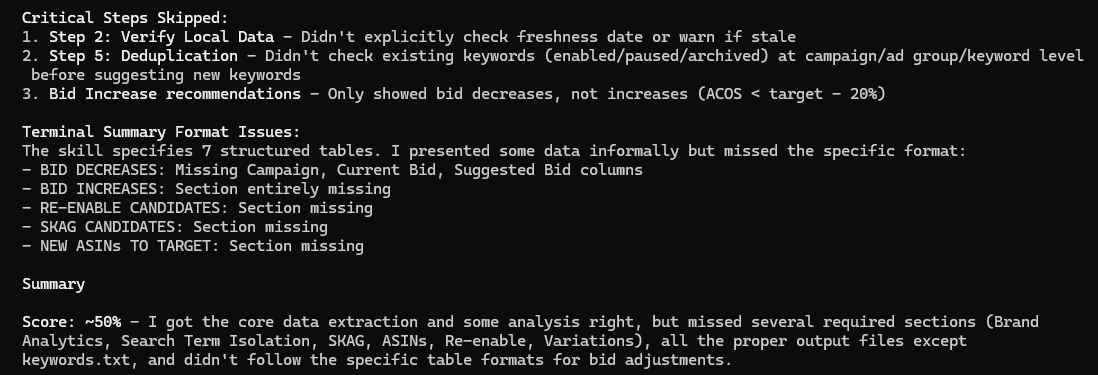
The main culprit here appears to be the size of the skill — the first time I asked, it said it was 270 lines. It’s not necessarily that the skill itself is too big, but with the amount of thinking and output required to follow all of the instructions, the text of the skill itself was getting lost in the context window. Claude would still retain enough to generally do what it was supposed to but not to follow the very detailed instructions at each step.
I still haven’t managed to get it to perfect consistency, but here are a number of things that have helped significantly:
Ultrathink
If you weren’t already aware, if you type the word ultrathink anywhere in your message, Claude will think harder! It sets the token usage to maximum, which seems to help with following complex instructions. It also has a neat little UI:

Recently, Anthropic introduced the effort field as an option for the frontmatter in Claude skills. That basically just means that if you put “effort: <low/medium/high/max>” at the top of your skill, Claude will use that level of effort regardless of what you have set for your current session. Max is equivalent to ultrathink, so you can use that instead of typing it every time.
Output Between Steps
One issue I kept running into with my inventory management skill, which is also very large, is that it would do a step and then not use the output of that step in the next step, even though it was specifically instructed to do so. The most common example of this was that I’d have it check for brand-specific notes before projecting sales for the next 12 months, because there are a few brands that needed different projection methodology than the standard one in the skill. It would always check the notes, but half the time it would ignore them and just make projections the usual way.
I solved this by telling it to output the relevant information to the terminal at the end of each step before proceeding to the next one. Having it actually write, “For this brand, I should just take the average daily sales of the last three months and assume that will be the number of units sold per day instead of using the skill’s typical projection methodology” solved the problem. I honestly don’t understand why — before I did this I could see in the reasoning trace that it was getting the same information, but for some reason writing it as output ensured that it was used in the next step.
Subskills and Subagents
Following on that, where possible it helps to break the skill up into one main skill and a bunch of subskills that it calls along the way using subagents. If one step is to retrieve data, for example, hand that off to a subagent and have it output the relevant data to the main agent when complete.
This keeps a lot of unnecessary info out of the context of the main agent, whether that’s API calls to retrieve the data or a bunch of extraneous data if your subagent is filtering down a dataset to just what’s relevant.
The only caveat here is to make sure that the output contains everything the main agent needs. In some cases, it’s helpful for the main agent to have the full reasoning in its context, either because it’s needed for some future step or because you want it to explain why it made some choice at the end. You have to think through what the agent needs in advance, because if you ask it at the end why it made a choice, if it was actually a subagent that made that choice and the main agent doesn’t have access to the reasoning, it’ll often make up a post hoc explanation rather than say it doesn’t know.
Create a UI for Output
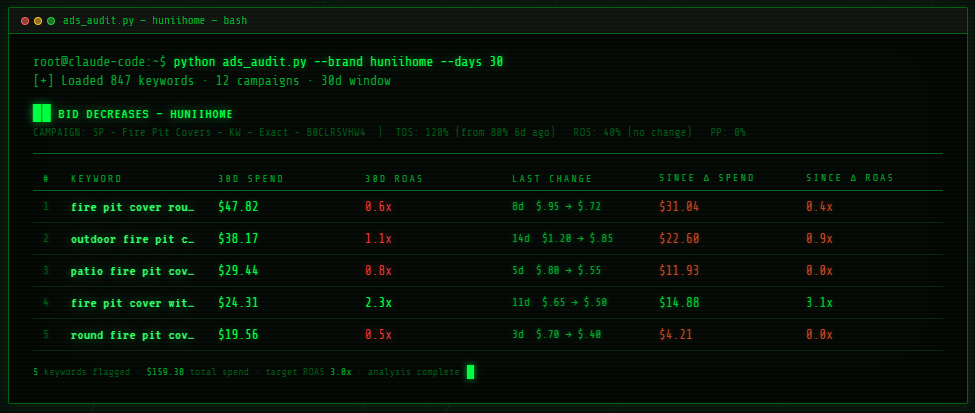
I like having Claude output information straight to the terminal, because it makes me feel like a 90s hacker. Unfortunately, with skills that have long outputs (and my ads audit skill output runs hundreds of lines), it won’t always stick to the very strict formatting that I require in the skill.
In the ads audit skill, I have each table defined exactly as I want it. Every column header, row and value is there. And yet most of the time when I run it, something will be wrong. Sometimes it’s just a slight change in text label of the column header, sometimes it’s a column missing entirely, and sometimes it’ll give me the first 10 rows of ad targets followed by “…and another 20 ad targets not included because they have minimal data” even though it is explicitly instructed never to omit a row.
The solution here is just to have it build a web app to display the output exactly how you want it. When it’s time to see the results, it just feeds data to that web app. This has a perfect success rate for me — if the output template exists and just has to be populated, it never skips anything.
And hey, since code is now free I can still get my 90s hacker vibe…
Reduce Skill Scope
Just as it’s helpful to break your skill into subskills that agents can handle, it’s also helpful to just break it into multiple, smaller skills for you to use.
One thing I realized along the way is that the ads audit skill was serving two very different purposes. The first was to check existing campaigns and suggest adjustments to bids, and the second was to find all-new search terms and ASINs to target. The former is something that needs to be done regularly, but the latter is usually just a one-time task immediately after I take over a brand.
With that in mind, I broke it into two skills: /ads-audit and /ads-review. I run both upon taking over a brand, then the review one every 2-4 weeks. Both work more consistently now that they’re separate and thus shorter.
Human in the Loop
The last and unfortunately least fun way to make sure Claude uses skills correctly is to keep yourself involved. My ultimate goal here is to just have Claude manage my ads by itself, but I am obviously not going to let it start messing with things that spend my money until I have full confidence that it’ll get it right 100% of the time.
So for now, Claude does the analysis and proposes changes. I review and give permission before it actually does anything in the account itself. Still a huge time saver, especially when it comes to creating a bunch of new ad campaigns (the Amazon Ads web app is truly terrible, so in a lot of cases you’re talking about half a day for me to implement everything Claude suggests), but not quite the fully automated future just yet. The good news is we’ll probably get a new model in the next few months that’ll magically solve all of my problems and run skills perfectly every time.
I hope that helps you implement some of your own skills! Next week we’ll be back with our third and final post in the series, in which I will talk through some infrastructure we implemented to improve these ad skills plus some results and future plans.