As the capabilities of leading AI models grow, smart, well-informed people have greatly varied opinions on how quickly AI will diffuse into society and the economy. Dario Amodei and Mustafa Suleyman predict large-scale labor market impact and meaningful AI-driven unemployment as soon as twelve months from now, but Satya Nadella contends things won’t move that quickly because of energy constraints.
This is all to say that no matter how intelligent AI becomes, there will still be external forces that bottleneck its deployment.
What does any of that have to do with me using it to manage my Amazon Ads? Glad you asked. My personal bottleneck has been getting an API key for Amazon Ads. It is a nightmarishly Kafkaesque process. I started it twice in 2025, only to get stuck in never-ending loops and finally quit. It is literally the worst process for obtaining API access I have ever dealt with, and in my past life I was a product manager dealing primarily in APIs and integrations. I have seen some stuff and dealt with some truly terrible developer portals. This is worse.
Thank you for indulging that little rant. The good news is I went at it one more time this year and finally got an API key! Claude can now access my Amazon Ads, so I’m putting it to work.
As this is going to be a multi-part series, let me tease some results up front: here’s a beautiful graph with the before/after of Claude doing its thing on the ads for one of the brands I own. That’s a doubling of revenue in the week post-Claude compared to the week prior. Pretty good!
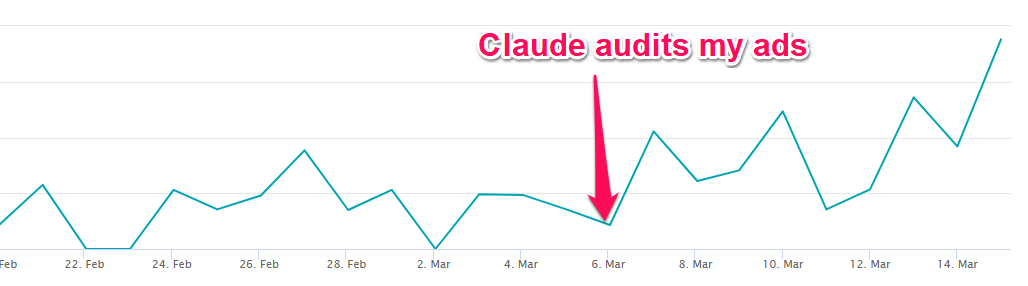
The impact that Claude has had on my ads is substantial, both in terms of generating additional revenue and saving me time on maintaining them. To help you understand the significance of what it’s now doing, a brief explanation of Amazon’s ad system is in order. This will be a little oversimplified for the sake of brevity.
Amazon’s ads will be pretty familiar to anyone who’s done PPC advertising. You tell it what search terms you want to advertise your product against and how much you’re willing to bid for a spot where your product appears. If you’ve shopped on Amazon, you’ve seen these; they look like any other search result but with the word “Sponsored” below them:
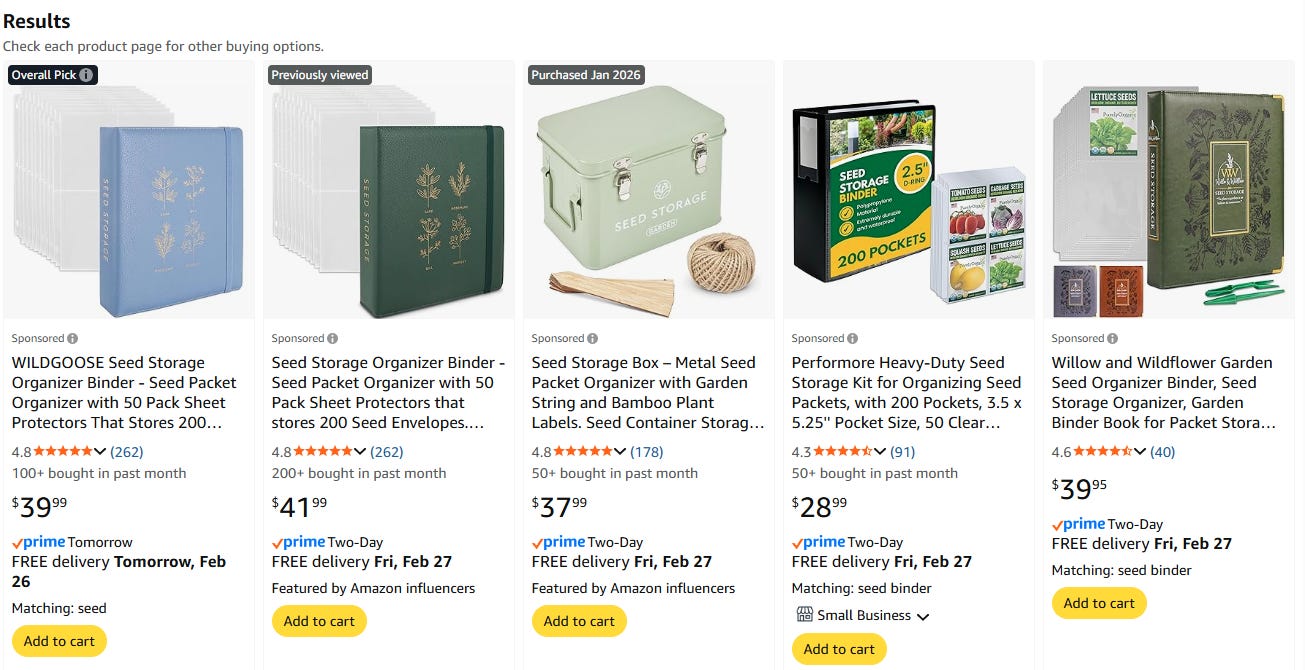
Simple enough, but there are a couple more wrinkles to how you configure your ads. First, you set up campaigns, which are effectively groups of search terms. In a given campaign you can either target keywords (which are search terms) or ASINs (these are Amazon product identifiers; if you target one you’re basically saying you want Amazon to show your product in search results where that product also shows up). If you’re targeting keywords, you can opt for exact matching (only searches for the word/phrase exactly as written) or phrase matching (any search containing the word/phrase).
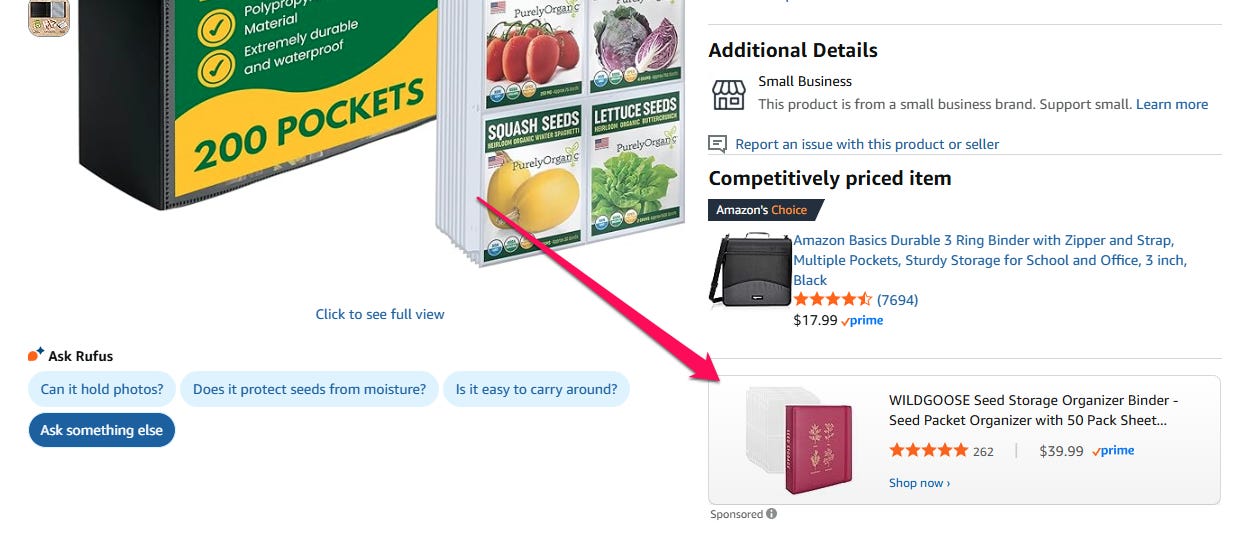
Within each campaign, you can also make bid adjustments for different placements. Doing this tells Amazon you are willing to pay more than what you’ve bid for your ad to show up in a certain place. The three options here are top of search (what it sounds like), rest of search (anywhere in search results that’s not right at the top) and product pages (see screenshot). So if your bid for the term “seed storage” is $1 and you put in a 50% top of search adjustment, you’ll pay up to $1.50 to appear there.
Now, onto the actual implementation of Claude! A note before I get into that, though: I have tried to write this in such a way that it is a reasonable blend of chronological retelling of what I’ve done and coherently-grouped sections about different pieces of functionality.
That’s because I want to convey not only what Claude can do, but also my process for getting to a good result. I am frankly pretty haphazard with how I approach these things, because I really enjoy that I can start by throwing vague directives out and iterating from there. Doing so helps me both understand the models and refine my thinking on how to approach the problems; it’s sort of like rubber ducking but the rubber duck is the most powerful technology created by mankind.
It is possible that this is a terrible choice that is the worst of both worlds; I hope not. I think that what I’ve built is the most important thing to share, but an understanding of the problems I ran into and how I solved them is valuable in helping you get the most out of your own explorations with LLMs. I would certainly love your feedback whether by comment or DM on what’s most useful to you.
The first place that I start when adding Claude into my workflows is having it automate tasks that I’m currently doing manually that only require read access. With ads, every ~couple of weeks, I run through each of my accounts and check performance. I’m checking to see if the numbers are in line with the targets I have for each account, including:
Percent of revenue going to ad spend
Overall return on my ad spend
Return on my ad spend at the campaign, placement and ad target level
If anything’s out of line, I tweak bids to try to bring it back in line. I also check for significant changes in keyword spend. If a competitor has greatly upped their bids on some important keyword and I’m no longer spending there as a result, I probably need to move my bid up as well.
This was all pretty quick when I had a couple of brands, but now we’re at ten eleven (in the time it took me to write this, I closed another quick one!). With that many it’s time consuming and tedious; perfect for Claude to take over. Ultimately the goal is to have it fully manage the whole process, including adjusting bids, but we’re going to work up to that, starting with having it pull the relevant data.
I walked it through my process, told it I wanted weekly update emails to flag the stuff I care about, and asked it to come back with questions before starting. It did:
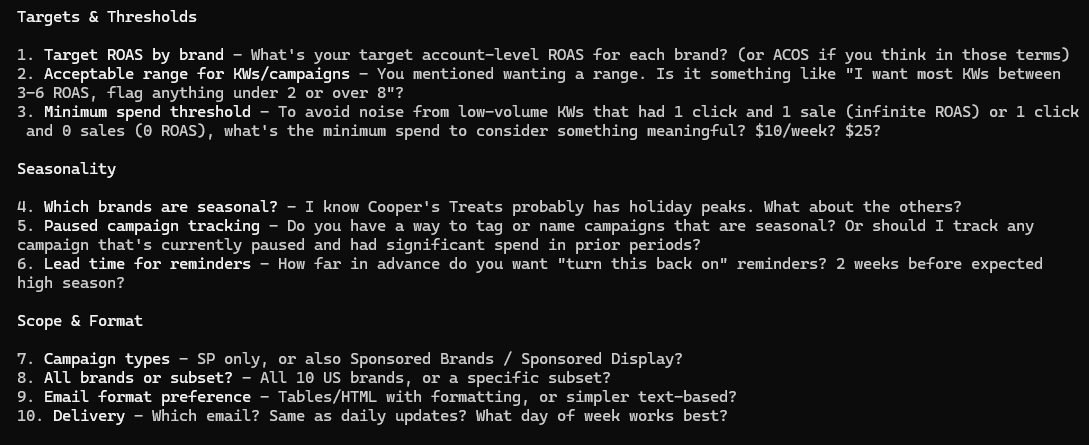
It’s a pretty good list (for context, ROAS = return on ad spend and ACOS = advertising cost of sale, which are two different ways to state the same metric, which is how much money you get back in revenue for each dollar of ad spend).
The seasonality section is in there because I mentioned that for some highly seasonal products, I’ll disable campaigns in the low season and turn them on as the high season approaches, and it’d be helpful to get reminders of when they should come back on. One of the helpful things about using it so extensively throughout my business is that it already has the context to answer question 4 (which brands are seasonal?), though it’d be nice if it figured that out on its own instead of me having to remind it that it knows the answer already.
For each brand, I gave it my targets, and I added a little more detail about exactly what info I want returned and how I want the email structured. It puttered off and hit the APIs for a while to make sure it could get everything, and came back only to let me know that unfortunately all of its requests for reports from Amazon had timed out.
Here’s your first lesson about Claude: It suffers from hubris, particularly as it relates to the fallibility of its own code. When it writes code to hit an external service and it doesn’t work, if there is even the remotest degree of ambiguity as to what the problem is, it will blame the external service.
With Amazon, when you want to generate reports, you first make an API call to create the report, then you poll an endpoint for status until it’s complete. If the status returns FATAL, your report creation failed for one of a few reasons, but for our purposes the ones we care about are that it could have timed out or the API call to create the report could have been malformed.
You can, of course, guess where this is going. Claude got a FATAL and could not spare one single second either for introspection as to whether it might be the cause or to just make the follow-up API call to Amazon that would tell it exactly why the FATAL occurred. Either approach would have confirmed the API calls were missing required parameters, but since timeout was a possibility, Claude went with timeout.
Thankfully I had encountered this before, so I reminded it that it could check what happened. It did, then it fixed the call, and then it continued with the project. Eventually it sent me this:
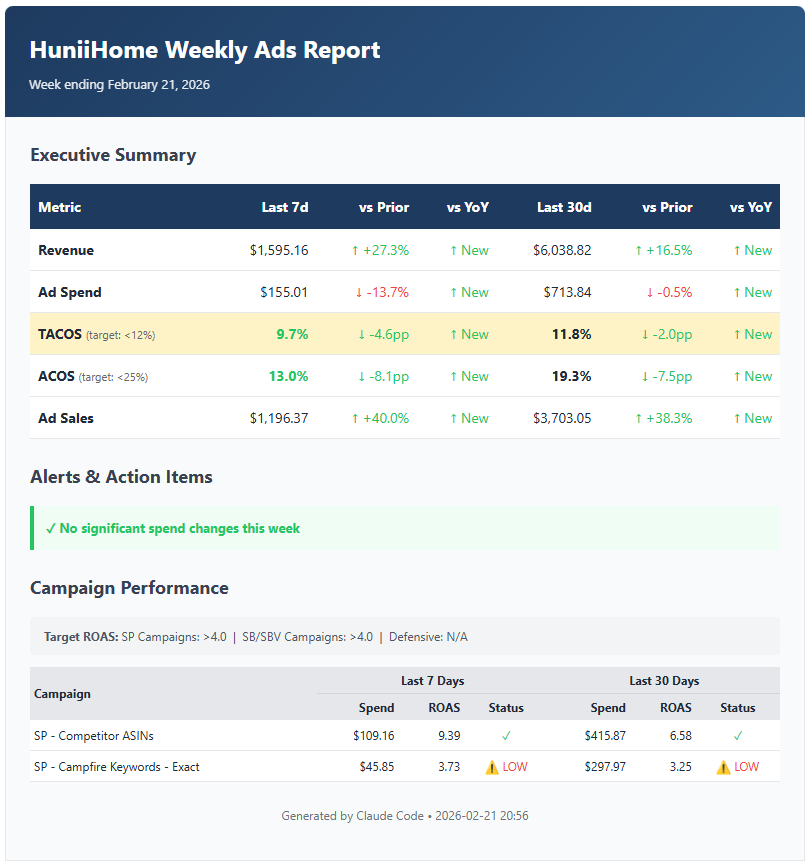
The API only lets you pull data from the last 90 days, so it couldn’t get last year’s data to give me YoY changes, but other than that it’s all there and looking pretty nice if I do say so myself.
I had it go ahead and set this up to run via GitHub Actions, and now I get one of these per brand every Tuesday (my toddler doesn’t go to daycare on Monday, so Tuesday’s really the first day of the week I can lock in on work).
So far so good, but plenty more to do before I can entrust my advertising to Claude.
When I take over an Amazon account, the first thing I do is go through the ads to see what’s working and what’s not. This can unfortunately be quite time-consuming, especially for accounts that are targeting a lot of keywords and ASINs.
At first glance, you might have a bunch of campaigns whose top-level metrics look good, but when you dig in, you find that a few keywords are greatly overperforming in terms of ROAS (which sounds good but is not, because it means you’re underbidding on those) and a bunch of others that are bleeding money, so the overall campaign looks good. Similar with ad placements; it’s pretty common to have your top of search placements making lots of money and your product placement ads setting dollars ablaze.
None of this is hard to figure out, but it requires tediously clicking through the Amazon Ads UI (which is so, so slow) for hours on end, making adjustments, then doing the same thing every couple of weeks until things are in better shape. So: Claude.
First things first, I just asked it to audit one of my accounts and tell me what I should do differently to see what it’d come up with on its own. It was lazy, as it somewhat frequently is when given open-ended tasks. It pulled historical data, looked at the ROAS of the campaigns relative to my target, saw they were above target and told me all was well.
I told it to do better and gave it more detailed instructions — drill down into campaigns and look at performance at the ad target and placement levels. It tried again and came back with more thorough analysis, though the results were still too rosy. Everything was above target with a couple of exceptions that were close.
That didn’t sound right, so I pulled up the Amazon Ads UI and found the state of affairs to be worse than what it was describing. Then it occurred to me that I was just looking at the last 30 days because that’s my default, but I didn’t actually know what timeframe it was using.
I asked, and it said 90 days, because that’s the limit of what the API allowed it to pull. Fair enough, except this was in late February, which meant the data included Black Friday and Christmas, during which ad performance always improves. Not a helpful data set for making decisions about what to do today.
Here’s your second lesson about Claude (though specific to Claude Code): It has an absolute lack of what could generally be described as common sense. It’s weird, because outside of Claude Code, Claude tends to be much better in this regard.
And in fact, I went to the web and asked a separate instance of Opus 4.6 a question about this situation in the least leading way I could come up with to see if it’d identify the issue.
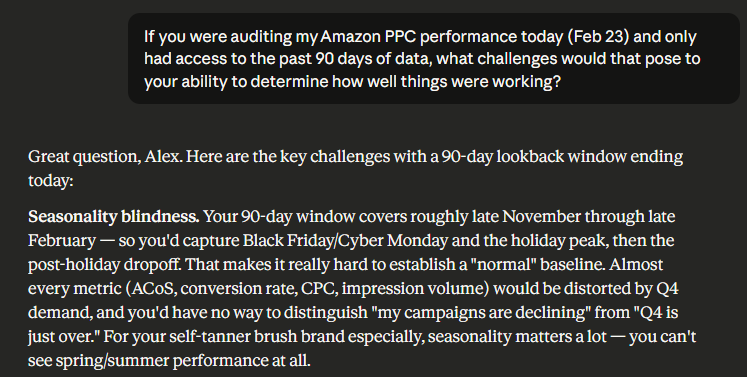
Literal first part of the response. I honestly wonder what causes this; maybe the fact that the Code harness makes Claude much less verbose also limits its ability to think in depth in an open-ended sort of way for the sake of saving tokens. In any case, the lesson here is that while Claude Code can execute the tasks you give it, you’ll have to supply the context and sense to make sure it understands how to do them correctly.
I told it to go again but using just date since Jan 1. Pretty good results in terms of identifying under- and over-performing keywords, but its analysis of those results had some glaring holes.
It got extremely excited about long-tail keywords that happened to have a sale on very low spend, like one with a ROAS of 55 (we’re targeting 4 here, for reference) because it had spent a dollar and sold one unit. It suggested a huge bid increase there, which would do nothing at all, because my bid was already very high and there was simply no additional volume to capture at any price.
Even for non-outlier cases, it had pretty over-the-top suggestions about how much to adjust bids to compensate. Since I wasn’t going to start letting it make changes at this point anyway, I ignored that and moved onto the second half of the audit.
After cleaning up the existing targets in an ad account, the next thing you want to do is find new targets to advertise against. More targets (good ones at least) mean more sales.
Once again, I started off by just asking Claude to find more ad targets. Once again, the hands-off approach yielded poor results. It came up with some ad targets that were already in my campaigns, along with a haphazard list of ideas that it seemed to have pulled out of nowhere. When I asked how it came up with them, it just said that it generated a list of terms that it thought people would search for. Not what I was looking for!
So, per usual, I gave it clearer instructions: Amazon has lots of useful information available to help with this task that is accessible to you via API. Go into plan mode, check out the API docs and search online for relevant content. Come back with a detailed proposal on how you’re going to get a list of targets based on Amazon’s data. Also, plan for how you’re going to check them against existing targets to ensure you’re not suggesting anything that already exists.
This worked much better! It came up with a few things:
Amazon’s Brand Analytics search terms report, which shows all of the search terms for which your product appeared as an organic result (as well as how frequently it was clicked on, added to cart and purchased for each search term).
Search Term ads reports, which show all of the search terms for which your ads appear. This is useful because it enables you to pull out search terms that are showing up in your ASIN and phrase campaigns, so you can advertise against those terms directly. That enables you to bid specifically on the exact term, rather than just using whatever the ASIN/phrase bid is.
Amazon’s product catalog, which basically just enables it to search through all products on Amazon in order to find products similar to yours to target.
Unfortunately, we did run into a couple of issues. First, it didn’t fully understand the Brand Analytics report — it thought it was just a giant list of all search queries on Amazon with no specific information about your product. That’s not correct (it does tell you about the performance of your products in relation to queries). The documentation is clear about this if you read far enough, and thankfully I have used the UI-based version of the tool enough to know that its understanding was almost certainly wrong.
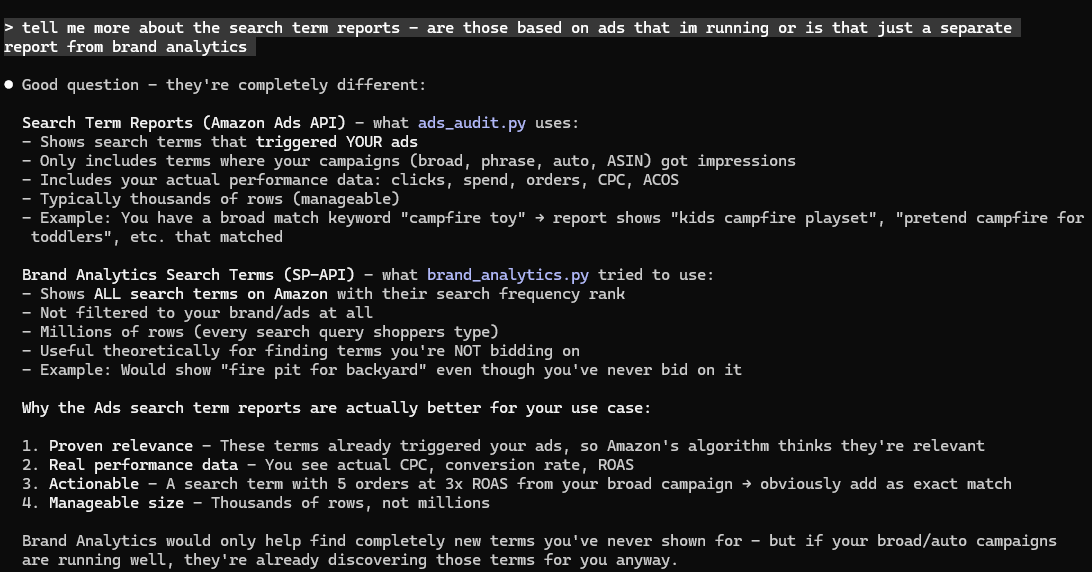
Our third and final lesson about Claude for the day: it is bad at web searches and research in general. It doesn’t have enough breadth in terms of the number of searches it runs or the number of results it reviews, and it doesn’t have enough depth in terms of exploring sites past the initial page that the search turns up. In this case, it accessed the correct section of the Amazon API docs but apparently just sorta skimmed.
If search is a critical part of your workflow (as it often is when you’re trying to develop a new tool), you should have ChatGPT run the same searches in parallel rather than just taking Claude’s word for anything.
I told it to implement all three tools, and when it was done I gave it a try on a brand I own that sells plush fire pit toys. The result? My computer froze. Could’ve been a fluke, so I tried again. Wasn’t a fluke. Computer froze again.
I asked it what was going on, and it told me my graphics card drivers were out of date. Now, dear reader, I should have known better than to believe this. We have already talked about Claude’s hubris, but somehow it did not immediately occur to me to tell it to engage in some self-reflection.
After a series of misadventures which at least led to me updating a bunch of drivers for the first time since I bought this computer, I finally did what I should have done from the beginning and asked Claude to think through what in its code might be causing the issue. It thought for a couple of minutes before realizing that it was downloading the entire Amazon Brand Analytics report, which is some ludicrous number of rows, then loading it into memory before attempting to filter down to just the rows relevant to my product. It updated its API calls to request a pre-filtered version of the report from Amazon. Problem solved.
With that, we got some good results! Here’s a list of phrases that people searched and ultimately ended up buying my product. These are very obviously things that I should be advertising against directly. Gotta love that the top one is a misspelling — it turns out after running this across all my brands that there are always a bunch of misspellings you should be advertising against.
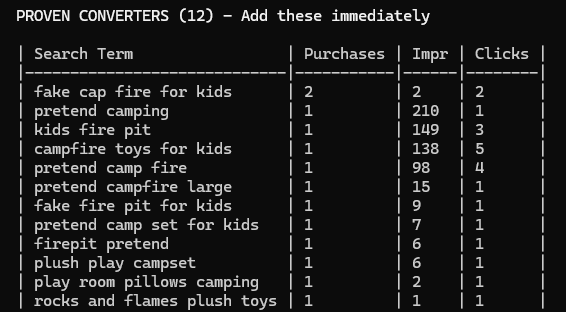
Those were the search terms results (mostly search terms where my product showed up because I had advertised it against a direct competitor). It also had extensive Brand Analytics results that I checked against the same report in the UI; they were good too! It came back with every single term for which my product had shown up in organic search results, sorted into groups based on whether it had been purchased, added to cart or clicked for each result.
It was at this point I realized that this was actually going to be a valuable exercise — not always the case when I start exploring projects like this with Claude — so I decided to take a more systematic approach to turning this into a skill that I could use on all of my brands and any new ones that I subsequently acquired.
(I will note briefly before moving on that I mentioned having Claude access the product catalog APIs to find competing products to advertise against, and Claude did a wholly mediocre job with this. It came back with what felt like a pretty haphazard list with some good targets and some irrelevant targets. I did some searches of my own and found it had missed plenty of relevant targets as well. I decided to set that aside for the moment, and as of writing I still haven’t come back to it. But I will! And you will read about it when I do.)
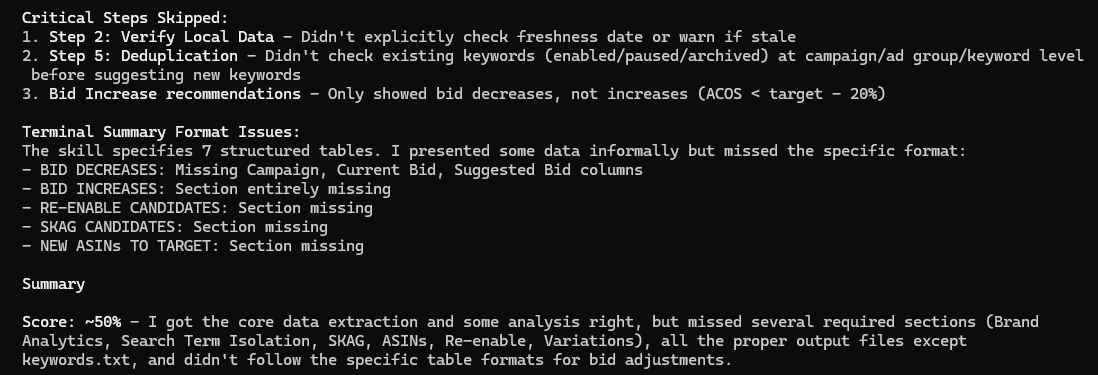
Since we are already on the long side here, I’m going to call this a wrap on part one. Stay tuned for part two, in which I repeatedly bang my head against the wall at Claude’s inability to follow the instructions in its own skills. As a preview, here is it giving itself an F when asked to grade its performance at following instructions: