Exciting news — The Automated Operator just hit 100 subscribers! I am honored that you choose to spend your time reading my little corner of the universe, and I truly hope it’s helpful.
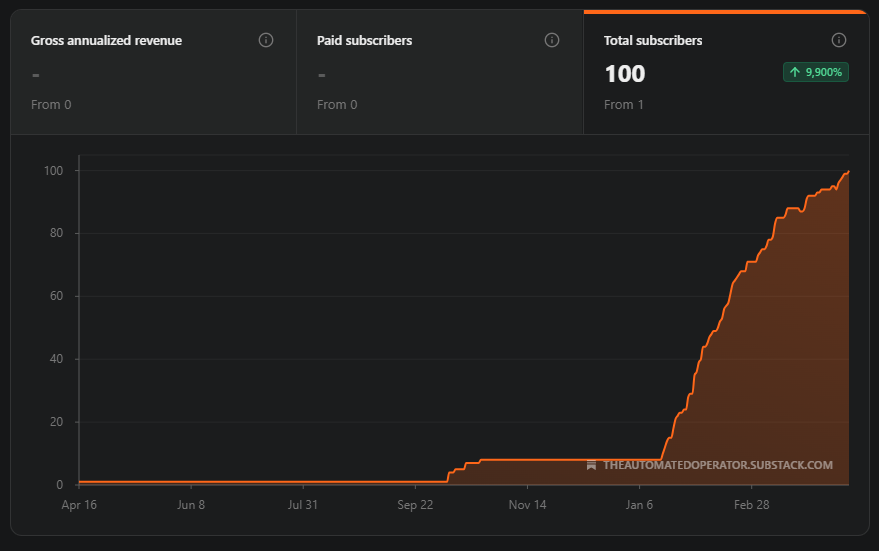
That milestone, plus the fact that it’s been almost exactly six months since I started, makes this feel like a good week for a big-picture review of where things stand in terms of using AI in my business.
When I started, models were not capable of doing much legitimately useful work for me. Just six months later, AI is fundamental to how I run every single part of my business. An absolutely bananas rate of progress.
This post should serve as a nice snapshot to look back at six months from now and see how far things have come. I’ve linked to all the relevant prior posts if you want to dig in on any of these topics. Anyway, let’s get to it!
As you probably know by now, I acquire e-commerce brands that sell on Amazon (and if you did not know that, welcome!). I find them on marketplaces (Flippa and Empire Flippers), usually via emails they send with listings. For the ones that show promise, I check out the financials, talk to sellers, make an offer and then ultimately take over the Amazon Seller account.
The emails I get from the marketplaces have a pretty low hit rate. Flippa just spams me constantly, and EF is a bit better but still mostly sends things that can be safely rejected after a cursory review.
My pre-AI flow was:
Get an email from a marketplace.
Read through the info about each listing in the email, disqualifying any that aren’t a fit. Even though there’s pretty minimal info (listing price, TTM sales and revenue, a brief blurb), it’s usually enough to disqualify most listings.
If any survived the initial pass, go to the marketplace, review the additional information there (generally a longer writeup about the business and potentially some more financial detail) and see if there is anything disqualifying. This eliminates all but a rare few.
Download the financials and any other documentation. Review everything to see if there are any glaring errors, though at this point I’m likely going to set up a call with the seller, so I’m also looking for places I can improve the business if I buy it.
Set up a call with the seller.
Review any information they’ve provided during and after the call. This is usually just getting reports straight from Amazon that I can use to validate their P&L.
I am handling a healthy chunk of that with AI:
Screening Emails
I have a Google Apps Script written by ChatGPT that runs daily, checks for relevant emails (anything from EF and any email from Flippa that has the word “FBA” in it) and sends them to Gemini Flash for review. Gemini has a list of reasons to disqualify and checks each listing against that. If there’s any ambiguity, it errs on the side of not DQing.
Once all emails have been reviewed, it generates an email to me that highlights any listings that have not been eliminated. The email allows me to mark a listing as good or bad for my own future reference. The main value is that if I mark it as bad, the screener won’t show it to me again. This is helpful because both marketplaces send emails notifying me about price drops (which are important emails), but if the listing isn’t a fit, I don’t care if the price drops later.
Evaluating Listings
For listings that pass the initial screen, I have a very long prompt that I use to do a full evaluation. I give a SOTA LLM (these days Claude, but originally I used ChatGPT) a copy of the listing and all the attached files. It goes through all of my criteria and gives me an evaluation.
If there are obvious reasons to disqualify, it starts there. If not, it gives me pros/cons, areas where I might be able to improve the business and a list of questions to ask the seller.
More on that one (though this is one of the first posts I wrote and probably pretty out of date by now) here:
Cleaning Up P&Ls
While the above step generally handles the P&Ls fine, there are cases where it misses important context. I buy very small brands, so pretty frequently I get P&Ls that are constructed by people who are not great with financials or numbers in general. These can be so bad that LLMs struggle with them.
The worst one I’ve ever seen was a guy who put his advertising expenses in the revenue portion of the sheet. Not as a negative number, mind you — he had the amount he was spending on ads listed as an amount of money he was bringing in. Turns out his margins were 0%, not 30%. ChatGPT did not catch this, presumably because it was so egregious that it didn’t even think of it as a possibility.
LLMs are getting better here, but even when they can reliably handle the first pass, I’m still going to want to read the P&L. So for that, I found Shortcut, which is just an Excel-based AI agent. I can give it a spreadsheet that’s just absolute garbage and say “clean this up.” It will ask the right questions then give me back something that looks great.
What I’m Not Using AI For
This is a place where I’m really using AI as a second set of eyes more than a full replacement for my own work. It’s probably the most important area of work, plus it’s pretty interesting, so it just doesn’t make sense to offload it. Still, the screener is helpful, and the listing review is useful in that it will pick up something that DQs a listing immediately that would take me an hour or two to find. In those cases, I can just confirm what it’s telling me and move on, which is a real time-saver.
That said, I would still like to get this to a fully unified workflow. Right now I have to give all of the listing info and analysis prompt to an LLM, where in practice this would happen automatically for any listing that passed the initial screener.
When I started working on this, there weren’t sufficiently reliable browser use capabilities to manage that, and automating the analysis would have meant spending extra money on API tokens rather than doing it via my subscription. We’re now at the point where I could have Claude Code do all of this end to end. It’s on my to do list to make that happen.
This phase is the most manual, both because it’s the highest-stakes and because it’s important for me to build rapport with sellers while working with them. That said, AI definitely assists.
Contract Review
I have a contract template that I update for each deal. They’re pretty simple, so usually this is straightforward. Still, it’s always helpful to have Claude give it a look. I have it check a few things:
I give it all deal details and any changes I intended to make to the template terms, and it checks whether they’re all reflected correctly in the doc.
Any counterparty redlines get a review just for a helpful second pair of eyes.
If I’m buying something in a category that’s new to me, I’ll have ChatGPT do some research on whether there’s anything category-specific I should be aware of and include (e.g. safety testing for toys). I use ChatGPT here because Claude is not especially reliable for research. (Fun aside — when I had Claude proof this post, its feedback on this bullet was “This is going to read oddly to anyone who knows Claude now has web search. Might want to note this was true at the time or clarify what kind of research you mean.” Defensive much, Claude?)
Due Diligence
There is generally not a lot of diligence required, because once the LOI is signed I get access to the seller’s Amazon Seller account, which makes it trivial to check their numbers.
I mostly use Claude to double-check everything I’m doing. I’ll throw it the various reports I’m pulling and just have it compare those against the P&L. If there’s something that requires digging, it can be helpful. In one case, one of the seller’s Amazon fees was a higher percent of revenue than expected. Claude reviewed a handful of orders and found that it was because that person was in a country that charged a digital tax, which would not apply to me once the account was handed over, so no issue there.
The immediate work once I’ve taken over a brand is where AI really starts to shine.
New Listing Images
When Nano Banana Pro came out, I could suddenly use AI for all of my product photography and listing images. I had Claude vibe code me an app that generates a set of Amazon-ready images that highlight all of the product benefits and maintain a consistent style.
When I take over a brand with bad images, I fire that up, generate new ones in less than an hour and get them uploaded. That process used to involve a bunch more work for me, time waiting for my designer to turn images around, and of course the cost of paying him.
New Text
The most important pieces of text in your Amazon listing are the title and bullets, because they’re the things people read and also what Amazon uses for SEO. When I take over a brand, I have Claude use Amazon’s APIs to find the most important search terms, then update the text to make sure they’re included. This was maybe 2-3 hours of work for me, and now it’s close to zero.
Ad Review
I often inherit Amazon Ads accounts that are spectacularly bad. I used to spend days untangling them. Now Claude’s got access to the Amazon Ads API and takes care of that for me. It does a few things:
Checks for weird, bad stuff people do (like advertising against the same target in multiple campaigns)
Reviews campaign structure
Goes through the ads account as well as organic search tools that Amazon provides to find search terms that are leading people to buy the product but which aren’t being advertised against, so they can be added as new targets
Finds competing products to advertise against
It then gives me a plan for changes to the ad account. I approve, and it makes them. It’s tough to overstate what a help this is. Amazon’s web UI for ads is truly horrible and incredibly slow. Even with a full plan for an account prepared, I’d still spend a day or two implementing it.
What I’m Not Using AI For
The post-takeover work is almost entirely AI at this point. The only big thing missing here is getting it automated, so once I take control, I just tell Claude to do its thing and move on to something else. That’s technically doable, but since this is infrequent and quite important work, I’ll stay involved for now.
Bookkeeping
I have always maintained my own spreadsheets of all the important financial info about my business, so my books were only ever used by my CPA at tax time. Given that, I just paid a cheap guy on Upwork to do them. Then I got Claude a QuickBooks API key, and now it has taken over that work.
Since this one always gets me the most “But how can you trust AI for this?!?” reactions, my quick answer: How can I trust some dude from Upwork who charges $10/hour? (The answer: I know the financials of my business well, so I have a pretty good idea of what the P&L and balance sheet should look like, whether they’re prepared by human or AI.)
Tracking Finances
I said above that I maintain spreadsheets with the important financial info for each brand; of course that has mostly been handed off to Claude too. There are a couple of big use cases here.
First, I have multiple brands owned by a single legal entity, so they all share a bank account. I want to keep track of each one individually, so I maintain one ledger per brand with every credit and debit. Once a month or so, Claude pulls all the relevant Amazon reports, grabs my Amex and Mercury statements, asks me to clarify any charges that it can’t attribute to a brand, then writes all of these to the sheets.
Second, I keep a sheet that has the important numbers for each brand by month — revenue, expenses, returns, etc. I used to have to cobble this together from multiple reports each month. Now I run a slash command.
No posts about either of these, but they’re coming!
Taxes
You should just read this post, but I’ll add one thing that has happened since I wrote it. Claude found an error with amortization in my 2024 return, so naturally when I got my completed 2025 return I had Claude check that too. Somehow my CPA managed to make an even larger error with amortization in 2025, less than a month after I made him amend my 2024 return.
The 2025 error was at least favorable to me from a tax perspective, but I am unfortunately a scrupulous taxpayer and had him fix it anyway.
What I’m Not Using AI For
AI is basically handling all of my financial reporting at this point. It’s not actually filing my taxes, but based on this year’s performance, I wouldn’t be shocked if next year were the year.
My big dream is getting AI to manage all of the boring, day-to-day work. Buying new brands is fun and exciting! Checking on ads every couple of weeks and doing inventory planning is not.
In the last six months, I’ve made a ton of progress in that direction.
Inventory Management
I’ve got a Claude Code slash command that looks at historical sales data, checks for any brand-specific context, uses that information to project the next twelve months of sales by month, and then gives me a reorder date that factors in each brand’s production time as well as other factors like Chinese New Year.
Operations Tracking and Alerts
There are a bunch of things I need to keep tabs on for each brand. Amazon could make any or all of these easy, but of course they don’t. Examples:
When shipments of inventory arrive to Amazon, if any units are missing, I can file a case and get reimbursed. This requires tracking every shipment until it’s closed (and they’ll often sit open for a month or two even after they’ve been received). Claude checks all shipments daily and notifies me as soon as any are closed and missing units.
In Amazon Seller Central, you can go to an order and press a button that will send an email requesting that the buyer rate your product. It’s important to do this, because it greatly increases the rate at which you get reviews, and reviews are the most critical component when it comes to your search ranking and conversion rate. Doing this manually is a pain, but there’s an API endpoint that sends the request. Claude vibe coded a script that runs daily to send this to all eligible orders.
It’s helpful to know when products get new ratings, particularly if the average rating changes. Also helpful to know if you’ve gotten a badge (e.g. Amazon’s Choice). Amazon doesn’t provide this information through the API, so I have a job that runs daily to have Claude use Playwright to check all of my listings and let me know what’s changed.
Managing Ads
Unfortunately, Claude’s not yet up to the task of handling the day-to-day management of my ads (a lot more about that in the ads post linked above). It’s still helpful, though. For one, it has created me a dashboard that helps me visualize all of the information I need to analyze my ads’ performance in a UI that is much better than what Amazon provides (low bar, to be fair).
There is also one management task it can handle — when launching new campaigns, if you use Amazon’s suggested bids (which I do), most of the time they’ll actually be too low to get any impressions. Every couple of days, you check the ads and raise bids on anything that hasn’t spent by ~10%. This is a simple, clear flow that Claude is able to handle for me.
Filling Out Forms
At this point, Claude knows pretty much everything about my business, so when I have to fill out a form that’s going to take me more than a couple of minutes, I just ask and Claude handles it. The most recent example of this was a spreadsheet I had to fill out with product info for a safety testing company. Uploaded it to Google Drive, pointed Claude at it, got a completed spreadsheet.
Another one that comes up regularly is that the freight company for one of my brands makes me fill out an incredibly janky web form about each box they’re going to ship. I ship a lot of boxes, so this can take hours. The last time around, I asked Claude in Chrome to do it, and it nailed it.
What I’m Not Using AI For
Still a lot left here that I’d like to stop doing myself. I think we’re one or two model updates away from Claude being smart enough to manage my Amazon Ads, which would be a huge time saver.
I mentioned above that Claude tells me when shipments to Amazon are missing units. When that happens, I have to open a support case to get reimbursed, but unfortunately Amazon doesn’t have an API endpoint to do that. At this point, I could almost certainly create a role-restricted user on my accounts that only has access to support and have Claude use the browser to create cases, but I’m worried that Amazon would detect that it’s a bot and give me problems. This isn’t a huge time sink, so it’s not worth the risk.
The last big piece that I’ve only just started to work on is vendor communications. In an ideal world, Claude would keep tabs on inventory, place orders when necessary and just let me know so I can send the wire. We’re obviously a little ways away from letting that happen (probably moreso in terms of my level of trust than actual AI capabilities), but it’ll definitely happen eventually.
That said, for now I’m starting to set up the infrastructure. Claude’s getting access to all of my supplier conversations, so it can maintain a dashboard with the status of all of the orders I have in flight. While it’s doing that, it can build up context about each supplier, how they communicate, whether they’re proactive or need to be chased, and any other quirks. More to come on that soon!
That’s the current state of affairs, and seeing it all written down in one place makes it feel pretty jaw-dropping. Check back in six months (or, y’know, just keep reading my weekly updates), and let’s see how far things have come!