Build terminal apps with HTML, CSS and the DOM.
TermDOM is a JavaScript/TypeScript library that renders HTML and CSS to the terminal. It draws actual DOM nodes to terminal output and redraws the screen when nodes are mutated, so TUIs and interactive CLIs can be written with vanilla JavaScript or any frontend web framework or library.
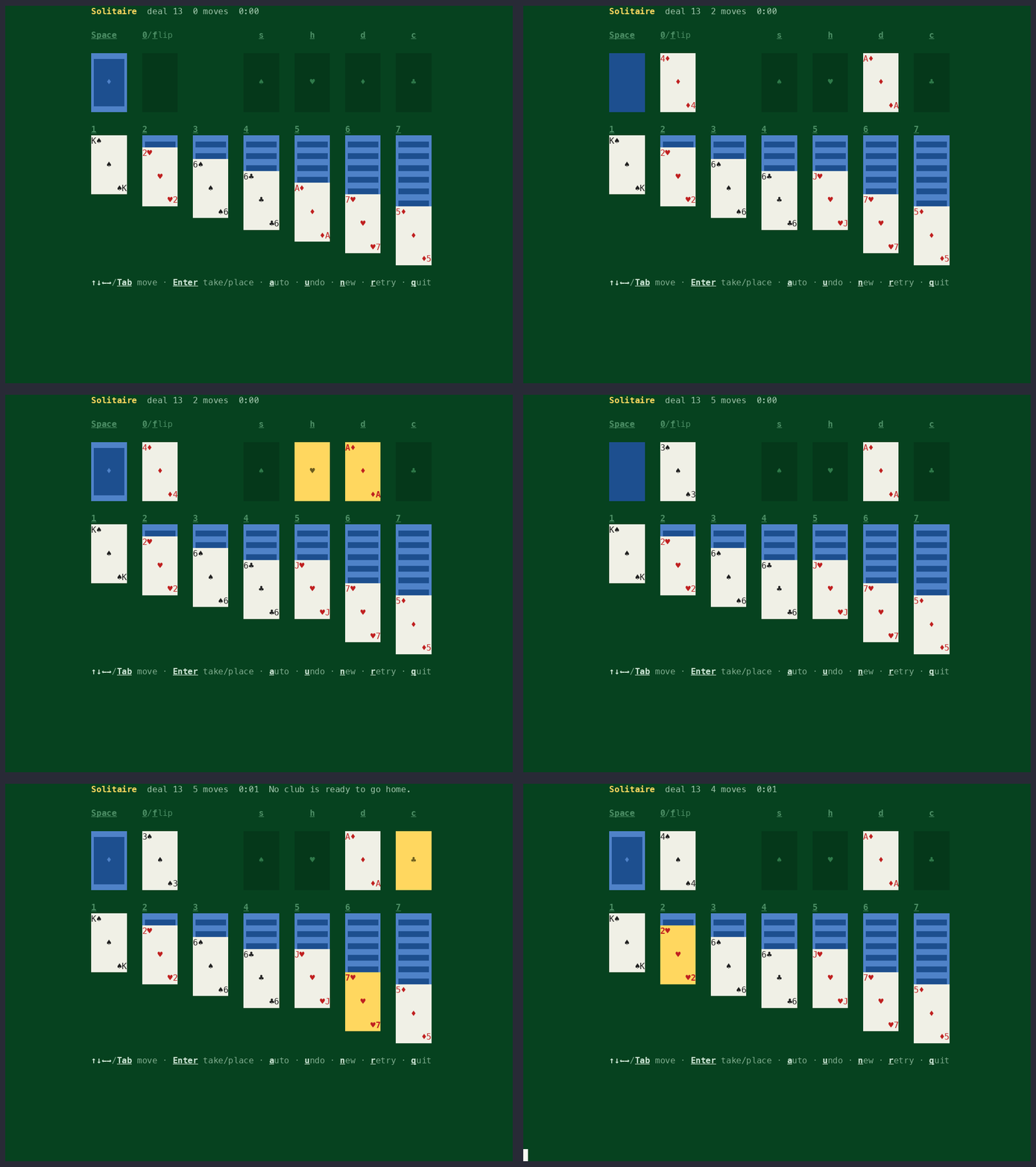
Typical terminal UI libraries ask you to learn its widgets: a Box, a List, a Screen, and the arbritrary APIs that go with them. By contrast, TermDOM implements a real, spec-compliant DOM and CSSOM API. Make a div, style it, put it in the body. Just like the browser there is no render call, and changes paint on the next frame.
hello-world.ts
import {TermDOM} from "@b9g/termdom";

const term = new TermDOM();
term.attach();
const {document} = term;

const heading = document.createElement("div");
heading.style.backgroundColor = "blue";
heading.style.color = "white";
heading.style.padding = "0 1ch";
heading.textContent = "Hello, terminal";

const subtitle = document.createElement("div");
subtitle.style.color = "yellow";
subtitle.style.marginTop = "1px";
subtitle.textContent = "HTML and CSS, drawn with ANSI escape sequences";

document.body.appendChild(heading);
document.body.appendChild(subtitle);
Styling #
TermDOM runs your stylesheets and inline styles through a real cascade and writes the computed styles to the screen as ANSI escape sequences. It resolves colors against the terminal’s palette and draws text decorations as terminal attributes: bold, italic, underline, strikethrough.
bar-chart.ts
import {TermDOM} from "@b9g/termdom";

const term = new TermDOM();
term.attach();

const {document} = term;
document.body.innerHTML = `
  <style>
    .chart { border: 1px solid #5fafff; padding: 0 1ch; width: 46ch; }
    .title { color: #5fafff; font-weight: bold; }
    .row { display: flex; }
    .label { width: 10ch; color: #888; }
    .bar { background-color: #5fafff; }
    .row:nth-of-type(2) .bar { background-color: green; }
    .row:nth-of-type(3) .bar { background-color: #cc99cd; }
    .row:nth-of-type(4) .bar { background-color: #f0a45d; }
    .value { margin-left: 1ch; color: #888; }
  </style>
  <div class="chart">
    <div class="title">Requests per region</div>
  </div>
`;

const chart = document.querySelector(".chart")!;
const regions = [
	{name: "us-east", requests: 18},
	{name: "eu-west", requests: 12},
	{name: "ap-south", requests: 7},
	{name: "sa-east", requests: 3},
];

const bars = regions.map((region) => {
	const row = document.createElement("div");
	row.className = "row";
	row.innerHTML = `
		<span class="label">${region.name}</span>
		<div class="bar"></div>
		<span class="value"></span>
	`;
	chart.appendChild(row);
	return {
		region,
		bar: row.querySelector(".bar") as HTMLElement,
		value: row.querySelector(".value") as HTMLElement,
	};
});

setInterval(() => {
	for (const {region, bar, value} of bars) {
		region.requests = Math.max(
			1,
			Math.min(24, region.requests + Math.floor(Math.random() * 3) - 1),
		);
		bar.style.width = region.requests + "ch";
		value.textContent = String(region.requests * 41);
	}
}, 300);
Layout #
TermDOM lays out boxes with the browser’s algorithms — flexbox, grid, tables,
the box model — against a grid of character cells. The cell is the unit basis
for CSS lengths: 1px and 1ch both mean one cell. Text wraps at the edge of
its box and reflows when the terminal resizes.
flexbox.ts
import {TermDOM} from "@b9g/termdom";
const term = new TermDOM();
term.attach();
const {document} = term;

const mainContainer = document.createElement("div");
mainContainer.style.display = "flex";
mainContainer.style.flexDirection = "column";
mainContainer.style.padding = "1px 2px";
mainContainer.style.backgroundColor = "darkblue";
document.body.appendChild(mainContainer);

const header = document.createElement("div");
header.style.display = "flex";
header.style.flexDirection = "row";
header.style.justifyContent = "space-between";
header.style.backgroundColor = "magenta";
header.style.padding = "1px 1px 1px 1px";
mainContainer.appendChild(header);

const headerTitle = document.createElement("span");
headerTitle.textContent = "🚀 TermDOM flexbox";
headerTitle.style.color = "white";
header.appendChild(headerTitle);

const headerSubtitle = document.createElement("span");
headerSubtitle.textContent = "HTML · CSS · DOM → cells";
headerSubtitle.style.textAlign = "right";
headerSubtitle.style.color = "white";
header.appendChild(headerSubtitle);

const contentArea = document.createElement("div");
contentArea.style.display = "flex";
contentArea.style.flexDirection = "row";
contentArea.style.padding = "1px 0 0";
mainContainer.appendChild(contentArea);

const sidebar = document.createElement("div");
sidebar.style.display = "flex";
sidebar.style.flexDirection = "column";
sidebar.style.backgroundColor = "darkgreen";
sidebar.style.padding = "1px";
sidebar.style.whiteSpace = "nowrap";
sidebar.style.flexShrink = "0";
contentArea.appendChild(sidebar);

const sidebarTitle = document.createElement("span");
sidebarTitle.textContent = "📋 Navigation";
sidebarTitle.style.color = "white";
sidebarTitle.style.textAlign = "center";
sidebar.appendChild(sidebarTitle);

const menuItems = ["• Home", "• About", "• Services", "• Contact"];
for (const item of menuItems) {
	const menuItem = document.createElement("span");
	menuItem.textContent = item;
	menuItem.style.color = "white";
	menuItem.style.padding = "0px 1px 0px 1px";
	sidebar.appendChild(menuItem);
}

const mainContent = document.createElement("div");
mainContent.style.display = "flex";
mainContent.style.flexDirection = "column";
mainContent.style.backgroundColor = "darkgray";
mainContent.style.padding = "1px 2px 1px 2px";
contentArea.appendChild(mainContent);

const contentTitle = document.createElement("span");
contentTitle.textContent = "📄 Main Content Area";
contentTitle.style.color = "white";
contentTitle.style.textAlign = "center";
mainContent.appendChild(contentTitle);

const contentText = document.createElement("span");
contentText.textContent =
	"Flex rows and columns, gap, grow and shrink -- resolved by a spec flexbox engine and painted to whole cells. Multi-line markup lays out as in a browser: whitespace between items is not an item.";
contentText.style.color = "white";
contentText.style.padding = "1px 0px 1px 0px";
mainContent.appendChild(contentText);

const featuresContainer = document.createElement("div");
featuresContainer.style.display = "flex";
featuresContainer.style.flexDirection = "row";
featuresContainer.style.padding = "1px 0px 0px 0px";
mainContent.appendChild(featuresContainer);

const features = [
	{title: "🎨 Styling", desc: "One cascade: sheets, inline, var(), :has()"},
	{title: "📐 Layout", desc: "Flex, tables, margin collapsing"},
	{title: "🧩 Widgets", desc: "Inputs and selects as UA shadow trees"},
];

for (const feature of features) {
	const featureCard = document.createElement("div");
	featureCard.style.display = "flex";
	featureCard.style.flexDirection = "column";
	featureCard.style.backgroundColor = "darkcyan";
	featureCard.style.padding = "1px 1px 1px 1px";
	featureCard.style.flex = "1";
	featuresContainer.appendChild(featureCard);

	const featureTitle = document.createElement("span");
	featureTitle.textContent = feature.title;
	featureTitle.style.color = "white";
	featureTitle.style.textAlign = "center";
	featureCard.appendChild(featureTitle);

	const featureDesc = document.createElement("span");
	featureDesc.textContent = feature.desc;
	featureDesc.style.color = "white";
	featureDesc.style.textAlign = "center";
	featureCard.appendChild(featureDesc);
}

const footer = document.createElement("div");
footer.style.display = "flex";
footer.style.flexDirection = "row-reverse";
footer.style.backgroundColor = "darkred";
footer.style.padding = "1px 2px 1px 2px";
mainContainer.appendChild(footer);

const footerText = document.createElement("span");
footerText.textContent = "© 2026 TermDOM";
footerText.style.color = "white";
footer.appendChild(footerText);

const footerVersion = document.createElement("span");
footerVersion.textContent = "v0.1.0";
footerVersion.style.color = "white";
footer.appendChild(footerVersion);
Events #
TermDOM decodes stdin’s escape sequences into DOM events and dispatches them
at real targets: keydown at the focused element, click on the element
under the pointer, paste with the pasted text. Tab moves focus, and :focus
styles follow it.
form.ts
import {TermDOM} from "@b9g/termdom";

const term = new TermDOM();

term.attach();
const {document} = term;

const style = document.createElement("style");
style.textContent = `
  .form { padding: 1ch 2ch; }
  .title { color: cyan; font-weight: bold; }
  .field { display: flex; flex-direction: row; padding: 1 0 0 0; }
  .label { color: white; width: 8ch; padding: 1 0 0 0; }
  input { background: #1d3557; color: white; width: 28ch; }
  input:focus { background: #264f78; }
  .preview { color: #888; padding: 1 0 0 0; }
  .done { color: green; font-weight: bold; padding: 1 0 0 0; }
  .hint { color: #666; padding: 1 0 0 0; }
`;
document.head.appendChild(style);

const form = document.createElement("div");
form.className = "form";
form.innerHTML = `
  <div class="title">New profile</div>
  <div class="field"><div class="label">Name</div><input id="name" type="text" autofocus></div>
  <div class="field"><div class="label">Email</div><input id="email" type="text"></div>
  <div class="field"><div class="label">Handle</div><input id="handle" type="text"></div>
  <div class="preview" id="preview"></div>
  <div class="done" id="done"></div>
  <div class="hint">tab next field · enter submit · ctrl+c quit</div>
`;
document.body.appendChild(form);

const fields = ["name", "email", "handle"].map(
	(id) => document.getElementById(id) as HTMLInputElement,
);
const preview = document.getElementById("preview")!;
const done = document.getElementById("done")!;

function updatePreview(): void {
	const [name, email, handle] = fields.map((f) => f.value);
	preview.textContent =
		name || email || handle ?
			`» ${name || "?"} <${email || "?"}> @${handle || "?"}` :
			"» start typing to build a profile";
	done.textContent = "";
}

// The standard event: fires on every edit, in any field.
for (const field of fields) {
	field.addEventListener("input", updatePreview);
}

document.addEventListener("keydown", (event: Event) => {
	if ((event as KeyboardEvent).key !== "Enter") {
		return;
	}
	const [name, email, handle] = fields.map((f) => f.value.trim());
	if (!name && !email && !handle) {
		return;
	}
	done.textContent = `✓ saved: ${name || "anonymous"} <${email || "n/a"}> @${handle || "n/a"}`;
});

updatePreview();
Libraries & Frameworks #
The payoff of implementing a real DOM is that you can use browser libraries in the terminal without modification. TermDOM also works with most frontend frameworks with a little bit of setup.
prism.ts
/**
 * Syntax highlighting by Prism, the browser library, unmodified. It arrives
 * through the imports a web page writes: the library, then a grammar pack.
 *
 * Prism turns source text into markup -- `<span class="token keyword">`,
 * `<span class="token string">`, one class per kind of token. The stylesheet
 * below is a Prism CSS theme (Tomorrow Night), whose rules match those
 * classes and nothing else. TermDOM lays the markup out under the theme and
 * paints the result as cells. A web highlighter and a web stylesheet, drawn
 * in a terminal.
 *
 * Keys: left/right arrows or 1-4 pick the language, q quits.
 */
import {TermDOM} from "@b9g/termdom";
import Prism from "prismjs";

// Each pack registers its grammar on the Prism it is imported beside. CSS and
// JavaScript ship in Prism's core, so only the rest need a line here.
import "prismjs/components/prism-typescript.js";
import "prismjs/components/prism-json.js";
import "prismjs/components/prism-python.js";

interface Sample {
	id: string;
	label: string;
	code: string;
}

// Samples are inline: nothing is read from disk, so the example runs in the
// browser playground as well as a terminal. Lines stay under 64 columns so
// they fit an 80-column screen beside the gutter.
const SAMPLES: Sample[] = [
	{
		id: "typescript",
		label: "TypeScript",
		code: `// Types are erased before the program runs. Tokens are not.
interface Point {
  x: number;
  y: number;
}

const ORIGIN: Point = {x: 0, y: 0};

export function distance(a: Point, b: Point = ORIGIN): number {
  const dx = a.x - b.x;
  const dy = a.y - b.y;
  return Math.sqrt(dx * dx + dy * dy);
}

const points: Point[] = [{x: 3, y: 4}, ORIGIN];
for (const point of points) {
  console.log(\`distance: \${distance(point).toFixed(2)}\`);
}`,
	},
	{
		id: "css",
		label: "CSS",
		code: `/* A Prism theme is author CSS: token classes in, colours out. */
:root {
  --ink: #cccccc;
  --paper: #2d2d2d;
}

.token.keyword,
.token.builtin {
  color: #cc99cd;
  font-weight: bold;
}

pre[class*="language-"] {
  background-color: var(--paper);
  padding: 0 1ch;
}

@media (max-width: 80ch) {
  .gutter { display: none; }
}`,
	},
	{
		id: "json",
		label: "JSON",
		code: `{
  "name": "@b9g/termdom",
  "version": "0.1.4",
  "private": false,
  "keywords": ["dom", "css", "terminal"],
  "engines": {"node": ">=20"},
  "scripts": {
    "test": "bun test",
    "lint": "eslint ."
  },
  "devDependencies": {
    "prismjs": "^1.30.0",
    "typescript": "^5.9.2"
  }
}`,
	},
	{
		id: "python",
		label: "Python",
		code: `# One grammar per language, one class per kind of token.
from dataclasses import dataclass

SUITS = "♠♥♦♣"


@dataclass
class Card:
    rank: int
    suit: str

    def label(self) -> str:
        names = {1: "A", 11: "J", 12: "Q", 13: "K"}
        return f"{names.get(self.rank, self.rank)}{self.suit}"


deck = [Card(rank, suit) for rank in range(1, 14) for suit in SUITS]
print(len(deck), deck[0].label(), deck[-1].label())`,
	},
];

const term = new TermDOM();

term.attach();
const {document} = term;

const style = document.createElement("style");
style.textContent = `
	body { background-color: #2d2d2d; color: #cccccc; }
	.tabs { display: flex; flex-direction: row; gap: 1ch; padding: 0 1ch; }
	.tab { color: #808080; padding: 0 1ch; }
	.tab.current { color: #2d2d2d; background-color: #cc99cd; font-weight: bold; }
	.pane { display: flex; flex-direction: row; padding: 1px 1ch; overflow: hidden; }
	.gutter { color: #666666; padding-right: 1ch; text-align: right; width: 3ch; }
	.hint { color: #666666; padding: 0 1ch; }

	/* Under 72 columns the gutter costs the source the room it needs, and
	   @media answers again on every resize. */
	@media (max-width: 72ch) {
		.gutter { display: none; }
	}

	/* Prism's Tomorrow Night theme, rule for rule. The selectors are the
	   classes Prism writes; the terminal resolves the hex to its palette. */
	.token.comment,
	.token.block-comment,
	.token.prolog,
	.token.doctype,
	.token.cdata { color: #999999; }
	.token.punctuation { color: #cccccc; }
	.token.tag,
	.token.attr-name,
	.token.namespace,
	.token.deleted { color: #e2777a; }
	.token.function-name { color: #6196cc; }
	.token.boolean,
	.token.number,
	.token.function { color: #f08d49; }
	.token.property,
	.token.class-name,
	.token.constant,
	.token.symbol { color: #f8c555; }
	.token.selector,
	.token.important,
	.token.atrule,
	.token.keyword,
	.token.builtin { color: #cc99cd; }
	.token.string,
	.token.char,
	.token.attr-value,
	.token.regex,
	.token.variable { color: #7ec699; }
	.token.operator,
	.token.entity,
	.token.url { color: #67cdcc; }
	.token.important,
	.token.bold { font-weight: bold; }
	.token.italic { font-style: italic; }
	.token.inserted { color: #7ec699; }
`;
document.head.appendChild(style);

const tabs = document.createElement("div");
tabs.className = "tabs";
const buttons = SAMPLES.map((sample, index) => {
	const tab = document.createElement("span");
	tab.className = "tab";
	tab.textContent = `${index + 1} ${sample.label}`;
	tabs.appendChild(tab);
	return tab;
});

const pane = document.createElement("div");
pane.className = "pane";
const gutter = document.createElement("pre");
gutter.className = "gutter";
const code = document.createElement("pre");
pane.append(gutter, code);

const hint = document.createElement("div");
hint.className = "hint";
hint.textContent = "←/→ or 1-4 language · q quit";

document.body.append(tabs, pane, hint);

let current = 0;

// `pre` keeps white-space: pre and the pane clips what runs past the right
// edge, so a source line holds one row and the gutter's numbers stay level
// with it at any width.
function show(index: number): void {
	current = (index + SAMPLES.length) % SAMPLES.length;
	const sample = SAMPLES[current];
	buttons.forEach((tab, i) => {
		tab.className = i === current ? "tab current" : "tab";
	});
	const lines = sample.code.split("\n");
	gutter.textContent = lines.map((_, i) => String(i + 1)).join("\n");
	code.innerHTML = Prism.highlight(
		sample.code,
		Prism.languages[sample.id],
		sample.id,
	);
}
show(0);

const bindings: Record<string, () => void> = {
	ArrowRight: () => show(current + 1),
	ArrowLeft: () => show(current - 1),
	q: () => term.window.close(),
};
document.addEventListener("keydown", (event: Event) => {
	const {key} = event as KeyboardEvent;
	const picked = Number(key);
	if (picked >= 1 && picked <= SAMPLES.length) {
		show(picked - 1);
		return;
	}
	bindings[key]?.();
});
Compatibility #
TermDOM tries to follow web specifications as closely as possible, diverging only when concepts wouldn’t make sense in the terminal. You can track which browser features are implemented via the compatibility table.
Get started #
npm install @b9g/termdomRead the getting started guide, poke at an example in the playground, or read the source on GitHub.