Supabase is NOT insecure by design.
It ships with robust security features like Row Level Security (RLS), role-based API keys, and granular policies. The exposures in this report are caused by developer mistakes, often caused by AI coding assistants generating insecure boilerplate, vibe-coding tools misconfiguring environment variables, or tutorials that skip security for simplicity.
This report aims to help developers fix these issues, not to criticize Supabase.
Something remarkable happened in 2024-2025: building a full-stack app became easy. Tools like Supabase, combined with AI coding assistants and no-code builders, let solo founders ship production apps in days, not months.
But speed comes at a cost. As we started using
SupaExplorer to
audit projects, we noticed a pattern: many apps were
misconfiguring their Supabase setup. The
anon key in client-side code is fine;
it's designed to be public. But we found apps exposing the
service_role key (which bypasses RLS),
or using the anon key with tables that had
no RLS policies at all.
We decided to quantify the problem. Over the past month, we collected launch URLs from five major indie product directories and systematically scanned each one.
1. How We Ran the Scan
Our methodology was straightforward. We wanted to see exactly what an attacker browsing these sites would see: no special access, just looking at what's publicly shipped to every visitor's browser.
1
Collected URLs from 5 directories
Fazier, TinyLaunch, Uneed, PeerPush, and TrustMRR
20,052
2
Fetched HTML + linked JavaScript
Crawled each homepage and followed all script tags. Average 11.36 files per site.
~228K files
3
Scanned for Supabase URLs and keys
Pattern-matched for project URLs, anon keys, and JWT tokens.
2,960 hits
4
Domains with exposed credentials
Unique domains where Supabase URLs or JWTs were detected in frontend assets.
2,217 domains
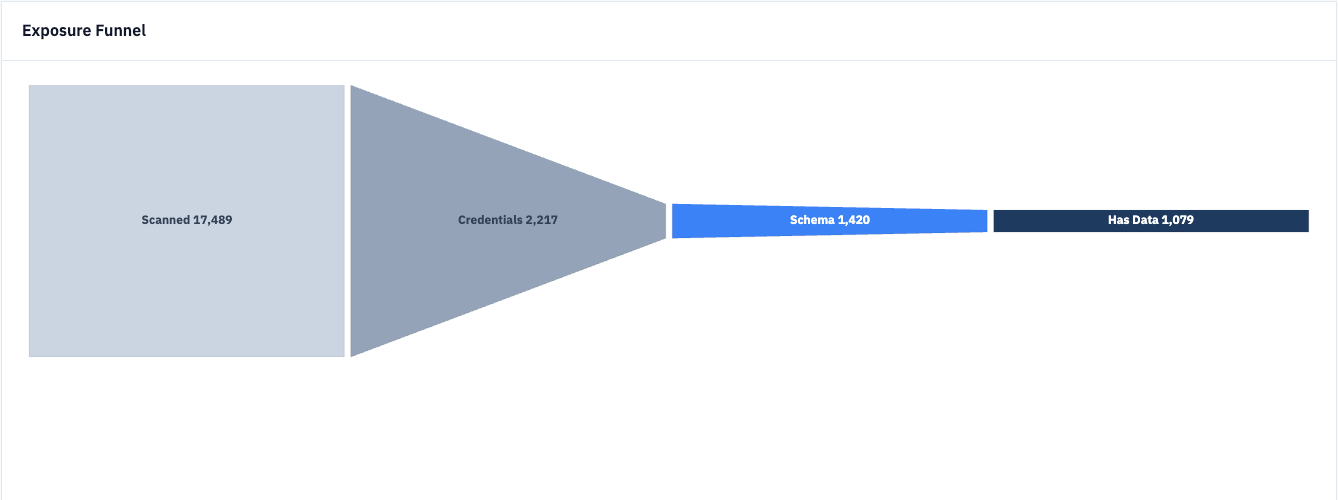 SupaExplorer Scanner Dashboard: Exposure funnel
2. What's Being Leaked
Not all exposures are equal. Finding a Supabase project URL and anon key in client code is expected, as both are designed to be public. The anon key provides low-privilege access that respects your Row Level Security policies.
The danger is when apps expose the
service_role key (or the new
sb_secret_... format), the
elevated-privilege key meant only for server-side use.
Of the 2,960 files flagged, we found credentials that
could bypass RLS in a significant portion. We also
verified which exposed databases had tables without RLS
protection.
Why service_role keys are dangerous
The service_role key (and secret keys)
bypass all Row Level Security policies. Anyone with
this key can read, modify, or delete
any data in your database, regardless of
your security rules.
Supabase docs are clear: never use in a browser, never expose publicly.
Severity Breakdown
Findings by Source
3. Which Directories Had the Most Leaks
Exposure rates varied significantly across directories. TrustMRR had the highest hit rate at 23.76%, with nearly 1 in 4 of its listed products exposing credentials. TinyLaunch contributed the highest absolute number.
Exposure Rate by Directory (%)
| Source | Scanned | Exposed | Rate | Findings | With JWT |
|---|
"Nearly 1 in 4 products listed on TrustMRR were shipping database credentials to every visitor's browser."
Is your site exposed?
Run a free scan in 30 seconds, no signup required. See exactly which files leak your credentials.
4. Where the Leaks Happen
Most exposed domains leaked credentials in just one or two files, typically the main JavaScript bundle. A small number had exposures across many files, suggesting systemic configuration issues.
Leaking Files Per Domain
5. Why This Keeps Happening
The tools are powerful, but the guardrails haven't caught up:
-
Framework auto-exposure: Frameworks
like Next.js, Vite, and SvelteKit auto-bundle any
env var prefixed with
PUBLIC_orVITE_. One wrong prefix, and your service key ships. - AI-generated code: LLMs trained on early Supabase examples suggest patterns that expose credentials. The code works, so it ships.
- Skipping the backend: Calling Supabase directly from the frontend is fastest. This works with proper RLS, but many developers don't configure policies.
- Copy-paste tutorials: Quick-start guides show the simplest setup first. Developers copy the code and forget to circle back.
The RLS false sense of security
"I have RLS enabled, so I'm safe." RLS only protects
you when using the anon key (or the new
sb_publishable_... key). The
service_role key and secret keys
(sb_secret_...)
bypass RLS entirely. If that key is in your frontend, all your policy
work is meaningless.
6. How to Fix It
If you've found exposed credentials (or you're worried), here's the action plan:
1. Rotate your keys immediately
Go to Supabase dashboard → Settings → API. Regenerate both keys. Yes, this breaks your app temporarily, but that's better than an open door.
2. Audit your environment variables
The service-role key should never have a
PUBLIC_, VITE_, or
NEXT_PUBLIC_ prefix.
3. Move sensitive operations to the backend
Use API routes or Supabase Edge Functions for anything requiring elevated privileges.
4. Enable and test RLS policies
Row Level Security should be enabled on every table. Test by querying with just the anon key.
5. Add a build-time check
Grep your build output for Supabase URLs paired with JWT tokens. If both appear, fail the build.
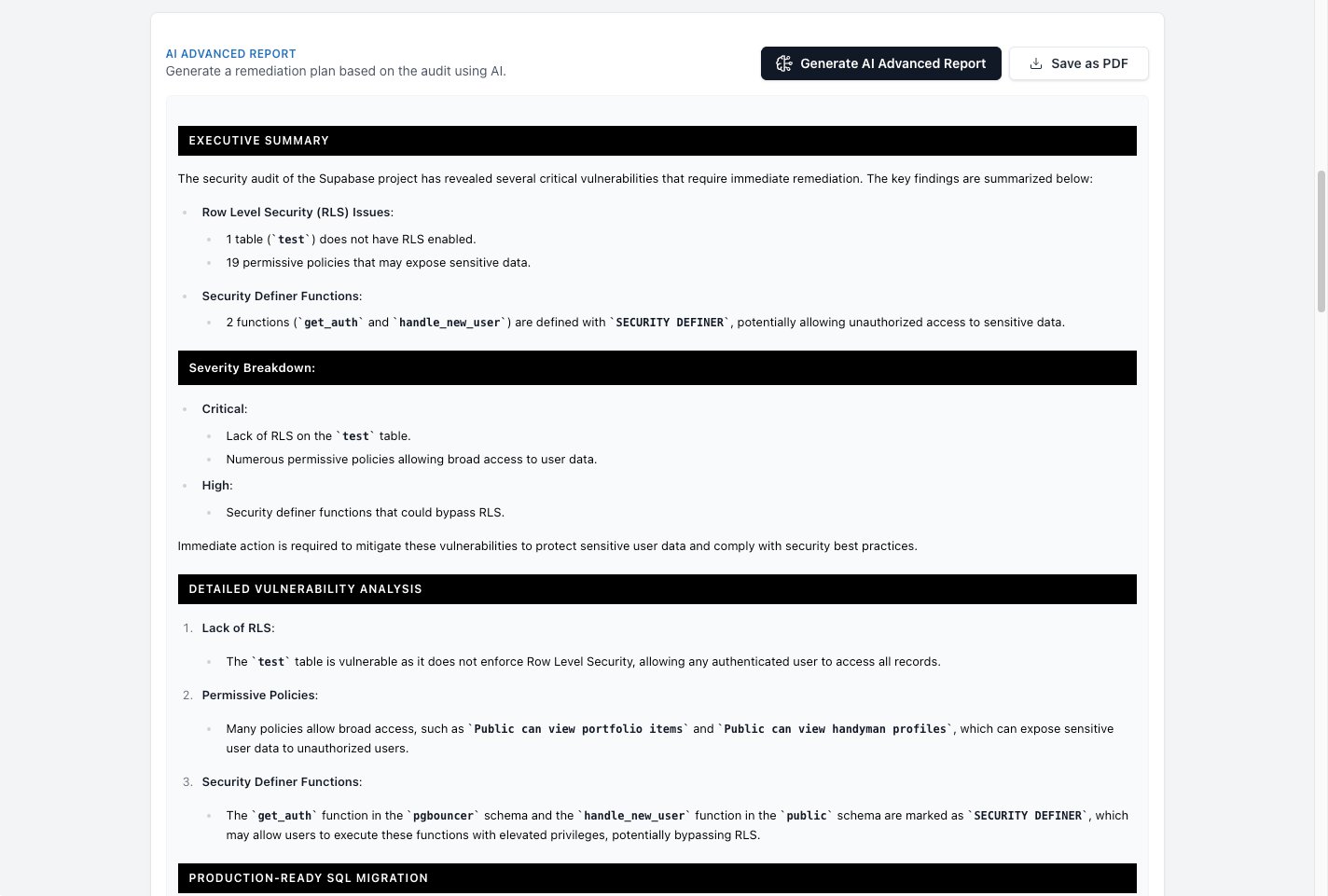 AI-generated security report with SQL fixes
Get AI-Powered Fixes for Your Database
SupaExplorer scans your Supabase project and generates copy-paste SQL to fix RLS policies and misconfigurations. Connect via Supabase OAuth for a free security audit.
7. What This Means
An 11% exposure rate across 20,000+ sites is concerning, but fixable. We're in the early days of a new development paradigm, one where shipping fast is prioritized over shipping secure.
The good news: these are solvable problems. The bad news: most affected developers don't know they're affected. That's why we built SupaExplorer.
If you're building with Supabase, take security seriously from day one. The vibe-coding era is here to stay, but so are the attackers watching indie directories for easy targets.
Detect Leaks While You Browse
Install the free Chrome extension to automatically detect exposed Supabase keys and API credentials on any website you visit.
Methodology
For collection of the data shared in this report, I used a new tool I built called SupaExplorer Python Scanner (a proprietary tool, and not open source). This allowed me to add sources, fetch the startup/SaaS pages, get the domains, and from there run the scanner on the pages and later collect the data and generate the report.
Sources: Fazier, TinyLaunch, Uneed,
PeerPush, TrustMRR (January 2026, only sites from the Acquire page)
Scan depth: HTML + linked JS (avg 11.36
files/site)
Deduplication: Domains in multiple
directories counted once for the totals, but not for the individual sources metrics.
Detection: Pattern matching for
*.supabase.co URLs and JWT tokens
Verification: Schema accessibility
tested; no data exfiltrated
Stack: SupaExplorer Python Scanner + Chart.js
Audit Your Supabase Security with SupaExplorer
Want to quickly check your RLS configuration across all tables? SupaExplorer connects via Supabase OAuth for a free security audit. See which tables have RLS enabled, explore your policies visually, and catch security issues before they become problems. Upgrade for AI-powered fix recommendations.