In the advent of AI, terms like embeddings, RAG and vector databases has become part of the standard vocabulary for many developers. Whether you’re working on customer service software, recommender systems — or software for AI-generated content, you’ve probably stumbled upon these concepts to some extent.
So I thought it would be useful to take a step back and explore what problems vector databases solve, and why they’re necessary for building performant, modern AI applications.
Usually, high-school teachers wanted you to think about vectors as “something with a direction and a length”, often represented as some kind of arrow. But that’s a bad mental model for what we’re trying to understand here. Instead, try to think about a vector as just a list of numbers, or even better, coordinates.
Coordinates of what, you might ask? Well, math doesn’t care about that. That’s up to you! You can assign meaning to each of the coordinates and then use it to compare different vectors. Let’s have a look at a simple example.
Let’s say we have some data about some athletes. We know their height and their weight. We can easily visualize our athletes:
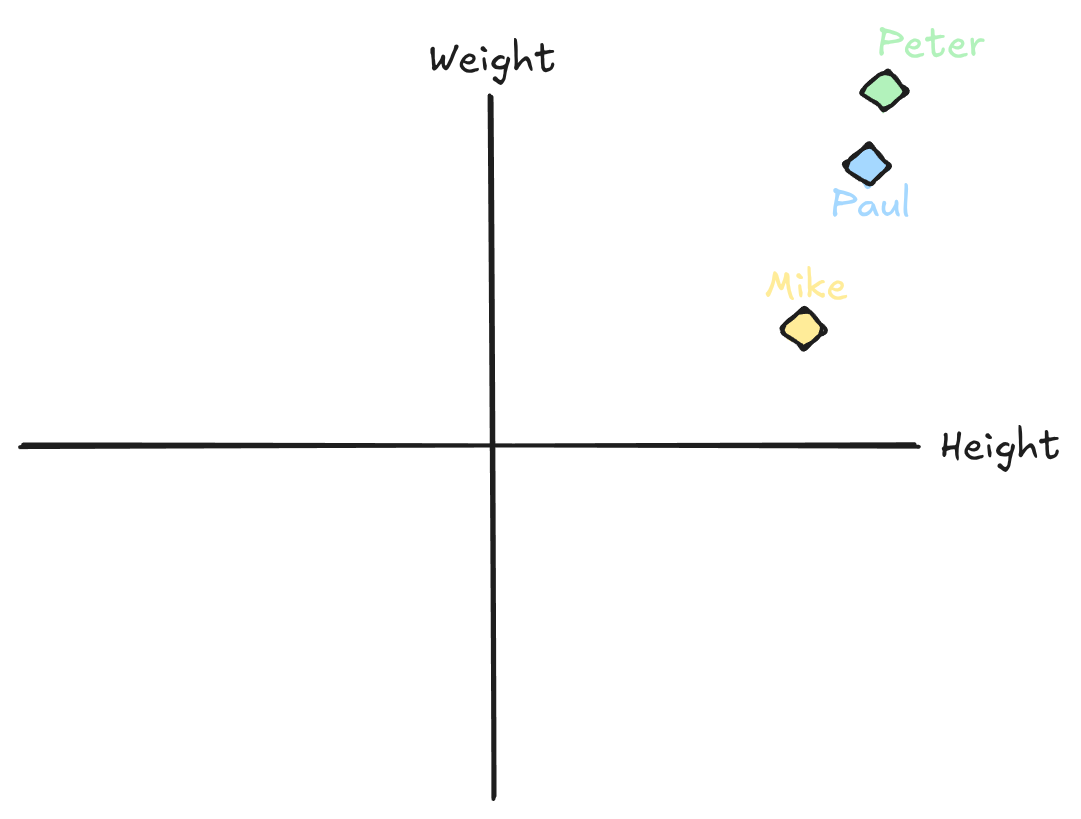
Now, by looking at this image, most people quickly build up some sense of similarity between the three athletes. If asked who has the closest resemblance to Peter, you’d say Paul without even thinking about it.
But how do we formalize it? Well, we can write Mike, Peter and Paul as 2-dimensional vectors, where the first coordinate is height and the second is weight:
\(v_{mike}=\begin{pmatrix} 175 \\ 65 \end{pmatrix} \quad v_{peter}=\begin{pmatrix} 180 \\ 85 \end{pmatrix} \quad v_{paul}=\begin{pmatrix} 185 \\ 90 \end{pmatrix}\)
What you implicitly did when asked about who closest resembles Peter is that you calculated the distance between Peter and Paul and Peter and Mike. We could also do that explicitly:
\(d(v_{peter}, v_{mike})=\sqrt{(185-175)^2+(90-65)^2}=26.93\)
\(d(v_{peter}, v_{paul})=\sqrt{(185-180)^2+(90-85)^2}=7.07\)
Clearly, as your intuition gave away, Paul is a lot closer to Peter than Mike.
Now, somebody might come to you and say that this really doesn’t capture the similarity between the athletes, because age is also a very important dimension when comparing athletes. Or Vo2 max, or something else entirely.
No problem, just add extra dimensions to the vectors. Visualisation might become tricky, or even impossible in 4+ dimensions, but the math still holds. Just calculate the distance between the vectors again. Here is a general formula for calculating the distance between two n-dimensional vectors x and y:
\(d(x,y)=\sqrt{\sum\nolimits_{i=1}^{n}{(x_i - y_i)^2}}\)
This way of calculating the distance between two vectors is called the euclidean distance. There are lots of other ways of calculating “distance”. More on that later.
In relational databases and key-value stores, we care mostly about the exact existence of something; “Does a user exist with this user name?”, “What is the balance of the bank account with this ID?“ and so on.
Vector search is different. The primary concern with vectors is not whether a given vector exists in the database. It’s whether something like a given vector exists. This concept is called similarity search. Think about our example before. We are not mainly interested in whether Paul (usually called our query vector) exists in the database. We want to find people in the database that are like Paul, or similar to Paul.
So how do we do similarity search? Can’t we just take our query vector and calculate the distance to every vector in our database? Sure, we could. But it would be very slow if you have many vectors. Generally speaking, that’s not how databases look up values. Databases are fast because they use indexes. When searching for a user name in a relational database, it doesn’t actually check all the values in the database one by one. It consults the index, usually a b-tree, which is a lot faster.
So, our goal is to use some kind of index for fast retrieval of vectors similar to our query vector, using the distance measure we have chosen. And that’s exactly what vector databases do.
So, a vector database is simply a database that store vectors and efficiently implements similarity search.
Note: The whole notion of who is “similar” to Paul is a blog post of its own. Other popular distance metrics exists such as cosine similarity, or jaccard similarity for binary vectors.
Let’s say your building a chat system for an e-commerce store. You want your ‘agent’ to provide high-quality answers to customers, so you use your favorite off-the-shelf model to create vector embeddings of each of your product descriptions.
A vector embedding of a product description is just a vector of numbers, typically with 768 or 1536 dimensions:
\(v = (x_1, x_2, ..., x_{1536})\)
So you have a big collection of these vectors, one for each of your products.
Like in our 2-dimensional example from before, each coordinate still has a meaning. But that meaning is now internal to the embedding model and not directly interpretable like “height” and “weight” was before. But a very important thing still holds; If most of the coordinates of two vectors are close (i.e the distance between the vectors is short), the two things that that the embeddings represent are similar.
Now, a customer asks “Which of your products are rain-proof?”. Straightaway, you create an embedding of the question using the same model. You get back a vector with the same number of dimensions:
\(q = (x_1, x_2, ..., x_{1536})\)
Now you search among your vectors to try and find vectors that similar to q:
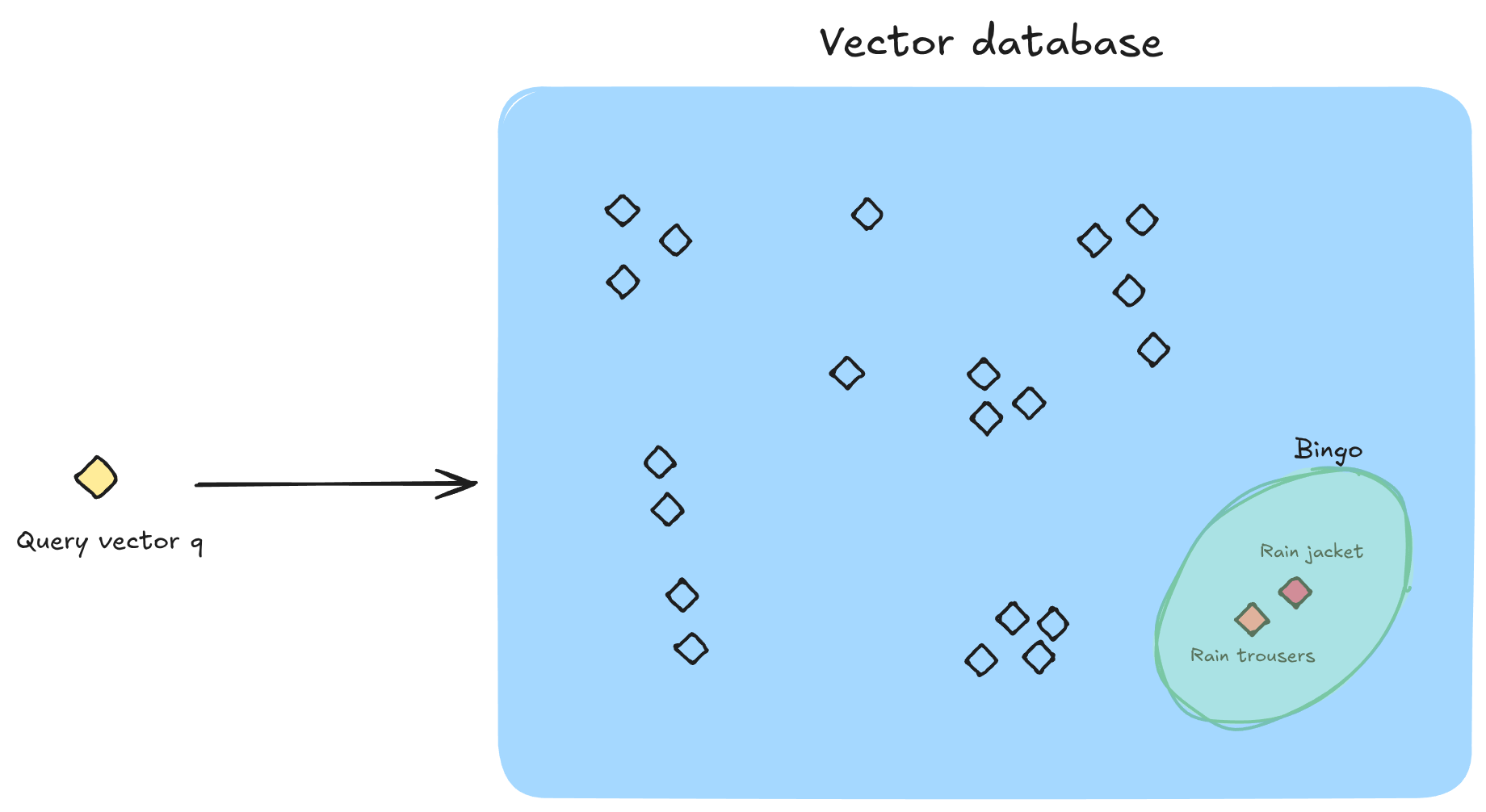
And of course, the customer waiting for your agent to reply in the chat, so you’d like this search to be very fast. And that’s why you need an index.
Indexing low-dimensional vectors is fairly easy. You can get fast, exact matches with algorithms such as KD-trees.
In practice though, vectors that stem from embedding models has a high number of dimensions (e.g 768 or 1536). Here, simple nearest neighbor algorithms break down due to the curse of dimensionality. It is simply not practical to run exact matches on any decent amount of vectors. Instead, you apply approximation algorithms to speed things up. In the realm of vector search, this problem is called approximate nearest neighbors.
Instead of giving you the closest vectors, approximation algorithms give you the vectors that are likely to be the closest vectors. How ‘likely’ is a tradeoff between how much time you want to spend maintaining and searching your index, and how good results you want.
Popular approaches include HNSW and IVFFlat. If you’re interested in the details, I recommend that you have a look at both as they’re quite different approaches to the same problem.
A wide variety of databases dedicated to vectors and similarity search exists. Some of the popular ones are pinecone and chroma.
But, as with most other query patterns, when they become popular enough, mainstream databases also grow to support them. Vectors and similiarity search are no exception.
The most popular example is probably pgvector, a postgres extension for handling vectors. “Extension” might sound like something that is bolted on and subpar to the real deal. It’s not. Pgvector is highly performant and even beats pinecone in some benchmarks. It’s also available for many managed postgres services, for example on AWS and Azure.
So, should you use a dedicated vector database?
Generally, I believe it’s always better to compress complexity and stick to the tooling you already have for as long as you can. If you’re already running postgres for your other workloads, I think you should try and stick with that.
One caveat though, is that it’s worth thinking about how many vectors you’re planning to index. Vector embeddings are usually orders of magnitude larger than the text they represent. If including this workload in your postgres catapults you into an entirely different storage class, it may become too expensive. Especially if you’re using managed services in the cloud, and run with proper redundancy, as you should. The cost per dollar of storage can simply be too high.
In fact, this realization is the raison d’être of turbopuffer, which I recommend you check out. The founder, Simon Eskildsen, has an excellent appearance on postgres.fm where he explains turbopuffer’s very cost-efficient approach to vector indexing, and how it unlocks use-cases that aren’t economically viable using traditional storage architecture. I recommend you check it out.
If you want to implement RAG, or something else that requires vectors and similarity search, you definitely need a vector database. But it doesn’t have to be a standalone solution. In fact, rather start as simple as possible with solutions like pgvector. Enjoy the familiarity of SQL syntax and keep your tool suite compressed.