Reader beware - This article is a rambling journal entry of my buying experience, not exactly a guide to ergonomic keyboards. None of these links are sponsored, they’re just what I looked at.
Do you remember the first time you spent real money on a quality tool for daily use? Mine was 7 years ago at a Best Buy in Anywhere, USA. I saw a $50 Logitech keyboard and mouse combination. My entire thought process went something like…
I need a keyboard.
This one comes with a mouse!
Sold.
The plastic is now covered in dust and crumbs. The once matte keycaps shine under my desk light. You can clearly see the exact spot that my right thumb hits the space bar hundreds, maybe thousands of times per day. That cheap keyboard lasted me 7 great years and I think it would last another 7 if asked.
My fiancee is also a typist and showed interest in a mechanical keyboard last year. I didn’t quite understand why, but like a responsible little consumer, I researched mechanical keyboards. Who knew people cared so much about switches?
After some brief YouTube “sound tests”, it seemed like Cherry MX Reds were a good balance between a satisfying typing noise and not wanting to claw my ears off when I am in the room next door. Looking at you, Blues. So I settled on the Mistel X8BT for its quality and chose Red switches.
She loves the new keyboard! But something about typing just doesn’t feel right to her… Maybe I should have gone with the silent Brown switches. One trip to Microcenter’s keyboard aisle, $90, and an hour of switch replacement later, she had her dream keyboard that she loves the look, sound and feel of.
I’m starting to see why people care so much about switches.
She seems like she’s having fun over there with her fancy switches that have names. Suddenly my 7 year old logitech seems .. well old. Cheap, light, inadequate. I am a programmer, dangit, I sit here and type for a living. Why should she have a 3x nicer keyboard than me?? My blood boils and my achy hands wring together, plotting.
On a serious note, I never realized there was more to the world of keyboards than “I’ll take the one that comes with a mouse”. Buying for her opened my eyes. And also got me thinking - I do have some wrist and hand pain. I do have some neck pain. I do sit like a dejected shrimp at the keyboard all day. Maybe looking into ergonomics and new keyboards is overdue.
Most cheap ergo keyboards just kind of bend the home row keys slightly, to, I don’t know, sell more keyboards on the pretext of being ergonomic. But I have one of those, and I don’t feel much or any benefit compared to a standard keyboard. A split keyboard seems like the way to go - I can separate my hands which will let me roll back my shoulders and sit up a little more straight.
Quest Unlocked: Find a “starter” split keyboard.
I want something relatively cheap (who knows if I even like it?), something stock, and preferably something with new buttons for my thumbs. Something like the ErgoDox EZ. This has thumb clusters, it’s … columnar (whatever that means), it has a tenting kit in case I want to take it camping. Let’s just start with thi— $350!?!?!?! Absolutely not. Knock that down $200 and I’m there.
How about another stock option?
Their Voyager model? $365, base.
Dygma? $365
Kinesis? $450
Glove80? $400
Stock is overrated anyway. I am a tinkerer anyway. I wanted to build it anyway. Let’s see if I can find a build kit.
My search has narrowed. Now I know I want a split keyboard build kit with thumb clusters. All I have to decide on is the size. Simple.
Do you want full size? 80%? 75%? 40%? One key that you press N times to cycle through all the symbols? Do you want it offset, or columnar/ortholinear? How much tenting do you want? Maybe the stock sizes aren’t your thing and you want a 4x5 layout, or a 5x6 layout. Do you need a rotary encoder with that?
My brother in Christ, just sell me a keyboard. I don’t know. I am overwhelmed and scared and tired.
Enter the Keebio Iris. This looks good enough. It’s “only” $150, if I reuse my fiancee’s old Red switches. It’s amazing how this journey made $150 look like a steal for a self built keyboard that doesn’t even have a case or switches, but let’s go for it.
After about an hour of building, we’re ready to rock.
Typing on a columnar keyboard feels extremely weird. My productivity is shattered temporarily. Also - who in their right mind uses their middle finger to hit the “c” key? I’ve been typing 100+wpm for almost 2 decades and I always thought your index finger was the correct one.
The thumb clusters are pretty strange at first, but it comes naturally after a couple days. The biggest adjustment, especially as a programmer, is that I am missing half of my old symbol keys. Curly braces are hidden in a layer, so are underscores and backslashes by default.
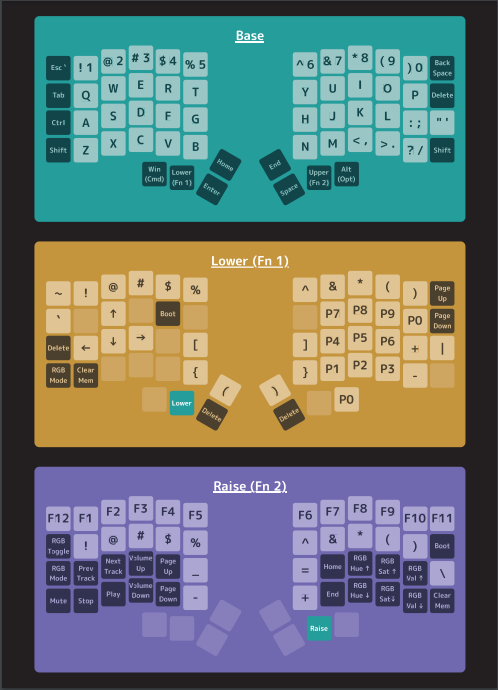
After some trial, error, and customization, I am pretty much in the swing of things. I wish I had my normal symbol keys back, but all in all, this is a great keyboard. It just… If I had to nitpick, the keys feel kind of squishy. They’re unsatisfying to press. I see why fiancee wanted new switches.
Time for a simple customization. I know I don’t like these linear switches, so let me get a silent tactile switch. I know I can always get Cherry MX Browns, but let me look up what the internet’s favorite switches are.
Holy Moly, folks, it’s not Cherry MX Browns.
I wish I could find some of the examples of things I saw on Reddit, but many enthusiasts have some colorful things to say about Cherry MX Browns. I’ve used them, I think they’re fine… but let me get something else just for the variety.
Just a couple more decisions-
Do you want the bump at 0.2mm or 0.3mm? Do you want true silent or is bottom out noise okay? You can always add o-rings if the noise is too much. Do you want a 45 gram switch or a 60 gram switch?
I’m sick of this. Baby kangaroos sound cute. I’m getting baby kangaroos. They are a heavy switch with an early bump. Whatever.
Wow, these really are some heavy switches. And there is a massive bump - there is no question of whether or not I hit the key. I practically had to move a mountain and I think I like it?
I’ve had this keyboard, with the new switches, for about a month. I now understand why the keyboard hobby goes so deep - there is so much customization, to the point where you can literally design your own PCB and 3d print a custom case for it. I applaud their dedication.
While it’s not perfect, I very much love this keyboard. My next keyboard will probably have a larger form factor - I need my symbol keys back eventually - and some slightly lighter switches. But for now, I have enjoyed this foray into uncharted territory.
I am officially retired from the ergonomic keyboard hobby for now. See you again in 7 years.