Split Linux is a general operating system optimized for safely navigating hostile environments like the Internet and physical check points.
"musl, privacy, security, encryption, and unbeatable network setup. A++"
-- sysdfree Blog
Split Linux builds on tools that follow the UNIX philosophy and is based on the fast and independent Void Linux.
Read The Split Way to learn about its benefits and philosophy.
Hard disk interaction
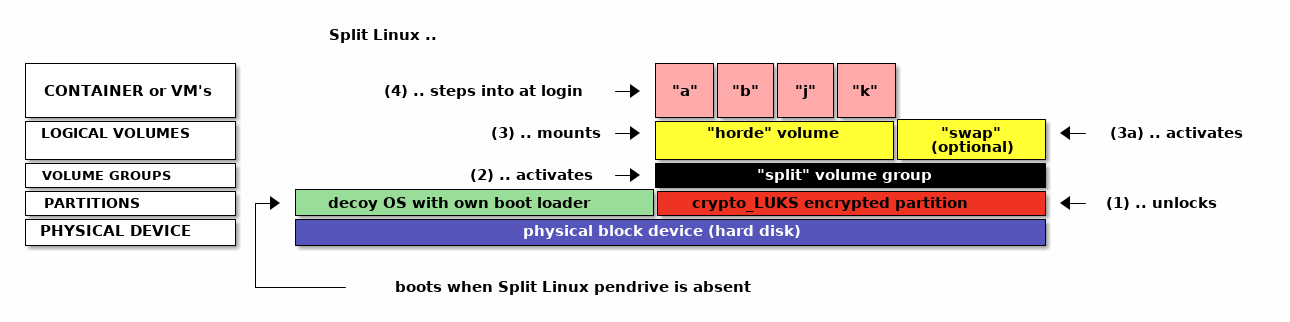
When booting the Split Linux live CD/ISO:
- If present, the user is prompted ot unlock a
crypto_LUKS-type partition. - If a volume group named "split" is found, it is activated.
- If a logical volume named "horde" is found, it is mounted on
/var/lib/lxc. - When the user logs in with a name matching one of the available containers, they directly end up in a session within that container.
- This will typically be an Xorg application like a window manager or desktop environment
- The user may launch additional containers in any other TTY and switch between them using Ctrl-Alt-Fx.
Containers can be any Linux distribution of your choice while VM's can be a wide range of operating systems, including Linux.
The decoy OS could be your current operating system resized to make space for the encrypted part, simply something small and innocent-looking or be left out altogether.
Networking in Split Linux Containers
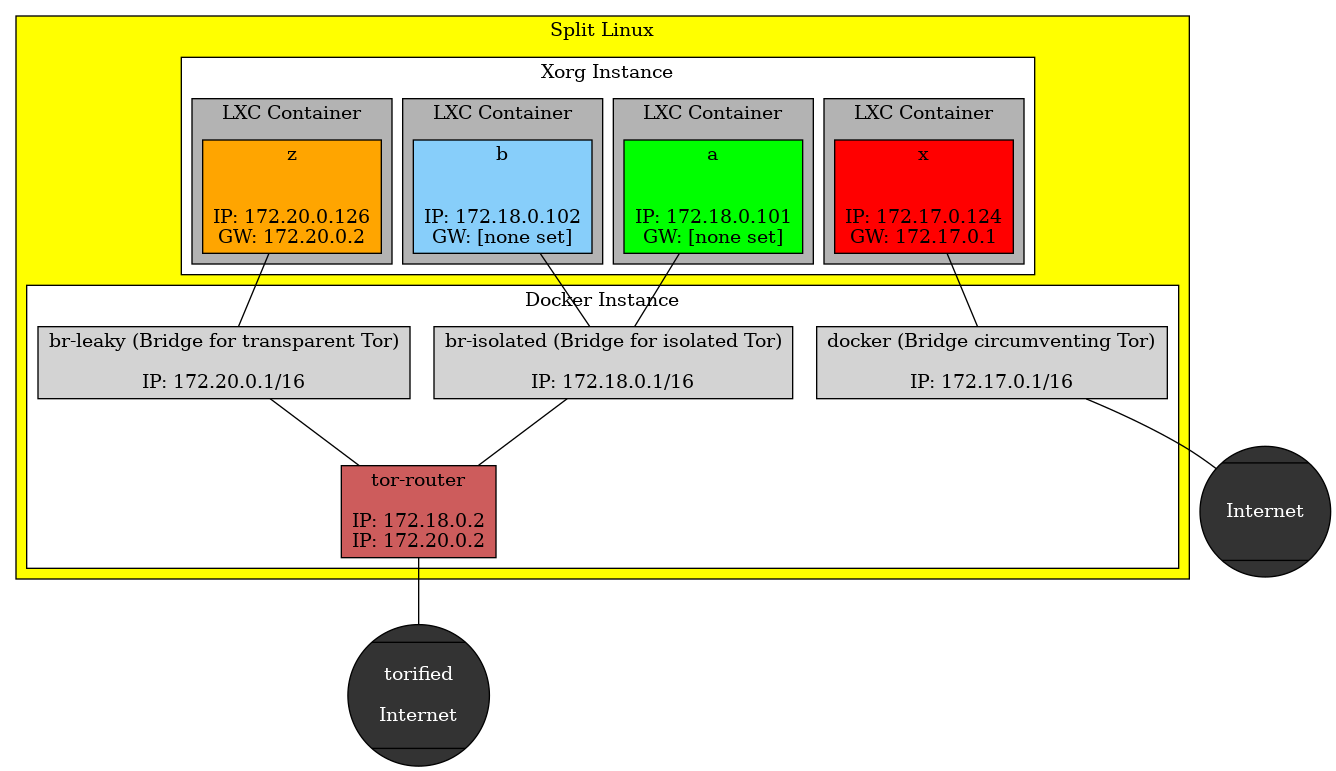
Split Linux launches a dockerized Tor router at boot. Containers connect through this router to the Internet in one of two fashions:
Isolated
In the recommended isolated configuration a container does not have a default gateway configured. Each application has to be told to use the Tor router as proxy. This way, the connections of various applications cannot be related to one another. Measures are in place to make sure that each application uses a completely separate Tor circuit.
Isolated should be the default as it provides the highest level of anonymity.
Transparent
The transparent setup is not recommended. The Tor router is defined as default gateway in the container and any application can access the Internet without additional configuration. The Tor circuits still differ from those of other containers, avoiding them to be related to each other, but the activity of one application may be correlated to that of another. It is still possible to configure applications to use separate circuits though.
Transparent might be used in the beginning until you know how to connect your applications.
Other modes
The user may opt to circumvent the use of Tor altogether, ditching anonymity for containers where Internet connection speed is more important than stealth. As a middle ground, traffic may still be routed through a VPN.
Download and Install
Download split-live-x86_64-musl-current.iso.
Then verify checksum and flash:
sha256sum split-live-x86_64-musl-current.iso |
  grep c2b382bcc5821def440e0ebb4338808f2c11d940e8c01053dd39163ed4cf2d35 &&
    dd status=progress oflag=direct bs=2M \
       if=split-live-x86_64-musl-current.iso \
       of=/dev/disk/by-id/<DEVICE>
Replace <DEVICE> with the path to your pendrive. For added certainty cross-check the SHA256-sum shown here with the one published on Reddit.
Release history
Expect releases once to twice a year. You'll be working from containers which you can update according to your needs.
- 6.12.34 - split-live-x86_64-musl-20250624.iso
c2b382bcc5821def440e0ebb4338808f2c11d940e8c01053dd39163ed4cf2d35- terminals
tty7totty10are enabled by default and reachable through Ctrl-Alt-Fx- Add an empty down override to disable undesired ones at boot. Example:
touch /HOST/overrides/etc/sv/agetty-tty10/down.
- Add an empty down override to disable undesired ones at boot. Example:
- new
-Lswitch tomkiso.shallows adding linux-lts to the ISO as secondary kernel- Doing so grows the ISO-size by roughly 300 MB, from 1.3 GB to 1.6 GB.
- GRUB hotkeys x and l respectively boot the current or the LTS-kernel
- Tor router updated to version 0.4.8.16
- 6.6.11 - split-live-x86_64-musl-20240128.iso
1e4be74189b98570f471de21fc9c46bece6b3ca9dc298fdf502acbde95dcf624- new command
spltestablishes an extensible interface to frequently used actions- The sub-commands
create,info,start,attach,route,vethupandrestartare available. splt create void <arguments>creates a new Void Linux container.splt routepermanently switches containers between the established Split Linux networking styles "isolated", "leaky" and "exposed".splt vethupenables the virtual networking interfaces of active containers.
- The sub-commands
- distributions based on BusyBox may now be logged into directly
- The shell configured for the container-user must be installed for GUI-launch to succeed.
- virtual network interfaces for new containers are now easily identified by their name being
veth-<CONTAINER_NAME>- Interface-names of existing containers can be set by adding a line like
lxc.net.0.veth.pair = veth-<CONTAINER_NAME>to their config file.
- Interface-names of existing containers can be set by adding a line like
- new soft-link /HOST allows quick access to contents of
/var/lib/lxc/_host/ - Tor router updated to version 0.4.8.10
- 6.3.13 - split-live-x86_64-musl-20230823.iso
3152791b9f0f055390bb24ca7dced624edc31b0f8040dfb3ab10ac70ead1a257- connections to Tor services may now utilize Client Authorization
- Keys formatted
<something>.auth_privateand owned by group9001have to be placed into/_host/override/tor_client_auth/. - The
splitlinux-tor-routerservice has to be restarted for changes to take effect.
- Keys formatted
- torified DNS queries are now possible for containers of type "exposed"
- Requests are handled on IP
172.17.0.2through UDP port 53.
- Requests are handled on IP
- files added by Split Linux itself can now be replaced through overrides
- Tor router updated to version 0.4.7.13
- 6.1.4 - split-live-x86_64-musl-20230114.iso
26bd661e10921fd2b9d17a7a8da1571067948424f985c08922e53559c5609566- swap volumes named "
split-swap" are now automatically used as such - support for 1 GB huge pages is activated
- Configuration is done by overriding
sysctl.conf,rc.localandlimits.confas required.
- Configuration is done by overriding
- Tor router updated to version 0.4.7.10
- 5.15.30 - split-live-x86_64-musl-20220326.iso
7161f6ac83e2796b79e6d4369b749ce414aec5f4a25ba09d02e645a229ec623a- encrypted RAID-devices are included in the selection of split-devices
- devices labelled "
split*" are preferred for decryption at boot - command
format_for_splitlinuxlabels newly created devices accordingly- Existing devices can be named by issuing
cryptsetup config --label split <DEVICE>.
- Existing devices can be named by issuing
- container-restart from
create_voidlinux_containershould now be faster
- split-live-x86_64-musl-20220215.iso
a6cadc3677bcf704639a90a35aa694d5ff47b2ad4eabcd56d88aa25b3933c2f8- immediate login after system boot is no longer hindered by slow Docker service startup
- networks may now route through a total of five SOCKS ports each
172.17.0.2:9050..9054for identities in "exposed"172.18.0.2:9050..9054for identities in "isolated"172.20.0.2:9050..9054for identities in "leaky"
- closing graphical session in the background no longer pulls the focus to its tty (upstream improvement)
- Tor router updated to version 0.4.6.9
- split-live-x86_64-musl-20220213.iso
5b8992d429d3c0d866b2b98ea2e4c5d565294f0a4a9fc6b6d1da727342ca2d86- retracted - see next release instead
- split-live-x86_64-musl-20210506.iso
7088fd01b00eaf962c85ba11ed4f1fc934566049461d89144d3d492adf8255d6- output of splitlinux-tor-router service no longer spams the console
- The section "Logging" in the Void Linux Handbook explains how to access the information.
- new command
format_for_splitlinuxautomates hard disk preparation - root now uses bash as shell; if no container partition is mounted, format_for_splitlinux is mentioned upon login
- Tor router updated to version 0.4.4.8
- split-live-x86_64-musl-20210112.iso
1ee709b2ab9c547105f73d3c47d417b9e2c2b6328717f598cdfc3539c762b231- network link is explicitly activated on container start
- crypt device selection now handles non-numeric input graciously
- split-live-x86_64-musl-20201128.iso
0681621d58090567555fe7a73f791fbba769b435cd1c1793d7a106970c770d1a- new command
create_voidlinux_containersimplifies creation of new identities - feral surprise added to repos (subsequently announced as the Beast Desktop Environment)
- split-live-x86_64-musl-20201108.iso
aafc067e3e3f3b2e2567a1b2a1f52b9c269b9dc4959ed2b22549331cf9e73fcf- user is presented with Split Linux specifc hints at login
- passwords for root and anon are overridden if a "shadow-formatted" password is present in
/_host/passwordon the horde volume - host system's
/etcfiles will be overridden by files from/_host/override/etc/of the horde volume; ideas:- Configure a
wpa_supplicant/wpa_supplicant-<interface>.confto automatically connect wireless on boot. - Configure a
udev/rules.d/99-sound-for-containers.rulesto allow sound from containers. - Configure a
X11/xorg.d/70-synaptics.confto customize touchpad behaviour.
- Configure a
- split-live-x86_64-musl-20201104.iso
ca3c88467520907f05f3e571f176a71f2ead0056e2f3fb68ed4bcc43aa54d17f- "leaky" network configuration now working
- Tor router updated to version 0.4.3.5
- split-live-x86_64-musl-20200701.iso
a6e925d3e0c5c1b91cba0a6d96924191664f8b9483b390396708f899e31a7cae- clearnet routing corrected
- package cache no longer shared with host
- container .xinitrc no longer needs to be made executable
- split-live-x86_64-musl-20200531.iso
d6530d730f0fd11eb0230dded60b4f874213c3f4359ff27f9a5f445c9ce207b8- initial release
Documentation
The Split Handbook (HTML, PDF)
Notes
Debugging: Customization Notes - Live CD
Link collection: Enter Crypto Currencies
Link collection: Live on Crypto
The Beast Desktop Environment - Changelog
Join the community
- Reddit r/splitlinux