v0.0.40 — latest release
The terminal editor for the AI era.
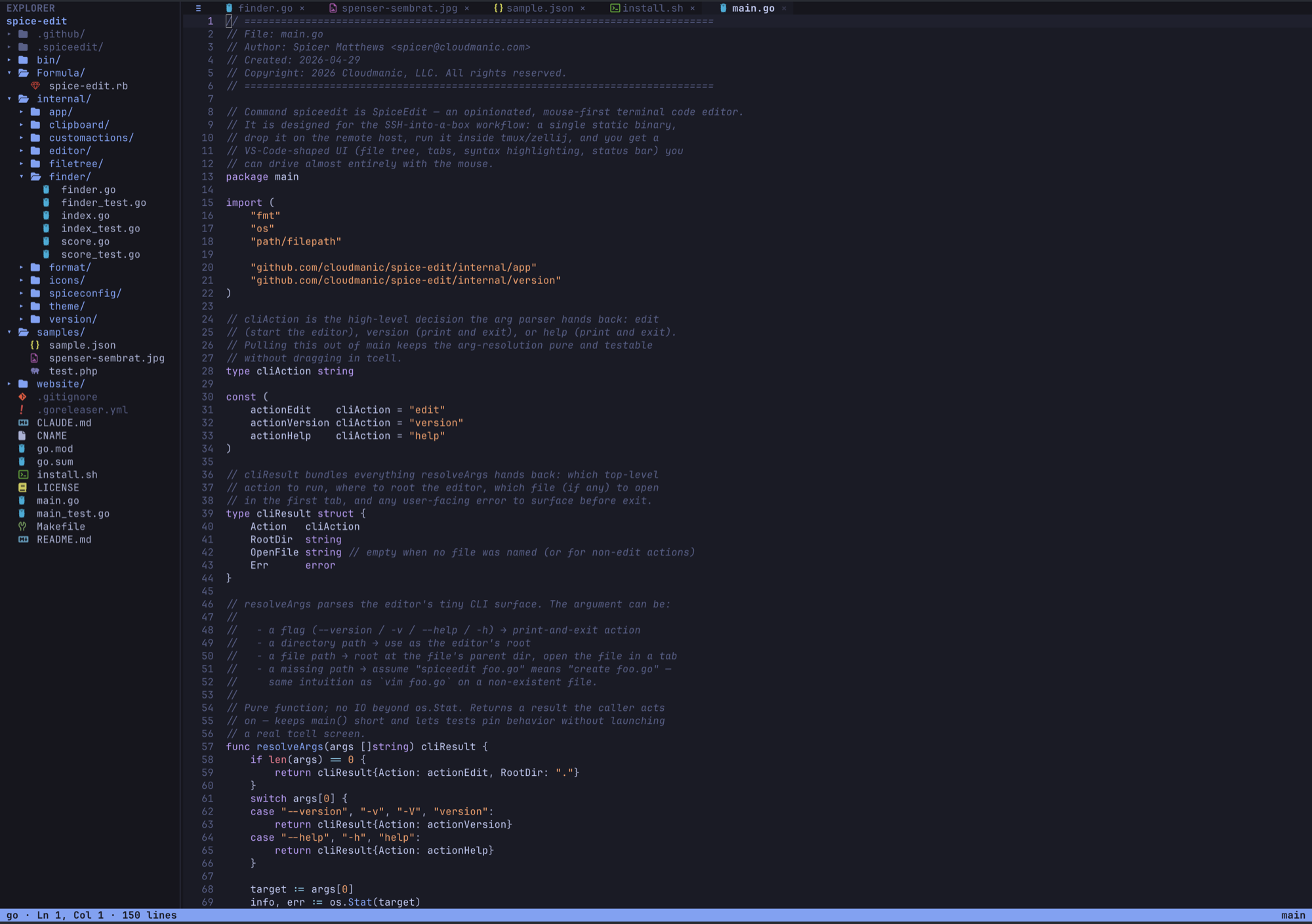
SpiceEdit is a mouse-first code editor for SSH workflows. Click a file, tweak a line, save, and get back to your agents.
For engineers who live in tmux — a code editor without the four-thousand-line vimrc.
brew tap cloudmanic/spice-edit https://github.com/cloudmanic/spice-edit && brew install cloudmanic/spice-edit/spice-edit
View on GitHubMac & Linux install. Windows? See all platforms.
spiceedit ~/code/spice-edit
The pitch
Agents write the code now.
The editor's job changed.
You used to spend eight hours a day in your editor. You memorized the hotkeys because you had to. A vim cheatsheet on the wall paid for itself in a week. Then 2025 happened. Most of the code in your repo this morning came out of an agent. You read diffs, you tweak prompts, you nudge a function name, you save. You spend ten minutes in your editor and ten hours in your terminal.
A tool you touch for ten minutes shouldn't ask you to study for it. SpiceEdit doesn't. It runs inside any terminal, looks like a tiny VS Code, and works with the mouse. Click a file in the tree. Drag to select. Scroll wheel scrolls. Drop the splitter where you want it. Open the menu, pick Save, get out. There is no vimrc, no plugin manager, no YAML directory. There is one static binary. Drop it on a server. Run it.
SpiceEdit was built for the workflow nobody else solves: SSH into a remote box, attach to tmux
or Zellij, edit files like a human, copy text back to your laptop's clipboard through three
layers of network. It runs over SSH because that's where work happens now. It avoids
Ctrl+
shortcuts because they fight tmux and the terminal itself. It opts into formatters per-project,
so cloning a stranger's repo never silently runs anything. It ships under MIT. Install it.
Forget it. Edit a file.
Why not Neovim or VS Code
Use the right tool for the job.
Neovim is a beautiful editor. VS Code is a beautiful editor. Both are heavier than the job most engineers ask of an editor in 2026. Use whichever fits the work in front of you.
Use Neovim when you want a programmable IDE in a terminal. Use VS Code when you want an IDE on your desk. Use SpiceEdit when you want to glance at a file on a server, fix one line, and get back to your agents.
Features
Designed for the workflow nobody else solves.
Every feature exists because it removes friction from the SSH-into-tmux loop. Nothing is here because someone shipped it in 2014 and nobody dared remove it.
Mouse-first UI
Click a file to open it. Click a tab to switch. Drag to select. Scroll wheel actually scrolls. Drop the splitter where you want it. Right-click works when your terminal forwards it; the menu icon and a double-tap of Esc cover when it doesn't.
Fuzzy file finder
Press Esc-p. Type three letters. Open the file. Indexes 50,000 files in roughly 150 ms by shelling out to git ls-files, falls back to a gitignore-aware walker on non-git projects, and rebuilds in the background every ten seconds.
Format on save
Drop .spiceedit/format.json in a repo. Map extensions to argv arrays — gofmt, prettier, pint, ruff, anything. SpiceEdit prompts once before running anything and re-prompts when the config changes. No shell, no injection surface.
SSH-native clipboard
Copy uses OSC 52 with a tmux passthrough wrapper, so highlighting text on a remote box ends up in your local clipboard. Works in iTerm2, WezTerm, Kitty, Alacritty, Ghostty, gnome-terminal, and the macOS default.
Custom actions
Define shell-out actions in ~/.config/spiceedit/actions.json. SpiceEdit exports $FILE and $FILENAME to a sh -c subshell. The killer use case: SSH into a server, click Open on Laptop, and your laptop opens the file you were just editing on the box.
One static binary
No CGO, no runtime, no plugin manager, no language server requirement. Cross-compiled for macOS, Linux, and Windows on amd64 and arm64. scp it onto a box. Run it. That's the install.
Syntax highlighting via Chroma
Pure-Go tokenizer with a Tokyo Night-inspired palette. Picks a lexer by filename, falls back to content sniffing, then to plain text. Dozens of languages out of the box, no tree-sitter setup, no language servers to install.
Esc-leader hotkeys
Tap Esc, then a letter inside half a second. Esc s saves, Esc p finds a file, Esc f searches the buffer. No Ctrl+ shortcuts fighting tmux or your terminal. Double-tap Esc opens the action menu.
Install
Pick your platform. Run one line.
We auto-detected your OS. Switch tabs to see the others — your choice sticks.
Install (Apple Silicon and Intel).
brew tap cloudmanic/spice-edit https://github.com/cloudmanic/spice-edit
brew install cloudmanic/spice-edit/spice-edit
Update to the latest release.
brew update
brew upgrade cloudmanic/spice-edit/spice-edit
Uninstall.
brew uninstall cloudmanic/spice-edit/spice-edit
brew untap cloudmanic/spice-edit
One-line installer (works on every Linux you'll ever SSH into).
curl -fsSL https://raw.githubusercontent.com/cloudmanic/spice-edit/main/install.sh | shThe script detects your OS and architecture, downloads the matching archive from the latest
GitHub Release, and drops the spiceedit binary into ~/.local/bin
(or /usr/local/bin if ~/.local/bin isn't writable). Re-run it to
upgrade. Plain POSIX sh, no bash required — works on Alpine, BusyBox, and any
SSH target.
Pin a specific version.
curl -fsSL https://raw.githubusercontent.com/cloudmanic/spice-edit/main/install.sh | VERSION=v0.0.40 shInstall to a custom directory.
curl -fsSL https://raw.githubusercontent.com/cloudmanic/spice-edit/main/install.sh | INSTALL_DIR=/opt/bin shWindows builds (amd64) ship as a zipped binary on every GitHub Release. Download the archive,
unzip spiceedit.exe, and drop it somewhere on your PATH. There is no
installer or Chocolatey package yet — the binary works in Windows Terminal, ConEmu, and WSL.
For the masochists, the contributors, and anyone behind a corporate firewall.
git clone https://github.com/cloudmanic/spice-edit.git
cd spice-edit
make install
Requires Go 1.22 or later. CGO is off by default — the build is fully static.
Need another path? See the full installation docs for manual binaries, version pinning, custom directories, and uninstall steps.
Made for
The workflows we built it for.
Engineers who SSH into boxes Teams that live in tmux or Zellij AI-native developers who only touch the editor for tweaks Anyone tired of memorizing keybindings Sysadmins editing one config file on a remote server
Install in one line.
No runtime. No setup. One static Go binary.