Google has today announced the launch of a new ‘Android Intrusion Logging’ feature as part of Android Advanced Protection Mode (AAPM). The new intrusion logging feature promises to be a major aid to digital forensics researchers undertaking investigations into sophisticated attacks on Android devices. This is the first time a major device vendor has release a feature specifically to enhance the ability to forensically detect and respond to advanced digital threats.
Amnesty International’s Security Lab acted as a design partner to Google over the past year during the conception and implementation of Android Advanced Protection Mode with particular focus on the Intrusion Logging feature. Research by Amnesty International and a growing community of threat labs and civil society investigators has identified ways numerous cases in which sophisticated attackers are targeting the phones of human rights defenders and journalists.
Civil society forensic efforts have relied almost exclusively on incidental records and log files which were not designed or intended for forensic or security use. As a result, the forensic traces available on mobile phones are frequently missing key context, are inaccessible to end user, or are short-lived and no longer available on the device when the forensic analysis is performed.
Surveillance actors are also increasingly aware of these forensic efforts, and are more diligent in their efforts to hide their actions on a targeted device. Relying on incidental forensic logs in such a context appears insufficient for long-term accountability efforts to tackle the misuse of cyber surveillance technologies.
Donncha Ó Cearbhaill – Head of Security Lab, Amnesty InternationalWe are very excited to see the roll-out of Android Intrusion Logging. It promises to help shift the balance to the advantage of defenders, providing civil society investigators with the key evidence needed to detect and expose some of the most advanced attacks facing journalists and activists.
With Intrusion Logging Google is the first major vendor to proactively address to challenge of detecting advanced attacks on device. By making more consensual forensic data available for researchers, we can make life more difficult for attackers and help civil society seek accountability when their devices are unlawfully targeted by spyware and mobile data extraction tools.
This technical briefing is written primarily for technologist and civil society forensic researchers. It outlines the key new features in Advance Protection Mode, and details how the Android Intrusion Logging feature specifically can enhance the work of researchers conducting consensual digital forensics.
To help make Intrusion Logging accessible to researchers, Amnesty International today has also releasing updates to AndroidQF and the Mobile Verification Toolkit (MVT) to provide initial support for automatically collecting and analyzing intrusion logs.
For high-risk users: please jump straight to our instructions for enabling Advanced Protection Mode.
Intro
Significant progress has been made in recent years to integrate stronger security mechanisms directly into mobile operating systems with the goal of addressing targeted and sophisticated attacks. Examples include Apple’s Lockdown Mode, GrapheneOS exploit mitigations and Android’s Advanced Protection Mode (AAPM). AAPM brings together a set of predetermined configurations, and as recently announced by Google it now includes an additional feature called Intrusion Logging (IL).
Historically, the Android architecture has imposed technical limitations on log availability for consensual forensic purposes. Logs are often short-lived and stored in fixed circular buffers that are regularly overwritten in a normal phone usage. For example, system messages collected via Logcat rely on a fixed set of buffers that fill up quickly, which makes them less useful for forensic purposes despite being the most verbose logging source in the Android OS. Similarly, crash dumps generated by debuggerd are stored as a limited number of tombstone files and are rotated over time, with older tombstones being overwritten as new crashes occur on the device.
In consensual forensic analysis, we typically operate in post-attack scenarios. Human rights defenders often contact us with suspicions of past infections that may have occurred months or even years earlier. While notifications from vendors such as Apple, Meta and Google have helped people recognize potential compromises and look for assistance more quickly, historical evidence may be already lost by the time an investigation begins.
In this context, an opt-in feature like Intrusion Logging represents a fundamental shift in the amount and quality of forensic data available on Android devices. Until now, forensic analysis has relied on logs that were never designed for intrusion detection. Developer and OEM troubleshooting artifacts, such as bugreports or data obtained via ADB shell commands, were often the only sources of data available. In addition, Google Takeout provided limited backup data intended for end users, not for forensic investigations. Instead, Intrusion Logging is designed specifically to capture events relevant to security and related to possible intrusions, with the explicit goal of enabling consensual forensic analysis and therefore, significantly improves the ability to identify and investigate sophisticated attacks on Android.
We have maintained an ongoing dialogue with Google during their development of this feature, sharing insights from exploitation patterns we have observed in the wild as well as the specific requirements of our consensual forensic methodologies. Collaboration between industry and civil society has repeatedly proven effective in building security features that better protect human rights defenders, and Intrusion Logging is a strong example of what such cooperation can achieve. When security features are developed and implemented with the most at-risk populations in mind, these advances benefit us all, and make advanced security options more accessible and usable.
AAPM overview
The features introduced under AAPM can be divided into two categories. The first focuses on reducing the attack surface of a device, hardening it against attacks, while the newly introduced Intrusion Logging feature is aimed at monitoring and providing visibility into attempted or successful attacks.
a. AAPM security features
When first enabled, the AAPM activates a layered set of protections across the device, which may vary depending on the Android version.
At the device level, it activates Theft Detection Lock and Offline Device Lock, which automatically lock the phone if it goes offline or if rapid movements suggest the device may have been stolen1. In addition, if the phone remains locked for three days, it will automatically reboot. Advanced Protection Mode also includes USB Protection, which blocks new USB data connections while the screen is locked, preventing unauthorized access or data communication through a USB connection. This matters in contexts of device seizure, because forcing the phone back into a “before first unlock” (BFU) state and blocking unauthorized USB based access makes it significantly harder for non-consensual forensic extraction tools to access the data stored on the device. These protections are clearly designed to mitigate attacks with a physical component, such as robbery, device loss or seizure.
At the app level, AAPM turns on and prevents Google Play Protect to be disabled and blocks the installation of apps from unknown sources, also known as sideloading. These settings are meant to limit exposure to malicious software, including stalkerware and surveillance apps that are frequently used in contexts of gender-based violence or covert monitoring and that often circulate outside official app stores. This would also protect against the side-loading of malicious apps through physical access to a device, an increasingly observed tactic. In this same vein, AAPM also enables Memory Tagging Extension (MTE), a protection designed to detect and protect from memory corruption attacks.
At the network and browsing level, AAPM disables 2G connections and enables additional web browsing protections, including disabling just-in-time compilation and warning users when visiting non-HTTPS sites. Finally, AAPM includes a series of spam and phishing protections, flagging suspicious content in both in Phone and Message apps.
b. Intrusion Logging (IL)
The most recent feature added to AAPM is Intrusion Logging (IL), also referred to as “Forensic logging”. Intrusion Logging is a privacy preserving logging mechanism because all forensic logs are encrypted with a user-generated key before the logs are securely archived in the user’s Google account. The logs can later be accessed and decrypted by the user, but not by Google or any unauthorized third parties. By default, logs are collected periodically once a day and stored in an encrypted form in the cloud. When forensic analysis is required, the device owner must explicitly share these logs from the device itself in a secure manner with the forensic analyst.
Using Intrusion Logging in a real forensic scenario
To illustrate the value of Intrusion Logging (IL), consider a realistic scenario in which a mobile device is seized without a warrant and later returned to its owner. From a forensic perspective, this raises several questions:
- Was the phone unlocked while it was out of the owner’s hands?
- Did someone unauthorized interact with it, for example using Android Debug Bridge (ADB)?
- Were any monitoring apps or spyware installed?
- Did the device communicate with external infrastructure that could indicate Command and Control (C2) activity?
- Were any traces of these actions later removed, either by an attacker trying to hide them or by legitimate security cleanup processes?
When Intrusion Logging is enabled in advance, many of these actions -from initial infection to C2 activity and the deletion of traces- leave behind traces in the IL logs. The sections below walk through how each of these stages can be identified using the relevant IL events.
Logged event types
IL records three main categories of events. The focus below is on those most relevant to consensual forensic investigations.
1. Security events
The full list of security events available through IL is documented here. From a consensual forensic standpoint, the following classes of events are particularly relevant:
a. Device unlocking
The event TAG_KEYGUARD_DISMISS_AUTH_ATTEMPT, combined with timestamps and a “success: true“ result, allows investigators to determine whether a device was successfully unlocked. This is especially relevant in cases involving police custody or gender-based violence where physical access to the device is suspected.
Example:
// IL event logs showing a device being locked

{"security_event":{"event_id":6,"event_time":1770984342543978764,"keyguard_secured":{}}}
// IL event logs showing a successful unlock of a device

{"security_event":{"event_id":7,"event_time":1770984359195595837,"keyguard_dismiss_auth_attempt":{"success":true,"method_strength":1}}}

{"security_event":{"event_id":8,"event_time":1770984359402276339,"keyguard_dismissed":{}}}
b. Physical access and abusive interactions
Events such as: TAG_ADB_SHELL_CMD, TAG_ADB_SHELL_INTERACTIVE, TAG_SYNC_SEND_FILE, TAG_SYNC_RECV_FILE, document direct interaction with the device via the Android Debug Bridge (ADB), including executing shell commands and transferring files using adb push and adb pull. Such activity typically indicates physical access and an unlocked debugging enabled device and is highly relevant in forensic investigations.
Example:
// Execution of an ADB shell command

{"security_event":{"event_id":0,"event_time":1771248003460210232,"adb_shell_cmd":{"command":"logcat"}}}
// File transfer from the device to the host

{"security_event":{"event_id":2,"event_time":1771243841015617441,"adb_sync_recv_file":{"path":"\/sdcard\/Download\/mal.txt"}}}
c. Spyware installation and removal
When physical access is available, malicious monitoring applications can be installed manually and later removed as a stealth tactic. The following events allow investigators to track this activity: TAG_PACKAGE_INSTALLED and TAG_PACKAGE_UNINSTALLED.
Installation events (TAG_PACKAGE_INSTALLED) can reveal the installation of monitoring or stalkerware applications, while APP_PROCESS_START events help identify which processes are launched and actively running on the device.
Uninstallation events (TAG_PACKAGE_UNINSTALLED) make it possible to see when an app is removed, whether deliberately or automatically by security mechanisms such as Google Play Protect or other OS level malware detection. Having persistent IL logs from before the uninstallation provides visibility into past potential malicious activity that has historically been very difficult to capture in Android forensic investigations.
Example:
// App installed

{"security_event":{"event_id":0,"event_time":1770993673783303483,"package_installed":{"package_name":"com.google.android.trichromelibrary_763204533","version_code":76320453,"user_id":0}}}
// Process launched

{"security_event":{"event_id":0,"event_time":1767011660603598998,"app_process_start":{"process":"WebViewLoader-armeabi-v7a","start_time":1770983836165655562,"uid":1037,"pid":2091,"seinfo":"null:complete","sha256":"No APK"}}}
// App uninstalled

{"security_event":{"event_id":0,"event_time":1770990226429938404,"package_uninstalled":{"package_name":"com.google.android.trichromelibrary_725800234","version_code":725800234,"user_id":0}}}
2. DNS and Connection events
DNS and connection events provide visibility into the navigation history. In the following IL example, we see how a DNS lookup for a hostname is followed by a corresponding connection event to the resolved IP address.
From a forensic point of view, these logs are especially useful because many sophisticated 1-click attacks rely on redirections to decoy pages, with non-perceptible visits to malicious websites. Even if the user does not notice the redirection, the DNS lookup and connection attempt will still be logged and can be matched against known IOCs. In addition, IL logs can expose Command and Control (C2) communication originating from compromised applications as each event includes a package_name, allowing to determine whether traffic originated from a browser or from a specific application.
Example:
{"dns_event":{"event_id":2,"event_time":1770983814122,"package_name":"com.android.chrome","hostname":"www.web.com","ip_addresses":["\/1XX.YYY.ZZZ.WWW","\/1XX.YYY.ZZZ.WWW","\/1XX.YYY.ZZZ.WWW"],"ip_addresses_count":3}}
Limitations and caveats
Although IL logs offer significant value for consensual forensic analysis, there are a number of limitations that need to be considered.
- AAPM (including IL) requires Android 16 or later and is currently available only on Pixel devices, with support from other vendors expected in the near future.
- Adoption by vendors (on non-Pixel devices) and end users may be slow.
- The device must be linked to a Google account.
- AAPM (and IL) must be enabled before an attack (or any high-risk situation that could lead to one), logs cannot be gathered retroactively.
- Certain features such as 2G downgrade protection or Memory Tagging Extension (MTE) are only available on supported hardware. For example, disabling 2G setting is only supported by devices that conform to Radio HAL 1.6+.
- Unlike previous artifacts such as bugreports or AndroidQF samples, which contain little or no private user data, IL logs may include sensitive information such as browser navigation history. Secure sharing of logs and informed consent are therefore more essential than ever.
AAPM and Intrusion Logging in practice
When supporting individuals at risk, AAPM can provide meaningful additional device level protection and should be considered as part of a set of recommendations for the individual, as long as it fits the overall risk management approach and the device and Android version support it. From a forensic perspective, it is important to understand that Intrusion Logging must be enabled in advance in order for logs to be generated and later analyzed.
1. Enable Android Advanced Protection Mode
AAPM should be enabled before entering a high-risk situation, or as an ongoing protection for individuals with high exposure profile.
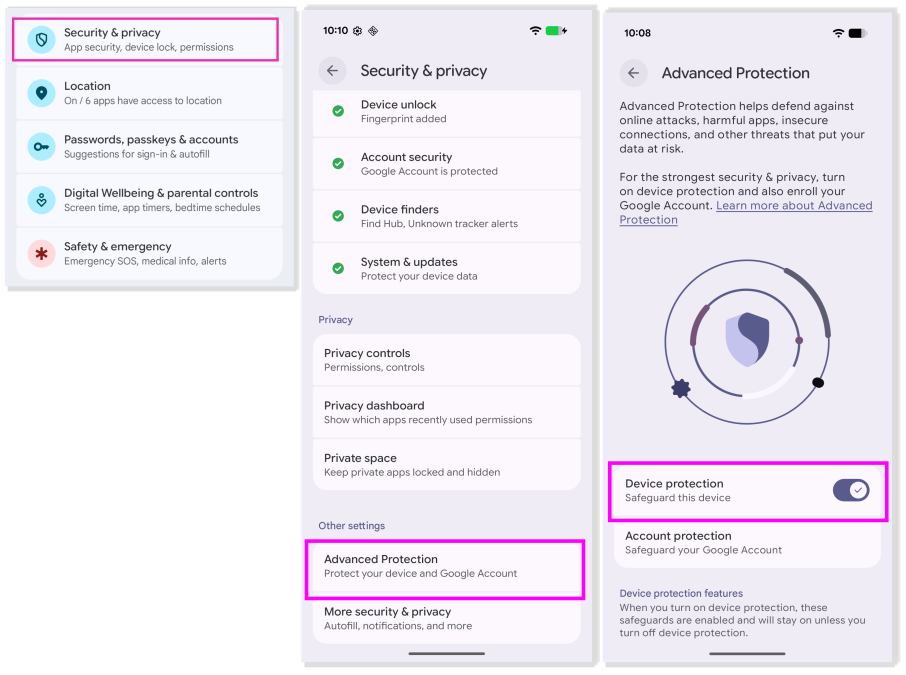
On Pixel devices, the feature can be found under the Menu: Settings > Security & privacy > Advanced Protection > Device protection
2. Enable Intrusion Logging
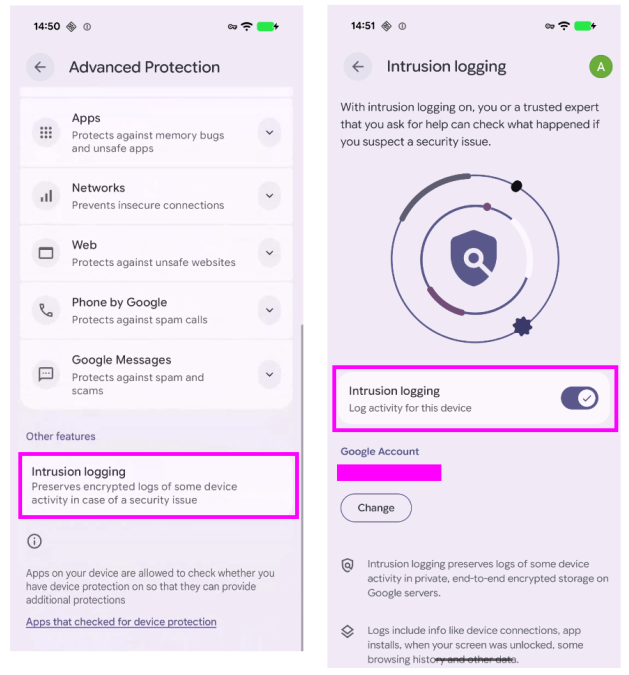
If AAPM is already enabled, make sure Intrusion Logging is also activated within the AAPM settings.
On Pixel devices, the feature can be found under the Menu: Settings > Security & privacy > Advanced Protection > Intrusion Logging, located at the bottom of the page. Once there, toggle Intrusion Logging on to enable it.
3. Continue normal device usage
Use the phone as usual while logging is enabled.
If something suspicious happens
At some point, a forensic analysis may become necessary. This could be triggered by a notification from Google or Meta, a device seizure by authorities, unexplained private information being leaked, or colleagues or close contacts having been targeted by spyware. In these situations, the next step is to export and securely share the logs from the device with a forensic analyst.
4. Share Intrusion logs securely with forensic specialists
Intrusion logs can be shared in two ways: manually from the device or via AndroidQF. Both methods are described below, however, AndroidQF is recommended because it automates the acquisition workflow (see 4b).
4a. Download Intrusion logs manually and share them
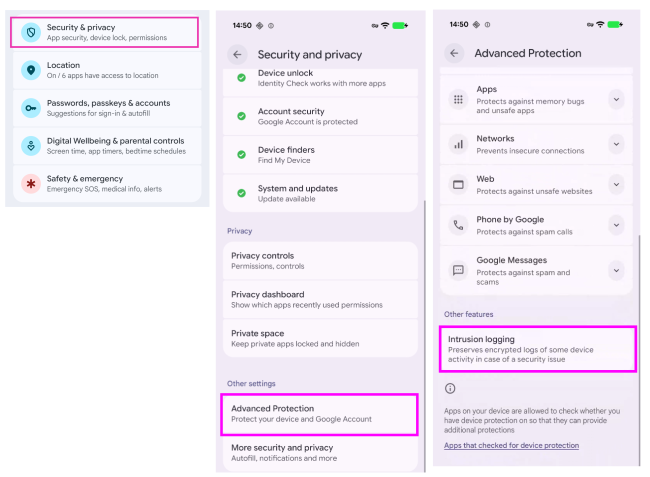
First, open the Intrusion Logging menu at Settings > Security & privacy > Advanced Protection > Intrusion Logging, located at the bottom of the page.
Under the Intrusion Logging menu, select Access logs, then choose Download and decrypt to download your device logs. You will be prompted to enter your PIN or use Face ID to approve the request. A popup will appear indicating that the download is in progress.
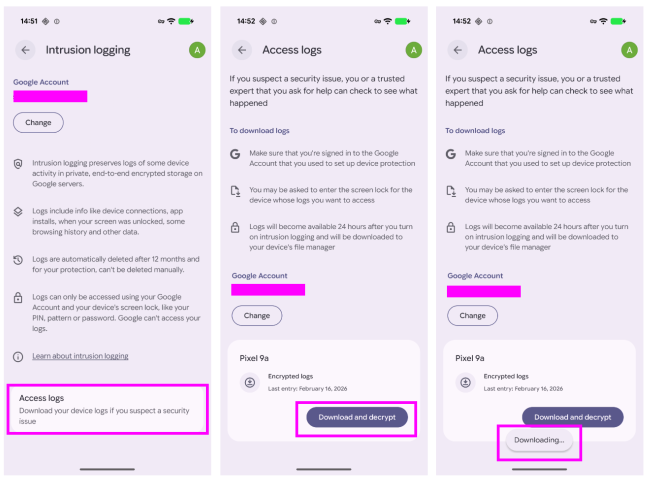
Once the download is complete, another popup will confirm: “Logs downloaded for [Device]”, and a notification will offer to open newly downloaded logs in the Files app.
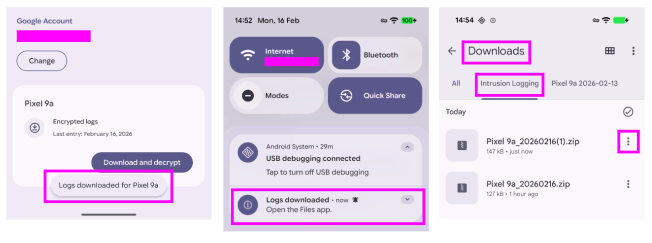
To access the logs manually, open the Files app and navigate to Downloads > Intrusion Logging, where you will find both previous and newly downloaded logs.
Share the logs using a secure and end to end encrypted method with a trusted forensic analyst.
4b. Acquire Intrusion logs directly with AndroidQF
Logs can also be acquired directly using AndroidQF following the standard acquisition process. During acquisition, one additional prompt will appear on the device requesting approval to access intrusion logs.
a. Ensure you are using the latest version of AQF, either by downloading the most recent release from the project repository or by building it from source following the provided instructions.
b. Run AQF from the CLI on your forensic workstation:
$ ./androidqf
Proceed with the acquisition as usual with the device connected via USB.
c. During acquisition, AQF will now prompt:“Would you like to take the Intrusion Logs of the device?”
At this stage, you may opt out or choose Yes to include the full Intrusion Logging folder in the acquisition.
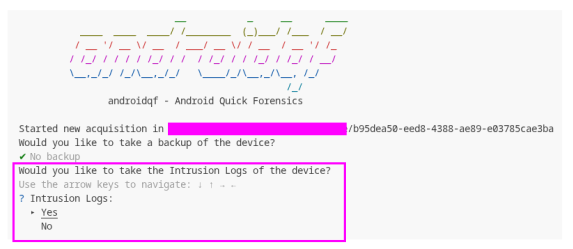
d. You will then be prompted to approve the action on the phone. AQF will automatically open the Intrusion Logging screen on the phone. From there, scroll to Download and Decrypt and tap it. Authorize the download of logs using your PIN or biometric authentication similar to workflow shown in 3a. If multiple devices are listed, you can download logs from each device.
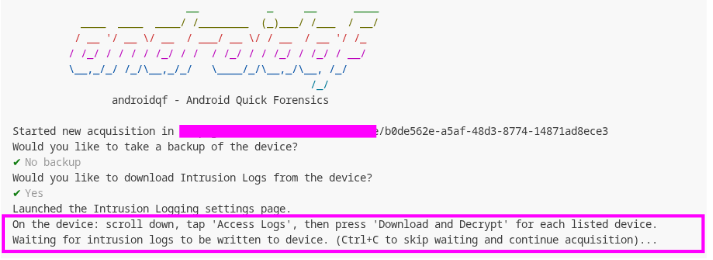
e. AQF will wait for the new intrusion log file to appear in: /sdcard/Download/Intrusion Logging/.

f. After you have finished downloading all files, press CTRL+C to continue with the acquisition of the remaining device data.

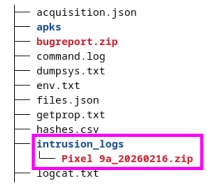
g. A new folder named intrusion_logs will be created in the final output directory, containing the raw intrusion logs extracted from the device.
5. Forensic analysis
IL logs can be reviewed manually, which we encourage in order to better understand their structure and content. The Mobile Verification Toolkit (MVT) includes a new module called check-advanced-logs specifically designed to parse IL logs and make the forensic analysis process easier.
Similarly, intrusion logs included in an AQF sample are automatically analyzed when running the check-androidqf module.
a. Before starting, make sure both MVT and the IOC datasets are up to date:
# if MVT was installed via pipx

$ pipx upgrade mvt
# if MVT was installed via pip

$ pip3 install -U mvt
# download public IOC datasets

$ mvt-android download-iocs
b. Run MVT against the Intrusion Logging data and save the output from MVT in a folder:
$ mvt-android check-advanced-logs ./il-raw-logs -o mvt-check_aapm-output
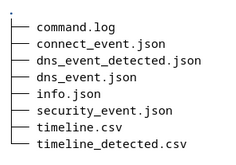
c. At this point we are ready to conduct the forensic analysis with the output generated by MVT. After running the MVT command, the tool generates its usual set of files. This includes a command.log file containing the command line output and execution details, as well as a timeline.csv file that aggregates all timestamped events detected on the sample logs.
When parsing Intrusion Logging data specifically, MVT also produces three separate files: security_event.json, dns_event.json and connect_event.json corresponding to the three IL event types. If suspicious activity is detected, those events are highlighted in timeline_detected.csv. In such cases, for example if suspicious DNS activity is identified, MVT will additionally generate a detected output file such as dns_event_detected.json containing only the relevant events. This follows the same output logic MVT applies across its other analysis modules.
Example of files generated by MVT when analyzing IL logs:
d. It is possible to combine the forensic analysis of IL logs with the analysis of other artifacts, such as a bugreport gathered from the phone, allowing all events to be reviewed together in a single timeline:
# run mvt to analyze a bugreport

$ mvt-android check-bugreport ./bugreport -o mvt-check_bugreport-output
# run MVT to analyze IL logs

$ mvt-android check-advanced-logs ./aapm-logs -o mvt-check_aapm-output
# concatenate both timelines generated interleaved by timestamp

$ cat ./mvt-check_bugreport-output/timeline.csv ./mvt-check_aapm-output/timeline.csv | sort -V > supertimeline.csv
After this, the supertimeline.csv file can be used to analyze timeframed events across all data collected from the device, including both IL and bugreport logs.
If the check-androidqf module was used instead, the resulting timeline already includes combined timestamped entries from all acquired data sources, including intrusion logs.