Simple Interface for Experimenting in JavaScript. Developed for Open Source using Open Source.
Learning • AI/ML • Scientific computation • Testing
Happy experimenting!
Github • Discord • X (twitter)
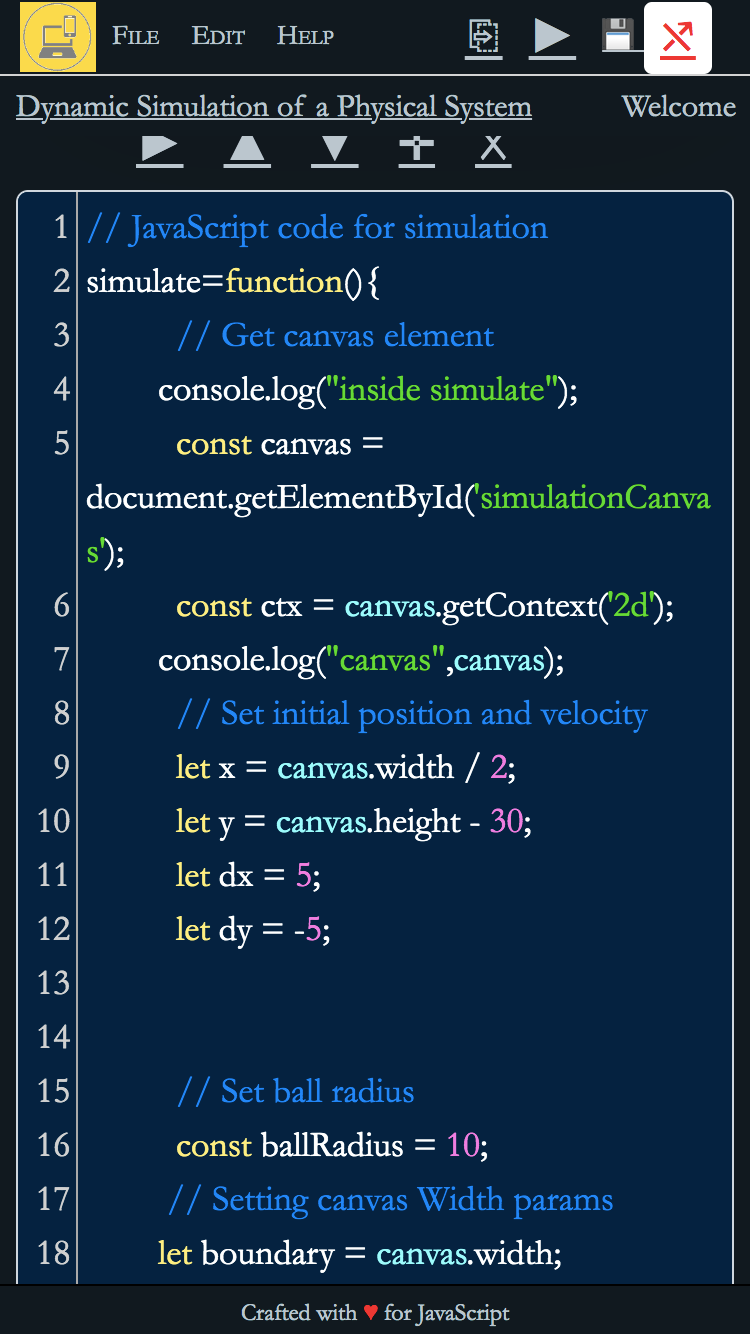
Experiment in JavaScript with Ease
Features
Scribbler is a browser-based tool to experiment in JavaScript for developers, engineers, and scientists. It is an online notebook/editor/compiler for JavaScript
Open and Free
No login, lock-ins, or heavy deployment requirements.
Easy to Use
Runs without backend/node/npm/python. Can be loaded from a static file server.
Device Agnostic
Minimalistic UI and mobile responsive design, works on any modern browser.
Extensible
Can load third-party ES-6 libraries dynamically from CDNs.
JS+HTML Enabled
Supports JS, HTML, Markdown, and CSS for building dynamic notebooks.
Github Friendly
Can push to and pull from Github directly from the tool.
JavaScript
JavaScript is the single most popular language for development on frontend and backend.
420mln+
JS Github Projects
one tool, several uses
Use Cases
Whether you’re a beginner, an advanced developer, an AI/ML engineer, or a scientist, Scribbler has you covered.
Learn
Learn JavaScript coding easy to use interface.
Key points
- Use HTML and JS.
- Interact with UI elements.
- Plot charts.
- Write functions, classes and other reusable code.
Scientific Computation
Advanced computation including simulations, solving equations.
Key Points
- Use math and scientific libraries.
- Do complex simulations.
- Visualize output.
- Dynamically experiment with parameters and code.
AI and ML
Use ML libraries like tensorflow.js and brain.js for training and inference.
Key Points
- Train ML models.
- Do inference of pre-trained models.
- Use Plotly etc for visualization.
- Build dynamic AI use-cases.
Testing
Test JavaScript code, libraries, and APIs with a simple UI.
Key Points
- Test snippets of code.
- Test APIs dynamically.
- Integrate UI and JS testing.
- Share test cases and results.
Overview.
Explore and experiment with JavaScript, get instant output to text and iterate.
Installing
- - No specific installation is required. You can use the git-hosted version (without downloading anything) here: https://app.scribbler.live/.
- - Alternatively, you can download or clone the Github repo on any machine and host it in webserver.
- - To host the app online, put the folder in web directory of the server and use the link to index.html.
- - That’s it. No no npm, no node, no pip install, no apt-get install.
Hello-World
JavaScript: The only language where you can write the “Hello world” code in one line or in 1000.
~ Anonymous
Easy to start:
scrib.show("Hello World")
Simple interface for array manipulation and charting:
range(0,10,0.01).map(Math.sin).plot()
Example Notebooks
A hello-world notebook: https://app.scribbler.live/#./examples/Hello-world.jsnb. More examples are added in the folder examples/ in Scribbler repository. Check the Samples page for links.
Cells
- - The notebook consists of cells. Each cell will have user inputted doc/code and an output.
- - There is a menu at the top right corner of the cell (or above the cell in case of smaller screens).
- - There are two types of cells: code and doc. The type of cell can be toggled using a switch in the cell menu.
- - For code cells input and output are both shown. For doc cells, input is hidden and opens up if you click the output.
Actions
To get the output of a cell press play ► button on the cell menu (or Cmd/Ctrl-Enter on keyboard after selecting the cell). The cell menu also has buttons for moving the cell up ↑, down ↓, adding a new cell ✛ and deleting the current cell ☓.
Saving
A notebook can be downloaded as json (has a default extension of .jsnb). IT can be loaded back into the app. The notebook or only the output can also be downloaded as html.
Loading
A .jsnb file can also be directly loaded into the app by suffixing the url of the file after “#” something like: https://app.scribbler.live/#link_to_file.jsnb. The url of the file should be accessible by the browser through GET method.