Strongbox is not actively maintained. Alternatives include AWS Secrets Manager (which was launched after Strongbox was open sourced).
Secret Management made Easy
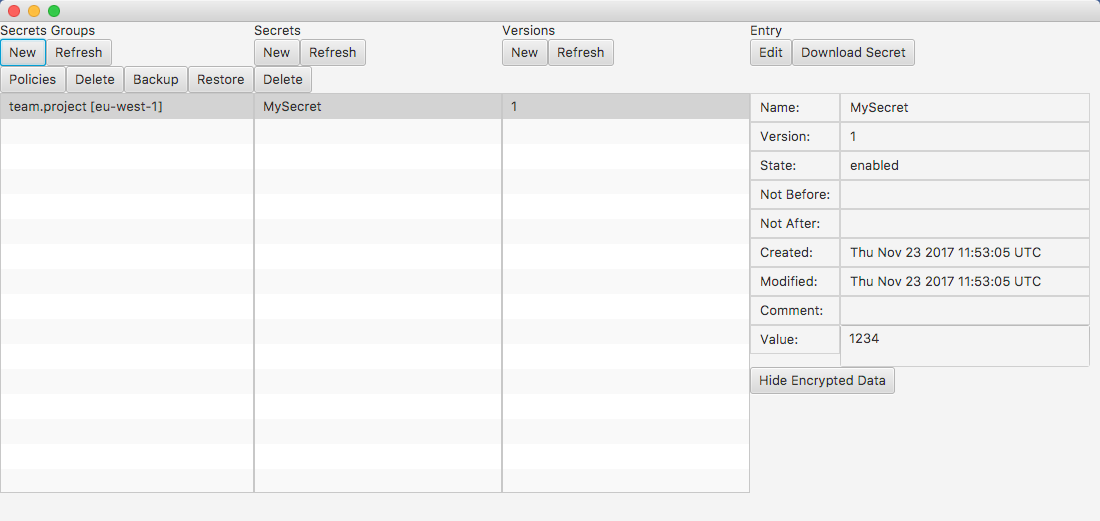
Strongbox is a secret manager for AWS. Manage and access secrets via the GUI, CLI or Java SDK.
Serverless
Strongbox will allocate and configure the required AWS resources for you: a DynamoDB table, a KMS key and IAM policies. Strongbox itself is a client side library, so there are no services to maintain.
Simple access model
Grant read-only or admin access to a group of secrets for individual roles, users, or groups.
Encryption
Secrets and most of its metadata is encrypted using the AWS Encryption SDK and AWS KMS.
Compatible with the AWS CLI
Strongbox supports the normal ways of specifying credentials and configuration including ~/.aws/credentials, ~/.aws/config, environment variables, and MFA support.
In most cases you can use your existing config with Strongbox.
Storage
The default store is AWS DynamoDB, but files can also be used.
Backup
Secrets Groups can be backed up to encrypted files.
Comparison
| Strongbox | AWS Parameter Store | Hashicorp Vault1 | |
|---|---|---|---|
| Auth | AWS IAM | AWS IAM | AWS IAM and others |
| Serverless | yes | yes | no |
| GUI | yes | yes | paid version |
| Max secret size | 50kB | 4kB | depends on backend, often more than 50kB |
| Max number of secrets | 264 | 10 000 | depends on backend, unlimited in theory |
| Supports secret versioning | yes | yes | no |
| Max number of secret versions | 264 | 100 past values | N/A |
| Multiple active versions of secret | yes | no | N/A |
| Max decryption rate | bound by KMS (~1200 d/s) | bound by KMS (~1200 d/s) | depends on available resources |
| Comments | yes, encrypted | yes, unencrypted | no |
| Secret types | string, binary | string | string |
| Convenience support for file secrets | yes | no | no |
| Secret value expiration | yes | no | no2 |
| Encrypted metadata | partial3 | no | partial |
| Padding to obfuscate length | yes | no | no |
| Encrypted backups | yes, using file backend | no | no |
| Cost (per month) | $1 per KMS key, from ~$1 per DynamoDB table | $1 per KMS key (can share 1 key across all secrets) | cost of running the open source version of Vault (there are also paid options) |
1: Assuming Key/Value or Cubbyhole Secret Backends.
2: TTL is about telling the client how often they should refresh, not when the secret value itself expires.
3: Only the metadata that is needed for fast filtering is exposed, e.g. name, version, notBefore, notAfter, and state (enabled, disabled, compromised). All other data is padded and encrypted, including: comment, created/modified timestamps, and up to 50kB of user data.
The integrity of the data that is not encrypted is protected against tampering via the encryption context of the data that is encrypted.
Usage
Install
-
Prerequisite:
~/.aws/credentialsneeds to be configured, e.g. by installing the AWS CLI and runningaws configure - For details and troubleshooting please refer to the Wiki.
Create a Secrets Group
A Secrets Group is a collection of secrets that are managed together. When you create a Secrets Group, Strongbox will allocate a DynamoDB table, a KMS Encryption Key, and two IAM Policies: one for read-only access to the Secrets Group, and one for admin access.
The KMS key will be used for envelope encryption using the AWS Encryption SDK. DynamoDB will store all the data, most of which is encrypted. The IAM policies will limit the access to the DynamoDB table and the KMS key as appropriate for the respective access level.
You can omit --region <region> if you have specified a region in ~/.aws/config. You can specify an AWS profile using --profile <profile>, otherwise the default profile will be used.
Assume role and MFA config can also be specified in ~/.aws/config.
Launch via the CLI:
strongbox --region eu-west-1 gui
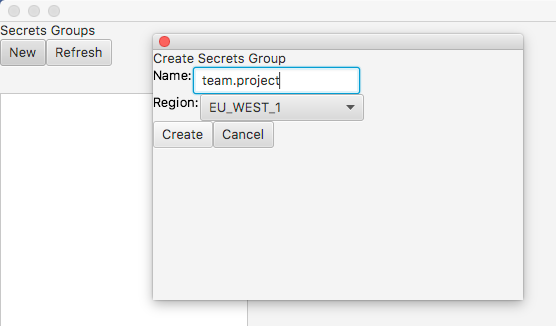
strongbox --region eu-west-1 group create team.project
SecretsGroupManager sgm = new DefaultSecretsGroupManager();
sgm.create(new SecretsGroupIdentifier(Region.EU_WEST_1, "team.project"));
Create a Secret
You can create a secret from an existing value, from a file or by generating one using KMS. When you create a secret it will be encrypted using the KMS Encryption SDK and stored in DynamoDB.
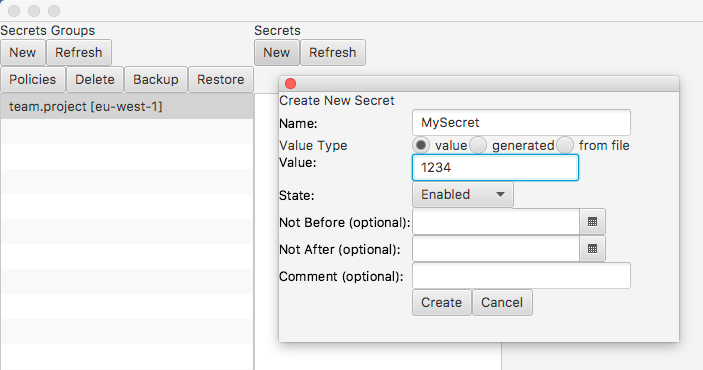
The following command will prompt you to enter the secret. You can also pipe or redirect into the same command.
strongbox --region eu-west-1 secret create --group team.project --name MySecret --value-from-stdin
SecretsGroupManager sgm = new DefaultSecretsGroupManager();
SecretsGroup sg = sgm.get(new SecretsGroupIdentifier(Region.EU_WEST_1, "team.project"));
sg.create(new NewSecretEntry(new SecretIdentifier("MySecret"), new SecretValue("1234", SecretType.OPAQUE), State.ENABLED));
Grant Read-only Access to a Secrets Group
Read-only access is provided on a per Secrets Group basis. To help avoid misconfiguration Strongbox generates a suitable read-only policy for you. Access is granted by attaching to this policy, either using one of AWS' methods of doing so, or by using Strongbox as shown below.
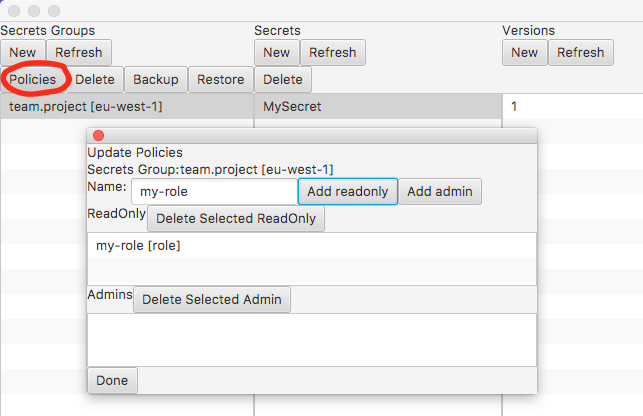
strongbox --region eu-west-1 group attach-readonly --group team.project --type role my-role
SecretsGroupManager sgm = new DefaultSecretsGroupManager();
SecretsGroupIdentifier group = new SecretsGroupIdentifier(Region.EU_WEST_1, "team.project");
Principal principal = new Principal(PrincipalType.ROLE, "my-role");
sgm.attachReadOnly(group, principal);
Fetch a Secret
Secrets are read from DynamoDB and then decrypted using the AWS Encryption SDK. In addition to the examples below there are also integrations with Spring Boot and Archaius.
Get the most recent secret
strongbox --region eu-west-1 secret get --group team.project --name MySecret
Get a specific version of a secret
strongbox --region eu-west-1 secret get --group team.project --name MySecret --version 1
Redirect the value to a file (works for both string and binary secrets)
strongbox --region eu-west-1 secret get --group team.project --name MySecret > my.file
For more examples see the Wiki.
Get the Secrets Group
SecretsGroupIdentifier group = new SecretsGroupIdentifier(Region.EU_WEST_1, "team.project");
SimpleSecretsGroup sg = new DefaultSimpleSecretsGroup(group);
Get the most recent version of a String secret
sg.getStringSecret("MySecret");
Get a specific version of a String secret
sg.getStringSecret("MySecret", 1);
Get a specific version of a binary secret
sg.getBinarySecret("MySecret", 1);
Get all String secrets
List<StringSecretEntry> all = sg.getAllStringSecrets();
For a complete example see the example repo.
For an overview of additional functionality see the Javadoc for SecretsGroup and SimpleSecretsGroup.