Overview
GitHub Agentic Workflow is a brand new feature from GitHub. It is essentially GitHub Actions, but users write English in .md files instead of steps in .yml.
Here is a simple example of a GitHub Agentic Workflow:
---
# metadata, IO, AI settings
---
# Daily Repo Status
Create an upbeat daily status report for the repo as a GitHub issue.
## What to include
- Recent repository activity (issues, PRs, discussions, releases, code changes)
- Progress tracking, goal reminders and highlights
- Project status and recommendations
- Actionable next steps for maintainers
## Style
- Be positive, encouraging, and helpful 🌟
- Use emojis moderately for engagement
- Keep it concise - adjust length based on actual activity
It uses AI agents in CI to execute this prompt, providing them with context about the repository, issues, pull requests, discussions, etc. It can be triggered just like existing GitHub Actions are triggered, such as on: pull_request, on: issues_create, on: daily, etc.
Creating New Agentic Workflow
GitHub CLI is required when working with Agentic Workflows. If it is not already installed, install it now.
Follow the Getting Started documentation for Agentic Workflows to create your first agentic workflow.
# install gh-aw extension
gh extension install github/gh-aw
Create new agentic workflow:
# at root of your project
gh aw add-wizard githubnext/agentics/daily-repo-status
This will setup Agent Provider + API Keys in GitHub secrets.
At a high level, the flow looks like this:
Create a
.mdfile in.github/workflows/new-agent-workflow.mdWrite your agentic workflow, and then compile it.
Terminal window gh aw compile
This will create a
.lock.ymlfile, which is an actual GitHub Actions file that thegh awCLI generates from our.mdfile.Commit and Push!
Using SafeDep MCP
Agentic Workflows support MCP, which helps integrate any MCP server that can then be used by agents running in CI.
We will integrate the SafeDep MCP server to run on every Pull Request and check the security posture of any introduced or updated dependencies.
Create a new .github/workflows/safedep-check-on-pr.md file.
touch .github/workflows/safedep-check-on-pr.md
Paste this content into that file:
---
on: pull_request
permissions:
contents: read
pull-requests: read
safe-outputs:
add-comment:
target: 'triggering' # Ensures the comment is posted on the PR that started the workflow
mcp-servers:
safedep:
url: 'https://mcp.safedep.io/model-context-protocol/threats/v1/mcp'
headers:
Authorization: '${{ secrets.SAFEDEP_API_KEY }}'
X-Tenant-ID: '${{ secrets.SAFEDEP_TENANT_ID }}'
allowed: ['*']
---
# SafeDep Security Check
Your task is to use SafeDep security checks to determine if the OSS packages introduced or updated in the Pull Request are safe to merge.
Note: We are using secrets here; you must add
SAFEDEP_API_KEYandSAFEDEP_TENANT_IDto your repository secrets. See the SafeDep MCP Docs for a guide on how to get these values. Compile the agentic workflow file by running:
# from root of your project
gh aw compile
This will create a new .yml GitHub Actions file.
Commit and Push!
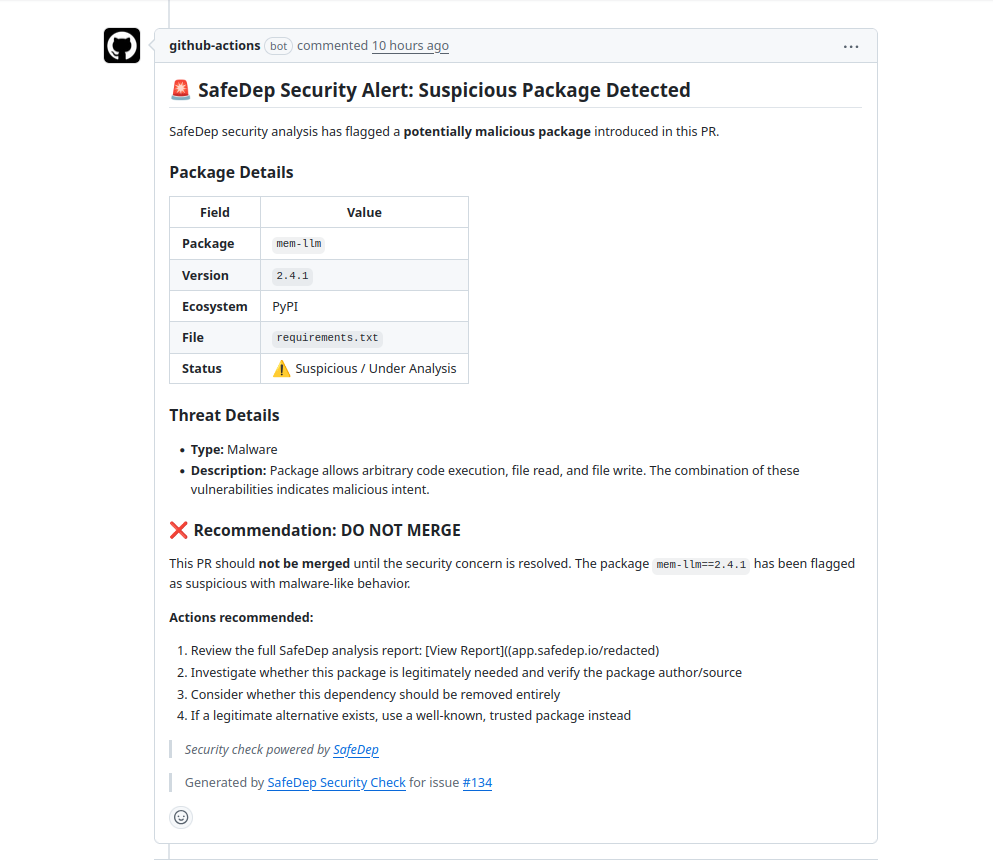
This workflow will be executed on every pull request, and a summary comment will be posted on it.
Conclusion
Using SafeDep MCP in GitHub Agentic Workflow is a powerful way to integrate AI SDLC security into your CI/CD, we have only scratched the surface, we can also create a workflow to run daily or weekly that creates a summary report of the security posture of all OSS packages. Possibilities are endless.