TLDR
Last update: Oct 22nd
- Shopify shops with “HulkApps”, “Swym Wishlist Plus“ or “Selleasy“ installed have could been phishing their own customers
- Malicious Javascript Code is being executed on customer’s browsers
- The code is not delivered by the apps directly but through the app developer’s APIs
- The code redirects users to fake checkout pages, steals credit cards and user data
- Origin of the malicious code unclear (HulkApps merchant accounts / employee accounts / HulkApps themselves / ???)
- Shopify announced a change on Oct 20th: “Your online store now asks customers to confirm before it sends them to a website outside your store.“
Hijack Domains
Most of the malicious domains are still not blocked by Spamhaus/Google/Abuse.ch (please report them!)
Infected Shopify Apps
As of Oct 22nd, all affected apps have been fixed or de-listed from the App Store.
- [unconfirmed but de-listed] 17TRACK (source)
- [unconfirmed but de-listed] Boost AI Search & Filter (source, source, source)
- [unconfirmed but de-listed] Privy ‑ Email, SMS & Pop Ups (source)
- [unconfirmed but de-listed] Consentmo GDPR Compliance (confidential source)
- [de-listed] HulkApps / Hulk Product Options (see below, another source)
- [de-listed] Swym Wishlist Plus (source)
- [de-listed] Selleasy (source)
- [resolved] Hextom (in August, source, source)
- [resolved] Qikify (in July, source, source, incident report)
See the following post for more information given from the App developers themselves.
Actions as Shop Owner
- Disable as much Shopify Apps as possible (especially the ones mentioned above)
- Open an incognito browser window and check if you are getting redirected to the real checkout page (place item in cart → press “checkout”)
- Contact Shopify immediately when you spot a fake checkout
- Change your Shopify password
- Change your Shopify app account’s password (eg. on HulkApps, Swym, Selleasy)
- Check which (AI) tools have access to your Shopify account
Updates
2026-10-22
Shopify announced a change: “New protection against unexpected redirects”
Your online store now asks customers to confirm before it sends them to a website outside your store. This helps protect customers from unexpected redirects.
Glad to see it - but they don’t mention the huge wave of compromised apps.
There is a link circulating to https://heyapps.dev/apps/delisted which shows de-listed Shopify apps. I have seen several people online claiming all of those apps were compromised which can not be confirmed. De-listing can happen on several reasons. The apps mentioned above by me follow user-reporting, not through the heyapps.dev only.
2026-10-19
It looks like another app has been infected: “Privy ‑ Email, SMS & Pop Ups“ as a merchant in this blog post’s comments. I am trying to confirm this - but the app is de-listed on the Shopify App Store.
2026-10-16
The story is getting international coverage. Thanks to Carly from WAGD for sending me regular updates!
2026-10-15
It looks like this is bigger than it seemed. five six seven merchants now contacted me and stated they suffered from the same hijack. But HulkApps wasn’t installed in all of those shops - which means at minimum 1 other Shopify app is acting malicious.
If you have seen this is Hijack in a Shopify shop after Oct 11 please contact me!
Dan S. on LinkedIn reported that the same attack happens over the Swym Wishlisht Plus App!
2026-10-10 16:40
Within 16 minutes of Shopify escalating the issue internally, the checkout Hijack on mechanicalkeyboards.com is gone. It looks like they removed the HulkApps integration.
The long story
Today I was shopping on mechanicalkeyboards.com and found a keyboard I really liked. But since I was located in Germany I wanted to see the shipping costs to determine if I should look on other websites.

So I have put the keyboard in my cart and pressed “Checkout”.
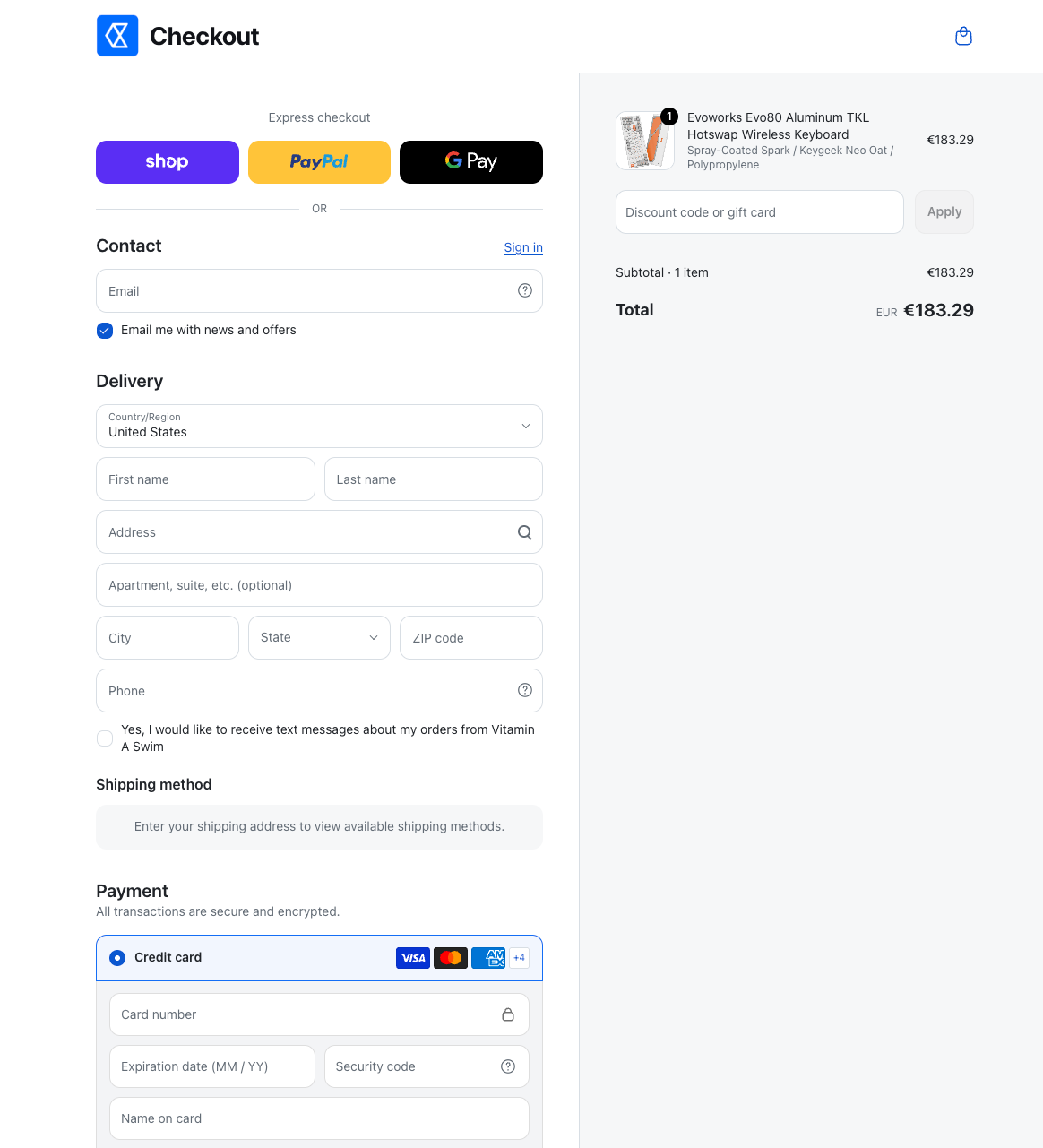
Yep, looks like a Shopify checkout page. At first I was a bit confused about the Shop logo but it’s not the first time that those ones don’t match when the shop owner hasn’t configured it correctly. (After writing the post, I noticed that it looks awfully close to another horrendous company: Polymarket)
When clicking the “First name” field, I was then offered 1Password auto complete - but not for my first name but my Credit Card’s first name which was very suspicious.

This made me look at the actual URL: https://www.biliing(.)top/check-out/
Yep
That was obviously a phishing attempt. I did some searching around a found a Reddit post from 18 days (!!) from a Vaping shop owner that reported the same issue with the same domain and said they contacted Shopify.
Allegedly reported over 2 weeks ago but mechanicalkeyboards.com had the same attack live?
Digging around
I wanted to find out, where this came from. Since neither any script or the website itself was blocked by multiple layers of AdBlock browser extensions or DNS malware filtering.
So starting at the checkout drawer, i inspected the “Checkout” buttons listeners with the Chrome DevTools - but nothing. Knowing that many scripts just add a listener on the window or document elements, I continued on.
Chrome allows developers to add breakpoints to event listeners such as click so execution stops immediately before an attached event listener is being executed.

Many scripts add event listeners to clicks, so skipping through every breakpoint I finally found this gem:

“hijack” doesn’t sound that trustworthy. So where does it come from? No idea. It had no source file attached (named VM142 by Chrome) so it must have been injected at runtime (like writing a <script> with Javascript).
So the new task was to find where the injected script comes from.
Fortunately, Chrome also provides an event listener breakpoint for “Script First Statement” - the point where any individual script is being started to execute. Those are a lot. But to my advantage, breakpoints persist page reloads and can also be scripted.
This snippet below overrides the default addEventListener function and looks for the word “hijack” as callback function - which we identified shortly before.
const orig = EventTarget.prototype.addEventListener;
EventTarget.prototype.addEventListener = function (type, fn, opts) {
  if (String(fn).includes('hijack')) {
    debugger
  }
  return orig.call(this, type, fn, opts)
};
And there we have it:

A hulkcode.js can be traced up the call stack to be the origin of our injected script.
This extension gets delivered right from the Shopify CDN and is apparently authored by Hulkapps.
https://cdn.shopify.com/extensions/01a0f64c-e6fd-7cec-a0fb-2d0baaff2105/product-options-by-hulkapps-1-201/assets/hulkcode.jsLooks like a development company tailored all around Shopify apps/extensions.


But why
But I still needed to find out why the malicious script was injected. Maybe Hulkapps itself got compromised or a configuration error allowed for the injected of inline Javascript.
While monitoring XHR requests, hulkcode.js ever only sends one POST request on page load to
https://productoption.hulkapps.com/api/v2/store/get_all_relationshipsThis contains the store id and information about the currently viewed product as payload. Notably, the response includes a advanced_users.custom_js key with 22.7 Kilobytes of Javascript - oh no no no.

JSON-decoding this script gives us a beautiful un-minified un-obfuscated script.
The script
The full script is available here as Github Gist.
Some Chinese, love to see good code documentation.

And here again is our beloved hijack function.

Note the firstCheckoutDetectedAt: The script only ever activates once per user and shop - it then stores a __ctf_shim_handoff_done_v1 in the session storage on the Shopify shop to indicate that the user has already been redirected to the phishing site and should not be re-attempted.
The other __ctf_checkout_txn_v1 entry is unknown to me. Possibly a session ID to match the selected product.
A redirect function leading us to the phishing site:

At the end of the script, there’s the configuration with a couple of domains

- biliing[.]top
- checkout-confirm[.]top
- order-confirm[.]top
Notably, none of those domains are listed on URLhaus (see here, here and here) or Google Safe Browsing.
Phish me
One last thing to try out is to get phished. I started a new private browsing session, went to the checkout and entered my information - which were as real as the checkout page itself.

After submitting, a POST request is sent to https://www.biliing(.)top/api/submissions with all of my data and I get a lovely response back shortly before being redirected to the correct checkout. (hey, no duplicate, awesome!)
{"ok":true,"id":1529,"recordId":"66ff0762-f2c0-417b-980f-da1cfe3a2a2e","duplicate":false}
If you’re interested, the phishing site is hosted on AS54801 (IPinfo).
Conclusion / TLDR
- HulkApps provides Shopify shops with merchant tools
- Shopify shop owners can install those extensions and apparently configure “custom Javascript” in their HulkApps account
- This custom Javascript is being sent to every shop on page load and is getting executed
- In this case, a hijack script redirected customers on checkout to fake phishing pages
Open questions
It’s unclear to me, how this malicious script found it’s way in HulkApps infrastructure. Some possible ways:
- The HulkApps account of the shop owner got compromised
- A HulkApps employee’s account got compromised
- HulkApps itself got compromised
- Another malicious Shopify app in the background modified the Hulkapps configuration
Also it is unclear how many Shops are compromised. Until right now, I know of two but the script itself is very generic and looks like it adapts to all Shopify shops.
Is your shop compromised?
Using infected apps or extensions, as mentioned at the top?
- No: probably not compromised
- Yes: continue
Try triggering a phishing attempt:
- Open a fresh Browser window in incognito
- Place any item in the cart
- Press “Checkout”
- Are you getting redirected to the real checkout page?
I would advice to change your HulkApps password/2FA although it is currently unclear how the malicious script got into the HulkApps configuration.
Disclosure
I am publishing this blog post to alert Shopify merchants that their store may be compromised if they are using HulkApps products.
Timeline
- 2026-10-10 12:10 Phishing attempt discovered
- 2026-10-10 12:24 Contacted Mechanical Keybords via E-Mail
- 2026-10-10 14:32 Contacted HulkApps via E-Mail
- 2026-10-10 14:46 Reported domains to URLhaus and Google Safe Browsing
- 2026-10-10 15:27 Contact with Shopify initiated
- 2026-10-10 16:18 Incident reported to BSI CERT
- 2026-10-10 16:21 Shopify has escalated the incident internally
- 2026-10-10 16:37 Shopify has fixed the Checkout Hijack on mechanicalkeyboards.com. They couldn't give me an answer how many other shops were impacted and if they took action on behalf of other shops
- 2026-10-10 18:46 mechanicalkeyboards.com confirmed that the app was immediately removed after they were notified of it and are in contact with Shopify
- 2026-10-15 09:58 It looks like some of the domains are now listed on Spamhaus.org and should be blocked on several DNS resolvers