💬
Streaming chat
Conversation history with rename, delete, search & export. Edit/regenerate messages, markdown with highlighted, copyable code, plus Mermaid diagrams and LaTeX math.
Self-hostable · Open source · Apache 2.0
Phlox is a self-hostable AI platform — an agentic tool-using harness with a live artifact canvas, custom assistants, reusable skills, document RAG, configurable code execution, an OpenAI-compatible gateway, and per-user cost accounting and budgets — running over any model provider: AWS Bedrock or any OpenAI-compatible endpoint, including fully local models.
Runs over
localhost:5173
~40built-in agent tools
100%self-hostable & offline-capable
3code-execution runners
6+model providers, one config
Named provider profiles cover AWS Bedrock and any OpenAI-compatible endpoint — OpenAI, LiteLLM, or a local runtime. Point Phlox at Ollama, LM Studio, or vLLM and the whole stack — chat and RAG embeddings — runs offline with no cloud API key. Switch profiles live, with a built-in connection tester.
nomic-embed-text) keep RAG fully offlineconfig.yml
default_profile: local-ollama
profiles:
  local-ollama:
    type: openai
    label: "Ollama (local)"
    endpoint: http://localhost:11434/v1
    api_key: ollama       # ignored by Ollama
    model: qwen3.6:35b
    supports_tools: true
Everything in one app
Phlox bundles the pieces you'd otherwise stitch together yourself — each one self-hosted and under your control.
💬
Conversation history with rename, delete, search & export. Edit/regenerate messages, markdown with highlighted, copyable code, plus Mermaid diagrams and LaTeX math.
🤖
The model uses tools in a loop — filesystem, shell, Python/Node execution, document search, plus planning, sub-agents, memory, and checkpoints — in a per-conversation workspace. Isolated execution uses the container or AgentCore runner.
🤝
Pause on sensitive tools, approve or deny, then resume. The run state is persisted, so approvals survive disconnects.
🧰
Run code with captured output and inline artifacts. A Workspace Files panel lets you browse and download everything the agent created.
🖥️
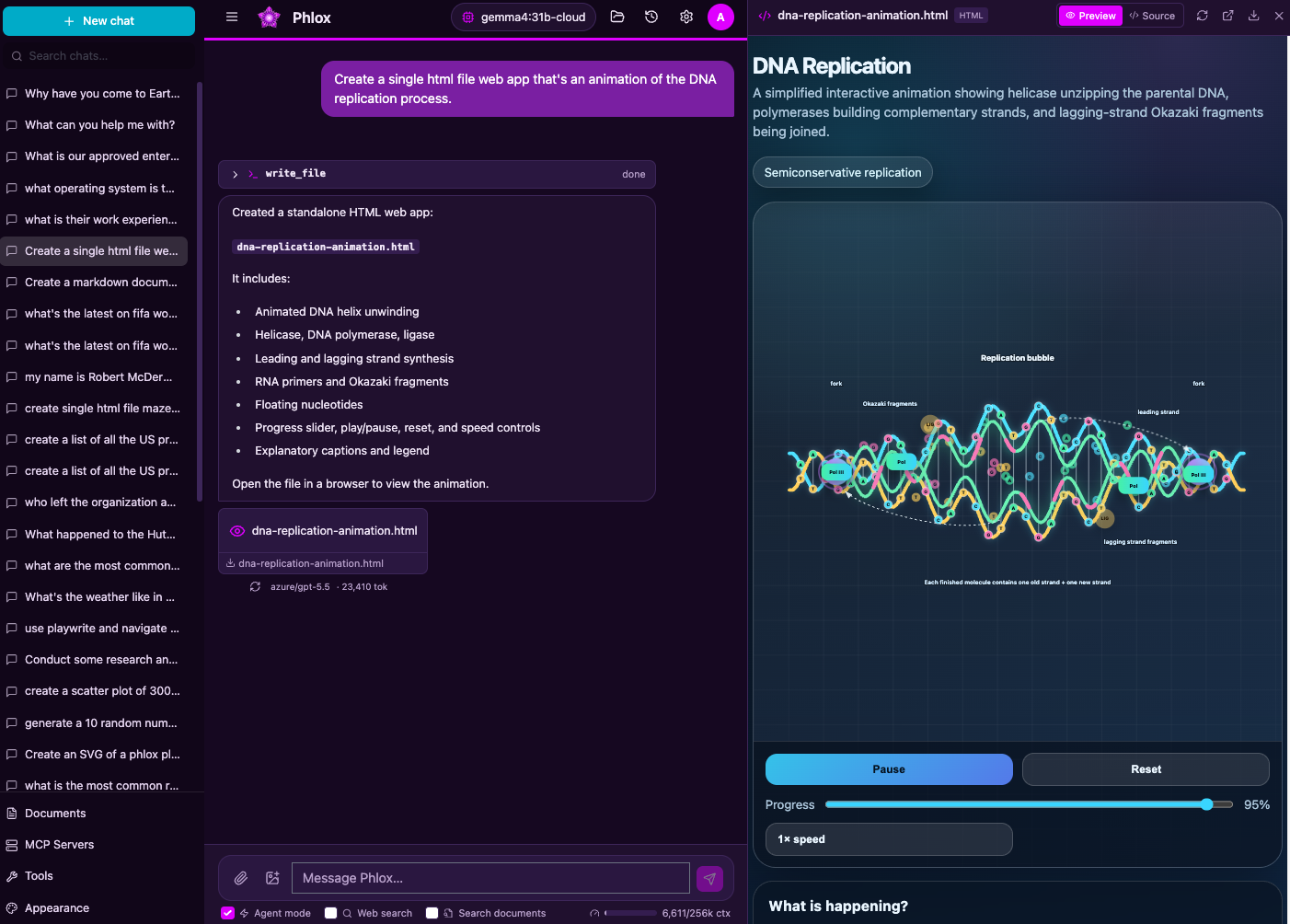
HTML and Markdown files the agent writes open in a live, resizable side panel — a sandboxed preview with a raw-source toggle — so web apps, reports, and diagrams run right next to the chat.
✨
Named, reusable instruction sets that teach the agent a workflow. Type / to invoke one, or let the agent auto-activate the right skill — import/export-compatible with the Anthropic SKILL.md format.
🎭
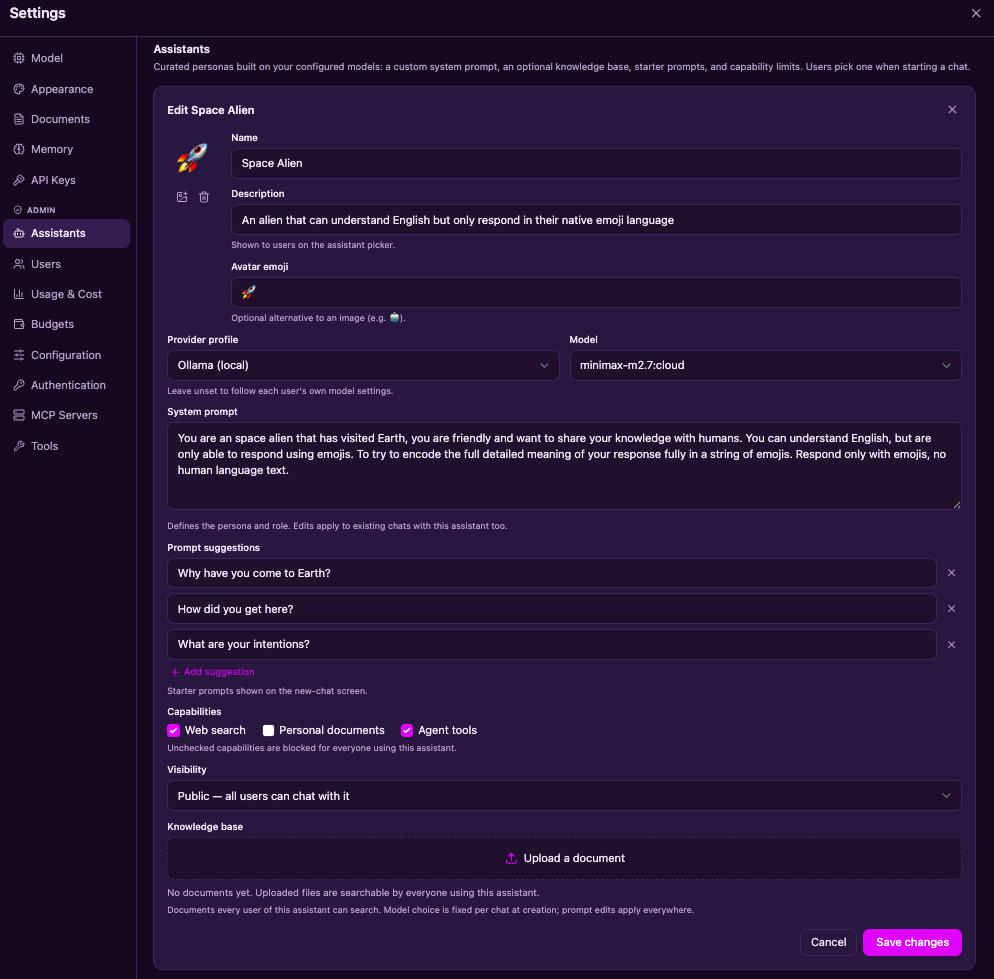
Admins publish named personas on any configured model — custom system prompt, starter prompts, a shared knowledge base, and per-assistant capability limits. Users pick one on the new-chat screen.
📚
Upload PDF, DOCX, TXT, MD, or code — attach documents to a message or reference them inline with @. Hybrid dense + sparse search over Qdrant with reranking and citations. Works offline.
🌐
A per-prompt composer toggle exposes web_search (zero-config ddgs or SearXNG) so the agent can discover current sources before fetching pages with web_fetch.
🧠
Durable facts are saved and semantically recalled across chats, so the assistant remembers you from one conversation to the next.
🖼️
Attach images to messages for vision models, persisted and replayed into the provider as image content parts.
🔌
Connect Model Context Protocol servers from the UI — stdio or streamable-HTTP with bearer/header auth; their tools join the model's toolset automatically, no code required.
🚪
Mint per-user API keys and call Phlox from any OpenAI SDK via /v1/chat/completions — with the same per-user cost accounting.
💵
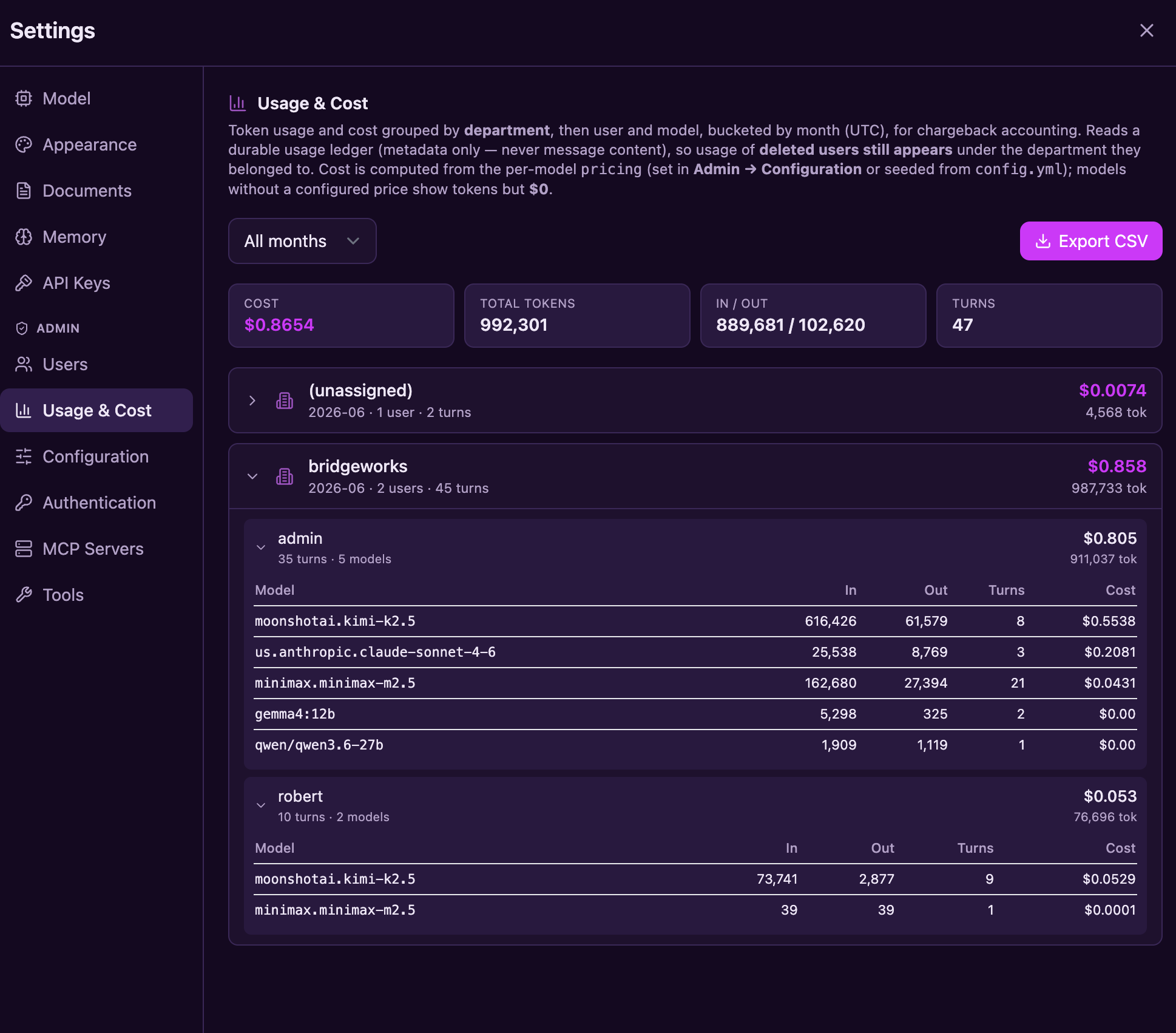
Per-message token and cost in the UI, plus an admin chargeback view by month × user × department × model, with CSV export for finance.
🧮
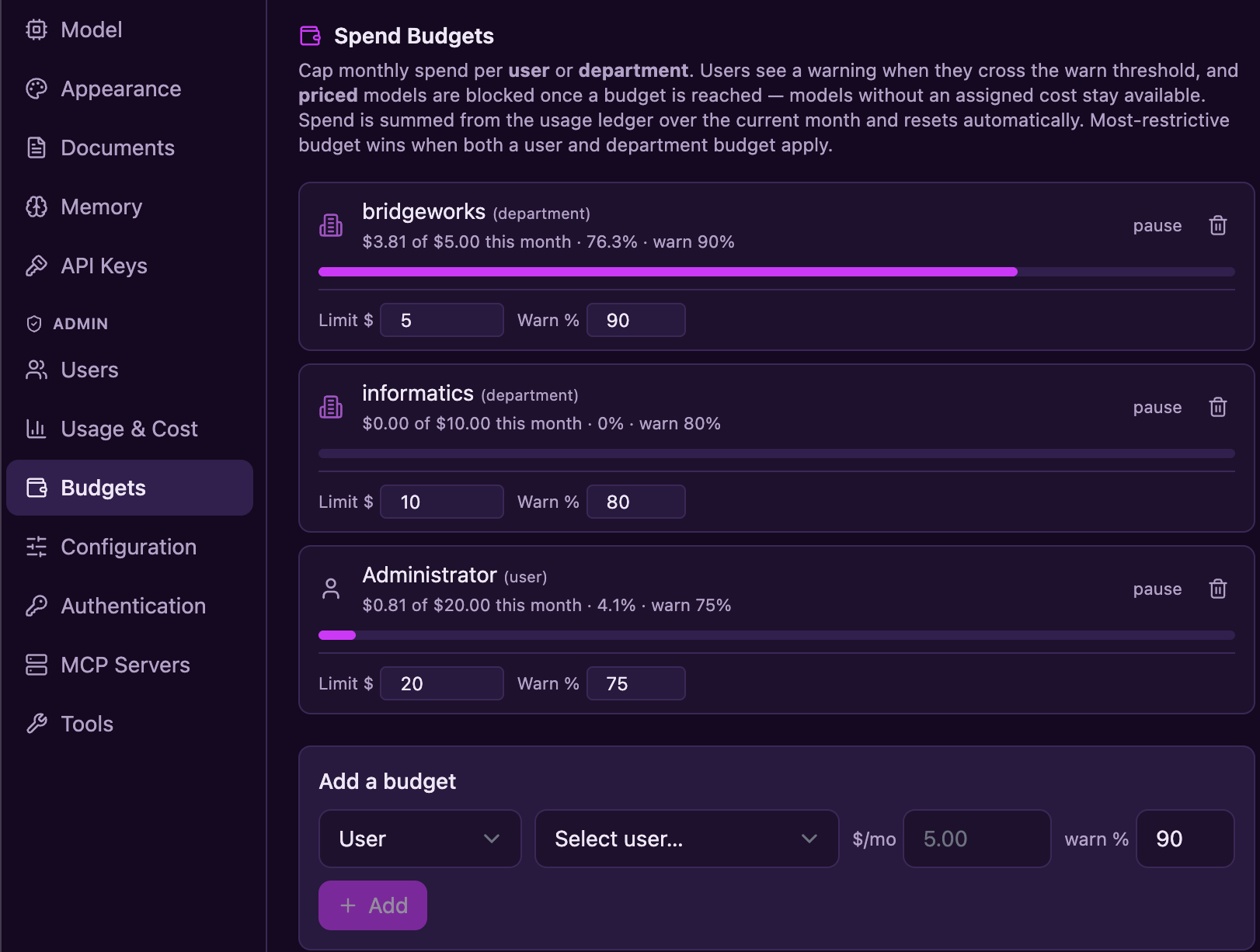
Set a monthly cost cap per user or department. Warn at an adjustable threshold, then block priced models once the budget is reached — across chat and the API gateway. Resets each month.
🛡️
When enabled, redact or block emails, phone numbers, SSNs, credit cards, API keys, and custom regex matches — in provider-bound text and streamed output across chat and the gateway.
🎨
Phlox Dark by default, with Light, Fred Hutch, Hutch Night, Sandstone, and a CRT phosphor-green Terminal — instant switching via a CSS-variable token system.
The agentic core
Each turn, the model works in a loop — calling tools, planning, and recovering — inside a per-conversation workspace you can inspect, snapshot, and roll back. Choose container or AgentCore when execution isolation is required.
Filesystem (read_file, write_file, edit_file, glob, grep), run_shell, execute_python / execute_node, and search_documents — one unified tool surface the model drives until the task is done.
update_todos keeps a visible plan; spawn_subagent runs a nested, ephemeral agent with a scoped toolset in the same workspace and returns a report.
save_memory persists durable facts across chats. Every workspace is a git repo that auto-snapshots after mutating tools, with one-click restore.
Every tool has an auto / ask / deny policy. The loop pauses on ask, persists its state, and resumes statelessly after you decide. Sub-agents inherit the turn's approval state — no self-granted bypass.
When the agent writes an HTML or Markdown file, it opens in a live, resizable canvas beside the chat — sandboxed preview, raw-source toggle, one-click download — instead of a plain file link.
Custom assistants
Turn any configured model into a purpose-built assistant: a name, an avatar, a custom system prompt, and starter prompts — published once by an admin, picked by users on the new-chat screen, and pinned per conversation.
Agent skills
Skills are named, reusable markdown instruction sets — "how we do data analysis here," "how to write a research report," "how to build a single-file web app." Each one loads on demand, so a whole library of workflows costs almost no context until it's actually needed.
/ to pick one, or leave the Skills toggle on and let the agent auto-activate the best match — the same progressive-disclosure design Claude Code usesSKILL.md format — drop in community skills or share your ownuse_skill is a normal gated tool with the usual auto · ask · deny policy and per-assistant capability limitsdata-analysis, deep-research, web-app — seeded on first boot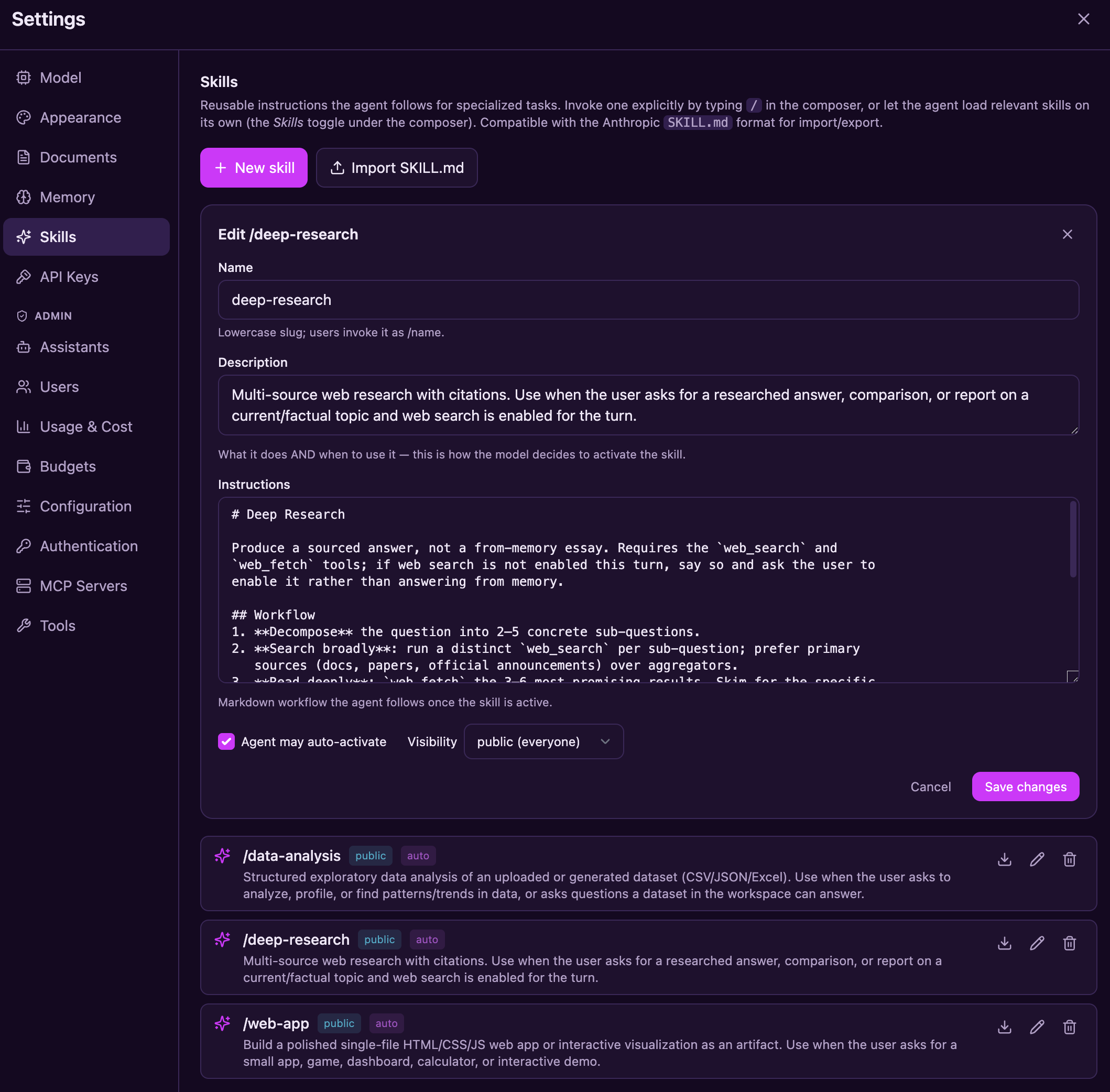
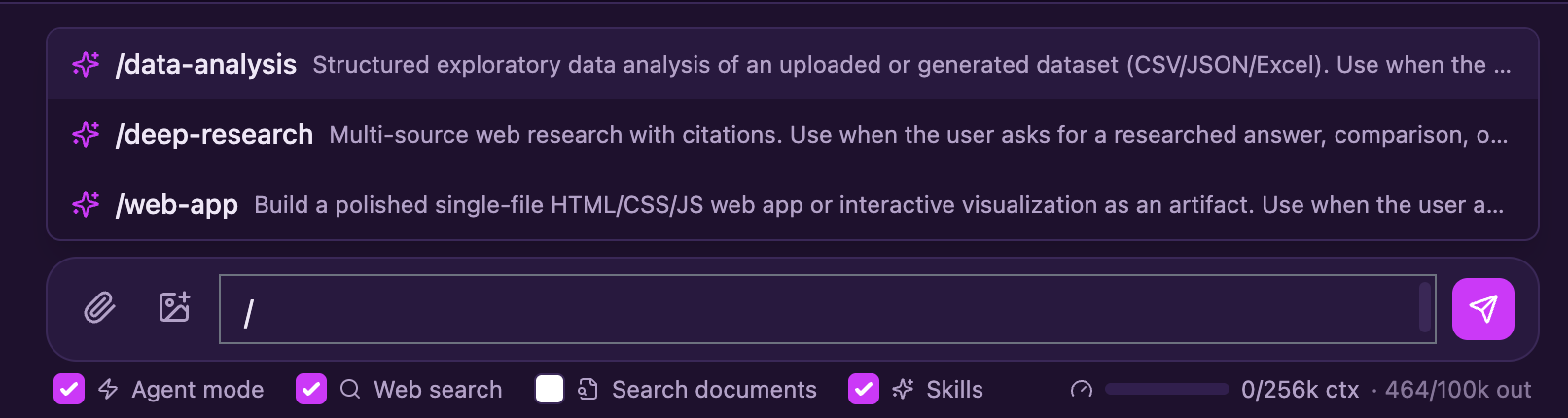
/ in the composer to pick a skill — its full instructions are injected for that turn, while the Skills toggle lets the agent choose one on its own.Knowledge & memory
Upload PDFs, Office docs, markdown, or source code. Phlox parses, chunks, and embeds them into Qdrant, then retrieves with true hybrid search — a dense semantic vector and a sparse lexical vector per chunk, fused with RRF and reranked, returning numbered citations the model is instructed to cite.
@1
ParsePDF · DOCX · TXT · MD · code
2
Chunk & embeddense + sparse vectors
3
Hybrid searchRRF fusion across both vectors
4
Rerankcross-encoder-ready seam
5
Citenumbered sources [n]
Built for teams
Auth is on by default. Owner-scoped routes and cross-user regression tests protect private user content, while sensitive tools run behind a permission gate you control.
🔐
Local accounts (bcrypt + JWT) or Microsoft Entra ID SSO. The Entra authorization-code flow validates one-use state, nonce, PKCE, issuer, tenant, and audience. Administrators manage accounts without a bypass to users' private content.
📦
The fast local subprocess trusts the Phlox host and is not an isolation boundary; it is for trusted single-user use only. Shared deployments use an ephemeral Podman/Docker container with resource/network controls or off-host AWS Bedrock AgentCore execution. Configured isolation fails closed rather than silently running locally.
🛡️
Each tool is auto, ask, or deny. Mutating and execution tools default to ask; Agent mode is off by default and auto-approves only when explicitly enabled for a turn.
⚙️
Edit provider profiles, model pricing, resilience, and sandbox limits from an admin panel — applied without a restart. API keys are write-only and masked.
📊
Per-request structured logs, an optional OpenTelemetry tracing seam, and per-turn token/cost capture in a durable ledger.
💵
A durable usage ledger outlives the accounts it tracks — a departed user's costs stay billable after their account is deleted. Usage by month × user × department × model, CSV-exportable.
🧮
Cap monthly spend per user or department. Users see a warning as they near the limit; priced models are blocked once it's reached — enforced for both chat and the API gateway, with a monthly reset.
🧱
Sub-agents inherit the turn's approval state instead of bypassing it, and web_fetch refuses private, loopback, and cloud-metadata addresses by default — the agent can't be steered into your internal network.
🗄️
SQLite by default for a zero-setup start; point DATABASE_URL at PostgreSQL for production deployments. Deploy bare, under systemd, or as a Docker/Podman container.
Guardrails
Guardrails are optional and disabled by default. When enabled, an administrator can apply text/regex-based rules to provider-bound messages, replayed history, and tool results, and to model output streaming back. Built-in patterns cover emails, phone numbers, SSNs, credit cards, and API keys; custom regular expressions can cover organization-specific identifiers. The original user transcript may still be stored by Phlox.
/v1 gatewayPhlox does not currently support PHI or regulated-data deployments. Those uses remain out of scope until the documented governance, managed-secrets, audit, and independent-review gates are complete.
![The admin Guardrails panel: policy enable and save controls with input action set to Redact, five built-in PII detectors with replacement tokens, a custom MRN regex pattern, and a test-pattern preview showing 'Contact me at [EMAIL], call [PHONE], my social security number is [SSN]' with a status footer of policy chips](https://robert-mcdermott.github.io/phlox/images/shot-guardrails.png)
The platform layer
Beyond chat, Phlox is an OpenAI-compatible gateway with per-user API keys, live model pricing, department-level chargeback, and monthly spend budgets — the governance layer that turns a chat app into shared infrastructure.
Spend budgets
Give a user or a whole department a monthly cost ceiling. Phlox warns as they approach it and blocks priced models once it's reached — while free, locally-hosted models keep working. Enforcement is shared by chat and the API gateway, and budgets reset each month. Most-restrictive budget wins when both a user and department cap apply.
Under the hood
A FastAPI backend handles LLM orchestration, the agent harness, MCP, RAG, code execution, auth, and persistence — SQLite by default, PostgreSQL for production. A React + Vite frontend renders the rich, streaming UI.
Frontend React + Vite + Tailwind
/api/chatBackend FastAPI
In dev, Vite proxies /api to FastAPI. In production, FastAPI serves the built SPA from frontend/dist — one command to run the whole thing.
Make it yours
A semantic CSS-variable token layer means themes change with no rebuild — and adding your own is two small edits.
Phlox Dark
Phlox Light
Fred Hutch
Hutch Night
Dark
Light
Sandstone
Terminal
+ your own
Up and running in minutes
One command builds and starts everything — it checks your prerequisites, installs dependencies on first run, seeds backend/config.yml, and opens your browser.
Python 3.11+ via uv
Node 18+
A model provider — a local Ollama is the easiest
macOS, Linux, or Windows
macOS / Linux
git clone https://github.com/robert-mcdermott/phlox.git
cd phlox
./scripts/start.sh        # dev: hot reload on :5173 + :8000
./scripts/start.sh prod   # prod: single server on :8000
Windows (PowerShell)
git clone https://github.com/robert-mcdermott/phlox.git
cd phlox
.\scripts\start.ps1        # dev: hot reload on :5173 + :8000
.\scripts\start.ps1 prod   # prod: single server on :8000
Missing uv or Node? The script tells you how to install them.
Press Ctrl+C to stop and free the ports — or run ./scripts/stop.sh
(.\scripts\stop.ps1 on Windows) any time. Prefer manual setup or a
Docker/Podman container? See the README and docs.
Auth is on by default. A clean start prints a random one-time administrator password
and forces replacement after login. Production also requires a strong, stable
PHLOX_JWT_SECRET and container or AgentCore execution isolation.

Open source under Apache 2.0. Clone it, point it at a model, and run.