A Protocol Outliving the World That Created It
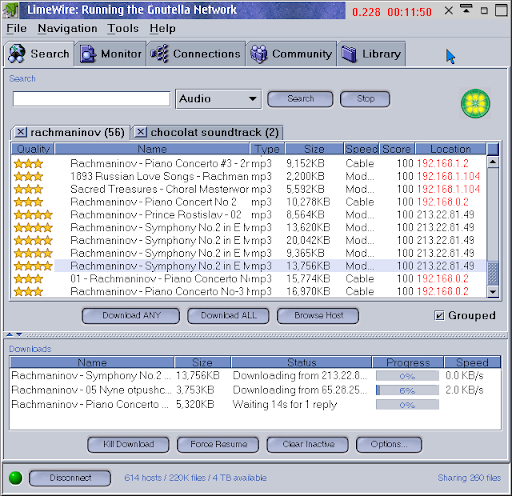
Gnutella is a file sharing protocol that many have forgotten and it has the story of a decentralized technology adopted by millions of casual users who did not care to learn what a peer-to-peer system was. Users showed up because the protocol solved real problems at scale and the solution just so happened to be decentralized. No one ever pretended to use Gnutella in hopes their GnutellaCoinTM would go up in value later. They just downloaded MP3s. The network exploded in popularity, then plateaued for almost a decade, then settled into a permanent long tail state of continued but diminished use.
Welcome to my overly enthusiastic love letter to Gnutella.
Despite its meteoric rise and its role as a driving force behind the file-sharing phenomenon of the 2000s, Gnutella has gone mostly forgotten. Some of that is because it was a component technology hidden beneath more visible projects like LimeWire. The other half of this is that the walled garden
model of modern platforms means most internet users don't even remember what a filesystem is anymore.
The Gnutella project began as an internal demo that leaked to the public after its corporate overlord, AOL, cancelled the project. Owing to its server-free decentralized design, it was impossible to put the toothpaste back in the figurative tube after it reached the public. It grew explosively for a decade and still works today despite years of attempts to stop it. Copies of the original Gnutella.exe are out there on archive.org if you dig for them.
Many have wrongly asserted that Gnutella failed
, but that's not a fair representation of what happened. Gnutella scaled to mainstream adoption (millions of concurrent active users) and thrived for a solid decade. The true reason for its fall from the mainstream was simply that the world it was born into disappeared.
Gnutella stood the test of time and solved problems for a software user that no longer exists. It's still there today, chugging along at reduced capacity.
Historic Conditions Leading to Adoption
The early 2000s represented a strange transition period for US consumers. Internet adoption hit 50% sometime around 2000-2001. The internet was slowly mutating from a complicated tool for nerds into a mainstream part of daily life. Music file sharing became a common practice during this time for a number of reasons:
- The music industry refused to adapt to changing consumer preference.
- MP3 players and solid-state data storage became affordable and ubiquitous.
- Low-speed dial-up internet made music streaming unfeasible.
- Managing disk space, directories, backups, and downloaded files was still a palatable and acceptable activity for even casual computer users of the era.
These conditions set the stage for a golden era that lasted into the early 2010s. If you do not believe me, ask anyone over the age of 35 about their LimeWire memories. I was there, man. It was wild.
Gnutella's lack of single points of failure makes it difficult to kill and the base protocol, though simple, was easily extended via optional protocol extensions baked into the spec.
Protocol Features
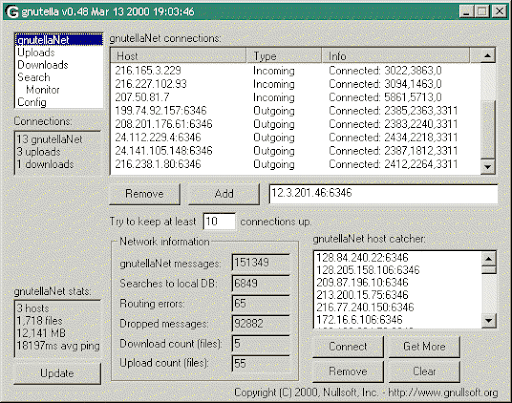
For most Gnutella was a file transfer tool. This categorization misses a basic function of the protocol. At its core, Gnutella is just a peer-to-peer search engine for blobs.
We could have used it as a poor man's DNS system, or a global metadata lookup table for key/value pairs, or a matchmaking service for your Unreal Tournament league, but that never really happened. Gnutella was good at providing file downloads that matched search queries, and that is what history remembers it for. Loads and loads of easy downloads. Usually MP3s.
Resources [things shared on Gnutella] can be anything:
mappings to other resources, cryptographic
keys, files of any type, meta-information on keyable resources, etc.
--- Gnutella 0.6 draft spec
The process worked as follows:
- You opened a desktop application that spoke Gnutella, such as LimeWire, BearShare, or GTK-Gnutella.
- The client connected to a handful of peers somewhere on the internet (I will explain how you found them later).
- You typed something into a search box, like
LinkinPark.mp3.exe
. - Your query spread outward through the network from peer to peer.
- Results slowly trickled back from random computers around the world.
- You inspected filenames, guessed which results were fake, compared connection speeds, and hoped none of them were viruses.
- Once you picked a file, your client downloaded pieces of it directly from user's computer over HTTP.
Sometimes you downloaded the wrong thing and accidentally discovered new content. Or malware, you never really knew for sure. This foraging behavior has disappeared with the advent of recommendation engines and we lost a tiny bit of internet magic in the process.
Clients usually offer 3-4 main features, mirroring the 5 main message types of the underlying protocol:
- A query manager: Querying was slow and spread across thousands of peers.
- A file manager: You specified which directories or paths you wanted to share and where downloaded files would end up.
- A transfer manager: A means of handling the resuming, splitting, and management of file transfers in both directions.
- Out-of-band Extras: IRC chat, message boards, a search query monitor, and browsing of a specific host. Many of these things were not actually part of the protocol, much like your AI search sidebar is not part of the HTTP spec.
The interesting thing here for me is that Gnutella managed to maintain a diversity of clients. Despite market leaders like LimeWire, there were still multiple options available and it was possible for independent devs to write a client from scratch.
I built my own Gnutella client this year for fun, and I walked away realizing that this interoperability was somewhat of a miracle. There is a lot of stuff that is not in the spec. There is a lot of stuff that was never written down. Or in an add-on spec. The protocol evolved to add new features, and it happened organically.
HTTP and Gossip
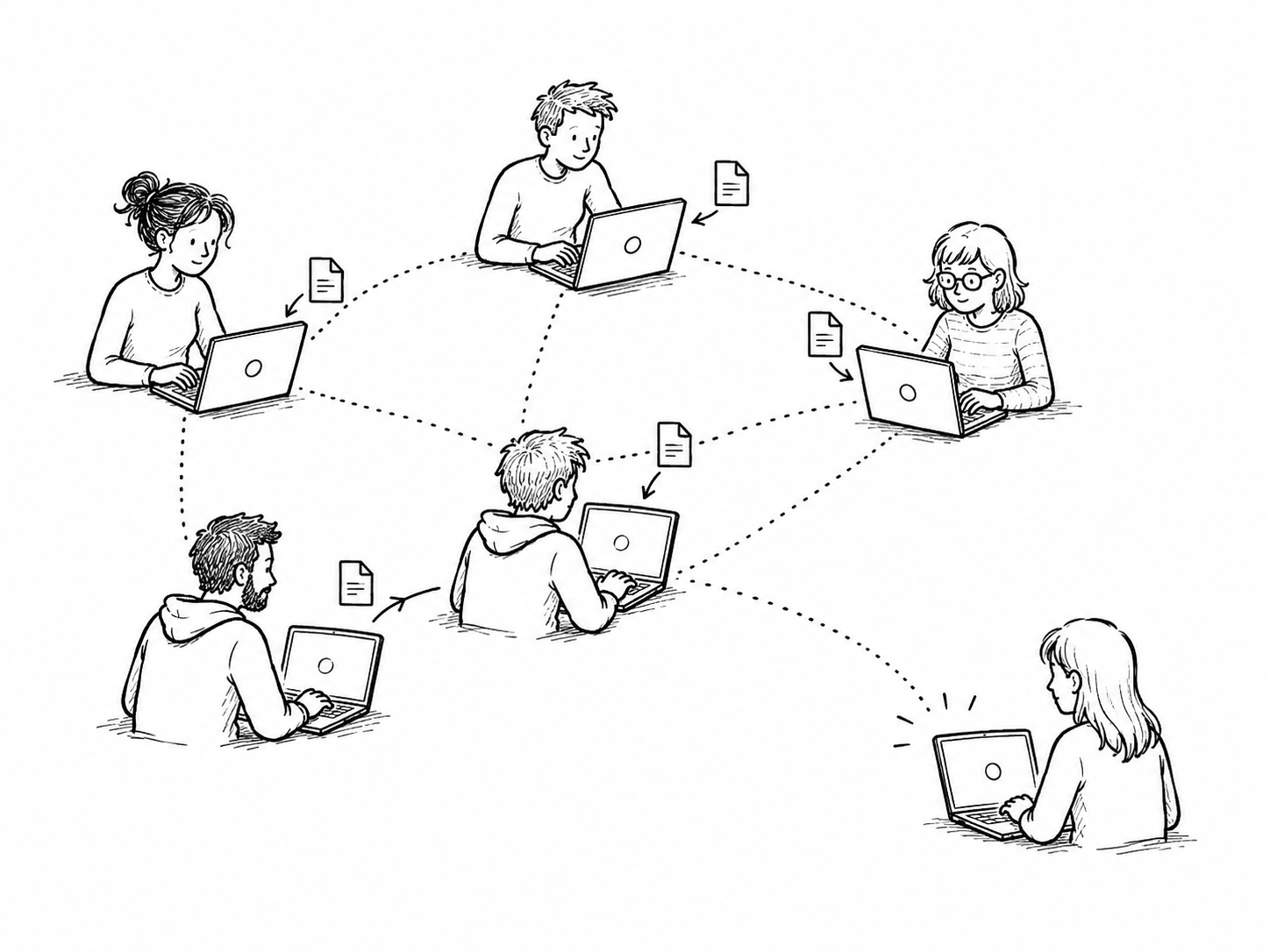
Imagine we all had HTTP servers running on our laptops and could give our friends an IP address whenever we needed to transfer a file. In theory, an HTTP server on everyone's machine would be enough for file sharing, right?
If you try to run an HTTP server on your personal computer today, there is a high likelihood the content will be inaccessible to the public internet. That's because NAT, firewalls, residential ISP policies, and a variety of other things make it difficult to expose an inbound TCP port.
That was less often the case 20 years ago. Back then, you could run a small HTTP server on your local machine and expose it on a public IP address. Gnutella exploited this to make file hosting possible for each participant in a mesh of gossiping peers. At its core, downloading a file via LimeWire (the file transfer part) was similar to downloading a file via curl or wget.
Gnutella is not just an HTTP server with a GUI, though. Conversely, HTTP is not a peer-to-peer file-sharing network. Our hypothetical scenario is just a bunch of HTTP servers on disparate IP addresses. With the TCP port problem mostly out of the way, there was another problem: most ISPs, even back then, did not offer stable static IP addresses. The IP address you shared with someone today might be totally different tomorrow.
Additionally, even if your IP address did not change, how were people going to find your files at a random URL like http://74.6.231.21:4000, which likely had never been indexed by a search engine and which goes offline when you shut your laptop lid?
These are the sorts of problems Gnutella aimed to solve. In addition to firing up an HTTP server, a Gnutella client also ran a TCP-based gossip protocol. This protocol announced your presence in a mesh of other peers who were also running Gnutella and serving shared directories over HTTP. Information like peer addresses, bandwidth, latency, and search queries moved through this mesh. There were some additional tools in there for dealing with firewalls, though these needed to be extended later on to deal with modern NAT problems.
In summary, a node handles:
- Transfering files to people who want them using a local HTTP server.
- Finding and announcing available files via search using a gossip mesh.
- (Sometimes) Fancy tricks to get around firewalls.
There is still one more situation to deal with: being a peer-to-peer protocol, Gnutella does not have a central entry point or user registry. Once you are in the mesh, you are in, and the gossip starts flowing. You discover new peers, inbound search queries, and other network traffic.
But how do you get into the mesh if you were never invited and there is no front door?
The answer is bootstrapping. You need to find a couple starter peers. After that, you are a fully functional network participant. You will even start finding more peers, thousands of them, as your computer overhears PONG messages, discussed later. But how do we find a set of starter peers? This is called bootstrapping
.
Bootstrapping
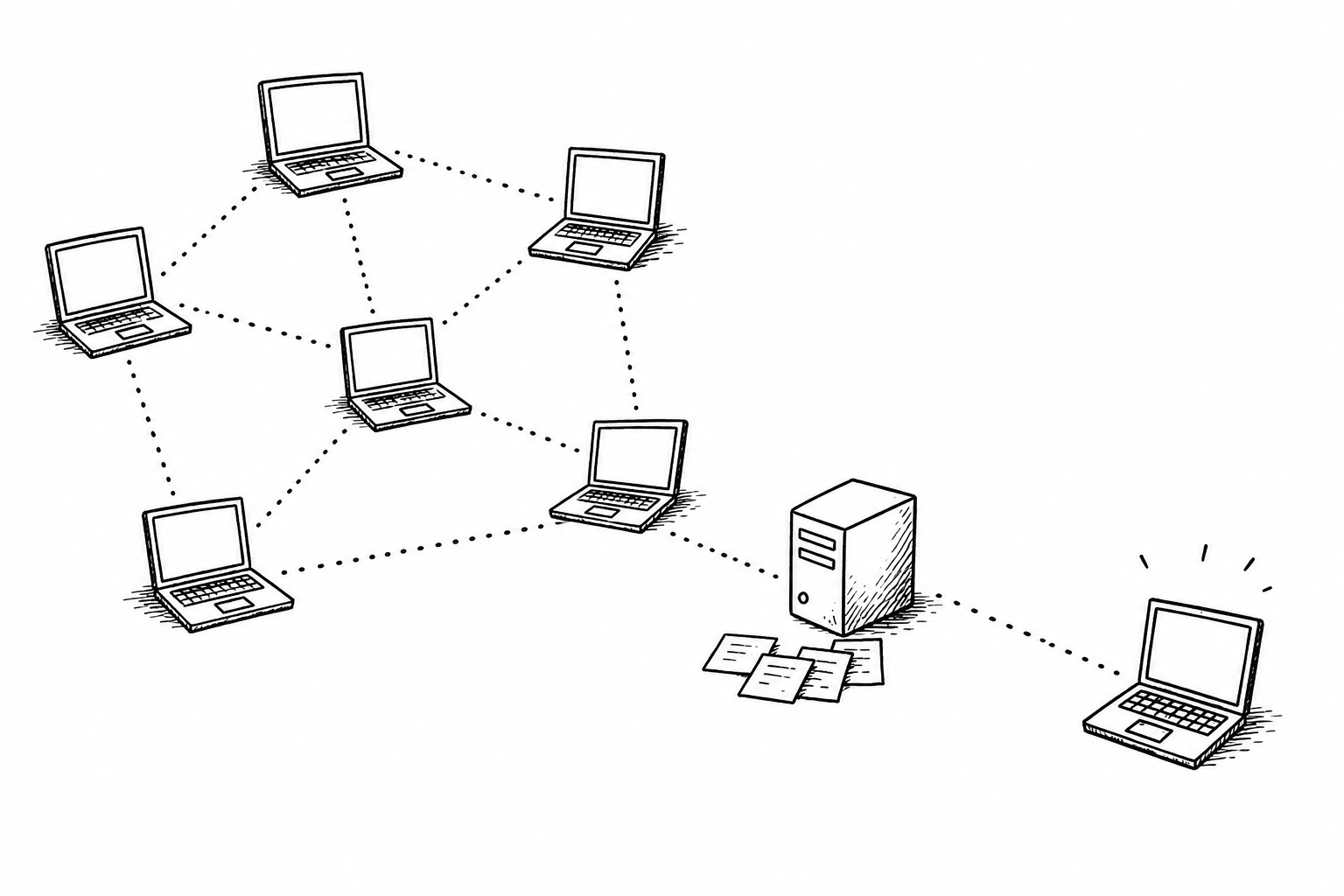
The Gnutella global network is a mixed bag of participant IP addresses. If you are able to connect to just one reliable peer who is already attached to the main network, you will begin to see network traffic from a very large subset of users. You will find more peers the longer you stay on the network via PONG messages. That peer list is stored to disk for when you want to reconnect. With time, entries on the list go bad because IP addresses change and people go offline. In such cases, you just keep moving down the list until you find a valid peer that can get you back to the party. This is not an option if you are joining the network for the first time, or reconnecting after being away for extended periods. Such situations require a process known as bootstrapping
.
There were a lot of ways to do this and I will only cover the most common, which is the GWebCache system. I have heard anecdotes (legends?) of past civilizations bootstrapping their clients over IRC chat rooms, but as far as I know, such clients do not participate in the network today, if they ever existed at all (prove me wrong, HN, prove me wrong). Many modern clients use a bootstrap mechanism called Gnutella Web Cache. GWebCache servers form a federation of independently managed web servers running a tiny web application, usually a CGI or PHP script run by a volunteer, that has a few basic responsibilities:
- Record the IP address of a Gnutella participant who volunteered this information.
- Record the IP or domain of other GWebCache servers, so you can have a backup if the current server goes down.
- Provide a list of alternative GWebCache servers.
- Provide a list of IP addresses of current and known Gnutella network participants.
Gnutella clients often contact the cache server automatically, while some clients require you to copy and paste the IPs into a config file or settings menu.
After connecting to these starter peers, you will begin indirectly collecting more peers from within the walls of the network mesh and cache use becomes less critical. It is important to point out that GWebCaches are not a central choke point in the network. This is still a real P2P network. There are many unrelated GWebCache servers out there, and there are many ways to bootstrap a client without a GWebCache server. Gnutella would still survive without them albeit in a less convenient capacity.
Curious readers can add ?get=1&client=TEST&version=1 to the end of the following URLs to fetch a bootstrap list. Do not do this too much; you will be rate limited quickly.
http://cache.jayl.de/g2/gwc.php
http://gweb.4octets.co.uk/skulls.php
http://midian.jayl.de/g2/bazooka.php
http://p2p.findclan.net/skulls.php
http://skulls.gwc.dyslexicfish.net/skulls.php
The output will look like this:
H|106.107.193.27:23459|88579
H|182.233.59.26:23464|88581
U|http://bj.ddns.net/skulls/skulls.php|208999
U|http://scissors.gwc.dyslexicfish.net:3709/|341201
Entries starting with an H are peers. Entries starting with a U are redundant cache servers you can store for use later, because a redundancy matters in P2P, remember?
To recap, we know that a Gnutella node (servent
) performs basic tasks like:
- Bootstrapping – Finding an initial set of peers to connect to.
- Hosting Files on a Web Server – Most file transfers happen via HTTP.
- Message passing (Gossiping and Handshaking) – Gnutella-specific protocol messages that run the network, covered in the next section.
Let's look at the core message types individually now.
Core Message Types
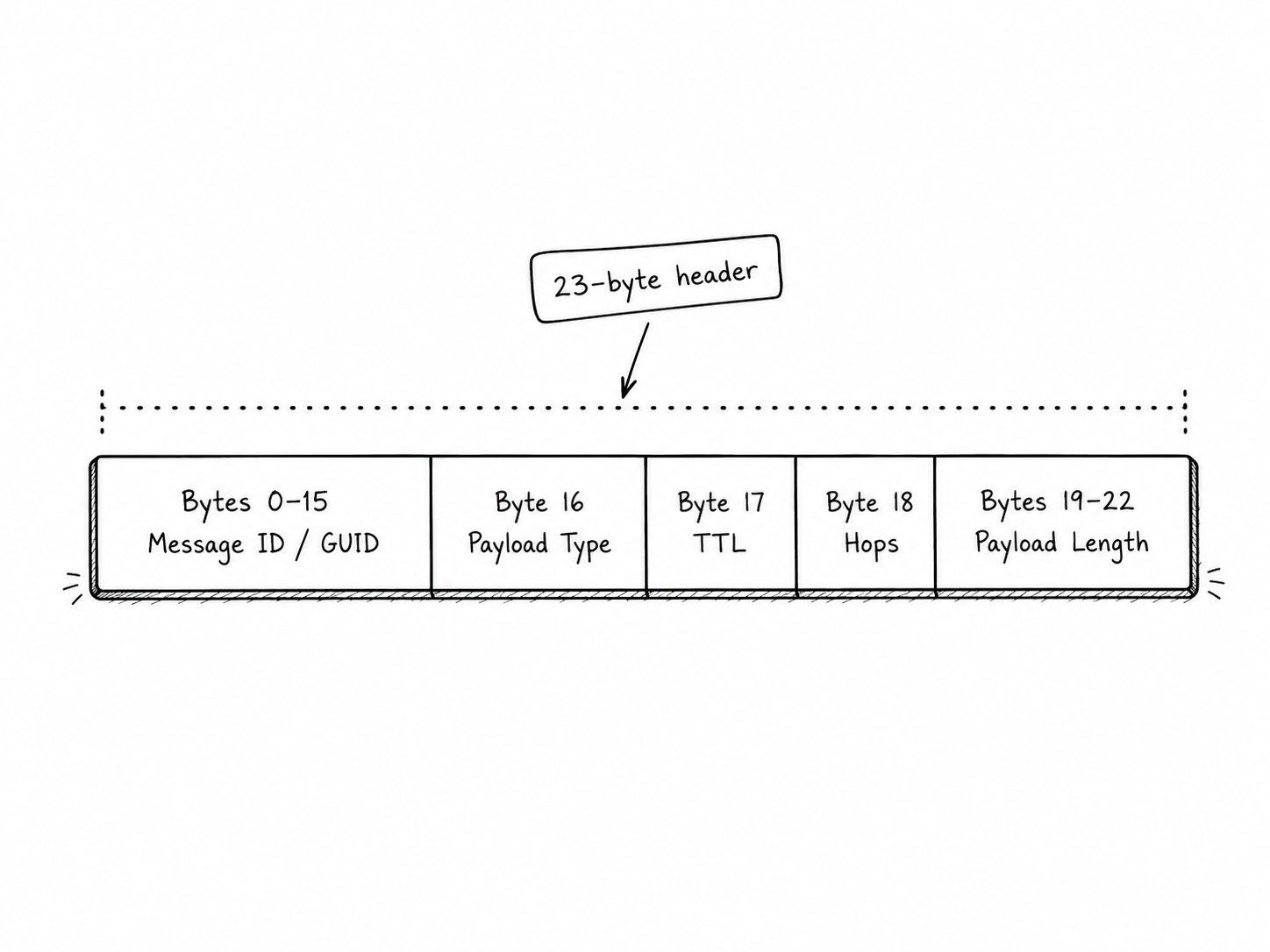
Gnutella is a TCP-based protocol. When a peer connects to another peer that accepts inbound connections, a handshake happens first. You send them a GNUTELLA CONNECT/0.4 or GNUTELLA CONNECT/0.6 and they send you back a positive response, at which point the connection is established and binary Gnutella messages begin flowing.
Every binary message starts with a 23-byte header. That header contains a message ID, a payload type, TTL, hops, and payload length. TTL is how much life the message has left. Hops is how far it has already traveled. Together, TTL + Hops tells you the message’s original intended range.
After the header comes one of the practical core messages:
| Code | Purpose |
|---|---|
| PING | Probe for live peers. Payload type 0x00 |
| PONG | Reply to a PING with an IP address, port, and sharing stats. Payload type 0x01 |
| QUERY | A search request, initiated by you or a nearby peer. Payload type 0x80 |
| QUERYHIT | A positive response to a QUERY, including file result records and connection info for downloading. Payload type 0x81 |
| PUSH | A workaround for firewalled uploaders. It asks the file holder to connect back to the downloader (imagine an HTTP server that connects to YOU). Payload type 0x40 |
The five messages above comprise the practical core of the protocol. There is also a BYE message, which is not strictly required. Protocol messages support extensions, which are extra data fields attached to normal messages so clients can add features without breaking the whole network. GTK-Gnutella, for example, supports TLS, IPv6, UDP, and other features that were not part of the tiny core protocol.
Extending the Protocol
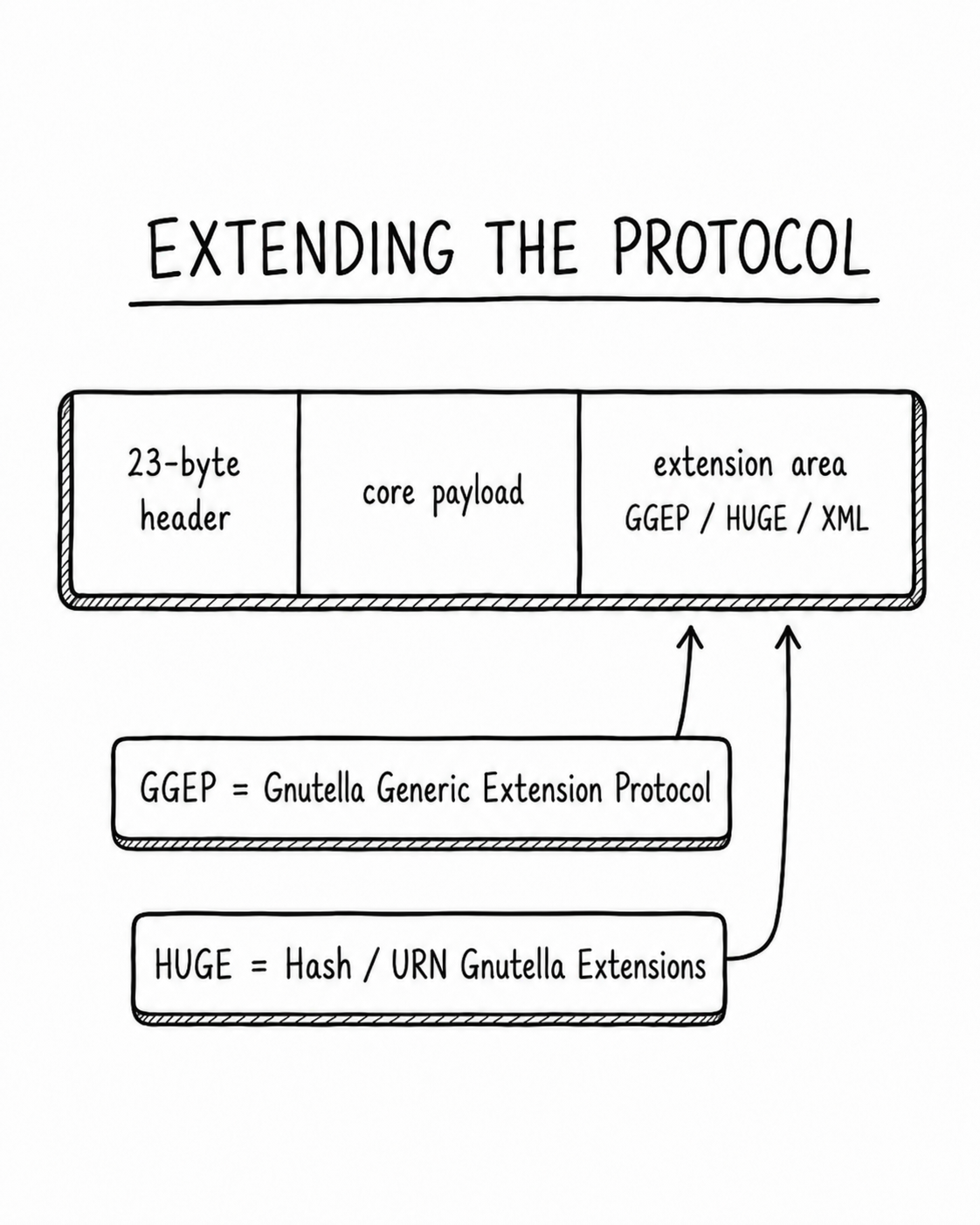
The five message types form the practical core of the spec. You could implement just these messages and have a working Gnutella client (probably). But the spec is almost 30 years old and the ecosystem did not stand still.
Gnutella left enough room for implementers to sneak new ideas into old packets. GGEP, the Gnutella Generic Extension Protocol, gave clients a generic place to put extension data inside normal messages. HUGE, the Hash/URN Gnutella Extensions, gave clients a way to identify files by SHA hash rather than filename. I am told it supports XML extension payloads also, but the spec talks about this in the past tense and I have never seen such traffic on the network in modern times.
The original design was small but it had just enough flexibility to keep stretching. With that out of the way, let's look at the 5 messages...
PING / PONG
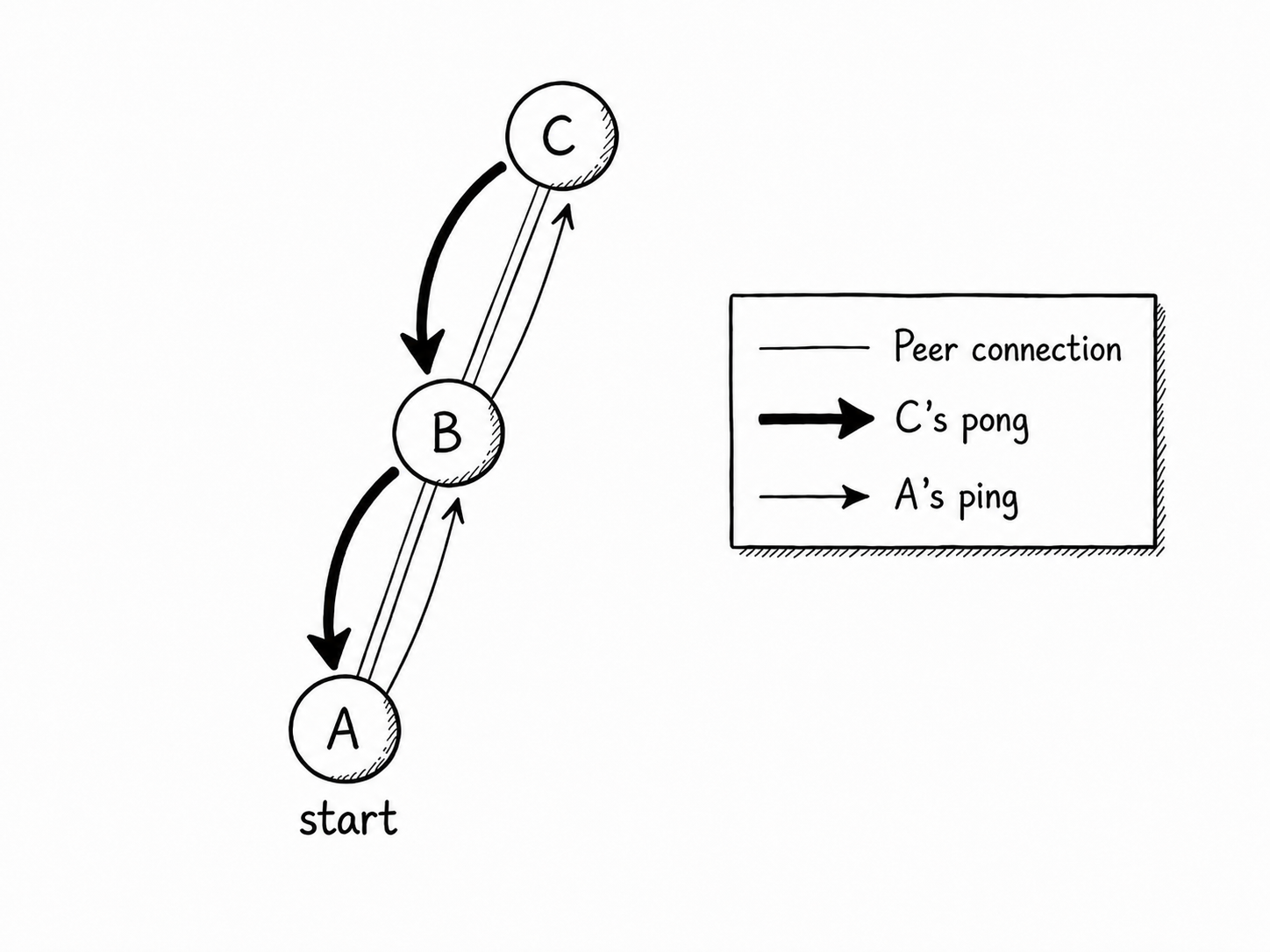
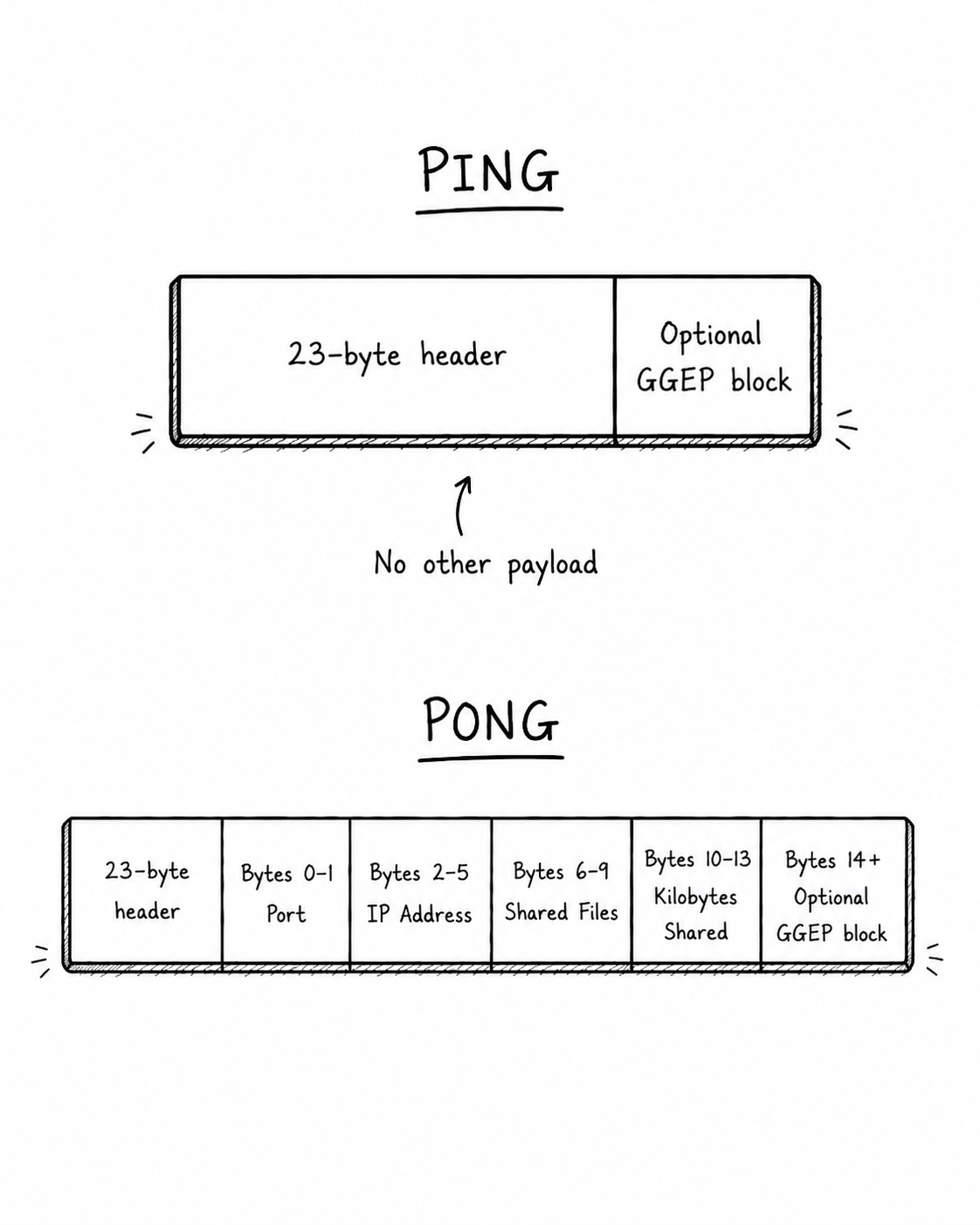
The PING and PONG messages form a heartbeat that travels between nodes. A PING is tiny. Aside from the normal 23-byte header, it has no required payload, though it can carry optional GGEP extension data.
PONG is the useful part. A PONG carries the responding servent's port, IPv4 address, number of shared files, and number of shared kilobytes. This is how the network spreads peer information around. The diagram showing nodes A B and C is mostly correct, but also an oversimplification because it would take too long to explain what PONG caching is (worth a read- it is in the spec).
If I am connected to seven peers who are connected to seven peers, my messages will fan out away from my node. Peers that hear my PING will reply with a PONG and I will collect the IP/Port info attached to these messages, making me a more connected member of the mesh. My client will hang onto this information for sessions later, reducing my reliance on bootstrapping. This is why bootstrapping becomes less important once you have been on the network for a while: your machine will passively mingle with other network participants and accumulate a reliable list of neighbors.
QUERY / QUERYHIT
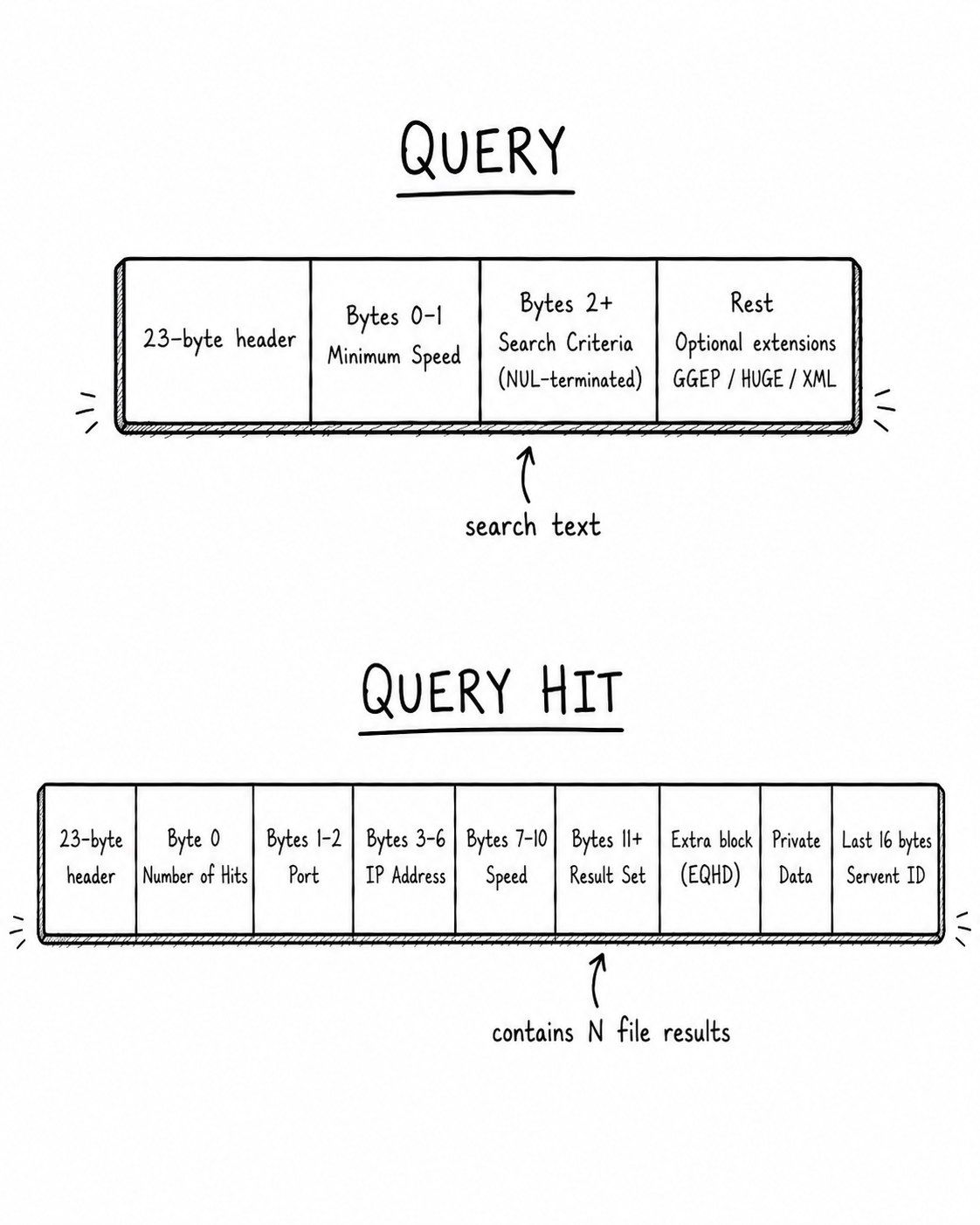
The QUERY and QUERYHIT messages work similarly to PING and PONG, except rather than advertising peers, they carry search traffic. A QUERY contains a minimum speed (transfer bandwidth) field, followed by a NUL-terminated search string. Example: beethoven.mp3.
QUERY messages flood away from the originator and QUERYHIT messages, if any, flow back toward the originator. A QUERYHIT contains the respondent's IP address, port, speed, and a result set. Each result has a file index, file size, filename, and optional metadata or extensions. That file index is later used to request the file over HTTP.
Because of the flood-routing nature of Gnutella, results would trickle in slowly, often taking full minutes to complete. Engineers at LimeWire came up with a smarter more scalable way to handle this called dynamic query routing. It leveraged bloom filters and a clever network topology. This more advanced configuration allowed the network to scale to millions without the problems associated with flood routing. This system lives on today and is implemented by most mainstream clients. I may write about this in a future post.
PUSH and Firewalls
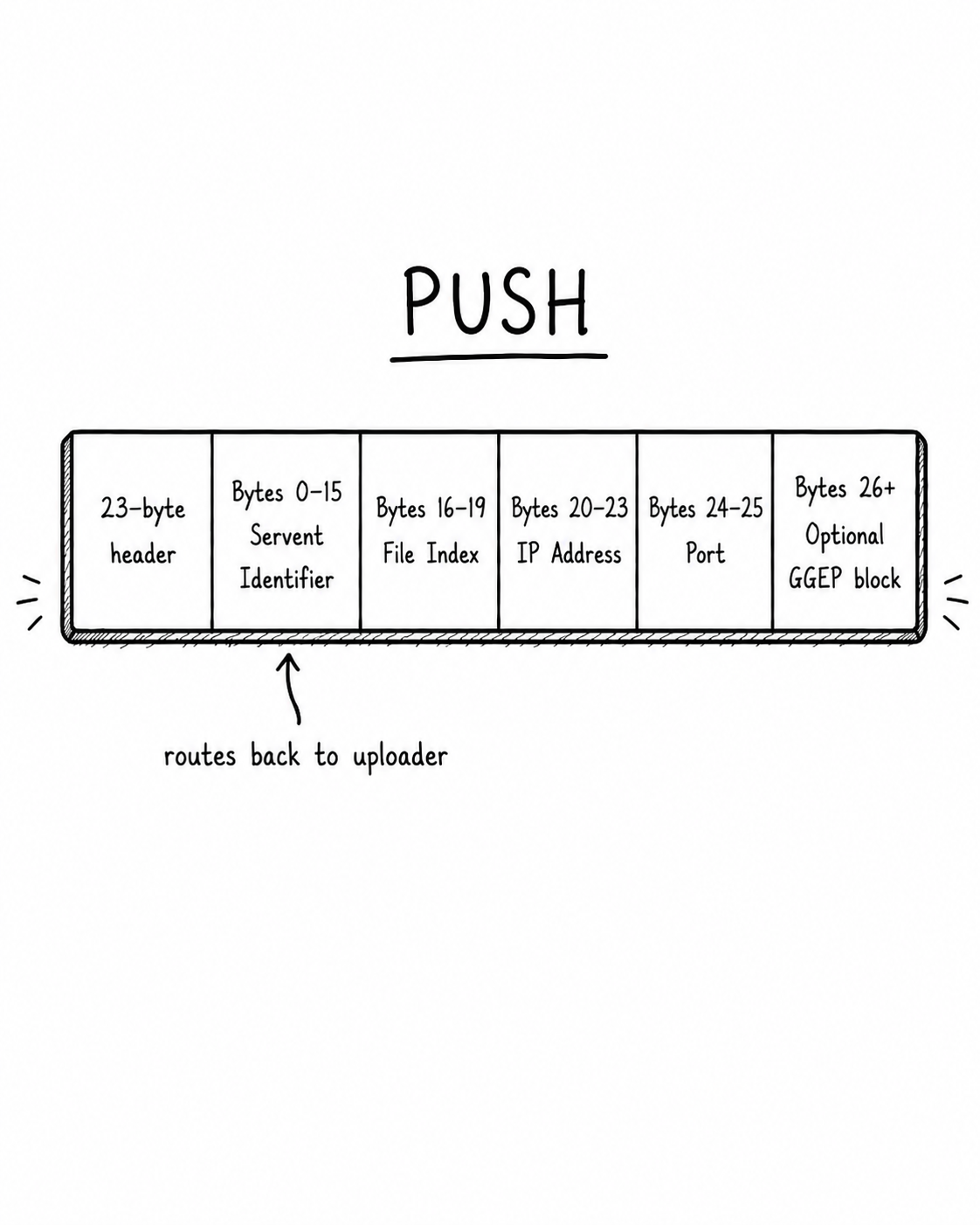
The last message type was a PUSH message, which was a hack to help some, but not all, HTTP servers break out of a firewall. Think of it as an arrangement where you perform an HTTP request by asking the server to contact you instead of the usual way of doing HTTP.
A PUSH message contains the servent identifier and other identifiers to help the uploader find the downloader. It is a client's way of saying: I cannot connect to you directly, please connect back to me and send it.
You can read more about it in the spec. Modern clients will perform extra tricks and add UDP extensions to deal with these issues gracefully.
Next Steps
I've outlined the core building blocks of a protocol that, thanks to some good initial design, was able to scale to millions of concurrent users, avoid shutdown, and stay online for decades with no outside help.
The story of Gnutella is not the story of a network that started with good intentions and then fell apart the moment production traffic arrived. Plenty of systems (many with pitch decks) have done that. It is important to remember that this meme of Y2K culture never actually died, which is a good indicator that it was well designed despite minor flaws.
The real reason Gnutella faded, in my opinion, is that it outlived the world that created it.
There are a number of useful links listed below for curious readers. I wish I could post more, but the network itself has outlived the sites that once hosted resources related to the protocol, which is a very impressive feat.
- GTK-Gnutella GitHub - GTK-Gnutella is the client to use if you want to use Gnutella for real in the 2020s. The lead maintainer (still active!) helped write the Gnutella 0.6 spec, so you know it's good.
- Gnutella Bun Client GitHub - Hobby Gnutella client implementation I wrote in TypeScript/Bun. It actually works and is mostly compatible with GTK-Gnutella, though it is not perfect.
- Gnutella Terminology Glossary - Glossary covering Gnutella terms like QRP, GGEP, GIV, and related concepts.
- Gnutella Forums - Long-running forum for Gnutella clients, troubleshooting, and network discussion. Not very active in 2026, but the legacy lives on.
- Cap’n Bry’s Gnutella Site - An old Gnutella fan page.
- Annotated Gnutella Protocol Specification v0.4 - Original/annotated Gnutella 0.4 protocol specification.
- Gnutella Protocol 0.6 Draft - Draft (lol) specification for the later Gnutella 0.6 protocol.
- Query Routing Protocol Spec - Spec for QRP, the Gnutella query-routing system used to reduce wasteful flooding. The diagrams have disappeared to the sands of time, unfortunately.