Deterministic Linux VMs
Scrub any run back to the step that broke it.
Rewind VM runs a Nix build, a test suite or any Linux command inside a deterministic KVM virtual machine. The same inputs produce the same events at the same steps, every time. When it fails, drag the timeline back to where it went wrong, look around, and fork from there.
The engine and CLI are open source under the MIT license. The desktop app is $49 for personal use and free to evaluate.
Rewind /nix/store/9x2k…-mylib-0.3.0.drv run #3 · failed run #2 · passed example data
step virtual time phase
Process tree · alive
Files · newest first
At this step
How it works
A run is a function of its inputs, so nothing has to be logged and fed back to repeat it. Rewind keeps the run's events, each with its step, and keyframes, and computes any step again.
-
Pack the inputs
The inputs, a Nix closure or any root filesystem, become a read-only erofs image mapped straight into the VM's memory. A small Linux kernel boots and runs your command.
-
Run deterministically
One vCPU on stock KVM, so code in the VM runs on the real CPU. The VM's kernel carries a small Rewind platform: interrupts arrive only when the VM hands control to Rewind, time moves only then, and the timestamp counter and hardware RNG are hidden. A step is one of those handoffs.
-
Keep keyframes
Every quarter second of guest work, at the same steps on every host, Rewind snapshots the machine using KVM's dirty-page log. Pages go into a content-addressed store (BLAKE3, zstd), so a page shared by keyframes, runs and forks is stored once.
-
Seek
To reach a step, Rewind restores the latest keyframe at or before it and runs forward. Same inputs, same events at the same steps.
In the desktop app
The real app, on the bug the tutorials follow.
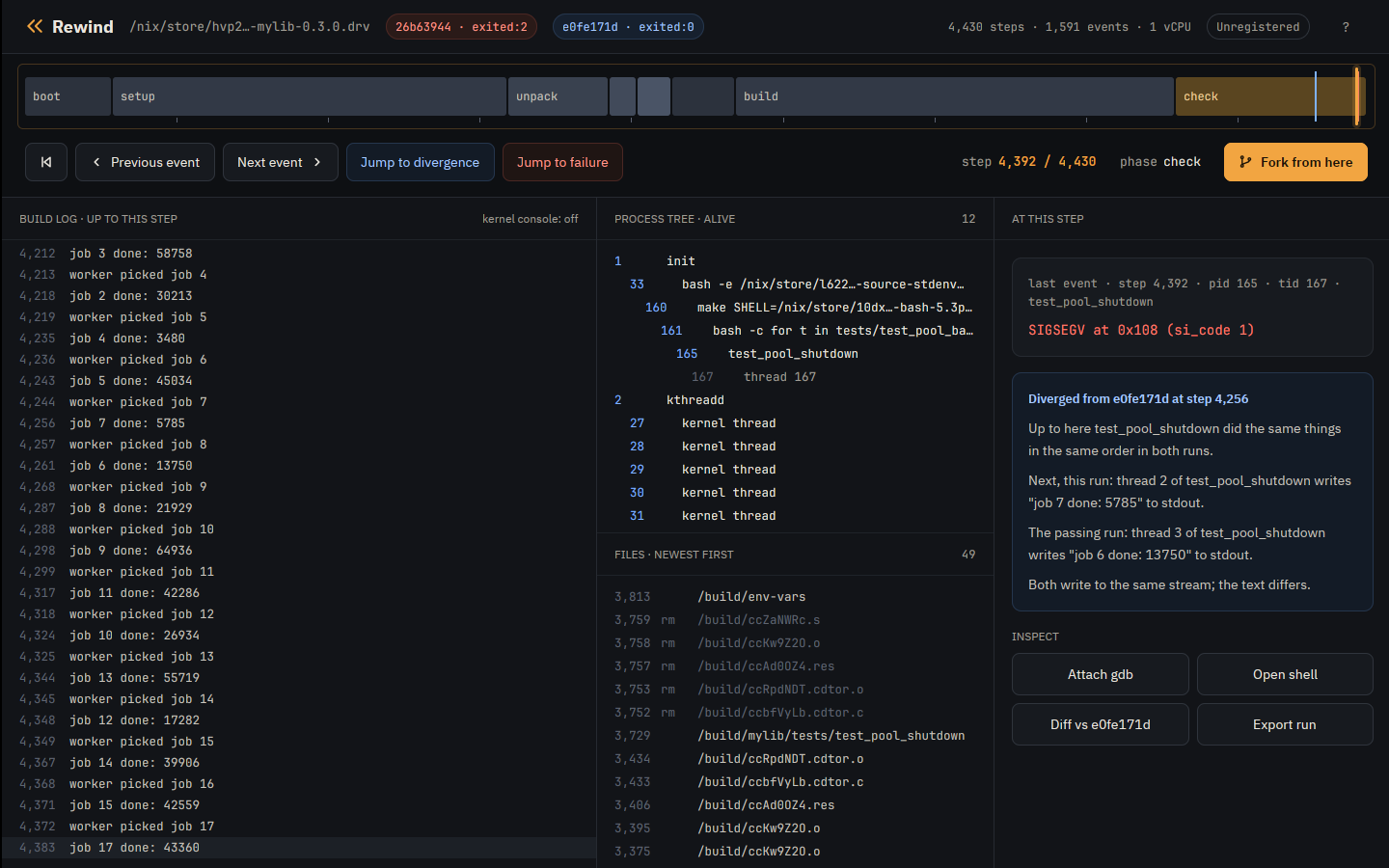
- The timeline The whole run, with where it parted from the passing one.
- Build log What the build printed, up to the playhead.
- Processes and files What was running, and what was written.
- The step's event Here the SIGSEGV, and where the runs parted.
- Fork from here Reruns from this step under a new schedule.
- Every run All runs and forks of the build, as a tree.
Bring a command, or bring a derivation
Any Linux workload
A root filesystem and a command
$ rewind run --root mylib.tar --cwd /src -- make check
The root is a directory, an erofs image, or a tarball such as
docker export writes. The VM mounts it under a writable overlay, and
nothing the command writes reaches your disk.
- flaky tests
-
rewind checkreruns the command under perturbed schedules until one ends differently, then names the step whose reschedule decides it. - properties
- Say what a correct run is, or assert it from inside the program with the Rewind SDK, and every schedule is judged by it.
- seeds
- Vary the program's randomness as well as its schedule.
- CI failures
- A failing run is a directory holding its inputs and every event with its step. Keep it and scrub back from the crash instead of reading a log that ends there.
- heisenbugs
- A race that vanishes when you add a printf stays put. A failing run fails the same way every time it runs.
- exploration
- Fork a passing run at a step under new schedules to try other interleavings from that point on.
For Nix users
Nix builds are already almost a closed world
$ rewind nix .#mylib
$ rewind check .#mylib
Pinned inputs, no network, fixed paths. Point Rewind at a flake attribute and most of the work of making the build deterministic is already done.
- .drv
- A run's id is the hash of all its inputs, and the derivation is one of them.
- the machine
- The VM's kernel is a derivation too, so the whole machine is pinned.
- rewind check
-
nix build --checksays the output "may not be deterministic".rewind checkbuilds under perturbed schedules, stops at the first build that ends differently, and names the step that decides it: without that one perturbation, the build passes. - the output
-
rewind nixhashes each output the VM builds and says whether it matches the copy already in your store, so you can see the VM built whatnix builddoes. - the clock
- Builds see today's date: the VM's clock starts at midnight UTC on the day of the run. The date is saved with the run, so a replay a year later sees the same one.
Tutorials
The first two follow one real bug, a shutdown race in a small C thread pool, from install to fix; the third says what a correct run is; the fourth reaches a race between two lines of code; the fifth finds why a build does not reproduce; the sixth has Nix build a derivation the same on every machine; the seventh is the rest of the tools. Every transcript in them is real output.
A flaky Nix build
Install with Nix, let rewind check find the interleaving that crashes a
derivation's tests, then replay it, fork it and check the fix.
A flaky test in a container
The same bug from a Docker image with no Nix: export the filesystem, find the failing schedule and replay the crash exactly.
Read the tutorial → PropertiesProperty-based testing
Properties that catch a bug on the first run, assertions from inside the program, and seeds that vary its randomness as well as its schedule.
Read the tutorial → PointsSchedule points
A race with no system call between its read and its store, which no schedule reaches until one line from the SDK puts a switch there.
Read the tutorial → Reproducible buildsReproducible builds
Build a derivation under several seeds and directory orders, see which files differ,
and let rewind blame name the program that wrote the bytes.
Deterministic derivations
Pin a build's environment with inRewind and check that a rebuild produces
the same bytes.
Advanced features
Short recipes: which thread held the CPU, watchpoints, the kernel's side of a crash, tools inside the VM, more CPUs, counting the schedules that fail from a step, and sharing a failing run.
Read the tutorial →Case studies
Rewind VM on Nix's own test suite and on devenv. Every transcript in them is real output.
Download
For x86_64 Linux with KVM. The engine and CLI are open source on GitHub, and the desktop app is free to download and use while you evaluate it.
With Nix
Run either straight from the flake, or install both into your profile:
$ nix run github:fzakaria/rewindvm -- pmu status
$ nix run github:fzakaria/rewindvm#app
$ nix profile install github:fzakaria/rewindvm github:fzakaria/rewindvm#app
On NixOS, add the flake as an input and turn on its module:
inputs.rewind.url = "github:fzakaria/rewindvm";

# in your configuration, with inputs.rewind.nixosModules.default imported;
# it also adds rewindvm.cachix.org to Nix's substituters
programs.rewind.enable = true;
programs.rewind.app.enable = true;
# AMD only: make the branch counter exact at every boot
programs.rewind.amdBranchCounterWorkaround = true;
Without Nix
$ curl -fsSL https://rewindvm.dev/install | shOr take the tarballs from the latest release yourself:
# the rewind command, with the VM's kernel
$ curl -L https://github.com/fzakaria/rewindvm/releases/latest/download/rewind-x86_64-linux.tar.gz | tar xz
# the desktop app
$ curl -L https://github.com/fzakaria/rewindvm/releases/latest/download/rewind-app-x86_64-linux.tar.gz | tar xz
# the kernel's debug symbols for rewind gdb, next to the command (150 MB)
$ curl -L https://github.com/fzakaria/rewindvm/releases/latest/download/rewind-debug-x86_64-linux.tar.gz | tar xz
If /dev/kvm is not readable and writable by you, add yourself to the
kvm group.
Pricing
Evaluate the app free for as long as you like, with an occasional reminder. Buy a license when it earns its keep.
Engine and CLI
Free MIT license
The engine and the command line. The VM's kernel is Linux with a patch and config of ours, GPL-2.0 as Linux is.
-
rewind run,nix,check,forkanddiff -
Any step at the prompt:
log,ps,cat,where,shellandgdb - Open source, for any use
Personal
$49 once
The desktop app, for you.
- All your machines
- 3 years of updates
- Offline license key by email
Commercial
$99 per seat
The desktop app, for use at a company.
- One seat per person using the app
- 3 years of updates
- Offline license key by email
The command line answers one question at a time. The app puts the whole run on one screen: a timeline to scrub from boot to the end, the failing run beside a passing one with where they first differ in words, the log, processes, files and source line at the playhead, a tree of every fork and schedule tried, and a fork, gdb or a shell at any step in a click.
A personal license is for one person, bought by that person, on all their machines. Use at a company takes a commercial license: a seat for each person who uses the app, on as many machines as they use it on.
Working on open source? The app is free for that. Email tacos@lunchtimesurf.com with a link to the project you work on, and we will send you a license.
Every license comes with a full refund within 30 days, for any reason. See the refund policy, and the app's license for what a license covers.
Limits
- Linux on x86_64 with KVM.
- One virtual CPU. Your threads take turns, and speed comes from running many machines at once.
- A loop that spins without a system call is never interrupted. Locks, sleeps and I/O are fine.
- A run made on an AMD machine replays on other AMD machines from Zen 2 on, and not on Intel. Replay from one Intel machine to another has not been tried.
- No network, other than loopback.