This blog post introduces and exemplifies the Raku package “LLM::Graph”, which is used to efficiently schedule and combine multiple LLM generation steps.
The package provides the class LLM::Graph with which computations are orchestrated.
The package follows the design discussed in the video “Live CEOing Ep 886: Design Review of LLMGraph”, [WRIv1], and the corresponding Wolfram Language function LLMGraph, [WRIf1].
The package implementation heavily relies on the package “LLM::Functions”, [AAp1]. Graph functionalities are provided by “Graph”, [AAp3].
Installation
Package installations from both sources use zef installer (which should be bundled with the “standard” Rakudo installation file.)
To install the package from Zef ecosystem use the shell command:
To install the package from the GitHub repository use the shell command:
zef install https://github.com/antononcube/Raku-LLM-Graph.git
Design
Creation of an LLM::Graph object in which “node_i” evaluates fun_i with results from parent nodes:
LLM::Graph.new({name_1 => fun_1, ...})
LLM::Graph objects are callables. Getting the result of a graph on input:
LLM::Graph.new(...)(input)
Details and options
- An
LLM::Graphenables efficient scheduling and integration of multiple LLM generation steps optimizing evaluation by managing the concurrency of LLM requests. - Using
LLM::Graphrequires (LLM) service authentication and internet connectivity.- Authentication and internet are required if all graph nodes are non-LLM computation specs.
- Possible values of the node function spec
fun_iare:
llm-function(...) | an llm-function for LLM submission |
sub (...) {...} | a sub for Raku computation submission |
%(key_i => val_i ...) | a Map with detailed node specifications nodespec |
- Possible node specifications keys in
nodespecare:
| “eval-function” | arbitrary Raku sub |
| “llm-function” | LLM evaluation via an llm-function |
| “listable-llm-function” | threaded LLM evaluation on list input values |
| “input” | explicit list of nodes required as sub arguments |
| “test-function” | whether the node should run |
| “test-function-input” | explicit list of nodes required as test arguments |
- Each node must be defined with only one of “eval-function”, “llm-function”, or “listable-llm-function”.
- The “test-function” specification makes a node evaluation conditional on the results from other nodes.
- Possible “llm-function” specifications
prompt_iinclude:
| “text” | static text |
["text1", ...] | a list of strings |
llm-prompt("name") | a repository prompt |
sub ($arg1..) {"Some $arg1 text"} | templated text |
llm-function(...) | an LLM::Function object |
- Any “node_i” result can be provided in input as a named argument.
inputcan have one positional argument and multiple named arguments. LLM::Graphobjects have the attributellm-evaluatorthat is used as a default (or fallback)
LLM evaluator object. (See [AAp1].)- The Boolean option “async” in
LLM::Graph.newcan be used to specify if the LLM submissions should be made asynchronous.- The class
Promiseis used.
- The class
Usage examples
Three poets
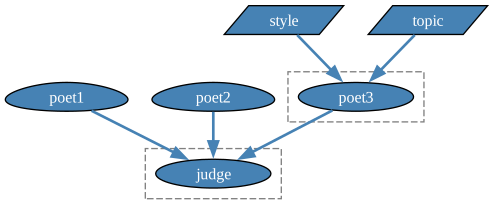
Make an LLM graph with three different poets, and a judge that selects the best of the poet-generated poems:
use LLM::Graph;
use Graph;

my %rules =
        poet1 => "Write a short poem about summer.",
        poet2 => "Write a haiku about winter.",
        poet3 => sub ($topic, $style) {
            "Write a poem about $topic in the $style style."
        },
        judge => sub ($poet1, $poet2, $poet3) {
            [
                "Choose the composition you think is best among these:\n\n",
                "1) Poem1: $poet1",
                "2) Poem2: $poet2",
                "3) Poem3: $poet3",
                "and copy it:"
            ].join("\n\n")
        };

my $gBestPoem = LLM::Graph.new(%rules);
# LLM::Graph(size => 4, nodes => judge, poet1, poet2, poet3)
Calculation with special parameters (topic and style) for the 3rd poet:
$gBestPoem(topic => 'hockey', style => 'limerick');
# LLM::Graph(size => 4, nodes => judge, poet1, poet2, poet3)
Remark Instances of LLM::Graph are callables. Instead of $gBestPoem(...), $gBestPoem.eval(...) can be used.
Computations dependency graph:
$gBestPoem.dot(engine => 'dot', node-width => 1.2 ):svg
The result by the terminal node(“judge”):
say $gBestPoem.nodes<judge>;
# {eval-function => sub { }, input => [poet1 poet3 poet2], result => I think Poem1 is the best composition among these. Here's the poem:
#
# Golden sun above so bright,
# Warmth that fills the day with light,
# Laughter dancing on the breeze,
# Whispers through the swaying trees.
#
# Fields alive with blooms in cheer,
# Endless days that draw us near,
# Summer’s song, a sweet embrace,
# Nature’s smile on every face., spec-type => (Routine), test-function-input => [], wrapper => Routine::WrapHandle.new}
Further examples
The following notebooks provide more elaborate examples:
The following notebook gives visual dictionaries for the interpretation of LLM-graph plots:
Implementation notes
LLM functors introduction
- Since the very beginning, the functions produced by “LLM::Functions” were actually blocks (
Block:D). It was in my TODO list for a long time instead of blocks to produce functors (function objects). For “LLM::Graph” that is/was necessary in order to make the node-specs processing more adequate.- So,
llm-functionproduces functors (LLM::Functionobjects) by default now. - The option “type” can be used to get blocks.
- So,
No need for topological sorting
- I thought that I should use the graph algorithms for topological sorting in order to navigate node dependencies during evaluation.
- Turned out, that is not necessary — simple recursion is sufficient.
- From the nodes specs, a directed graph (a
Graphobject) is made. Graph‘s methodreverseis used to get the directed computational dependency graph.- That latter graph is used in the node-evaluation recursion.
- From the nodes specs, a directed graph (a
Wrapping “string templates”
- It is convenient to specify LLM functions with “string templates.”
- Since there are no separate “string template” objects in Raku, subs or blocks are used.
- For example:
sub ($country, $year) {"What is the GDP of $country in $year"}(sub){"What is the GDP of $^a in $^b?"}(block)
- String template subs are wrapped to be executed first and then the result is LLM-submitted.
- Since the blocks cannot be wrapped, currently “LLM::Graph” refuses to process them.
- It is planned later versions of “LLM::Graph” to process blocks.
Special graph plotting
- Of course, it is nice to have the LLM-graphs visualized.
- Instead of the generic graph visualization provided by the package “Graph” (method
dot) a more informative graph plot is produced in which the different types of notes have different shapes.- The graph vertex shapes help distinguishing LLM-nodes from just-Raku-nodes.
- Also, test function dependencies are designated with dashed arrows.
- The shapes in the graph plot can be tuned by the user.
- See the Jupyter notebook “Graph-plots-interpretation-guide.ipynb”.
References
Blog posts
[AA1] Anton Antonov, “Parameterized Literate Programming”, (2025), RakuForPrediction at WordPress.
Functions, packages
[AAp1] Anton Antonov, LLM::Functions, Raku package, (2023-2025), GitHub/antononcube.
[AAp2] Anton Antonov, LLM::Prompts, Raku package, (2023-2025), GitHub/antononcube.
[AAp3] Anton Antonov, Graph, Raku package, (2024-2025), GitHub/antononcube.
[WRIf1] Wolfram Research (2025), LLMGraph, Wolfram Language function.
Notebooks
[AAn1] Anton Antonov, “LLM comprehensive summary template for large texts”, (2025), Wolfram Community.
Videos
[WRIv1] Wolfram Research, Inc., “Live CEOing Ep 886: Design Review of LLMGraph”, (2025), YouTube/WolframResearch.