Welcome to our QR Generator. It is amazing at turning photos into QR codes which also means it can make a QR code from another embedded QR code, a digital message nestled inside another message! It adds an element of suspense as to which code will be scanned - the outer or the inner one?
Step 1: Contents inner QR?
Enter the contents for the inner QR code. Contents shorter than 31 characters (or using the link shortener) will display as a big QR.✖
Enter the contents for the inner QR code
Step 2: Free sample?
You can now check out a free sample with a preset outer QR code. Otherwise continue for more customization.✖
Check out a free sample or continue for more customization.
Step 3: Contents outer QR?
The shorter the text the less distortions of the inner QR.✖
Enter the contents for the outer QR code
Step 4: Generate
Finalize and purchase your unique QR-in-QR code
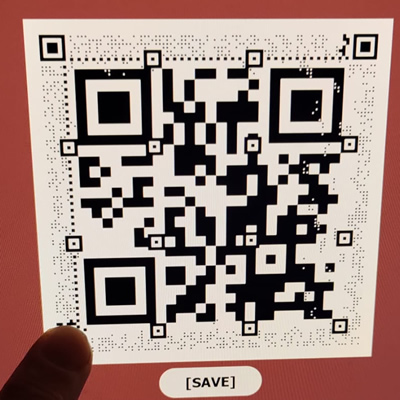
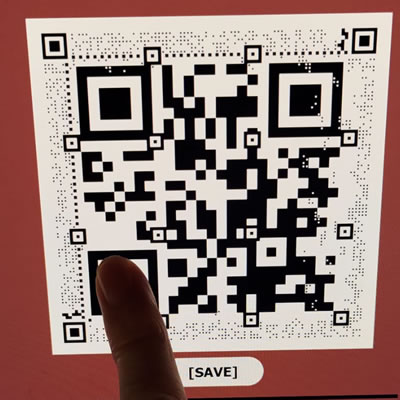
Scanning a QR-in-QR code might seem like a puzzle! Depending on your scanner, it might choose to read either the outside or inside QR code. Fear not! If you want to definitely scan the outer or inner QR, just cover one of the big position sync pads.
For example, to scan the inner code, cover the bottom-left sync pad of the outer QR code. And if you want to scan the outer code, cover the bottom-left pad of the inner QR. For the latter, be careful not to obscure the outer sync pad.
To illustrate this, we've provided two handy pictures showing exactly where to place your finger.