Can an AI reviewer save us time and improve code quality in our workflow? To find out, we pitted several AI PR review tools against each other in a real-world scenario – and in this 2026 update, we've expanded the list to ten tools, because the market has exploded since we ran our original test.
Before we dive in: I code well, but I write like a donkey – so I used AI to turn our hands-on research into an easy-to-read blog post.
Key takeaways
- We tested four AI code reviewers hands-on in our production monorepo: CodeRabbit, devlo, GitHub Copilot, and Ellipsis. Ellipsis won on signal-to-noise.
- Six more tools have earned a place on the 2026 shortlist: Qodo Merge, Greptile, Graphite, Cursor Bugbot, CodeAnt AI, and Bito.
- Every tool on this list reads your diff. None of them run your application – which is why teams shipping with coding agents pair a code reviewer with PR testing.
Our test environment was a Vercel Turborepo-based monorepo that contains a bit of everything – TypeScript packages, React applications (with ShadCN UI components and Tailwind CSS), and even a Python app. We weren't just interested in if these tools work, but how they handle the quirks of a real codebase. Do they nitpick formatting or actually catch tricky bugs? Are they helpful sidekicks or noisy backseat drivers?
Part one covers the four reviewers we ran on our own pull requests: CodeRabbit, devlo, GitHub Copilot, and Ellipsis (YC W24). Part two rounds up six more tools worth evaluating in 2026. And part three covers the half of the PR gate that none of these tools touch. (Don't worry – we'll keep it technical, but with a dash of humor. Even code review bots appreciate a good dad joke now and then.)
Part 1: The four AI code reviewers we tested hands-on
After running these tools on several PRs, we gathered some high-level impressions of each. Here's how CodeRabbit, devlo, Copilot, and Ellipsis fared in our monorepo showdown.
CodeRabbit
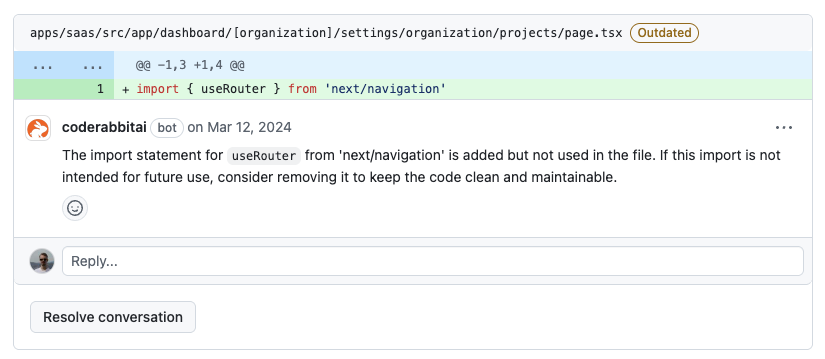
CodeRabbit made a strong first impression when it came to enforcing code standards and style consistency. It diligently pointed out lint issues, formatting inconsistencies, and naming deviations. In a way, it felt like an automated ESLint+Prettier on steroids – if a variable name didn't match our conventions or a file's structure was off, CodeRabbit caught it. This was great for keeping our TypeScript/React code style on point.
However, CodeRabbit showed some weakness in catching deeper implementation bugs. It occasionally missed logical errors or subtle bugs in the code's logic. For example, in one PR a function's edge case (handling an empty input) was flawed – our human reviewers caught it, but CodeRabbit was oddly silent, having been more concerned about a missing JSDoc comment. It seems CodeRabbit stays within the lines of the PR diff and focuses on what it can easily lint. If a potential issue involved understanding context outside the PR or a cross-module interaction, it often glossed over it.
Worth noting for 2026: CodeRabbit remains one of the most widely adopted reviewers in the category, with broad platform support across GitHub, GitLab, Bitbucket, and Azure DevOps, and it has kept adding features at a steady pace since our test.
Bottom line: great for polish, consistency, and easy adoption, but don't expect it to be a full-fledged bug detective.
devlo
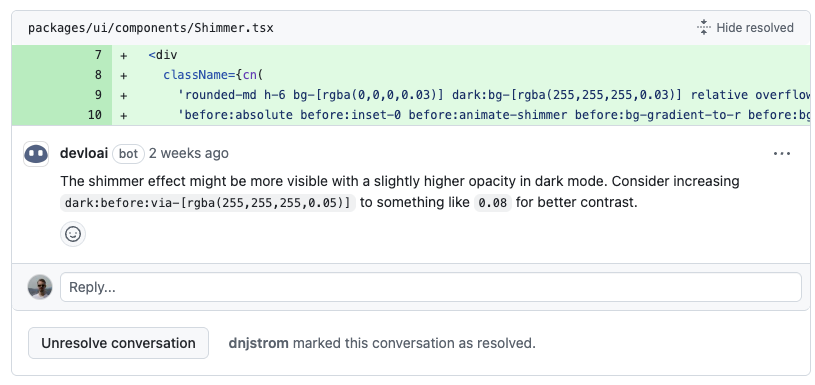
The devlo AI reviewer was like an enthusiastic teammate who had just finished a software architecture course. It provided insightful suggestions – often going beyond surface-level comments. In several instances, devlo not only flagged a potential problem but also suggested a clever solution or a best practice. For instance, it spotted an inefficient loop in our Python module and suggested using a generator for better performance. These kinds of value-added comments made us feel like devlo was really reading and understanding our code, not just pattern-matching common issues.
The flip side was that devlo could be noisy with excessive comments. It had a lot to say... about everything. Minor issues, stylistic preferences, even things that were arguably subjective got comments. Our PR discussion threads sometimes doubled in length due to devlo's running commentary. We found ourselves sifting through a wall of AI comments to find the one or two truly important suggestions. It felt like having a hyperactive intern – eager to help but pointing out the obvious along with the insightful. We occasionally responded with, "Thanks, devlo, we'll consider that," while secretly rolling our eyes at a comment about an extra newline.
Bottom line: devlo's feedback was a mixed bag – very useful gems buried in a lot of well-intentioned noise.
GitHub Copilot (PR Reviews)
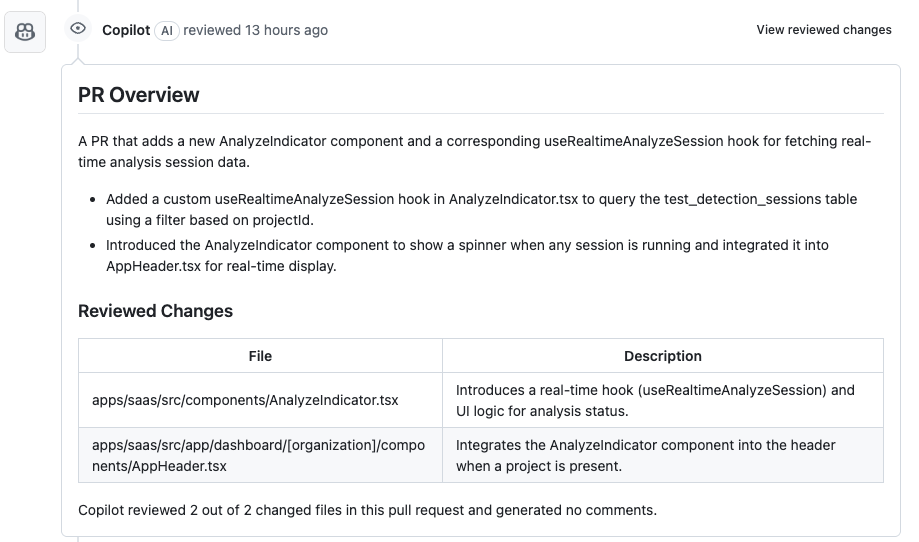
We also experimented with GitHub Copilot's pull request review features. Unlike CodeRabbit and devlo, Copilot's approach felt more like a gentle assistant than an overly eager reviewer. It typically produced fewer comments overall, focusing on only the most relevant points. Its hallmark was delivering an excellent summary of the PR. For each pull request, Copilot would generate a succinct description of what changed – highlighting key modifications (e.g. "Added new validation for email input in UserForm component" or "Refactored the authentication middleware in the Python app"). This summary was pure gold for quickly understanding a large PR without reading every line.
When it came to detailed line-by-line feedback, Copilot was relatively quiet. It flagged only obvious issues, leaving the nitpicks aside. This minimalist approach meant less noise, but also that Copilot might overlook improvements the specialist tools would comment on. At the time of our original test, we also hit automation challenges – summaries were flaky to trigger, and in one case Copilot simply refused to comment on a multi-package diff in our monorepo.
A fair 2026 update: Copilot code review has matured considerably since then. It now ships as part of Copilot at the organization level, which makes it the zero-friction baseline for any team already paying for Copilot. Depth still trails the specialists, but as a default first pass it has become table stakes.
Bottom line: a high-level PR assistant, great for summaries and light feedback. Use it as the floor and layer a specialist on top for high-stakes repos.
Ellipsis (YC W24)
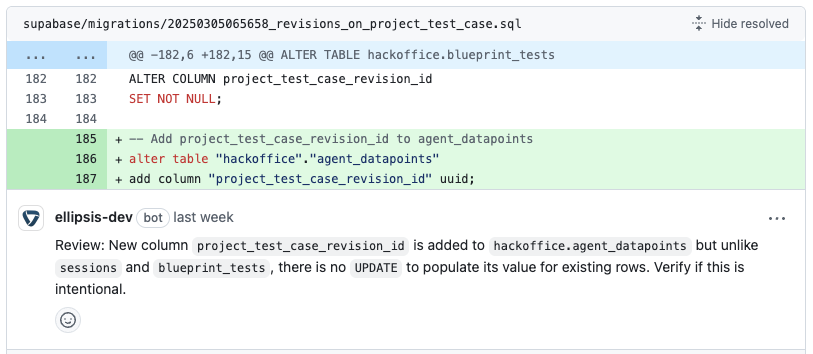
Ellipsis was ultimately the best performer in our tests. Right out of the gate, its feedback quality was impressive. It seemed to filter out unhelpful suggestions and avoid commenting just for the sake of it. When Ellipsis left a comment, it was usually on point – either identifying a potential bug, a logic oversight, or a meaningful improvement. For example, Ellipsis caught a tricky state management bug in our React app that none of the other AI tools (nor one of our humans!) caught initially. That earned it some real street cred with the team.
We also noticed that Ellipsis adapted to our feedback and guidelines over time. We had a few custom rules (like allowing certain TODO comments, or using specific TypeScript utility types) that initially triggered some comments. But after we dismissed a couple of those, Ellipsis learned – subsequent PRs saw fewer irrelevant comments. It was almost as if it was tuning itself to our codebase's personality.
The comment quality was uniformly high. Ellipsis's comments read like a seasoned developer's review: clear, concise, and with context. Instead of just "This is wrong," it would say "This check will fail for empty arrays – consider handling that case to avoid a runtime error." That kind of guidance is invaluable. It even provided occasional links to documentation when pointing out less obvious issues.
The favorite: why Ellipsis stood out
After weeks of dogfooding these AI tools, Ellipsis (YC W24) emerged as the clear favorite for our team. So, what made Ellipsis shine brighter than the rest?
1. Focused reviews. Ellipsis has an almost human-like judgment on what's important. It doesn't bother us with trivial style points if our existing linters already handle them. Instead, it hones in on things that impact bug risk, logic, or maintainability. One developer noted, "Ellipsis's comments feel like they came from a tech lead, not a lintern" – by which he meant a linter turned up to 11.
2. Adaptability. Perhaps the most impressive aspect was how Ellipsis learned from our interactions. We have a unique mix of frontend (React + ShadCN/Tailwind) and backend (Python FastAPI) code. Early on, we gave Ellipsis feedback by dismissing a couple of comments. To our surprise, similar suggestions didn't appear in later reviews. It felt like training a smart junior dev: once we said "hey, in our repo we do XYZ this way," Ellipsis remembered.
3. Quality of feedback. The feedback from Ellipsis wasn't just accurate – it was actionable and well-articulated. Comments often included reasoning or even pseudo-code for a fix. In a PR refactoring our authentication logic, Ellipsis pointed out a potential race condition and suggested using an async lock, with a short code snippet to illustrate. It didn't just say "possible bug here"; it told us the what and the why.
4. Workflow improvement. With Ellipsis in our GitHub workflow, our PRs got merged faster and with more confidence. It acts like a tireless first-pass reviewer, so human reviewers could focus on design decisions instead of combing through for small bugs. Because it so rarely cried wolf, we paid attention when it spoke up. One teammate joked that Ellipsis deserved an "Employee of the Month" award, if only it had a GitHub profile picture to put on the plaque.