Reasoning models like GPT-5.5 use internal reasoning tokens before producing a response. This helps the model plan, use tools effectively, inspect alternatives, recover from ambiguity, and solve harder multi-step tasks. Reasoning models work especially well for complex problem solving, coding, scientific reasoning, and multi-step agentic workflows. They’re also the best models for Codex CLI, our lightweight coding agent.
Start with gpt-5.6 for most reasoning workloads. If you need the highest-intelligence API option for more challenging problems that can tolerate more latency, use gpt-5.6-sol in the Responses API with reasoning.mode set to pro. For lower cost, consider gpt-5.6-terra, or gpt-5.6-luna for the lowest cost and latency.
Reasoning models work better with the Responses API. While the Chat Completions API is still supported, you’ll get improved model intelligence and performance by using Responses.
Call the Responses API and specify your reasoning model and reasoning effort:
from openai import OpenAI

client = OpenAI()

prompt = """
Write a bash script that takes a matrix represented as a string with
format '[1,2],[3,4],[5,6]' and prints the transpose in the same format.
"""

response = client.responses.create(
    model="gpt-5.6",
    reasoning={"effort": "low"},
    input=[{"role": "user", "content": prompt}],
)

print(response.output_text)
The reasoning.effort parameter guides the model on how much to think when performing a task.
Supported values are model-dependent and can include none, minimal, low, medium, high, xhigh, and max. Lower effort favors speed and lower token usage, while at higher effort the model thinks more completely to provide higher quality responses. The models also reason adaptively across reasoning efforts, using fewer tokens for simpler tasks and thinking harder for complex tasks.
Defaults are also model-dependent rather than universal. gpt-5.5 defaults to medium reasoning effort. This is the best starting point for gpt-5.5’s full balance of quality, reliability and performance.
| Effort | Best for |
|---|---|
none | Latency-critical tasks that do not benefit from any reasoning or multi-chained tool calls. For latency-sensitive use cases with gpt-5.5, we recommend trying low to begin with and then moving to none if required.Common use cases include voice, fast information retrieval, and classification. |
low | Efficient reasoning with a modest latency increase. Ideal for use cases requiring tool-use, planning, search, or multi-step decision making, while optimizing for speed and cost. Common use cases include data analysis, drafting, execution-oriented coding, and customer support / chat assistant workflows. |
medium | When quality and reliability matter, and the task involves planning, complex reasoning, and judgement. Default configuration for most workloads, and a well-balanced point on the pareto curve of latency, performance and cost. Common use cases include agentic coding, research, working with spreadsheets & slides, and delegating long-horizon work. |
high | Hard reasoning, complex debugging, deep planning, and high-value tasks where quality and intelligence matters more than latency. Recommended for complex workflows and agentic tasks. Common use cases include agentic coding, long-horizon research, and knowledge work. Depending on the complexity of the task, evaluate both |
xhigh | Deep research, asynchronous workflows and agentic tasks that require long runs. Only use when your evals show a clear benefit that justifies the extra latency and cost. Common use cases include security and code review, enterprise productivity, deeper research tasks, and challenging coding workflows. |
max | Maximum reasoning for your most complex tasks. If you are currently using xhigh, evaluate if max results in stronger performance |
For faster time to first visible token in latency-sensitive applications, ask the model to generate a short preamble before continuing with deeper reasoning.
Some models support only a subset of these values, so check the relevant model page before choosing a setting.
GPT-5.6 models support standard and pro reasoning modes in the Responses API. standard is the default. Set reasoning.mode to pro for difficult tasks that need more model work and can tolerate higher latency and token usage.
Reasoning mode and reasoning effort are independent. Mode selects standard or pro execution, while reasoning.effort controls how much reasoning the model applies within that mode. If you omit reasoning.effort, GPT-5.6 defaults to medium in both modes.
curl https://api.openai.com/v1/responses \
  -H "Content-Type: application/json" \
  -H "Authorization: Bearer $OPENAI_API_KEY" \
  -d '{
    "model": "gpt-5.6",
    "reasoning": {
      "mode": "pro",
      "effort": "medium"
    },
    "input": "Review this database migration plan and identify potential failure modes."
  }'
Pro mode aggregates the model work performed to produce the final answer and bills those tokens at the selected model’s standard token rates. Pro mode performs more model work than standard mode, increasing token usage and cost. Existing Pro model IDs keep their current behavior and pricing.
Reasoning models introduce reasoning tokens in addition to input and output tokens. The models use these reasoning tokens to “think,” breaking down the prompt and considering multiple approaches to generating a response. Our reasoning models like gpt-5.5 and gpt-5.4 support interleaved thinking, where the model is able to generate visible output tokens before and in between thinking, and is able to think in between tool calls.
For models released before GPT-5.6, the default behavior in a multi-step conversation is to carry over input and output tokens from each step without rendering reasoning from earlier turns into the next sample. GPT-5.6 models instead default to rendering available reasoning from earlier turns. Use reasoning.context to select either behavior on supported models.
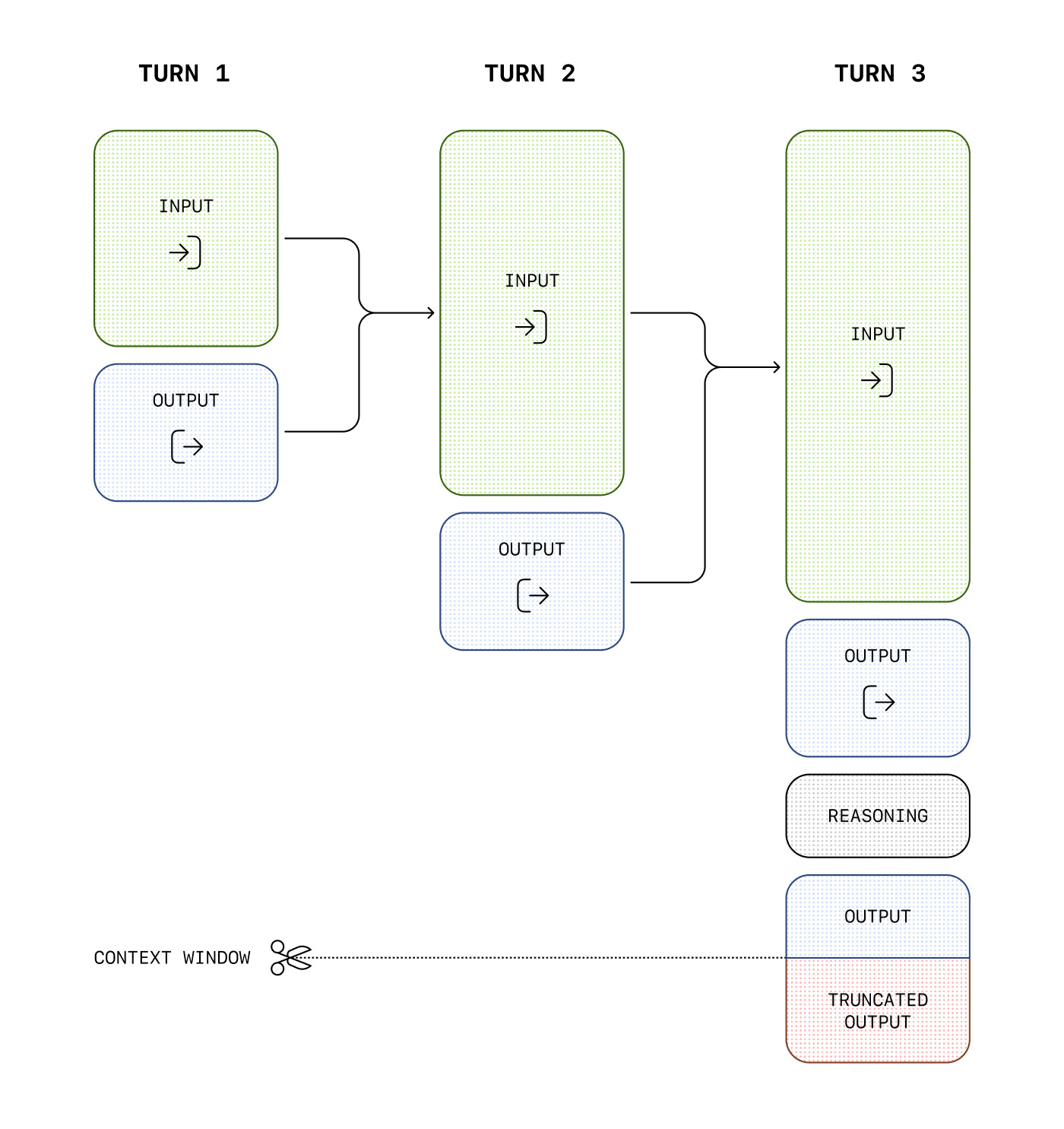
While reasoning tokens are not visible via the API, they still occupy space in the model’s context window and are billed as output tokens.
Managing the context window
It’s important to ensure there’s enough space in the context window for reasoning tokens when creating responses. Depending on the problem’s complexity, the models may generate anywhere from a few hundred to tens of thousands of reasoning tokens. The exact number of reasoning tokens used is visible in the usage object of the response object, under output_tokens_details:
      {
  "usage": {
    "input_tokens": 75,
    "input_tokens_details": {
      "cached_tokens": 0
    },
    "output_tokens": 1186,
    "output_tokens_details": {
      "reasoning_tokens": 1024
    },
    "total_tokens": 1261
  }
}
Context window lengths are found on the model reference page, and will differ across model snapshots.
Controlling costs
To manage costs with reasoning models, you can limit the total number of tokens the
model generates, including reasoning tokens, visible output tokens, and non-visible
formatting tokens, by using the
max_output_tokens
parameter. See output token counts for details about how generated tokens are reflected in usage and output limits.
Allocating space for reasoning
If the generated tokens reach the context window limit or the max_output_tokens value you’ve set, you’ll receive a response with a status of incomplete and incomplete_details with reason set to max_output_tokens. This might occur before any visible output tokens are produced, meaning you could incur costs for input and reasoning tokens without receiving a visible response.
To prevent this, ensure there’s sufficient space in the context window or adjust the max_output_tokens value to a higher number. OpenAI recommends reserving at least 25,000 tokens for reasoning and outputs when you start experimenting with these models. As you become familiar with the number of reasoning tokens your prompts require, you can adjust this buffer accordingly.
from openai import OpenAI

client = OpenAI()

prompt = """
Write a bash script that takes a matrix represented as a string with
format '[1,2],[3,4],[5,6]' and prints the transpose in the same format.
"""

response = client.responses.create(
    model="gpt-5.6",
    reasoning={"effort": "medium"},
    input=[{"role": "user", "content": prompt}],
    max_output_tokens=300,
)

if (
    response.status == "incomplete"
    and response.incomplete_details.reason == "max_output_tokens"
):
    print("Ran out of tokens")
    if response.output_text:
        print("Partial output:", response.output_text)
    else:
        print("Ran out of tokens during reasoning")
Keeping reasoning items in context
When doing function calling with a reasoning model in the Responses API, we highly recommend you pass back any reasoning items returned with the last function call (in addition to the output of your function). If the model calls multiple functions consecutively, you should pass back all reasoning items, function call items, and function call output items, since the last user message. This allows the model to continue its reasoning process to produce better results in the most token-efficient manner.
The simplest way to do this is to pass in all reasoning items from a previous response into the next one. Our systems will smartly ignore any reasoning items that aren’t relevant to your functions, and only retain those in context that are relevant. You can pass reasoning items from previous responses either using the previous_response_id parameter, or by manually passing in all the output items from a past response into the input of a new one.
For advanced use cases where you might be truncating and optimizing parts of the context window before passing them on to the next response, just ensure all items between the last user message and your function call output are passed into the next response untouched. This will ensure that the model has all the context it needs.
Check out this guide to learn more about manual context management.
Conversation state and reasoning state serve different purposes. Passing messages across calls gives the model the visible conversation history. On supported models, persisted reasoning also lets the model render compatible reasoning items from earlier turns into its next context.
Persisted reasoning provides continuity; it does not expose the model’s raw reasoning. The reasoning items remain opaque, and the API does not return their reasoning text. Set reasoning.context to control which available reasoning items the model can use:
The GPT-5.6 model family supports
all_turns and uses it by default. Earlier models default to
current_turn. Omit reasoning.context or set it to
auto to use the selected model’s default.
| Value | Behavior |
|---|---|
auto | Uses the selected model’s default. Omitting reasoning.context has the same effect as auto. |
current_turn | Makes reasoning from the active turn available, but does not render reasoning from earlier turns into the next sample. |
all_turns | Renders available, compatible reasoning items from earlier turns into the next sample. GPT-5.6 models support this value. |
The response’s reasoning.context field contains the effective mode, either current_turn or all_turns. Check this field on each response to confirm which mode the model used. The setting does not create reasoning items that are not already available.
all_turns has an effect only when the request has access to earlier response items. Use previous_response_id, attach the response to a conversation, or manually replay the complete response history. On the first request, current_turn and all_turns behave the same because no earlier reasoning exists.
Persisted reasoning can be reused only within the same model family. For example, gpt-5.6-sol, gpt-5.6-terra, and gpt-5.6-luna can reuse each other’s reasoning, but reasoning does not carry between the GPT-5.6 and GPT-5.5 families.
When you switch model families, the API omits incompatible reasoning from the model’s context, even when reasoning.context is all_turns.
Continue reasoning with stored responses
Use previous_response_id for the shortest stateful integration:
from openai import OpenAI

client = OpenAI()
model = "gpt-5.6"

first = client.responses.create(
    model=model,
    input="Inspect this repository and identify the likely bug.",
    reasoning={"context": "current_turn"},
)

second = client.responses.create(
    model=model,
    previous_response_id=first.id,
    input="Now patch the bug and explain the change.",
    reasoning={"context": "all_turns"},
)

print(second.output_text)
Use current_turn when replaying older response items that the model no longer needs. Those reasoning items can remain in the API payload for continuity, but the service does not render them into the new sample. This can reduce the rendered context for long-running workflows.
Preserve reasoning without stored responses
When you create a response in stateless mode, reasoning items in the response’s output array include an encrypted_content property by default. Stateless mode applies when store is false or when your organization uses Zero Data Retention (ZDR). The API still accepts the legacy reasoning.encrypted_content value in include for compatibility, but doesn’t require it.
The following request returns encrypted reasoning content without specifying include:
curl https://api.openai.com/v1/responses \
  -H "Content-Type: application/json" \
  -H "Authorization: Bearer $OPENAI_API_KEY" \
  -d '{
    "model": "gpt-5.6",
    "store": false,
    "reasoning": {"effort": "medium"},
    "input": "What is the weather like today?",
    "tools": [ ... function config here ... ]
  }'
Reasoning items in the output array will include an encrypted_content property containing encrypted reasoning tokens that you can pass to future calls.
To use all_turns with store: false, preserve every output item, append the next user message, and replay the complete history:
from openai import OpenAI

client = OpenAI()
model = "gpt-5.6"

history = [
    {
        "role": "user",
        "content": "Inspect this repository and identify the likely bug.",
    }
]

first = client.responses.create(
    model=model,
    store=False,
    input=history,
    reasoning={"context": "current_turn"},
)

# Keep every output item, including encrypted reasoning and assistant phase.
history.extend(item.model_dump() for item in first.output)
history.append(
    {
        "role": "user",
        "content": "Now patch the bug and explain the change.",
    }
)

second = client.responses.create(
    model=model,
    store=False,
    input=history,
    reasoning={"context": "all_turns"},
)

print(second.output_text)
While we don’t expose the raw reasoning tokens emitted by the model, you can view a summary of the model’s reasoning using the summary parameter. See our model documentation to check which reasoning models support summaries.
Different models support different reasoning summary settings. For example, our computer use model supports the concise summarizer, while o4-mini supports detailed. To access the most detailed summarizer available for a model, set the value of this parameter to auto. auto will be equivalent to detailed for most reasoning models today, but there may be more granular settings in the future.
Reasoning summary output is part of the summary array in the reasoning output item. This output will not be included unless you explicitly opt in to including reasoning summaries.
The example below shows how to make an API request that includes a reasoning summary.
from openai import OpenAI

client = OpenAI()

response = client.responses.create(
    model="gpt-5.6",
    input="What is the capital of France?",
    reasoning={"effort": "low", "summary": "auto"},
)

print(response.output)
This API request will return an output array with both an assistant message and a summary of the model’s reasoning in generating that response.
      [
  {
    "id": "rs_6876cf02e0bc8192b74af0fb64b715ff06fa2fcced15a5ac",
    "type": "reasoning",
    "summary": [
      {
        "type": "summary_text",
        "text": "**Answering a simple question**\n\nI\u2019m looking at a straightforward question: the capital of France is Paris. It\u2019s a well-known fact, and I want to keep it brief and to the point. Paris is known for its history, art, and culture, so it might be nice to add just a hint of that charm. But mostly, I\u2019ll aim to focus on delivering a clear and direct answer, ensuring the user gets what they\u2019re looking for without any extra fluff."
      }
    ]
  },
  {
    "id": "msg_6876cf054f58819284ecc1058131305506fa2fcced15a5ac",
    "type": "message",
    "status": "completed",
    "content": [
      {
        "type": "output_text",
        "annotations": [],
        "logprobs": [],
        "text": "The capital of France is Paris."
      }
    ],
    "role": "assistant"
  }
]
For long-running or tool-heavy flows with GPT-5.5 and GPT-5.4 in the Responses API, use the assistant message phase field to avoid early stopping and other misbehavior.
phase is optional at the API level, but OpenAI recommends using it. Use phase: "commentary" for intermediate assistant updates, such as preambles before tool calls, and phase: "final_answer" for the completed answer. Don’t add phase to user messages.
Using previous_response_id is usually the simplest path because prior assistant state is preserved. If you replay assistant history manually, preserve each original phase value.
Missing or dropped phase can cause preambles to be treated as final answers in those workflows. For model-specific prompt guidance, see Prompting GPT-5.5.
Round-trip assistant phase values
from openai import OpenAI

client = OpenAI()

response = client.responses.create(
    model="gpt-5.6",
    input=[
        {
            "role": "assistant",
            "phase": "commentary",
            "content": "I’ll inspect the logs and then summarize root cause and remediation.",
        },
        {
            "role": "assistant",
            "phase": "final_answer",
            "content": "Root cause: cache invalidation race.",
        },
        {
            "role": "user",
            "content": "Great—now give me a rollout-safe fix plan.",
        },
    ],
)

print(response.output_text)
Consider these differences when prompting a reasoning model. Reasoning-capable GPT-5 models usually work best when you give them a clear goal, strong constraints, and an explicit output contract without prescribing every intermediate step.
- Give the model the task, constraints, and desired output format.
- Treat
reasoning.effortas a tuning knob, not the primary way to recover quality. - For agentic or research-heavy workflows, define what counts as done and how the model should verify its work.
For more information on best practices when using reasoning models, refer to this guide.
Prompt examples
Coding (refactoring)
OpenAI o-series models are able to implement complex algorithms and produce code. This prompt asks o1 to refactor a React component based on some specific criteria.
import OpenAI from "openai";

const openai = new OpenAI();

const prompt = `
Instructions:
- Given the React component below, change it so that nonfiction books have red
  text.
- Return only the code in your reply
- Do not include any additional formatting, such as markdown code blocks
- For formatting, use four space tabs, and do not allow any lines of code to
  exceed 80 columns

const books = [
  { title: 'Dune', category: 'fiction', id: 1 },
  { title: 'Frankenstein', category: 'fiction', id: 2 },
  { title: 'Moneyball', category: 'nonfiction', id: 3 },
];

export default function BookList() {
  const listItems = books.map(book =>
    <li>
      {book.title}
    </li>
  );

  return (
    <ul>{listItems}</ul>
  );
}
`.trim();

const response = await openai.responses.create({
  model: "gpt-5.6",
  input: [
    {
      role: "user",
      content: prompt,
    },
  ],
});

console.log(response.output_text);
Some examples of using reasoning models for real-world use cases can be found in the cookbook.
Using reasoning for data validation
Evaluate a synthetic medical data set for discrepancies.
Using reasoning for routine generation
Use help center articles to generate actions that an agent could perform.