Adobe Creative Cloud has seemingly been rewriting users’ hosts files on its own.
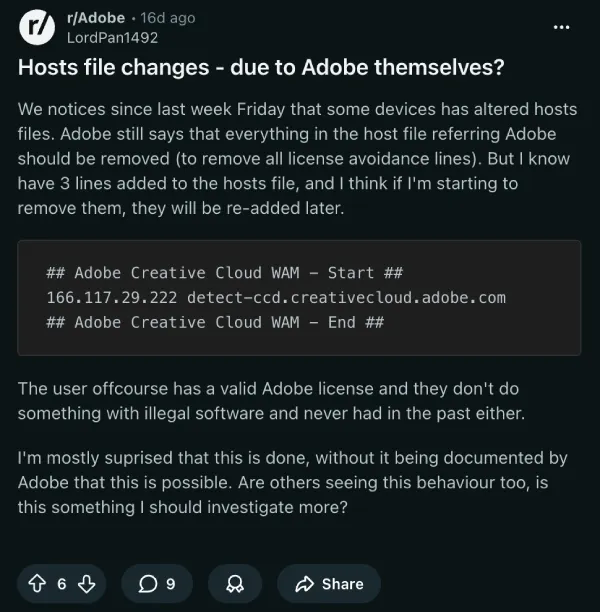
The change adds three lines that route detect-ccd.creativecloud.adobe.com to the IP 166.117.29.222. It wraps them neatly between “Adobe Creative Cloud WAM” comment markers. From what I was able to piece together, the whole point is to let Adobe know whether the desktop app is installed on your machine.
When you hit adobe.com/home, their JavaScript quietly tries loading a tiny image from that exact domain. Hosts entry present equals success. No entry equals it fails. Simple check.
Users first spotted the edits around mid-March. The OP in one post on Reddit had a fully paid subscription and never used cracked software. He still woke up to the new lines in his file. A few others also jumped into the comments right after. Long-time Photography Plan users. Agency folks. The same exact block showed up on their machines too.
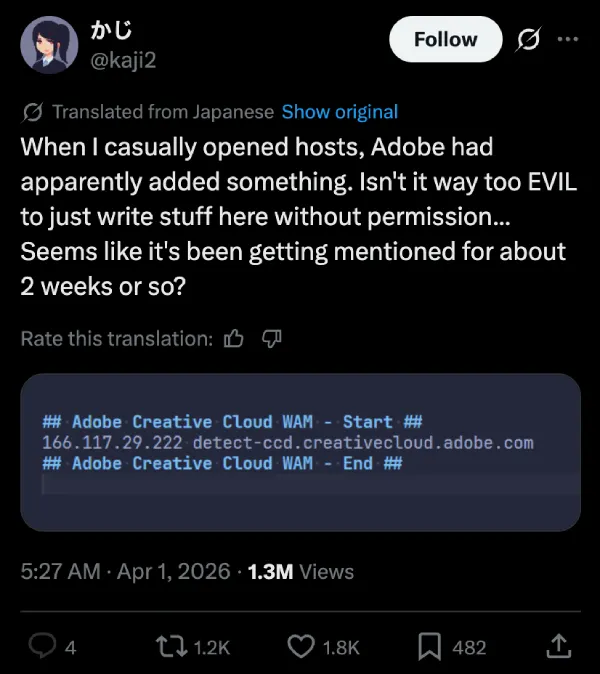
It really took off yesterday on X. A Japanese user opened his hosts file, saw Adobe had added stuff without asking, and called it straight-up evil. Another account warned that this is the same move malware pulls. It requires admin privileges, happens without any warning or permission, and in some cases simply overwrites whatever custom entries were already there.
Meanwhile, corporate environments are running into extra headaches. Security software is flagging the unauthorized edit, and at least one person reported that the change also turned on the IIS web server listening on port 80. That’s not ideal on a locked-down work laptop.
The detection code itself is pretty basic, as explained by a commenter on Reddit. Adobe’s JavaScript pings the image with a cache-buster and a special header. Success means Creative Cloud is present. No big data grab or anything beyond that check. Still, the silent edit to a core system file is rubbing a lot of paying customers the wrong way.
One of the X posters later added some perspective, noting that if you’ve never messed with your hosts file before, there’s no immediate danger. The issue is the principle. It just doesn’t feel right.
Adobe hasn’t commented publicly. Their own support docs still tell users to delete any Adobe-related lines from the hosts file when troubleshooting licensing issues. Now the company is the one putting them in.
If you’re running Creative Cloud, it takes about thirty seconds to check. Open your hosts file and scan for those WAM markers.

We stand out from the tech-media crowd because we break news stories; we mainly bring you stuff that you won’t find anywhere in the mainstream tech media. Our stories have been picked up by some of the world’s most popular websites and media outlets—more info is available here.