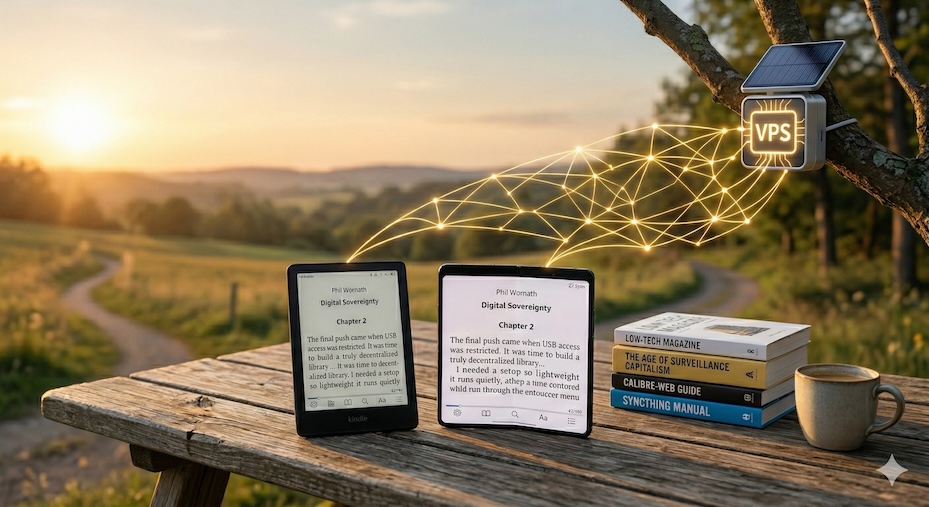
Part of the Digital Sovereignty series - Exploring how designers (and friends) can transition from digital tenants to architects of their own infrastructure - Inspired by the spirit of Digital Independence Day - a call to reclaim your digital life, one service at a time, every first Sunday of the month.
I’ve always loved the idea of creating a universal library: starting a chapter on my Kindle at home and picking up mid-sentence on my phone during a commute.
For many, the answer is a physical bookshelf. But for me, physical books have a major flaw: discoverability. When my grandpa passed away, he left behind a massive library, but his favorite quotes, marginalia, and insights died with him, trapped in thousands of unsearchable pages. I wanted a system that preserved my thoughts for later review—one that "just works" while maintaining true digital sovereignty.

Hey there! 👋 I'm Phil, and I love sharing my thoughts on innovation, design, and the future of technology.
Join my newsletter for insights on innovation, design, and the future of technology—straight to your inbox.
The Friction Tax
Amazon’s "Send to Kindle" is convenient, but it demands total ecosystem surrender. Sideloading via USB is a chore, highlights are notoriously difficult to export, and organization is a nightmare.
The breaking point came when my work laptop restricted USB devices, officially locking me out of my own Kindle. It was a wake-up call that coincided with a shifting tide in the industry. As noted in recent 2026 reports by Android Authority, the Kindle has transitioned from a reader’s tool into a data-mining billboard. With Amazon sunsetting legacy hardware effectively "bricking" devices released before 2013 by cutting off store access and registration - it’s clear that in their eyes, we are merely renting our digital lives.
I remembered a text a friend sent me last year, urging me to jailbreak my Kindle because a new exploit had made it possible. Back then, I did it, but I didn't know what to do with it yet. I had the "open" hardware, but I lacked the workflow to make it useful. Instead of feeding Amazon’s AI reading assistants with my data, I went on a hunt for a lightweight, self-hosted alternative.
Here is the workflow I use to sync my books, highlights, and reading progress across a jailbroken Kindle and an Android phone, using a simple VPS.
The Philosophy: Keep It Simple
This isn't about building new software from scratch; it’s about connecting brilliant open-source tools to act as a single, cohesive engine:
- Real-time Bidirectional Sync for my active books, reading progress, and notes.
- A Pull-Based Library to download new books on demand from my full archive.
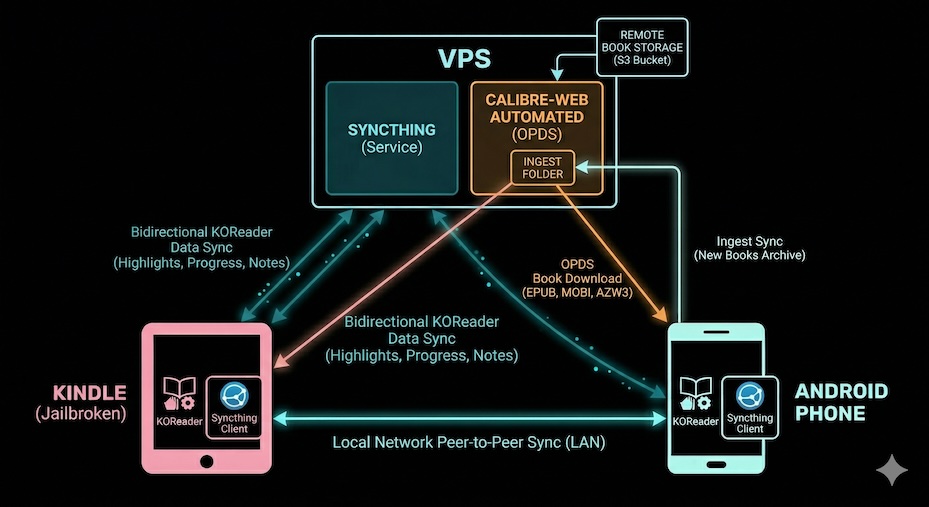
The architecture relies on a few brilliant open-source tools:
- The Hub (VPS): A lightweight cloud server acting as the central node. You can also use a Raspberry Pi for full physical control at home.
- The Reading Engine: KOReader, installed on both my jailbroken Kindle and my Android phone. It’s open-source and stores progress in accessible local files rather than a hidden database.
- The Sync Engine: Syncthing. It’s decentralized, secure, and runs quietly as a background service on all three nodes (VPS, Kindle, Android).
- The Library: Calibre-Web Automated (CWA) running on the VPS to serve my e-book archive.
The Flow: Data in Motion
Instead of pushing my entire library to every device—which goes against the principles of intentional tech use—the system handles data dynamically through two distinct loops.
1. The Continuous Sync (Progress & Notes)
This is the "magic" layer. When I finish reading on the Kindle, KOReader updates a small metadata file locally.
- The Handshake: Syncthing instantly spots the change and pushes it to my VPS.
- The Result: From the VPS, it syncs down to my phone. If I open KOReader on my phone later, the book opens to the exact sentence I left off on at home. My highlights and notes are always in a unified, current state across the entire "triad."
2. The OPDS Pull (New Books)
I don’t want my entire library eating up local storage and creating cognitive clutter.
- The Browse: On my phone or E-Reader, I use KOReader’s built-in OPDS support to browse my collection hosted on Calibre-Web.
- The Fetch: I download the book directly to the device.
- The Distribution: Once downloaded, Syncthing detects the new file and automatically ferries it over to the Kindle and VPS.
Why This Matters
It’s resilient. By removing the central "cloud" dependency and relying on peer-to-peer sync, I actually own my data. While Amazon moves toward forced obsolescence and invasive telemetry, this setup remains offline-first and private.
There are no subscriptions, no tracking telemetry, and no ecosystem lock-in.
But the best part is the room for future play. Because my highlights and progress files are just sitting on my VPS, I can build server-side automations. I can write scripts to parse my notes, log my reading stats, or push my favorite quotes to a dashboard—all without asking permission from a tech giant's API.
If you’re looking for more inspiration on digital sovereignty and sustainable tech, check out Digital Independence Day and Low-tech Magazine.
Also, check out KoShelf - a beautiful, self-hosted dashboard for KOReader metadata, reading stats, and highlights. I haven’t tried it yet, but it looks awesome!
How many books in your current digital library are actually "yours" if the provider decides to turn off the server tomorrow?